Action item list — generated from meeting commitments
Meetlens turns commitments in a recorded meeting into a structured task section inside the AI report. Each generated item can include the task, responsible person, and due date when those details are clear in the conversation. Review the result, then copy or export it into your team workflow.
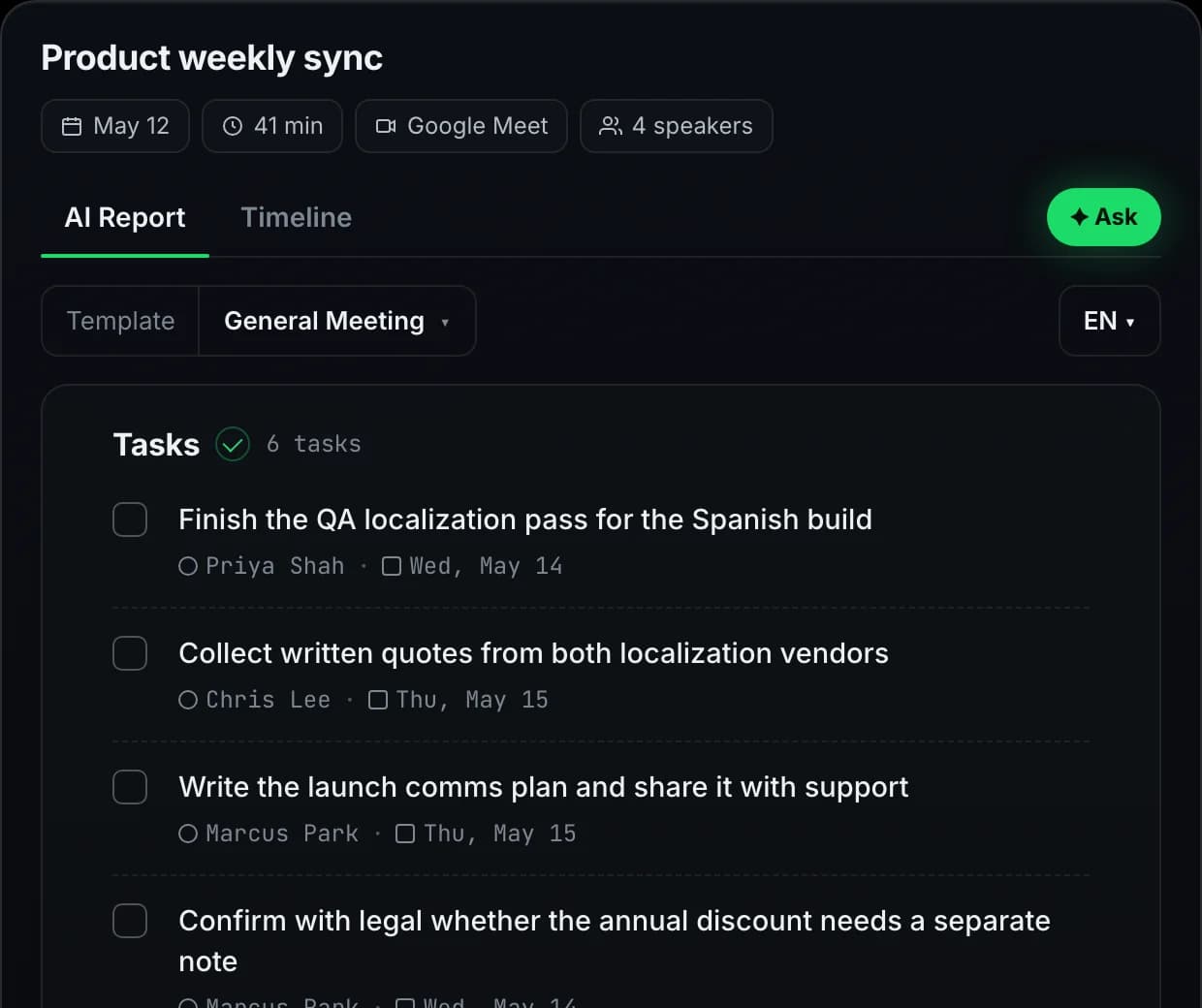
Action items inside the AI meeting report
Tasks remain part of the AI report. Verify names and deadlines against the original transcript or meeting timeline.
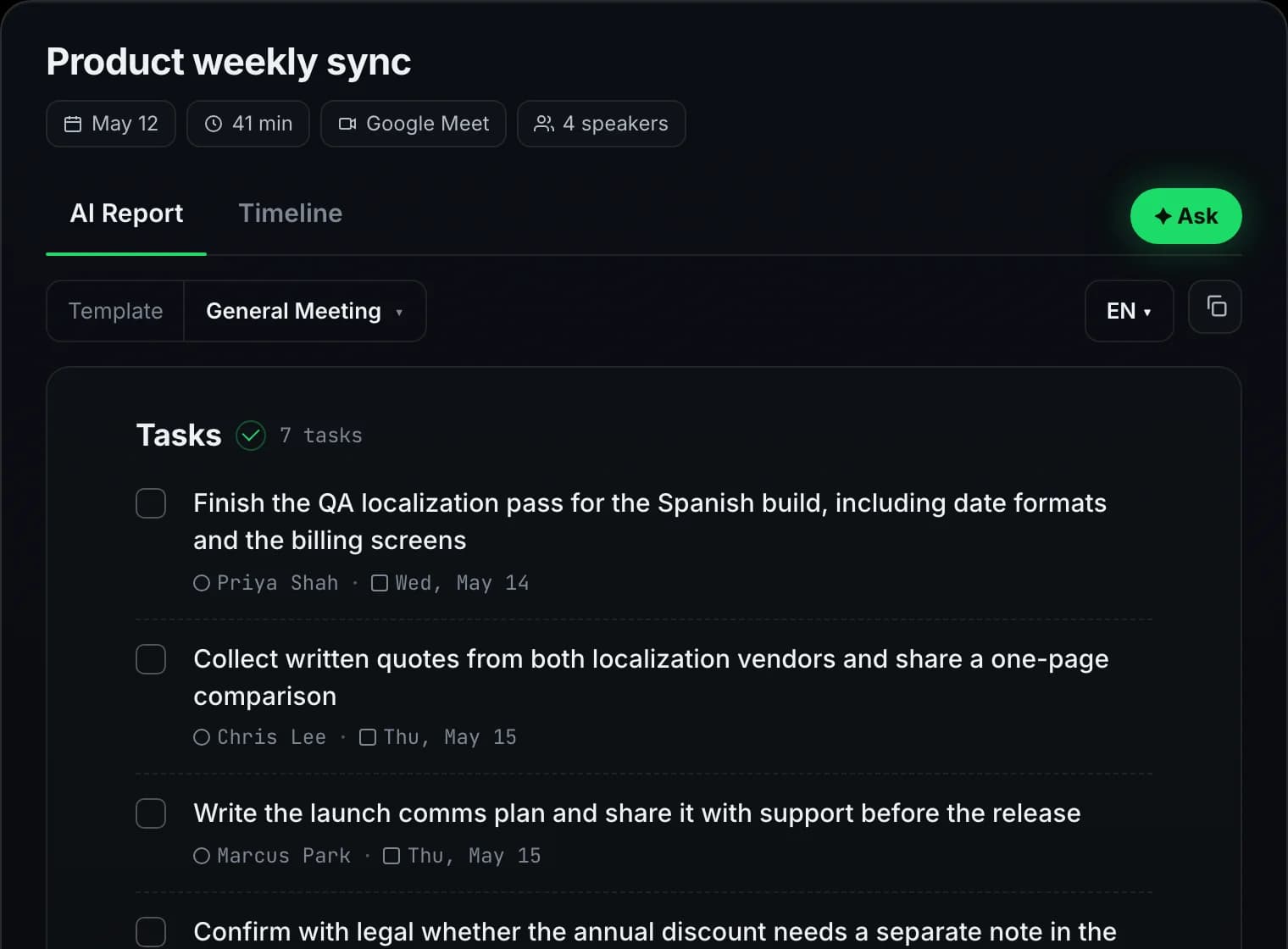
From spoken commitment to copy-paste task
Three stages: listen, extract, export. Meetlens runs the first two on its own.
Catches commitments in the transcript
After the call ends, imperative phrases, ownership cues, and time references are pulled from the transcript. "Alex will send…", "I'll follow up by Friday", "can you ping legal?" — all flagged as candidate action items, not filed under decisions or context.
Task, responsible person, and due date
The generated report separates the follow-up itself from the person responsible and the deadline when those details are present. Because ownership and dates can be ambiguous in natural conversation, review the result before moving it into a tracker.
Paste into any tracker
Action items land in your report ready to copy. Pro and Business export the block as Markdown, TXT, or PDF, with the task, owner, and due date kept together so the list stays readable after you paste it into Linear, Asana, Jira, or Notion. No native API integrations today; native one-click push is on the roadmap.
Which meetings benefit most from action items?
Where structured commitment-tracking changes how the team works.
Sales discovery & follow-up
When a prospect call contains clear commitments, the generated report can organize the deck you owe, the introduction you promised, or the pricing breakdown Procurement requested. Review the list before moving it into your CRM activity log.
Product reviews & PRD sync
Product reviews contain both decisions and possible follow-ups. Check the generated action item list against the conversation, confirm ownership, then manually create tickets in your project tool. Keep the decision context in the meeting report.
Customer-success escalations
On a renewal-risk call, every commitment matters. Meetlens can turn statements such as "we'll get engineering on this by Wednesday" into a task with an owner and date for the team to review after the call.
Engineering standups & 1:1s
Daily syncs and weekly 1:1s often contain clear follow-ups: who is unblocking what and when a review is needed. Meetlens can organize those commitments in the generated report for the team to verify.
What is an action item?
The short answer — plus how Meetlens captures action items differently from a generic meeting summary.
An action item is a concrete task assigned to a specific person, with a deadline (when mentioned), captured during a meeting. Three fields define it: owner, what, by when.
It differs from a decision (the group conclusion — what direction to take), a topic (the subject discussed), and a follow-up(a vague intent to revisit). Action items are the follow-through — tasks that must move out of the meeting and into someone's queue.
Meetlens uses the meeting transcript to build a structured action-item section from phrases such as "Alex will send…", "by Friday", or "María owns this". The transcript remains available in the meeting workspace when the generated task needs more context.
Looking for an action item log, or for follow-up action items with their owners? It is the same generated section — task, responsible person, and due date when the meeting states one. The examples below show what it looks like for different meeting types.
Meeting action items examples by meeting type
What the action item list typically looks like for the meetings real teams run.
Sales discovery call
- □AE — Send the security one-pager + SOC 2 audit(Today)
- □AE — Schedule technical evaluation with IT(Wed)
- □Champion — Confirm budget owner for procurement(EOW)
Product weekly
- □Alex — Spec the SSO flow + share with eng(Mon)
- □María — User research interviews — 5 candidates(Next sprint)
- □Eng team — Capacity estimate for Q3 mobile(Fri)
Customer-success check-in
- □CSM — Loop in solutions eng on the API question(Tue)
- □Customer — Forward the renewal terms to finance(Next call)
- □CSM — Share the v2 rollout calendar(Today)
Engineering 1:1
- □IC — Open the RFC PR for review(Tomorrow)
- □Manager — Connect IC with the platform team(EOW)
- □IC — Pick a stretch project for Q2(Next 1:1)
These four are illustrative — Meetlens builds the equivalent action item list for any meeting where commitments are made.
The best way to track action items
Three patterns we see across teams that actually close their action items — versus the ones that lose them in a Slack thread.
Owner first, task second
A useful action item starts with a responsible person. When the conversation makes ownership clear, Meetlens can include that person in the generated task. Ambiguous assignments still need human review.
One source of truth — the report
Action items live in the meeting report, not in someone's notebook or the chat scrollback. The report is shareable, searchable, and exportable; the notebook isn't. Track action items where they were captured, not where they're easiest to lose.
Review against the meeting record
Generated tasks should be checked before work is assigned. Keep the action-items section together with the meeting report and return to the transcript when a commitment needs more context.
Lands wherever your tasks live
Export the report as Markdown, TXT, or PDF on Pro and Business, then transfer reviewed tasks to your tracker manually.
Markdown
TXT
Action items by the numbers
The defaults every Meetlens account gets, free or paid.
Try every feature on the free plan
180 minutes per month, all 10 AI report templates, no credit card.
Get started freeQuestions, answered
Everything teams ask before switching to Meetlens.