Home/Features/Multilingual
Multilingual

Audio-to-text transcription — 99+ languages

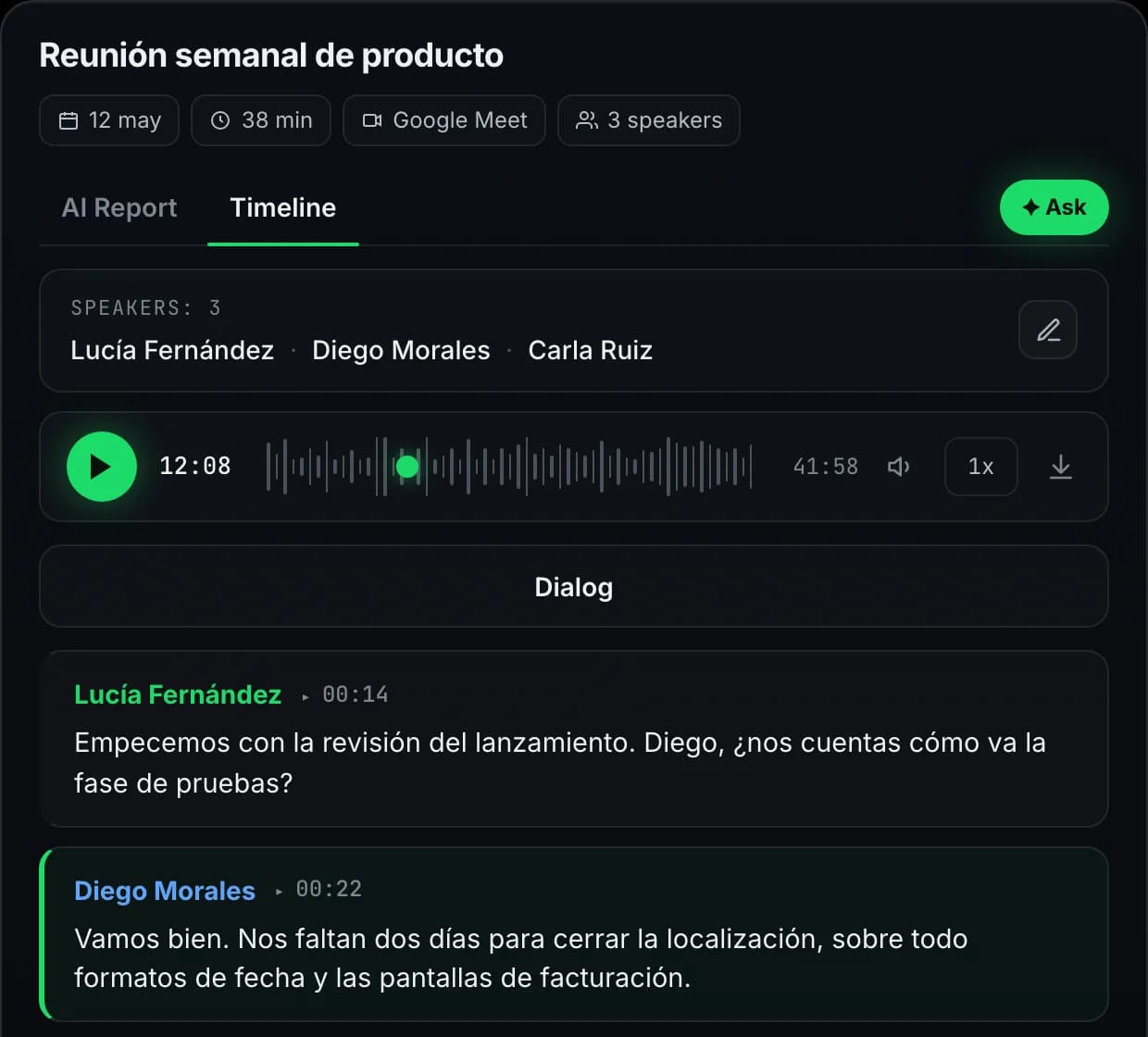
Automatic language detection on every call. The transcript stays in the meeting's original language, preserving tone and idiom. AI reports can be generated in English, Russian, Spanish, or German, so a multinational team can read a common output even when the meeting was in a different language.

Auto
Language detected · ES
99+ languages
Transcript in native script
Report
EN · RU · ES · DE
99+
Languages transcribed
Auto-detect
No drop-down, no preset
4
Report output languages
Native
Transcript in original language
99+ languages

Native-language transcript, common report

A sample from a Spanish product sync. Speaker turns, timestamps, and punctuation work the same way regardless of which language the meeting was in.

Spanish-market launch · weekly sync
23 min · auto-detected ES · report rendered in EN
Sample
00:42
AlexES
¿Cómo va el lanzamiento al mercado español?
01:18
MaríaES
Tenemos buen progreso. La keyword research está completa, y el equipo de SEO ya tiene el plan para los siguientes dos sprints.
02:05
AlexES
Excelente. ¿Y los rankings? ¿Hemos visto algún movimiento orgánico todavía?
AI report · EnglishDecisions: Spanish-market launch is on track. SEO keyword research complete; rankings plan ready for the next two sprints. Owner: María.
how it works

From audio to native-language transcript

Three stages, all automatic. Detect, transcribe, report.

1
DETECT

Auto-detect the meeting language

Automatic language identification runs on every recording, no drop-downs and no presets. The dominant spoken language is detected from the audio itself and applied to the transcript.

2
TRANSCRIBE

Native-language transcript

The transcript stays in the original language of the meeting, preserving slang, idiom, and tone. Speaker labels are language-agnostic so attribution works regardless of which language the speakers use. 99+ languages are supported for transcription.

3
REPORT

Report in one of four output languages

Pick the report language during onboarding. Today Meetlens generates AI summaries, decisions, and action items in English, Russian, Spanish, or German. The original-language transcript is always preserved alongside the report, so nothing of the meeting itself is lost.

use cases

When multilingual transcription matters

Real scenarios from teams running calls across borders and language pairs.

International team standups

Daily syncs where one engineer joins in Russian, another in English, a third in Spanish. Meetlens transcribes everyone in their own language and produces a single bilingual report.

Customer-discovery in local markets

Sales and CS calls with prospects who prefer their native language. Capture the call verbatim, get an English summary for your CRM, keep the original transcript for the account record.

Research and user interviews

Interviews conducted in the participant's first language stay nuanced — slang, idiom, and emotional tone come through. Translation runs on top for cross-team analysis without losing the original.

Hiring interviews in the candidate's language

Conduct the interview in whichever language the candidate is most comfortable in, get a native-language transcript, generate the AI report in your team's working language. Reviewers read the structured summary while keeping the original transcript available for nuance.

languages

Speaks every major language

Auto-detected per call — pick none, get all. Reports and AI chat in your team's preferred language.

EnglishEspañolFrançaisDeutsch中文日本語РусскийPortuguêsहिन्दीالعربيةItalianoTürkçe+87 more
platforms

Same detection on every host

Audio captured directly from the meeting tab — no platform-specific configuration.

Google Meet — 99+ languages

Auto-detect on Google Meet calls — Workspace and personal accounts. Mixed-language meetings handled in the same pass.

Zoom — 99+ languages

Both live Zoom calls and uploaded Zoom Cloud recordings get the same auto-detect treatment, with native-language transcripts and a report in your preferred output language.

Microsoft Teams — 99+ languages

Teams meetings, 1:1 calls, channel calls. No tenant admin install; detection runs from the meeting tab and works across every Teams call type.

Webex & Telemost — 99+ languages

Webex and Yandex Telemost get the same language coverage as the major hosts. Russian, English, and the long tail of 99+ all detected automatically.

featured languages

Transcribe audio in any major language

Drop in a recording or join a live call — Meetlens detects the language automatically and produces a clean, speaker-labelled transcript in the meeting's original language. AI reports can be generated in English, Russian, Spanish, or German.

EspañolSpanish

Transcribe Spanish audio to text — Latin American and European Spanish handled identically. The transcript stays in Spanish; AI reports can be written in Spanish or English.

FrançaisFrench

Transcribe French audio to text — Parisian and Canadian variants. Accent-robust French audio transcription with punctuation and capitalization.

DeutschGerman

German audio transcription with technical-vocabulary handling — Fachbegriffe, compound words, formal Sie/informal du preserved.

日本語Japanese

Transcribe Japanese audio to text with kanji, hiragana, and katakana correctly segmented. Honorifics and keigo preserved in the Japanese audio transcription.

中文Mandarin Chinese

Transcribe Chinese audio to text — Simplified and Traditional Chinese supported. Mandarin transcription with pinyin available for non-native reviewers.

РусскийRussian

Transcribe Russian audio to text with full Cyrillic, punctuation, and case markers. Mixed Russian-English meetings supported.

العربيةArabic

Transcribe Arabic audio to text — Modern Standard Arabic and major dialects. Right-to-left rendering preserved across export.

PortuguêsPortuguese

Portuguese audio transcription with Brazilian and European variants distinguished. Code-switching with Spanish handled cleanly.

Plus 91 more — Italian, Polish, Ukrainian, Korean, Vietnamese, Thai, Hindi, Hebrew, Turkish, Persian, Indonesian, Filipino, Swahili, and every other major language family. No language tags to configure; detection is automatic.

specs

Multilingual by the numbers

What every Meetlens account ships with, free or paid.

99+
Transcription languages
Auto-detected on every recording
4
Report output languages
English, Russian, Spanish, German
Native
Original-language transcript
Preserved alongside translated reports
Auto
Detection per call
No setup, no language picker

Try every feature on the free plan

180 minutes per month, all 10 AI report templates, no credit card.

Get started free
faq

Questions, answered

Everything teams ask before switching to Meetlens.

Which languages are supported for transcription?
99+ languages out of the box, including Spanish, French, German, Italian, Portuguese, Russian, Polish, Ukrainian, Arabic, Hebrew, Turkish, Persian, Hindi, Bengali, Tamil, Mandarin Chinese, Japanese, Korean, Vietnamese, Thai, Indonesian, and dozens more. The dominant language of the meeting is detected automatically. No manual setup, no language tags to configure.
Which languages are supported for AI reports and summaries?
Four output languages today: English, Russian, Spanish, German. You pick the report language during onboarding (changeable later in settings). The transcript itself stays in the meeting's original language even if the report is in a different one, so the original quotes are always preserved. Additional report languages are on the roadmap.
What happens when a meeting mixes two languages?
Meetlens picks the dominant language detected in the recording and transcribes the whole call in that language. Lines in the secondary language are still usually readable but accuracy drops on them. For best results when a conversation is genuinely bilingual, run the discussion mostly in one language at a time. Per-block code-switching detection is on the roadmap.
Is translation available?
The AI report acts as a kind of translation: a meeting recorded in Spanish can have its summary, decisions, and action items written in English (or one of the other three report languages). The literal transcript is not translated line-by-line today; if you need that, copy the original transcript through your translation tool of choice.
Can I export the original-language transcript?
Yes, on Lite and Pro plans. Export the meeting transcript to Markdown, TXT, or PDF directly from the workspace. Speaker labels and timestamps are preserved. Free-plan users can read and copy from the workspace; file export is paid.
Can Meetlens transcribe Spanish, Arabic, Japanese, Russian audio to text?
Yes. And Chinese, French, German, Portuguese, Korean, Hindi, Polish, Ukrainian, Hebrew, Turkish, Persian, Thai, Vietnamese, plus 80+ more. The right script (Latin, Cyrillic, Arabic, Kanji, Hangul, Devanagari, etc.) is handled automatically once the language is detected. Whether you transcribe Spanish audio to text or Japanese audio to text, the same flow produces a clean, speaker-labelled transcript.
Does it work on Zoom, Google Meet, Teams, Webex, Telemost?
Yes. The Chrome extension records audio directly from the meeting tab on any of those platforms. Language detection and transcription run after the call ends regardless of which platform you used. No bot joins the call, no 'recording started' notification disrupts the conversation.