Is It Legal to Record a Meeting? Consent Rules for Zoom, Teams and In-Person Meetings
 Meetlens Editorial8 min read
Last reviewed: October 9, 2026. Fact-checked against the statute texts linked in this article.
On this page
- Is it legal to record a meeting?
- Whose recording consent law applies when attendees are in different states?
- Does a Zoom, Teams or Google Meet recording notice count as consent?
- Do AI note takers and recording bots need everyone's consent?
- Can you record a meeting at work?
- What happens if you record a meeting without consent?
- How do you ask for consent before recording a meeting?
- Recording meetings with attendees outside the US
- Check the rules for your state
Recording a meeting you attend is legal in most US states if you consent yourself, but some states require every participant to agree — and your employer can ban recording even where the law allows it. It's the same rule that decides is it illegal to record a phone call: one participant's consent or everyone's, depending on where people are. Below: multi-state meetings, platform notices, AI note takers, work rules, penalties, scripts.
Is it legal to record a meeting?
Yes, recording a meeting you attend is legal under federal law and in most states as long as one participant — you — consents, but all-party consent states require every participant to agree, and your employer's policy can forbid recording even where the law allows it.
The federal rule is one-party consent: the Federal Wiretap Act, now Title I of the Electronic Communications Privacy Act (ECPA), lets a participant record unless the purpose is a crime or a tort (18 U.S.C. § 2511(2)(d)). An audio recording of a meeting is legal when:
- You are in the meeting, in person or on the call.
- You follow the strictest state among the attendees: one-party consent states need only your consent.
- No company policy or contract forbids it.
So can you record a meeting without consent from the others? Yes, if all three hold. A phone left running in an empty conference room is different: recording conversations at a closed-door meeting you're not in, with no attendee's consent, is eavesdropping, illegal almost everywhere.
Whose recording consent law applies when attendees are in different states?
Courts disagree about whose law governs a meeting that crosses state lines, so the safe default is to follow the strictest state any attendee is in: if one person joins from an all-party consent state, get everyone's consent. For the applicable law, some courts pick the recorder's jurisdiction, others the recorded person's, according to the Reporters Committee for Freedom of the Press (RCFP).
California shows why: California Penal Code § 632 bars recording a confidential communication without all parties' consent, and in Kearney v. Salomon Smith Barney (2006), the California Supreme Court held that it governs calls a brokerage's office in Atlanta, Georgia, was accused of recording with California clients, but applied it only going forward and declined to impose damages for earlier calls.
| Where attendees are | What to do |
|---|---|
| All in one-party states (e.g., New York, Texas) | Legal to record as a participant; announcing is still good practice |
| One attendee in California or another all-party state | Get every attendee's consent |
| Attendee's location unknown (external guests) | Treat as all-party: announce and get consent |
| Attendees outside the US | See "Recording meetings with attendees outside the US" below |
New York (Penal Law § 250.00) and Texas (Penal Code § 16.02) need one party's consent; California is an all-party consent state, also called two-party consent. Connecticut and Nevada are stricter for phone calls, Oregon for in-person meetings and video calls, and courts and guides disagree about Michigan.
Oregon: meetings need everyone informed. Oregon's "conversation" covers talk that isn't a phone or radio call and, since 2021, communication through a video conferencing program (ORS 165.535(1)). Recording one is illegal unless all participants are "specifically informed" (ORS 165.540(1)(c), on the same page). A phone call needs only a participant's consent; an in-person meeting or a Zoom or Teams call needs everyone informed. Exceptions: private meetings where all "knew or reasonably should have known" about the recording, made with an unconcealed recorder or on video (165.540(6)(a)(C)), and a participant recording a video call to capture alleged unlawful activity as evidence (165.540(6)(b)).
Does a Zoom, Teams or Google Meet recording notice count as consent?
A platform's recording notice tells people they are being recorded, and staying in the call after a clear notice is often treated as implied consent, but in all-party states a spoken announcement and a recorded "yes" is the safer standard. The RCFP guide says people who are warned of a recording and keep talking are generally presumed to consent, and it calls recording each person's verbal consent best practice.
| Platform | What attendees see when recording starts | Can attendees refuse? | Source |
|---|---|---|---|
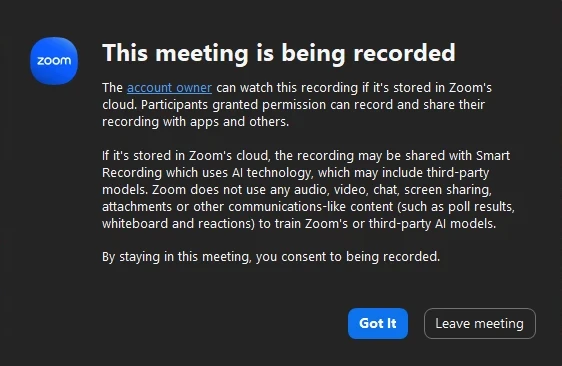
| Zoom | A recording consent disclaimer; always on for Basic, Pro and Business accounts under 100 licenses; larger accounts can turn it off for internal attendees, but guests always see it | Click OK (Got It in some app versions) to stay or Leave to exit | Zoom: notification prompts, custom disclaimer, giving consent |
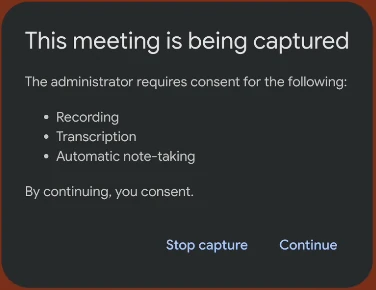
| Google Meet | A notification to everyone when recording starts and stops | Only if an admin requires explicit consent (off by default); otherwise, leave | Google Meet Help |
| Microsoft Teams | A notification in the desktop, web and mobile apps as soon as recording starts | Yes, when an admin turns on explicit recording consent, which requires attendees to agree to be recorded | Microsoft Support, Microsoft Learn: app policy, dial-in |
Recording notices as a non-host attendee sees them
zoom
google meet
microsoft teams
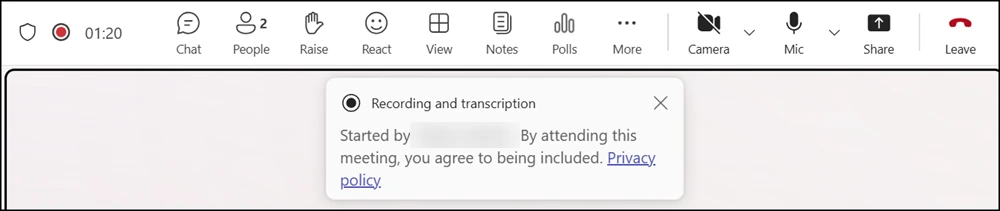
Images: Zoom Community; Google Workspace Updates; Topedia. Name blurred.
These notices come from the platform's own virtual meeting recording. A bot that records through the platform's permissions can trigger them too, depending on the platform and its settings (Teams, for one, requires it of apps that record through its media API); a browser extension that captures tab audio or a phone on the desk triggers none of them.
Do AI note takers and recording bots need everyone's consent?
Yes — an AI note taker records the meeting just like a person would, so the same consent rules apply, and the person who adds the tool is responsible for telling the others. What differs is how much the other attendees can see:
| Recording method | What other attendees see | What you need to do |
|---|---|---|
| Built-in platform recording | The platform's notice | Announce and get a yes anyway if anyone may be in an all-party state |
| AI note-taker bot that joins as a participant | The bot in the attendee list; a platform recording notice or a chat message, depending on the platform and the tool | Announce, get a yes, and remove the bot if anyone objects |
| Browser extension that captures tab audio without a bot (how Meetlens works) | Nothing: no bot, no platform notice | Announce and get each yes; no one else will tell them |
| Smartphone or voice recorder in a meeting room | Nothing, unless they spot the device | Announce and get a yes, especially in all-party states |
What other attendees see, by recording method
-
Built-in platform recording
What other attendees see: The platform’s notice
What you need to do: Announce, get a yes
-
AI note-taker bot that joins as a participant
What other attendees see: The bot in the attendee list; a platform recording notice or a chat message, depending on the platform and the tool
What you need to do: Announce, get a yes
-
Browser extension that captures tab audio without a bot how Meetlens works
What other attendees see: Nothing: no bot, no platform notice
What you need to do: Announce, get a yes
-
Smartphone or voice recorder in a meeting room
What other attendees see: Nothing, unless they spot the device
What you need to do: Announce, get a yes
Announce, get a yes: ask each person to say yes in a full sentence after recording begins, such as “Yes, I agree to the recording.”
The first big test of a meeting bot is In re Otter.AI Privacy Litigation (N.D. Cal.): attendees allege the Otter.ai Notetaker joined Zoom and Microsoft Teams meetings as a "silent participant" without everyone's consent. Filed in August 2025 and consolidated in October 2025, the case kept its core claims on August 13, 2026, under the federal Wiretap Act, which covers electronic communications, and California privacy law, mainly because Otter.ai allegedly kept recordings to train its AI, which can make a vendor a third party rather than the host's tool. The court also said a visible bot doesn't by itself show that an attendee knew he was being recorded. Nothing is proven, and liability between user and vendor is open. So don't treat the host's yes, or the bot's name in the attendee list, as everyone's consent.
Can you record a meeting at work?
Often yes under state law, but an employer can ban recording in its policies and discipline employees who break the rule, except where federal labor law protects recording as part of concerted activity. A workplace recording can be evidence in court of discrimination or harassment, yet breaking a company policy against recording can still bring workplace discipline. Can you record a work meeting without permission? Legally, often; check your handbook too.
Federal labor law limits those bans: Section 7 of the National Labor Relations Act (NLRA) protects employees, not supervisors (§ 152(3)), who act together for "mutual aid or protection," or protected concerted activity (29 U.S.C. § 157). In Whole Foods Market Group v. NLRB (2d Cir. 2017), the court upheld the National Labor Relations Board's ruling against a ban on all recording without management approval. Rules like these are judged under the NLRB's Stericycle decision, which presumes a rule unlawful if it has a reasonable tendency to chill those rights; the agency's general counsel is asking the Board to overturn it in pending cases. As of October 2026, the Board had not ruled.
Can you record a one-on-one with your manager?
Yes, if the rules of your state and your manager's state allow it and company policy doesn't forbid it. An in-person 1:1 behind a closed door carries a high reasonable expectation of privacy, the test federal law applies to face-to-face talk but not to calls (18 U.S.C. § 2510). Either way, in an all-party state, ask first.
Can your employer record meetings without telling you?
Your employer follows the same consent rules: in one-party states, a manager in the meeting can record without telling you; in all-party states, you must agree. Employee monitoring laws (privacy in the workplace) also require notice: New York (Civil Rights Law § 52-c) and Delaware (Del. Code tit. 19, § 705) for phone, email and internet monitoring, Connecticut for any electronic monitoring, naming locations since October 1, 2026 (Public Act 26-73).
What happens if you record a meeting without consent?
Depending on the state, recording a meeting without the consent the law requires can be a crime, can let attendees sue for damages, and can get the recording thrown out as evidence — on top of any discipline at work. So is it illegal to record a meeting without consent? It is wherever an attendee's state requires consent you didn't get.
- Crime: under state statutes such as California's § 632.
- Lawsuit: under state law and federal law (18 U.S.C. § 2520).
- Evidence: in California, an illegal recording generally can't be used in a civil case or hearing except to prove the violation (§ 632(d)); in criminal trials, the state Supreme Court held in People v. Guzman (2019) that this ban no longer applies.
Penalty amounts are in the guide linked at the top. If a dispute over recording meetings without consent starts, written consent is the easiest proof; talk to an attorney before you use the file.
How do you ask for consent before recording a meeting?
Tell attendees before the meeting and again when it starts, ask each person to say yes in a full sentence after recording begins, and stop if anyone objects.
- Add a line to the invite:
This meeting will be recorded and transcribed for notes. Reply or tell the organizer if you'd prefer not to be recorded.
- Start recording, then ask out loud, and wait for each person to answer:
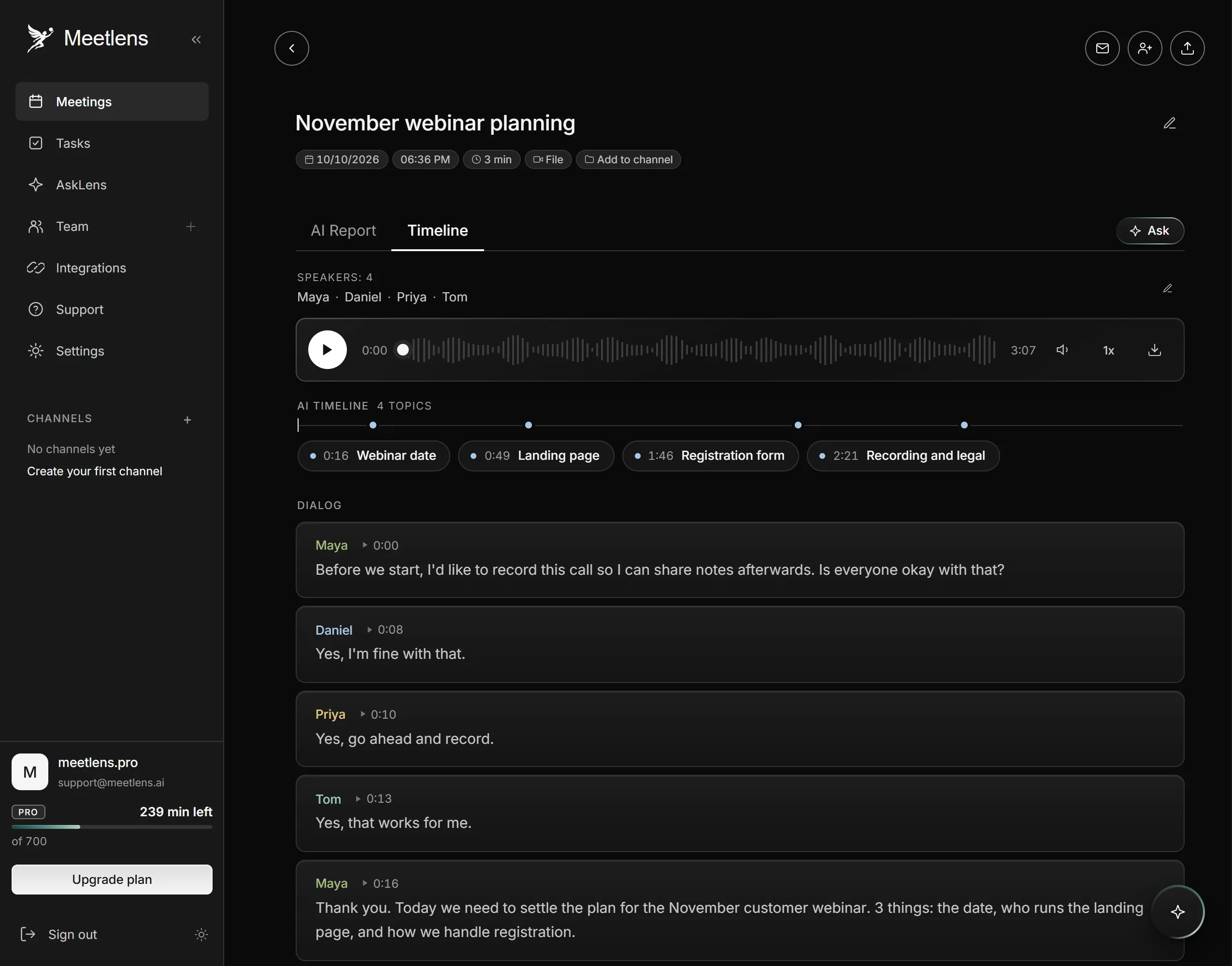
Before we start — I'd like to record this call so I can share notes afterwards. Is everyone OK with that?
- Post a chat message for late joiners:
For anyone joining now: we're recording this meeting for notes. Let me know now if you'd prefer not to be recorded.
- Honor an opt out: if anyone objects, stop recording and offer written notes instead.
Starting the recorder first puts the answers in the recording. A full sentence, such as "Yes, I agree to the recording," gives each consent its own timestamped line at the top of the transcript; a bare "yes" can be merged into a neighboring speaker's line. Connecticut's phone-call statute, linked above, accepts all-party consent that is "part of, and obtained at the start of, the recording."
In Google Meet, Zoom Web, Microsoft Teams Web or Webex, the Meetlens Chrome extension records the meeting audio without a bot, adds your microphone if you allow access, and produces a transcript with speaker labels and timestamps. With no bot, there is no platform notice, so you announce: allow microphone access so your own announcement is recorded, choose the General Meeting format, press Start recording, then announce and get each yes. See how the Chrome meeting recorder works.
Recent changes we track:
- Connecticut: Public Act 26-73 now requires monitoring notices to name where monitoring happens.
- Google Meet: admins can require explicit consent before recording (Workspace Updates, rollout from May 5, 2026).
- The Otter.ai case: the core claims survived the motion to dismiss; no ruling on the merits yet.
What if some attendees are outside the US?
Recording meetings with attendees outside the US
In the European Union and the UK, recording a meeting means processing personal data, so one-party consent is not the test. You need a lawful basis, such as consent or legitimate interests (Article 6), and must tell people why you record (Article 13): under the GDPR in the EU, the UK GDPR in Britain.
Check the rules for your state
Before a sensitive meeting recording, read the consent statute for your state and each attendee's state on the legislature's official site, and check the date of its last amendment: these laws change.