How to Summarize a Transcript With AI (and Check the Result)
 Meetlens Editorial13 min readUpdated October 17, 2026
On this page
- Can AI summarize a transcript?
- How to summarize a transcript with AI, step by step
- Can ChatGPT summarize a transcript?
- What should a meeting or interview transcript summary include?
- How to summarize a transcript by hand, without AI
- How to check an AI summary for errors
- What if you only have a video or recording?
By the Meetlens team. Meetlens is one of the tools covered. ChatGPT, Zoom, Teams and Google Meet details checked against the linked help pages on October 13, 2026.
You can summarize a transcript with AI by labeling the speakers, asking for decisions, action items and open questions, then checking every owner, date and number against the original. The steps are the same for any recording: every transcript example, from a team meeting to a research interview, has speakers, turns and decisions. Below: AI's role, steps, a ChatGPT prompt, what a transcription summary includes, the manual method and error checks.
Can AI summarize a transcript?
Yes: a large language model reads the transcript and returns the key points, decisions and action items; the quality depends on the transcript and on what you ask for.
On the transcript of a staged 10-minute team meeting, ChatGPT (free, logged out) returned a summary in about 10 seconds with either prompt tested below: 10.4 seconds for "summarize this transcript" and 10.0 seconds for the structured prompt (October 16, 2026).
Summarization, a natural language processing task, works in two ways: extractive summarization copies the key sentences word for word, and abstractive summarization rewrites them. Generative AI tools, from ChatGPT to AI meeting assistants, write abstractive summaries, which read well but can state something nobody said; every AI summary of a transcript needs the error check below.
The transcription sets the ceiling: a summary can only contain what the transcript captures. Speaker diarization, the part of transcription that splits the audio by voice, labels people "Speaker 1" and "Speaker 2" when the tool can't match a voice to a name. If those labels stay generic, the model assigns action items to "Speaker 1" or to a guessed name, and a number misheard during transcription goes into the summary as it is.
How to summarize a transcript with AI, step by step
Clean up speaker names, choose the summary format, run the summary, then check every owner, date and number against the transcript. The steps are the same for a chatbot and a meeting tool.
- Prepare the transcription in a text editor and save it as TXT.
- Video conferencing platforms with built-in transcription export different files: Zoom saves a cloud recording's audio transcript as VTT (Zoom Support), Microsoft Teams lets organizers download DOCX or VTT (Microsoft Support), and Google Meet saves the transcript to the organizer's Google Drive (Google Meet Help).
- Use Find and Replace to turn generic speaker labels such as "Speaker 1" into real names.
- In a VTT or SubRip (SRT) subtitle file, delete the WEBVTT header, the cue numbers and the repeated timing lines ("00:01:02.000 --> 00:01:05.000"). Keep one start time per speaker turn and the names inside
<v>voice tags (W3C WebVTT spec).
- Choose the format: decisions and action items for a meeting (a meeting summary format), findings and quotes for an interview (an interview summary); see the table below.
- Run the summary in a chatbot, or upload the recording to a meeting tool instead; both are covered below.
- Check it against the transcript with the checklist at the end.
- Share it by email or in your team's Slack channel, and copy each action item into your task tracker with the same owner and due date.
Using a meeting tool (Meetlens)
A meeting tool replaces the prompt: you upload the recording, pick a report format, and the decisions and tasks land in fixed sections. Meetlens, a Chrome extension that records browser meetings without a bot and turns them into transcripts and AI reports, also lets you import a recording of a call it didn't record. It transcribes the file, then builds the AI report from that transcript.
- Upload the audio or video file (MP3, WAV, M4A, OGG, WebM or MP4).
- Pick the report format in the import window; General Meeting, the default report format, fits most meetings.
- Read Decisions, Open Questions and the Tasks block, where each task has an owner and a due date or is marked Unassigned.
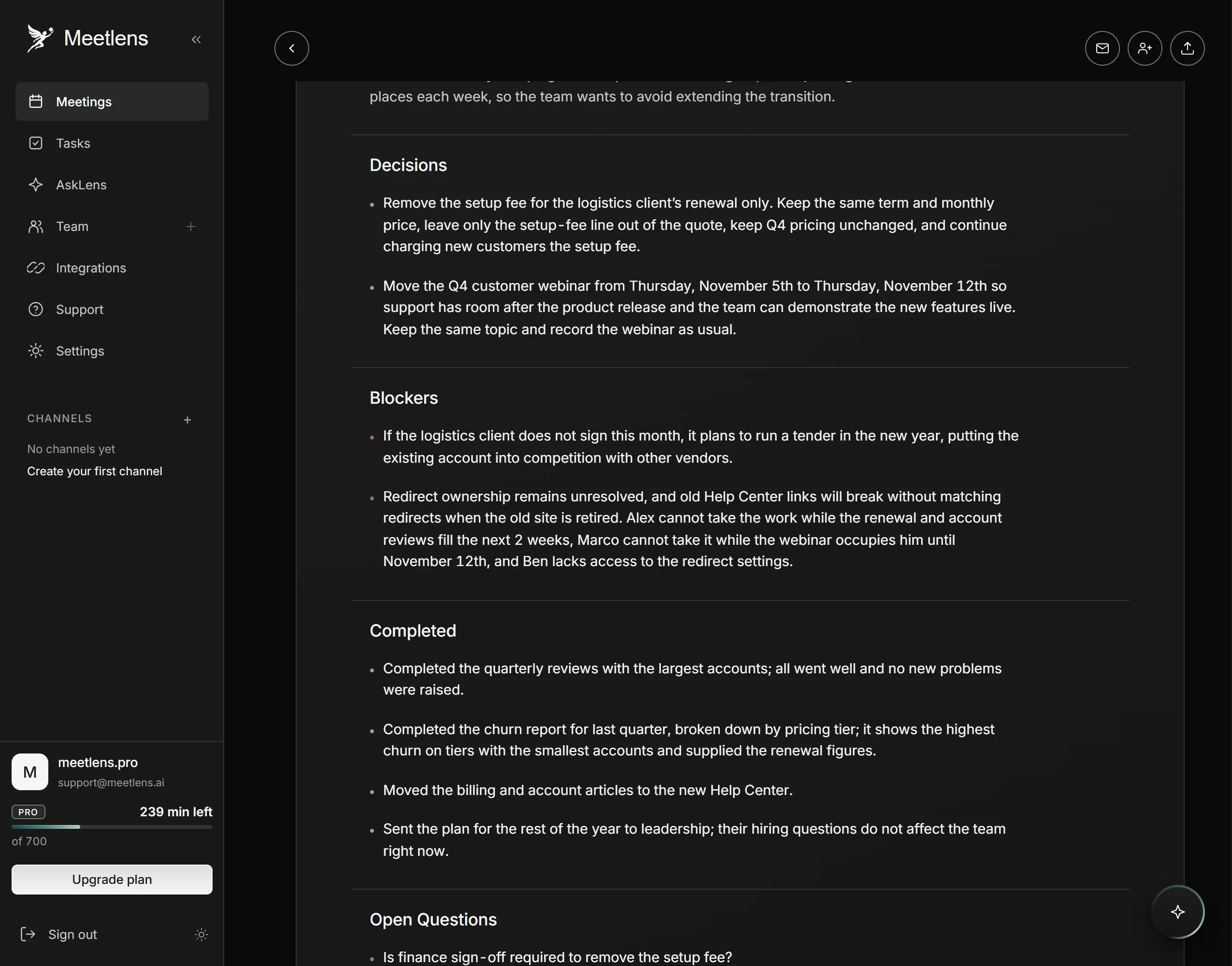
Each decision in the report links to its moment in the recording, on the AI meeting timeline. See how Meetlens AI reports summarize meeting transcripts by meeting type.
Can ChatGPT summarize a transcript?
Yes: paste the transcript or upload it as a file, give a structured prompt, and split a transcript that is too long into parts, then merge the partial summaries. ChatGPT can summarize any text you paste or upload, and OpenAI's file upload help page lists TXT, DOCX and PDF among accepted files. The prompt sets a role, the type of transcript and the output format, the core of prompt engineering; replace the bracket with your type:
You are a note-taker. Summarize this [team meeting / client call / interview / lecture] transcript for someone who missed it. Use only the transcript.
1. Summary: 3 sentences on purpose and outcome.
2. Decisions: only what was explicitly agreed, each with its timestamp.
3. Action items: Task | Owner | Due date | Timestamp.
4. Open questions: unresolved points, including proposals nobody accepted.
Keep negations as spoken ("we won't..."). If an owner, date or number isn't in the transcript, write "not stated".
We ran this prompt on the staged meeting's transcript, pasted as text after the prompt in a new chat. An excerpt of the answer, the first of its four decisions (the full answer, with its action items table, is further down, after the table of what a summary should include):
## 2. Decisions

| Decision | Timestamp |
| --- | --- |
| Drop the setup fee for the logistics client renewal only; keep the same contract term and monthly price. Q4 pricing remains unchanged, and new customers still pay the setup fee. | 2:42; 3:27–4:21 |
ChatGPT (free, logged out), run on October 16, 2026. Copied with ChatGPT's Copy button; the text is unedited. Transcript from a staged test meeting: scripted conversation, synthetic voices.
The context window, the amount of text the model reads at once, depends on the plan and model; OpenAI's pricing page lists it per plan. If a long transcript doesn't fit, split it at agenda items, summarize each part, then merge the results:
Merge these partial summaries into one, in the same four sections. Keep every decision, owner, date and timestamp, remove duplicates, and add nothing new.Privacy comes before the paste. The same pricing page lists "Content is used to train our models," with an opt-out, for the Free, Go, Plus and Pro plans; ChatGPT Business and Enterprise data isn't used for training by default (OpenAI enterprise privacy). Don't upload a confidential transcript to a tool your company hasn't approved, and remember that consent to a recording isn't consent to sharing it with an AI tool.
Can ChatGPT do transcription?
Yes, on paid plans: ChatGPT can transcribe an audio file such as MP3, WAV or M4A, but audio uploads aren't available on the Free plan. OpenAI's file upload help page, linked above, warns that "speaker identification may be unreliable," so after this speech-to-text step, check who is credited with each line of the transcription before you summarize.
What should a meeting or interview transcript summary include?
A useful transcript summary answers three questions: what was decided, who does what by when, and what is still open; it adds key points only where they explain a decision. Meeting notes follow the conversation; a summary extracts only the outcome of the decision-making. Blocks by transcript type:
| Transcript | What the summary must include | Meetlens report format |
|---|---|---|
| Team meeting | Decisions; action items with owner and due date; open questions; blockers | General Meeting |
| Client call | Client needs; what was agreed; objections; next steps with owner and date | Client Meeting |
| Sales call | Buyer's problem, budget and timeline as stated; objections; agreed next step with a date | Client Meeting |
| Job interview | Experience against the role; signals and risks; next hiring step | HR Interview |
| Research interview | Findings by theme; quotes with timestamps; workarounds | General Meeting; ask the AI chat for quotes |
| Lecture or webinar | Main ideas; definitions and figures; references; audience questions | General Meeting |
A research interview summary is organized by finding rather than by decision, which makes it a separate topic. For every type, write decisions, tasks and open questions as bullet-point lists under a concise paragraph of context. In any tool, look for speaker labels, decisions with owners and dates, and timestamps that link back to the transcript.
The full answer to the structured prompt for the staged meeting, with decisions and action items as tables:
## 1. Summary

The team reviewed three priorities: the logistics client renewal, the Q4 customer webinar date, and the Help Center migration. The team agreed to waive the logistics client's approximately $2,400 setup fee for this renewal only, move the webinar to November 12, 2026, and keep the Help Center migration moving while leaving redirect ownership unresolved. Alex will send the revised quote, Marco will draft the webinar invite list, and Nora will ensure redirect ownership is addressed at the next sync; finance approval requirements remain an open question.

## 2. Decisions

| Decision | Timestamp |
| --- | --- |
| Drop the setup fee for the logistics client renewal only; keep the same contract term and monthly price. Q4 pricing remains unchanged, and new customers still pay the setup fee. | 2:42; 3:27–4:21 |
| Move the Q4 customer webinar from Thursday, November 5, to Thursday, November 12, 2026. The topic stays the same, and the webinar will still be recorded. | 6:24–6:39; 5:35–5:59 |
| Continue moving articles to the new Help Center while the old pages remain available until redirects are ready. | 8:33–8:36 |
| Leave redirect ownership unassigned for now and return the issue to next week's agenda, with Nora ensuring an owner is assigned at that meeting. | 8:10–8:25 |

## 3. Action items

| Task | Owner | Due date | Timestamp |
| --- | --- | --- | --- |
| Send the revised logistics client renewal quote with the setup fee removed and the same term and monthly price. | Alex | Thursday, October 15, 2026 | 2:42–2:47 |
| Determine whether finance approval is required for removing the setup fee, before the quote goes out. | not stated | Before the quote goes out; answer requested before October 15, 2026 | 2:54–2:57; 4:28–4:36 |
| Draft the Q4 webinar invite list. | Marco | Tuesday, October 20, 2026 | 6:39–6:47 |
| Ensure the team assigns an owner for the Help Center redirects. | Nora | Tuesday, October 20, 2026 (next sync) | 8:10–8:25 |
| Continue moving articles to the new Help Center. | Ben | not stated | 8:33–8:36 |
| Resolve and set up redirects from old Help Center article addresses to their matching new articles. | not stated | not stated | 6:56–7:20; 8:10–8:25 |

## 4. Open questions

- Finance approval for the renewal: Is finance sign-off required to remove the setup fee? Nora does not know who in finance decides this, and the answer is needed before the quote goes out. Owner: not stated. (2:54–2:57; 4:28–4:36; 9:26–9:40)
- Help Center redirect ownership: Who will own the redirect list and configure the redirect rules? Alex, Marco, and Ben did not take ownership; Ben lacks access to the redirect settings, and Nora does not want to assign the work without consulting Ines. The issue will return to next week's agenda. (7:36–8:25; 9:40–9:55)
- Redirect timing and old Help Center retirement: How long will the old Help Center need to remain running alongside the new one? Ben said it can technically stay up as long as needed, but maintaining two Help Centers requires updating the same articles in both places. No retirement date was agreed. (8:33–8:49)
- Proposal to pause the migration: Marco asked whether article moves should stop until a redirect owner is assigned. Ben explicitly rejected stopping the migration, saying he can continue moving articles and the old pages will stay up until redirects are ready. No pause was agreed. (8:33–8:36)
- Redirect ownership proposal for Alex: Nora asked Alex to take ownership, but Alex declined because the renewal and account reviews fill his next two weeks. No alternative owner was agreed. (7:36–7:52)
The structured prompt's answer for the staged meeting, unedited: ChatGPT (free, logged out), run on October 16, 2026, with the transcript pasted as text after the prompt; copied with ChatGPT's Copy button. The meeting is a staged 10-minute team meeting (scripted conversation, synthetic voices); each timestamp points to a line in its transcript.
How to summarize a transcript by hand, without AI
Read once without notes, then highlight decisions, commitments and numbers, group them by topic and write one line per group. Summarizing by hand fits a transcript that can't go to an AI tool, such as a confidential HR discussion, and it is the baseline for checking AI.
- Read the transcript once without notes, so you know how each discussion ends.
- Highlight in three colors: decisions ("let's", "we'll go with"), commitments (a name, a task and a date) and numbers.
- Mark every "no", "not right now" and "we won't", so a declined task doesn't become an action item.
- Group the highlights by topic or agenda item.
- Write one line per group: the decision, then owner, task and date, then the open question, each with its timestamp. Keep it to a one-page summary.
Agenda item 1, highlighted before writing the summary
Customer success weekly sync
[2:21] Nora
Okay, the renewal quote for the logistics client. Alex, where are we?
[2:26] Alex
They pushed back on price. If we drop the setup fee, I think they sign this month.
[2:33] Marco
The fee is about $2,400 on this deal. Churn on that tier was 4.1% last quarter, So keeping them is worth more.
Highlighted: numbers
[2:42] Nora
Fine. Let’s drop the setup fee. Alex, can you send the revised quote?
Highlighted: decision
[2:47] Alex
Yes, I’ll take that one. I’ll send the revised quote by Thursday, October 15th.
Highlighted: commitment
[2:54] Ben
Do we need finance sign-off for that?
Marked: open question
[2:57] Nora
Good question. Let’s find out before the quote goes out.
- Decision “let’s”, “we’ll go with”
- Commitment a name, a task and a date
- Numbers prices and percentages
- Open question an unresolved point
How to check an AI summary for errors
Check the four things that decide what people do next: who owns each task, dates and numbers, negations ("we won't…"), and items that were discussed but not agreed. The accuracy that matters here is faithfulness: every line says what the transcript says. A 2020 study found neural abstractive summarization systems "highly prone to hallucinate content that is unfaithful to the input document" (Maynez et al., ACL 2020).
Two kinds of error reach a summary: transcription errors, where speech-to-text misheard a word or misplaced a sentence break, and summarization errors, where the model drops, changes or adds a point. The checklist catches both.
Run this checklist on every AI summary; the examples come from the staged meeting above:
- Owners. Each task names the person who said yes. Nora asked Alex to take the redirects, and Alex answered "Not right now, I'm afraid" [7:44]; a summary that gives Alex the redirects is wrong.
- Dates. "By Thursday" matches the calendar, and an odd date matches the audio. The transcript reads "the Q4 customer webinar on September 29th" [5:04], but in the audio September 29 is the day the webinar date was set: a transcription error moved the sentence break.
- Numbers. Prices and percentages match the transcript and are credited to the person who said them.
- Negations. "No, the same term and the same monthly price" [3:27] means only the setup fee changes; a flipped negation turns a refusal into a task.
- Agreed vs. discussed. An offer nobody confirmed isn't a task: Ben offered to help "with the content side" but said "I shouldn't be the owner" [8:02].
- Traceability. Every line has a timestamp you can find in the transcript. A line you can't trace is an AI hallucination: delete it.
Ask for a timestamp next to every decision and task, and the timestamp check becomes a lookup instead of a reread.
We ran both prompts on the staged meeting's transcript and scored the answers against the meeting's answer key: 2 decisions, 2 agreed tasks with owners and dates, 2 open questions, 3 requests or offers that aren't tasks, 1 negation and 2 figures.
| Check against the answer key | "summarize this transcript" | Structured prompt above |
|---|---|---|
| Decisions found (of 2) | 2 | 2 |
| Tasks with the right owner and date (of 2) | 2 | 2 |
| Open questions found (of 2) | 2 | 2 |
| Negation kept: same term and same monthly price [3:27] | No, left out | Yes |
| Figures right and credited to Marco: fee about $2,400, churn 4.1% [2:33] | Both right; only the churn figure credited to Marco | Fee right, not credited; churn figure left out |
| Webinar date given as November 12, not "September 29th" [5:04] | Yes | Yes |
| Declined requests or offers listed as tasks (of 3) | 0 | 0 |
| Timestamps on decisions and tasks | None | On every line |
| Extra decisions or tasks that trace to a transcript line | 4 | 6 |
| Lines with no match in the transcript | 1 | 0 |
| Time from Send to the end of the answer | 10.4 s | 10.0 s |
ChatGPT (free, logged out; the model name isn't shown), October 16, 2026. Each prompt in a new chat, the transcript pasted as text after it. Transcript from a staged test meeting: scripted conversation, synthetic voices.
Both prompts found every decision, agreed task and open question, and neither gave the redirects to someone who had declined them. The structured prompt kept the negation, put a timestamp on every line and wrote "not stated" where nobody was named; the one-line request dropped the negation and added a follow-up for the next meeting, "Review the revised quote's status," that nobody proposed. The structured answer left out the 4.1% churn figure, and both answers listed more tasks than the two that were agreed: each extra traces to a transcript line, but someone has to decide whether to keep it.
For comparison, Meetlens built its General Meeting report for this meeting from the recording, not from the transcript text. The report filled Brief, Meeting Topics, Decisions, Blockers, Completed and Open Questions, and listed the tasks, with owners and due dates, in the Tasks block.
No transcript yet? Start one step earlier.
What if you only have a video or recording?
Turn the video or recording into text first, then summarize the transcript. A recording becomes text through transcription, and the type you choose, verbatim, clean or edited, decides what a summary can quote; the types are explained in what is a transcription. Then fix the speaker names as in step 1 above.