Meeting Summary Template: 6 Copy-and-Paste Formats With Examples
 Meetlens Editorial9 min readUpdated October 10, 2026
On this page
- Meeting summary template vs. other meeting records: which do you need?
- What should a meeting summary template include?
- Meeting summary template (copy and paste)
- Meeting recap templates for different audiences
- How do you fill in a meeting summary template quickly?
- When you need the full meeting notes
- Sending the summary as an email
A meeting summary template is a short form with a TL;DR (too long; didn't read), decisions, action items with owners and due dates, open questions and the next meeting. A meeting summary is the short version of clear meeting notes: what was decided, who does what, and by when. Copy one of the six templates below. In order: summary vs. other records, what to include, templates by audience, fill-in tips.
Jump to: universal · team · client · stakeholder · project · key takeaways
Meeting summary template vs. other meeting records: which do you need?
A meeting summary is a short, informal list of outcomes for people who need the result; meeting minutes are the formal, approved record of what happened. A meeting summary template serves the first job: it leads with what changed and leaves out how the group got there.
| Meeting notes | Meeting summary | Meeting minutes | Recap email | |
|---|---|---|---|---|
| Length | Key points and outcomes per agenda item | Outcomes only | Every agenda item, with motions and votes | The summary plus a greeting |
| Audience | You and your team | Team, client, leadership, absentees | Board or committee members | Attendees, outside readers |
| Formality | Informal, unapproved | Informal, unapproved | Formal; approved, usually at the next meeting | Business email |
| When it's sent | Rarely; shared as a link | Right after the meeting | As a draft before the next meeting | With the summary |
| Order | Meeting agenda | Most important first | Meeting agenda | Same as the summary |
Order is the biggest structural difference: a summary puts the decision that changes the most work first, while the formal record follows the meeting agenda item by item. A meeting synopsis is the same document under another name. If your group votes on motions or approves its record, that formal record needs its own template; a summary can go out alongside it.
One weekly team call, shown three ways
- Disappears in the summary: the number line and the agenda order
- Added in the recap email: subject, greeting and closing
Meeting notes
Customer success weekly sync — 2026-10-13 — 10 min
Attendees: Nora (host), Alex, Marco, Ben (notes)
1. Logistics client renewal
D:Drop the setup fee for the renewal.
A:Alex — send revised quote — Oct 15
#Fee ≈ $2,400; churn on this tier was 4.1% last quarter (Marco).
Q:Is finance sign-off needed for dropping the fee? Owner not set; answer needed before the quote goes out.
2. Q4 customer webinar
D:Move the webinar to Nov 12.
A:Marco — draft the invite list — Oct 20
3. Help center migration
Q:Who owns the redirects? Not assigned; back on next week's agenda.
Meeting summary
Customer success weekly sync — Oct 13, 2026
Attendees: Nora (host), Alex, Marco, Ben (notes)
TL;DR: We're dropping the setup fee to keep the logistics client's renewal, and the Q4 customer webinar moves to Nov 12. Next, Alex sends the revised quote by Oct 15; finance sign-off has to be settled first.
Decisions
- Drop the setup fee for the logistics client renewal.
- Move the Q4 customer webinar to Nov 12.
Action items
- Alex — send revised quote — Oct 15
- Marco — draft the invite list — Oct 20
Open questions and risks
- Is finance sign-off needed for dropping the fee? Owner not set; answer needed before the quote goes out.
- Who owns the help center redirects? Not assigned; back on next week's agenda.
Next meeting: Oct 20 (weekly sync)
Notes and recording: link
Recap email
Subject: Weekly sync, Oct 13: setup fee dropped, webinar moved to Nov 12
Hi all, here's where we landed today.
TL;DR: We're dropping the setup fee to keep the logistics client's renewal, and the Q4 customer webinar moves to Nov 12. Next, Alex sends the revised quote by Oct 15; finance sign-off has to be settled first.
Decisions
- Drop the setup fee for the logistics client renewal.
- Move the Q4 customer webinar to Nov 12.
Action items
- Alex — send revised quote — Oct 15
- Marco — draft the invite list — Oct 20
Open questions and risks
- Is finance sign-off needed for dropping the fee? Owner not set; answer needed before the quote goes out.
- Who owns the help center redirects? Not assigned; back on next week's agenda.
Next meeting: Oct 20 (weekly sync)
Notes and recording: link
Reply if I missed or misstated anything.
— Ben
What should a meeting summary template include?
A meeting summary template needs six parts: a two-sentence TL;DR, decisions, action items with owners and due dates, open questions or risks, the next meeting, and links to the notes or recording. A header line with the meeting name, date and attendees sits above them, so readers know which meeting it was and whom to ask.
- TL;DR. In Merriam-Webster's second sense, "a briefly expressed main point or key message that summarizes a longer discussion or explanation." Sentence one gives the main outcome; sentence two names the next steps.
- Decisions. One line each: the result of the decision-making, not the debate.
- Action items. Owner, task, due date. The owner of each action item is one named person, not "the team": accountability needs a name.
- Open questions and risks. What's unresolved, and who will find the answer.
- Next meeting. The date the open questions come back.
- Links. The full notes, the recording, and the tracker where you track action items.
Delete a field when it's empty instead of writing "none." The one exception: if the meeting decided nothing, say so in the TL;DR and name the question that blocked the decision.
Meeting summary template (copy and paste)
Use this meeting summary template for an email, a chat post or a doc; it fits on one screen. Filled in, it runs about 150 words. The plain-text page layout pastes cleanly into Microsoft Word or Google Docs; for an editable copy of the Docs version linked above, use File > Make a copy.
[Meeting name] — [Mon D, YYYY]
Attendees: [names]

TL;DR: [The main outcome, in one sentence.] [What happens next, in one sentence.]

Decisions
- [Decision, one line each]

Action items
- [Owner] — [task, starting with a verb] — [due date]

Open questions and risks
- [Question or risk] — [who finds the answer, or "owner not set"] — [by when]

Next meeting: [Mon D]
Notes and recording: [link]
Here it is filled in after a weekly customer success sync, ready to share with the team.
Illustrative example: the names, the client and the figures are invented.
Customer success weekly sync — Oct 13, 2026
Attendees: Nora (host), Alex, Marco, Ben (notes)

TL;DR: We're dropping the setup fee to keep the logistics client's renewal, and the Q4 customer webinar moves to Nov 12. Next, Alex sends the revised quote by Oct 15; finance sign-off has to be settled first.

Decisions
- Drop the setup fee for the logistics client renewal.
- Move the Q4 customer webinar to Nov 12.

Action items
- Alex — send revised quote — Oct 15
- Marco — draft the invite list — Oct 20

Open questions and risks
- Is finance sign-off needed for dropping the fee? Owner not set; answer needed before the quote goes out.
- Who owns the help center redirects? Not assigned; back on next week's agenda.

Next meeting: Oct 20 (weekly sync)
Notes and recording: [link]
Compared with the notes from the same call, three things changed: the decisions moved to the top instead of following the agenda, the line with the dollar amount and last quarter's churn stayed out because it changes nobody's next step, and a TL;DR was added. Sent as a recap email, the same text goes under a one-line greeting (see the last section).
Meeting recap templates for different audiences
The same meeting needs a different recap for your team, a client, leadership, and anyone who missed it. Anyone who missed it gets the universal meeting summary template above. Each meeting recap template below swaps fields for one reader or one kind of meeting; for when and how to send one, see how to write a meeting recap.
Team meeting recap template
Post it in the team channel after a weekly sync. Team members check what changed and who is stuck, so each blocker names who will clear it.
[Team] sync — [Mon D, YYYY]

Decisions
- [Decision]

Who's doing what
- [Owner] — [task] — [due date]

Blockers
- [What's blocked] — [who will clear it] — [by when]

Next sync: [Mon D]
Filled in for the following week's sync (illustrative):
Customer success weekly sync — Oct 20, 2026

Decisions
- Launch the new help center on Nov 2.
- Ben owns the help center redirects.

Who's doing what
- Ben — map old help center URLs to new articles — Oct 27
- Alex — update the 20 most-read help articles — Oct 23

Blockers
- Redirect rules need web team access — Nora asks the web team lead — Oct 21

Next sync: Oct 27
Client meeting recap template
Send it to the client after a call that settled scope, price or dates. It lists your deliverables and the client's tasks, with dates, and leaves internal discussion out.
[Call topic] — [Mon D, YYYY]

What we agreed
- [Agreement]

What we'll deliver and when
- [Owner on our side] — [deliverable] — [date]

What we need from you
- [Request] — [by when]

Next call: [Mon D]
Filled in after a renewal call with the logistics client (illustrative):
Renewal call — Oct 16, 2026

What we agreed
- Renew for 12 months at the revised quote, with no setup fee.

What we'll deliver and when
- Alex — contract for e-signature — Oct 19
- Ben — training for your two new warehouse users — Oct 28

What we need from you
- Names and emails of the two new users — Oct 21
- Signed contract — Oct 23

Next call: Oct 28 (the training session)
Stakeholder status update template
Use it for leadership and other stakeholders after a status update meeting or as a weekly project update. The status line uses a traffic light rating system, often called RAG status: green is on track, yellow is at risk with a recovery plan, red is off track and needs a decision. Readers who stop at that line still get an executive summary.
[Project] status update — [Mon D, YYYY]
Status: [Green / Yellow / Red] — [one-line reason]

Progress since last update
- [Finished step or result]

Risks
- [Risk] — [impact] — [what we're doing about it]

Decisions needed
- [Decision] — [from whom] — [by when]
Project recap template
Use it at the end of a project phase. In project management terms, it compares the goal with the result and carries lessons forward; a project summary follows the same order.
[Project] — [phase] recap — [Mon D, YYYY]
Goal: [what the phase set out to do, with a target number if there was one]
Result: [what happened, against that goal]
What changed: [scope, dates or budget, and why]
Lessons: [what to repeat, what to avoid]
Next phase: [goal, owner, start date]
Key takeaways template
Use it after a workshop, a conference talk or a training, where the output is ideas, not tasks. Three key takeaways and one action force you to choose.
[Session or event] — [Mon D, YYYY]

Key takeaways
1. [Idea, in your own words]
2. [Idea]
3. [Idea]

One action: [what you'll do with it] — [by when]
Source: [slides or recording link]
How do you fill in a meeting summary template quickly?
Fill in the meeting summary template within an hour of the meeting, starting from the decisions and action items in your notes, and cut everything that doesn't change what someone will do. The note-taker drafts it; the facilitator checks the decisions before it goes out.
- Copy the decisions first, each as a result: "Move the webinar to Nov 12," not "Discussed webinar timing."
- Copy the action items with owners and dates. Names, not "we"; absolute dates, not "next Tuesday": ambiguity comes back as follow-up questions. No owner in the notes means "owner not set," not a guess.
- Write the TL;DR last, once you see which change matters most.
- Run the 30-second test. If someone who missed the meeting can't tell in 30 seconds what changed and what they owe, cut more.
Using AI to fill in the summary
An AI note taker can fill in most of a meeting summary template from the recording; you still check the decisions, owners and dates. ChatGPT can summarize meeting notes or a transcript you paste in; give it this template and ask for "owner not set" instead of guesses. Built-in options depend on the plan (vendor pages, October 2026): Zoom's meeting summary (formerly part of AI Companion) on eligible paid Zoom Workplace plans, Microsoft Teams intelligent recap with Teams Premium or a Microsoft Copilot license, and Gemini's "Take notes for me" in Google Meet on eligible Google Workspace editions or Google AI plans.
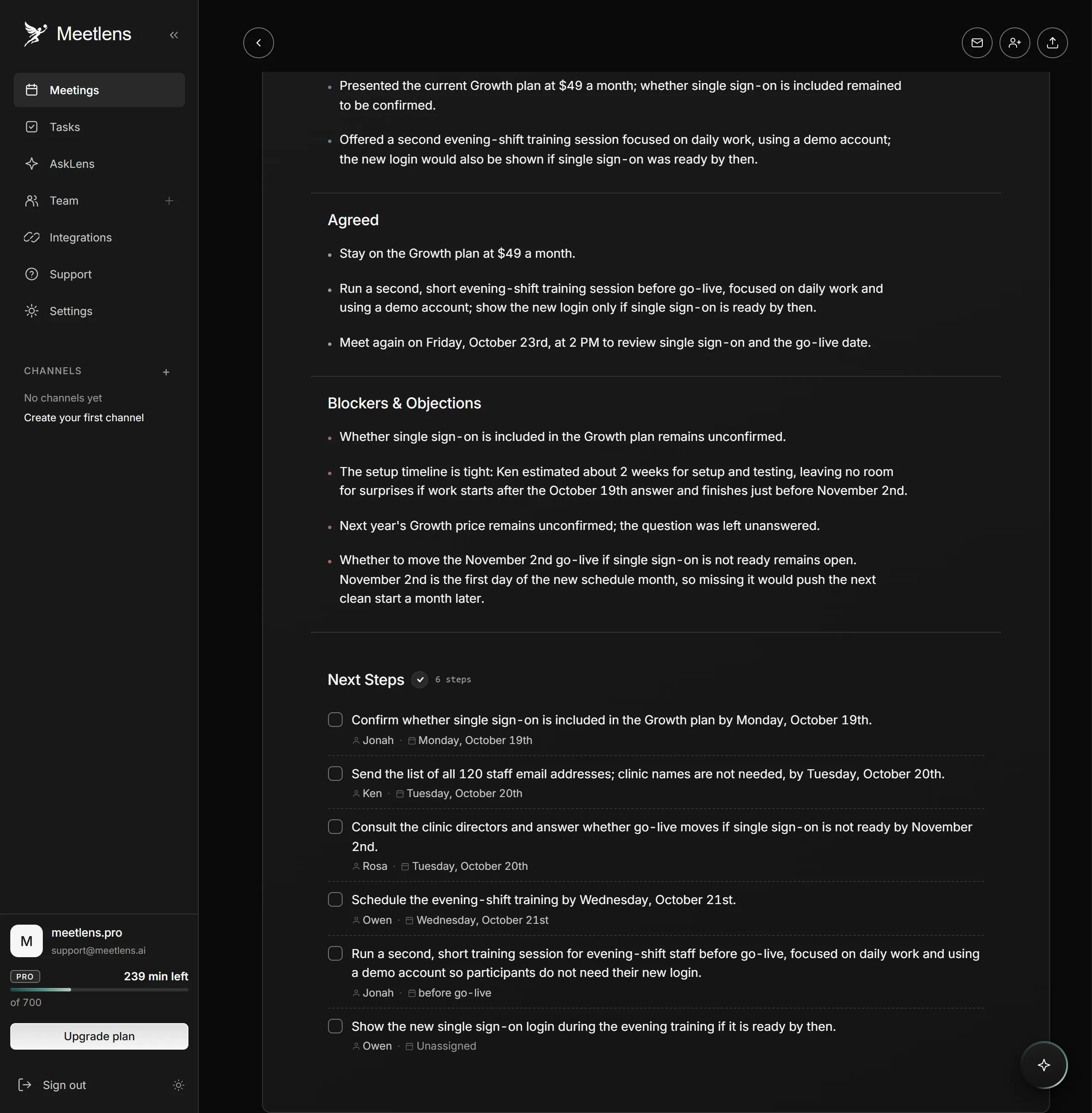
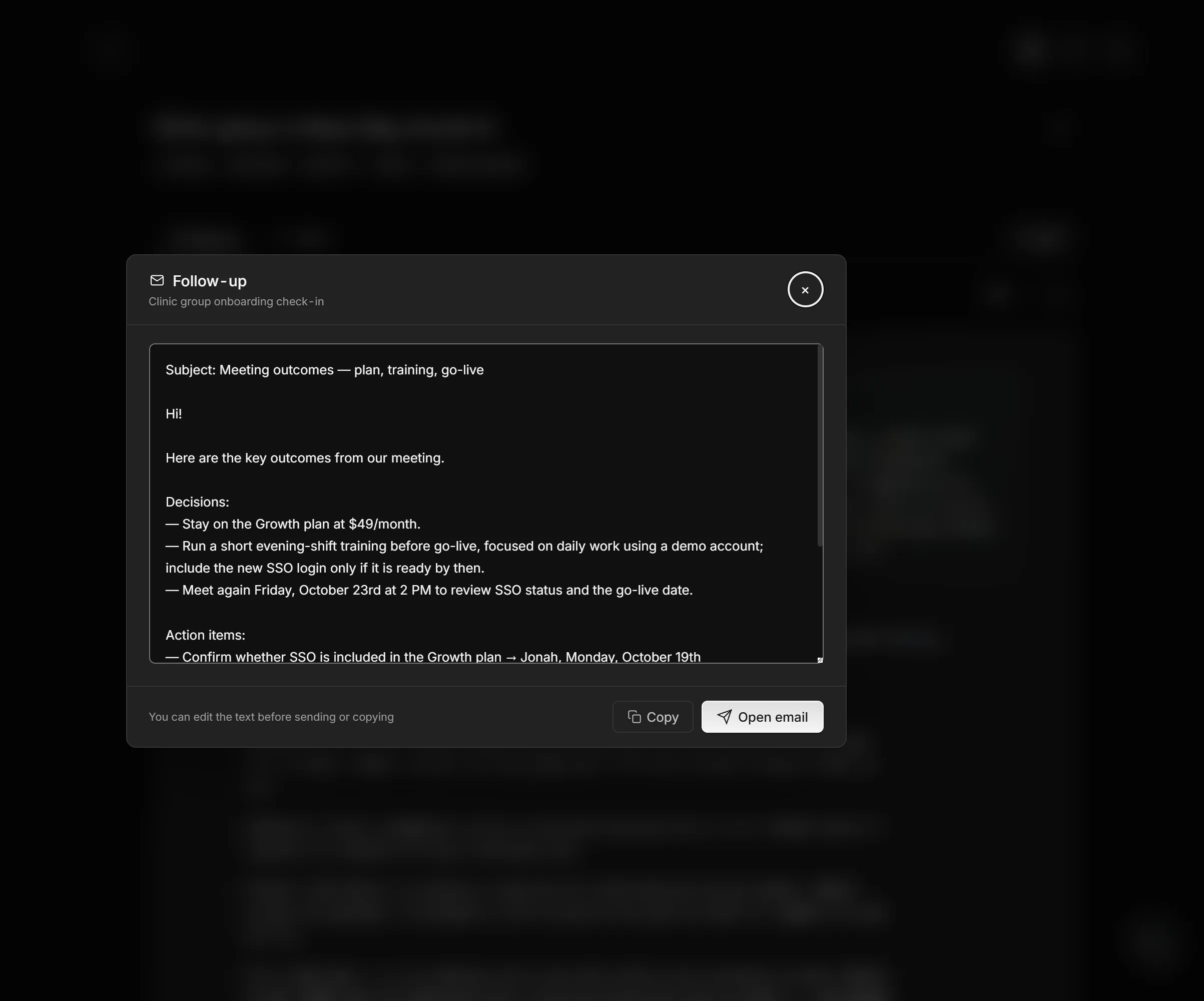
Meetlens, a Chrome extension, records the audio of a browser meeting in Google Meet, Zoom Web, Microsoft Teams Web or Webex without a bot joining the call, or takes an uploaded audio file or MP4, and produces AI-generated meeting summaries. General Meeting, the default report format, has Brief, Meeting Topics, Decisions and Tasks with an owner and a due date, plus Open Questions when any came up. Team Sync, for the team version, has Decisions and Blockers sections and lists tasks with owners and due dates under Next Steps; Client Meeting covers client calls, with Agreed and Next Steps sections. On the Pro and Business plans, Meetlens drafts a follow-up email with the decisions and tasks, which you review and send yourself. With no bot, the platform shows no recording notice, so announce the recording and get each person's OK.
Where does the summary go next — and what if you need longer notes?
When you need the full meeting notes
A meeting summary template is built from your notes, so when someone needs the full discussion, share the notes themselves. The same fields carry over: decisions, action items with owners and due dates, and open questions. A meeting note template lays them out under each agenda item, with room for the discussion behind them.
Sending the summary as an email
To send a filled meeting summary template as an email, paste it under a one-line greeting, put the main outcome in the subject line, and ask for corrections. For the example above: "Weekly sync, Oct 13: setup fee dropped, webinar moved to Nov 12." Recaps from real meetings differ mostly in what they leave out: a client gets the client version, without internal debate.