How to Take Meeting Notes: What to Capture, 4 Methods and an Example
 Meetlens Editorial11 min readUpdated October 10, 2026
On this page
- What should meeting notes include?
- How do you take notes in a meeting, step by step?
- Which note-taking method works best for meetings?
- Should you take meeting notes by hand or on a laptop?
- What do good meeting notes look like? (Example)
- Can AI take meeting notes for you?
- How should you organize and share meeting notes?
- Short summaries for people who weren't there
- Notes for project meetings and formal reports
Good meeting notes record decisions, action items and open questions — not everything that was said. That filter is most of how to take meeting notes well; the rest of good note-taking is habit. Below, in order: what to capture, how to take notes in a meeting before, during and after it, four note-taking methods, paper or laptop, an example, where AI helps, and how to organize the result.
What should meeting notes include?
Meeting notes should capture decisions, action items with an owner and a due date, open questions, and the key numbers behind them. Meeting note-taking is a filter: if a line won't change what someone does next week, leave it out.
| Capture | Skip |
|---|---|
| Decisions: what was agreed, one line each | The back-and-forth that led to each decision |
| Action items: task, owner, due date | Small talk and updates nobody acted on |
| Open questions, and who will find the answer | Anything already in the slides or a shared doc (link it instead) |
| Key numbers: budgets, targets, dates, figures quoted | Word-for-word quotes, unless the exact wording matters |
| Risks, blockers and attendees | Your opinion of how the meeting went |
Decisions come first because they are the output of decision-making; if a meeting decided nothing, the notes should say so and list the open questions that blocked it.
An action item without an owner and a due date is a wish, not a task. Accountability starts when a name and a date sit next to the verb: "send revised quote" becomes "Alex — send revised quote — Oct 15." Attendees go at the top, so a reader who wasn't there knows whom to ask.
Meeting notes vs. meeting minutes: which do you need?
You need meeting minutes when a board, committee or other formal body makes decisions and approves the record at its next meeting; for everything else, meeting notes are enough. Meeting minutes record motions, votes and decisions, and the group approves them; meeting notes are a working record for you or your team that nobody approves. Note-taking for the official record is called minute-taking, so if you're asked to take notes as a secretary for a board or committee, that's the job.
How do you take notes in a meeting, step by step?
Take meeting notes in three passes: set up headings from the agenda before the meeting, capture outcomes during it, and do a 10-minute cleanup right after. Splitting note-taking into passes means you never structure, listen and summarize at the same time.
Before the meeting: turn the agenda into note headings
Copy the meeting agenda into your meeting notes as headings, so during the call you only fill in outcomes. Add a header with the date and attendees. Under each agenda item, leave empty D:, A: and Q: lines, and keep a parking lot at the end for topics raised out of order.
Customer success weekly sync — 2026-10-13
Attendees:

1. <agenda item>
D:
A:
Q:

2. <agenda item>
D:
A:
Q:

Parking lot:
Name the note-taker before the call starts, and don't pick the person running the meeting: facilitating and writing compete for the same attention. In recurring meetings, rotate the role.
During the meeting: listen for outcomes, not words
During the meeting, write down outcomes as they happen — decisions, action items, open questions and numbers — and let the talk itself go. Active listening here means catching the moment a conversation turns into a result: "let's go with," "can you," "by Thursday," "we still don't know." That's how to take notes during meetings without falling behind.
A four-marker shorthand keeps each line short and easy to sort:
| Marker | Means | Example line (illustrative) |
|---|---|---|
| D: | Decision | D: drop setup fee for the renewal |
| A: | Action item: owner — task — due date | A: Alex — send revised quote — Oct 15 |
| Q: | Open question | Q: finance sign-off needed? owner? before quote goes out |
| # | A number worth keeping | # fee ≈ $2,400; tier churn 4.1% last quarter (Marco) |
Three habits keep the meeting notes usable:
- Don't write verbatim. A transcript keeps the exact words; your notes keep the key points, one line per agenda item.
- Ask for the owner and date out loud. When a task comes up without them, ask "Who's taking that, and by when?" before the meeting moves on.
- Read the D: and A: lines back before the call ends, while people can still correct them.
After the meeting: the 10-minute cleanup
Give your meeting notes a 10-minute pass right after the call, while the gaps are still easy to fill. Hermann Ebbinghaus's forgetting curve shows memory of new material dropping most steeply in the first hours, and a 2015 replication by Murre and Dros in PLOS ONE reproduced his original results.
The checklist:
- Expand the shorthand into lines a teammate can read. Mark anything you're unsure of with "?" instead of guessing.
- Check every A: line for an owner and a due date. If one is missing, ask the person; don't fill it in from memory.
- Order each agenda item: decisions first, then action items, then numbers and open questions, so a reader sees outcomes before loose ends.
- Copy each action item into your task tracker with the same wording.
- Send the follow-up to attendees within 24 hours: a short meeting recap with decisions, owners and dates, plus a link to the full notes.
If the call was recorded, settle a disputed line with the recording, not with whoever remembers it most confidently.
Which note-taking method works best for meetings?
The best method depends on the meeting: outline notes suit agenda-driven meetings, the Cornell method suits meetings you'll review later, and mind maps suit brainstorming. The quadrant method is a fourth option for meetings that leave you with many tasks. Any note-taking method works for meeting notes only if decisions and action items still stand out at a glance.
| Note-taking method | Layout | Best for | Weak spot |
|---|---|---|---|
| Outline | Agenda items as headings, indented points underneath | Status meetings, weekly syncs | Breaks down when the talk jumps between topics |
| Cornell | Cue column on the left, notes on the right, summary at the bottom | Project reviews, client calls, trainings you'll revisit | Needs time afterward to fill in cues and summary |
| Mind map | Central topic in the middle, ideas branching out | Brainstorming, early planning | Hard to read for people who weren't there; tasks hide in branches |
| Quadrant | Four boxes: general notes, your tasks, others' tasks, questions | Meetings where you'll own several tasks | Little room for context |
The outline method fits most work meetings, because headings copied from the agenda already form an outline. The D:, A:, Q: and # markers work inside any of the four layouts.
The Cornell note-taking system was developed by Walter Pauk, a Cornell University education professor. Cornell's Learning Strategies Center lays out the page as a 2.5-inch cue column, a 6-inch note-taking column and a 2-inch summary strip at the bottom. For a meeting, put questions, owners and dates in the cue column and the decisions in the summary.
A Cornell page adapted for a team call
Customer success weekly sync — 2026-10-13
Attendees: Nora (host), Alex, Marco, Ben (notes)
Cue column
- Alex — Oct 15
- finance sign-off needed?
- owner?
- before quote goes out
Notes column
1. Logistics client renewal
#fee ≈ $2,400; tier churn 4.1% last quarter (Marco)
D:drop setup fee for the renewal
A:Alex — send revised quote — Oct 15
Q:finance sign-off needed? owner? before quote goes out
Summary strip
D:Drop the setup fee for the renewal.
What are the 5 R's of note-taking?
The 5 R's of note-taking are Record, Reduce, Recite, Reflect and Review, the steps Walter Pauk paired with the Cornell system in How to Study in College. PennWest University's library guide lists them from the 1989 edition; the Learning Strategies Center page, adapted from the 2001 edition, names the second step Questions instead of Reduce. Applied to meeting notes:
- Record: write outcomes during the call.
- Reduce: right after, pull owners, dates and questions into the cue column.
- Recite: read decisions and action items aloud before everyone leaves.
- Reflect: note what each decision changes in your own work.
- Review: reread the notes before the next meeting in the series.
Should you take meeting notes by hand or on a laptop?
Neither wins outright: handwriting may help you remember, but typed notes are easier to share and search. In Mueller and Oppenheimer (2014), students who typed notes on a laptop did worse on conceptual questions than students who wrote by hand, and the authors linked the gap to copying lectures word for word. A direct replication by Morehead, Dunlosky and Rawson (2019) found that performance did not consistently differ between the handwriting and laptop groups. Both studies tested students' note-taking on lectures, not people in meetings.
For meeting notes, memorization matters less than what happens next: action items must reach a tracker, and decisions must be findable months later. Typed notes win on both. In a one-on-one or an interview, where a laptop can feel like a wall, write by hand and type up the D: and A: lines afterward. Mobile devices fall in between: a tablet with a stylus keeps the handwriting and syncs it. For recall, the cleanup right after the call matters more than the pen.
What do good meeting notes look like? (Example)
Good meeting notes are short lines grouped under agenda items: each decision, action item with owner and date, key number and open question on its own line. Here is a 10-minute team call reduced to 12 lines. In this weekly customer success sync, Nora runs the meeting and Ben takes notes. The left column is a short stretch of discussion on one agenda item; the right column is everything Ben wrote during it.
Illustrative example: the names, the client and the figures are invented.
| What was said (transcript excerpt) | What Ben wrote |
|---|---|
| Nora (2:21): Okay, the renewal quote for the logistics client. Alex, where are we? | (prepared heading) 1. Logistics client renewal |
| Alex (2:26): They pushed back on price. If we drop the setup fee, I think they sign this month. | |
| Marco (2:33): The fee is about $2,400 on this deal. Churn on that tier was 4.1% last quarter, so keeping them is worth more. | # fee ≈ $2,400; tier churn 4.1% last quarter (Marco) |
| Nora (2:42): Fine. Let's drop the setup fee. Alex, can you send the revised quote? | D: drop setup fee for the renewal |
| Alex (2:47): Yes, I'll take that one. I'll send the revised quote by Thursday, October 15th. | A: Alex — send revised quote — Oct 15 |
| Ben (2:54): Do we need finance sign-off for that? | |
| Nora (2:57): Good question. Let's find out before the quote goes out. | Q: finance sign-off needed? owner? before quote goes out |
Seven lines of talk became four marker lines under a heading Ben prepared before the call. After the cleanup, the notes for the whole call read:
Customer success weekly sync — 2026-10-13 — 10 min
Attendees: Nora (host), Alex, Marco, Ben (notes)
1. Logistics client renewal
D: Drop the setup fee for the renewal.
A: Alex — send revised quote — Oct 15
# Fee ≈ $2,400; churn on this tier was 4.1% last quarter (Marco).
Q: Is finance sign-off needed for dropping the fee? Owner not set; answer needed before the quote goes out.
2. Q4 customer webinar
D: Move the webinar to Nov 12.
A: Marco — draft the invite list — Oct 20
3. Help center migration
Q: Who owns the redirects? Not assigned; back on next week's agenda.
The cleanup turned shorthand into sentences but kept the task wording, so it matches the tracker. The number kept its source, and the missing owner stayed missing: nobody took the finance question, so the notes say "Owner not set" instead of guessing a name. For a ready layout, start from a meeting notes template.
Can AI take meeting notes for you?
Yes — AI note takers record the call, transcribe it and draft notes, but you still need to check decisions, owners, dates and names. Speech-to-text transcription turns the recording into a transcript, and generative AI condenses it into AI-generated notes that summarize what was said, which is not always what was decided.
There are three ways to hand note-taking to AI:
- Built-in platform features: Zoom's meeting summary (formerly part of AI Companion), Google Meet's "Take notes for me" and Microsoft Teams' intelligent recap, on eligible paid plans or add-ons.
- Bot assistants: a third-party AI note taker joins the call as a participant.
- Extensions without a bot: a browser extension records the meeting tab's audio, and no extra participant appears.
Meetlens is an example of the third kind: a Chrome extension for botless AI meeting notes that records the audio of a browser meeting in Google Meet, Zoom Web, Microsoft Teams Web or Webex, then produces a transcript with speaker labels and a structured report. General Meeting, the default report format, has the same structure as hand-written meeting notes: Brief, Meeting Topics, Decisions and Tasks with an owner and a due date, plus Open Questions when any came up. It's preselected in the extension, so you get a Meetlens General Meeting report without picking a format. The extension records audio only, from desktop Chrome, not from the Zoom or Teams desktop apps.
No bot means no recording notice from the platform. Allow microphone access so your own announcement is recorded, then start recording, announce it, get each person's yes, and stop if anyone objects.
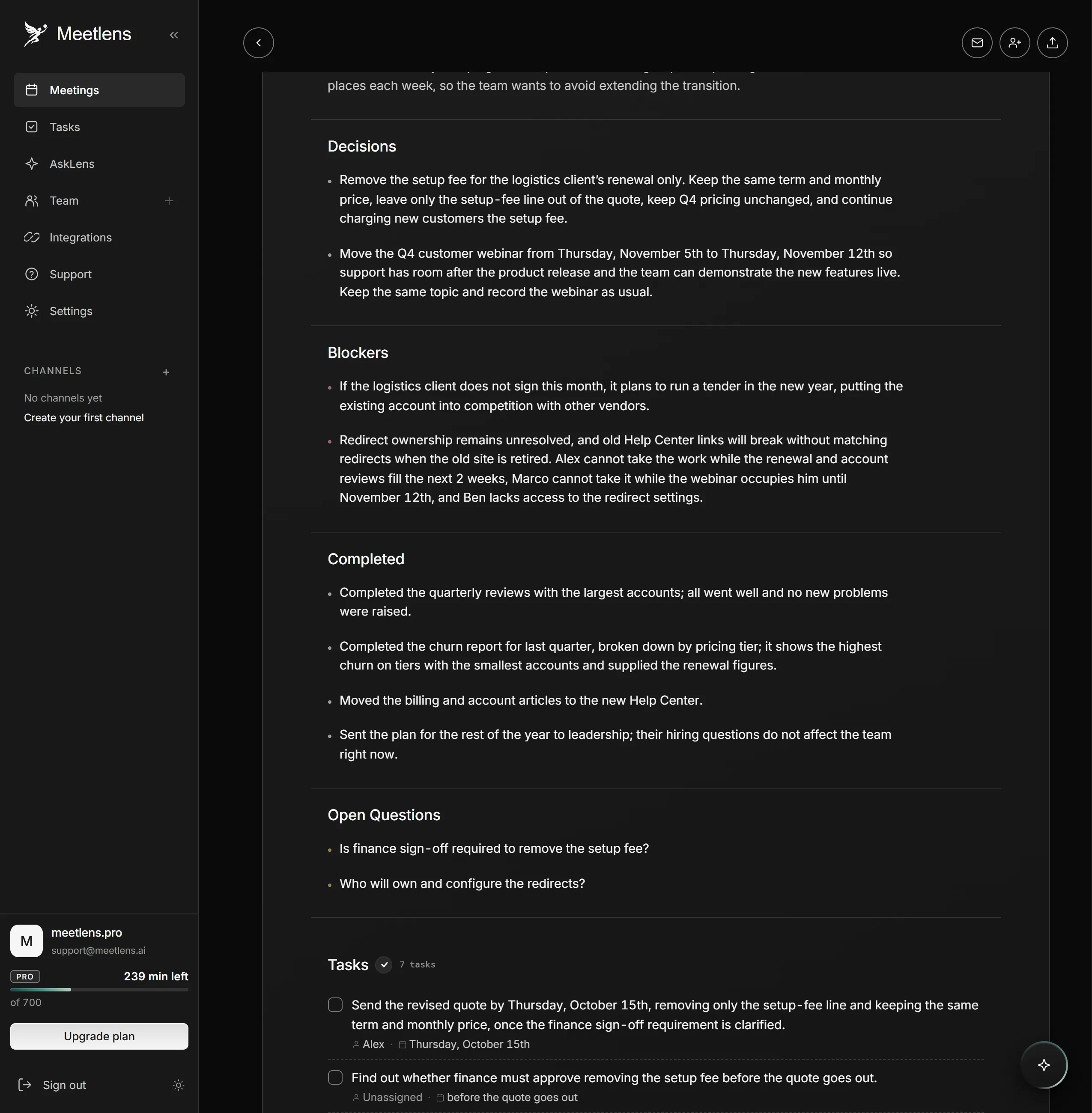
Before you send AI-generated notes, check them against the transcript: each decision was agreed, not just suggested; every owner and date was said aloud; names are spelled right. Setup and prompts are in how to use AI to take meeting notes, and where errors come from is in are AI meeting notes accurate.
Can ChatGPT take meeting notes?
ChatGPT can turn a transcript you paste into meeting notes; on its own, it records calls only with record mode in the ChatGPT macOS app, which, with Google Calendar connected, can join Google Meet calls on schedule but needs a manual start for Zoom or Teams. Ask for fixed sections (decisions, action items with owner and due date, unresolved questions) and tell it to write "not stated" instead of guessing. OpenAI's help center describes that record mode: it runs in the macOS desktop app on paid plans and transcribes and summarizes audio such as meetings; the same consent steps apply. Don't paste confidential discussions into a tool your company hasn't approved.
How should you organize and share meeting notes?
Keep every meeting's notes in one place, under one naming pattern, and send action items to the people who own them. One place means one: a shared Google Docs folder, a page in your team's knowledge base or a section of the company intranet, not all three.
Name every file the same way, date first, so the folder sorts itself: YYYY-MM-DD — meeting — project, for example 2026-10-13 — Customer success weekly sync — logistics renewal.
Then move the work out of the meeting notes. Every A: line becomes a task in your project management tool with the same owner and due date. Post the link in the team's Slack channel; in remote work across time zones, that written record is how absent teammates catch up. Board and committee records follow the same filing rules, and our guide on how to organize meeting minutes covers folders and search for both.
What if you need a different kind of record after the meeting?
Short summaries for people who weren't there
People who missed the meeting need a summary, not your full meeting notes: the decisions and action items in a few lines they can read at a glance. That's async work in practice: written updates that teammates read later instead of joining the call. A good recap answers what changed, who owes what, and by when. Start from a meeting recap template.
Notes for project meetings and formal reports
Project meetings add a few fixed fields to the meeting notes, such as status, risks and upcoming deadlines, and the project management meeting notes template lays them out. When notes have to become a document for leadership or a client, they follow a meeting report format instead of a running list.