Meeting Notes Template: 6 Free Templates With Filled-In Examples
 Meetlens Editorial10 min readUpdated October 10, 2026
On this page
- What should a meeting notes template include?
- Simple meeting notes template (copy and paste)
- Meeting notes templates for different meeting types
- What is the best format for meeting notes?
- Meeting notes examples: what a filled-in template looks like
- Which tool should you use: Word, Google Docs, Excel or Notion?
- How do you fill in a meeting notes template automatically?
- Summary templates for people who missed the meeting
- Meeting minutes for formal meetings
- Call notes for sales and phone calls
A meeting notes template is a ready-made page with fields for attendees, agenda items, decisions, action items with owners and due dates, and open questions. The template gives you the structure; knowing how to take notes in a meeting — what to listen for and what to skip — fills it in. Below are six free ones to copy or download. Covered in order: fields, templates, format, examples, files, auto-fill.
What should a meeting notes template include?
A meeting notes template needs seven fields: meeting details, attendees, agenda items, decisions, action items with owners and due dates, open questions, and the next meeting. Examples come from the sample in the next section.
| Field | What to write | Example (illustrative) |
|---|---|---|
| Meeting details | Name, date, time, place or link | Plans page review, Oct 14, 2026, Google Meet |
| Attendees | Who came; mark the host and note-taker | Maria (host), Jonah, Elena, Owen (note-taker) |
| Agenda items | One heading per topic on the meeting agenda | 1. Growth tier price; 2. Comparison table |
| Decisions | What was agreed, one line each | Remove the comparison table from the plans page. |
| Action items | Owner — task — due date | Elena — remove the comparison table — Oct 16 |
| Open questions | Question, who answers, by when | Offer an annual discount? Jonah answers at the Oct 21 review. |
| Next meeting | Date and what carries over | Oct 21, 2026; annual discount proposal |
Decisions record the outcome of decision-making; if nothing was decided, write "No decisions." Action items plus the next meeting are your next steps.
Simple meeting notes template (copy and paste)
Copy this simple meeting notes template into any doc; it works for most internal meetings. Its headings form a meeting notes outline: a header, then four blocks per agenda item. It works as a plain word processing template: keep the page layout to headings and bullets, so the note-taking follows the same order every time and your notes stay consistent.
# [Meeting name] — [Month D, YYYY]
Time: [start]–[end] · Where: [room or link]
Attendees: [Name (host)], [Name], [Name (note-taker)]

## 1. [Agenda item]
Decisions:
- [what was agreed]
Action items:
- [Owner] — [task] — [due date]
Numbers and open questions:
- [figure with unit (source)]
- [question? who answers, by when]
Discussion:
- [only what explains a decision]

## 2. [Agenda item]
(same four blocks)

## Next meeting
[Month D, YYYY, time] · Carry over: [open items]
Here is the same meeting note template after a 25-minute review.
Illustrative example: names and figures are invented.
# Plans page review — Oct 14, 2026
Time: 10:00–10:25 a.m. · Where: Google Meet
Attendees: Maria (host), Jonah, Elena, Owen (note-taker)

## 1. Growth tier price
Decisions:
- Keep the Growth tier at $49 a month.
Action items:
- Maria — update the plans page FAQ — Oct 20
Numbers and open questions:
- Growth was 62% of new paid sign-ups in September (Jonah).
- Offer an annual discount? Jonah answers at the Oct 21 review.
Discussion:
- Two customers asked for a cheaper plan; nobody proposed a cut.

## 2. Comparison table
Decisions:
- Remove the comparison table from the plans page.
Action items:
- Elena — remove the comparison table — Oct 16
Numbers and open questions:
- Who updates old blog posts that link to the table? Owner not set.

## Next meeting
Oct 21, 2026, 10:00 a.m. · Carry over: annual discount proposal
Meeting notes templates for different meeting types
Different meetings need different meeting notes templates: team syncs track progress, client calls track commitments, and conferences track takeaways. The five templates for meeting notes below keep the simple template's header and line rules.
Team meeting notes template
Use this team meeting notes template for weekly syncs; it doubles as a work or employee meeting notes template for staff meetings.
# [Team] weekly sync — [Month D, YYYY]
Attendees: [Name (host)], [Name], [Name (note-taker)]

Updates since last sync (one per person):
- [Name]: [what got done]. Blocker: [what (who can unblock)] or none.

Decisions:
- [what was agreed]
Action items:
- [Owner] — [task] — [due date]
Next sync: [Month D] · Check first: [open action items from this sync]Client meeting notes template
Use this client meeting notes template for customer calls: it separates what the client asked for from what your team promised.
# Client call: [client] — [Month D, YYYY]
Client attendees: [Name (role)], [Name (role)]
Our team: [Name (role)], [Name (note-taker)]
Goal of the call: [one line]

Client requests:
- [what the client asked for, in their words]
Commitments we made:
- [Owner] — [commitment] — [due date]
Client follow-ups:
- [Client name] — [what they send or decide] — [due date]
Open questions:
- [question? who answers, by when]
Next call: [Month D, YYYY, time]
Client notes reach more stakeholders than internal ones, sometimes the client too, so write each commitment as the client would read it.
Meeting notes and action items template
Use this meeting notes and action items template when a meeting exists to move tasks. It is the one layout here that puts action items before decisions.
# [Meeting] — [Month D, YYYY]
Attendees: [Name], [Name (note-taker)]

## Action items
| # | Owner  | Task            | Due       | Status                    |
|---|--------|-----------------|-----------|---------------------------|
| 1 | [Name] | [verb + object] | [Month D] | Open / In progress / Done |

## Decisions
- [what was agreed]

## Context
- [only what explains a task or a decision]
Each row names one task owner and a due date, so at the next meeting you ask one person about one task: that is what makes the table an accountability tool. Keep one running table and update Status at each meeting.
Conference notes template
Use this conference notes template once per session, with no more than three key takeaways.
# [Conference] — Day [n] — [Month D, YYYY]
Session: [title] · Speaker: [name, organization] · Time: [start]

Key takeaways:
1. [ ]
2. [ ]
3. [ ]
Ideas to apply: [idea] — [who on your team should hear it]
Follow-up: [slides link, contact or resource]Cornell and quadrant note-taking template (printable)
Use the printable Cornell or quadrant page as a meeting note taking template for handwritten notes. Cornell notes split the page into a cue column, a note-taking column and a summary; for a meeting, put questions, owners and dates in the cues and decisions in the summary.
+-----------+-----------------------------+
| Cues:     | Notes:                      |
| questions | one line per point          |
| owners    |                             |
| dates     |                             |
+-----------+-----------------------------+
| Summary: decisions                      |
+-----------------------------------------+
The quadrant layout gives two of its four boxes to action items:
+------------------------+------------------------+
| General notes          | My action items        |
+------------------------+------------------------+
| Others' action items   | Questions              |
+------------------------+------------------------+What is the best format for meeting notes?
The best meeting notes format puts decisions and action items at the top of each agenda item and discussion details below, so a reader gets the outcome at a glance. Within an item: decisions first, then action items, then numbers and open questions. For readability, write each line so someone who missed the call gets the outcome from its first words:
- Bullet points, one idea per line.
- Past tense for what happened: "Elena removed the table." Decisions keep the outcome verb: "Remove the comparison table."
- Names, not pronouns: "She'll send it" means nothing a week later.
- Absolute dates: "Oct 20," not "next Tuesday."
- Numbers with units and a source: "3 weeks (Elena's estimate)," not "a while."
- An owner and a due date on every action item, worded as in your task tracker.
The same rules apply in every meeting notes template on this page.
Meeting notes examples: what a filled-in template looks like
Below are two meeting notes examples, a 30-minute team sync and a client call, each filled in from a template above. The team is the one from the simple template's sample. Either example works as a sample meeting notes template.
Illustrative examples: names, the client and the figures are invented.
Example 1: team sync (team template)
# Revenue team weekly sync — Oct 15, 2026 — 30 min
Attendees: Maria (host), Jonah, Elena, Owen (note-taker)

Updates since last sync (one per person):
- Maria: drafted the plans page FAQ update. Blocker: none.
- Jonah: started the annual discount model.
  Blocker: churn data by plan (Elena).
- Elena: removed the comparison table. Blocker: none.
- Owen: closed the onboarding email test; 41% of new users
  opened version B, 36% opened the control. Blocker: none.

Decisions:
- Send onboarding email version B to all new sign-ups from Oct 19.
Action items:
- Elena — send churn data by plan to Jonah — Oct 16
- Owen — switch the onboarding email to version B — Oct 19
Next sync: Oct 22 · Check first: both action items above
Example 2: client call (client template)
# Client call: clinic group onboarding check-in — Oct 16, 2026
Client attendees: Rosa (operations manager), Ken (IT lead)
Our team: Jonah (account manager), Owen (note-taker)
Goal of the call: confirm what the client needs before the Nov 2 go-live

Client requests:
- Single sign-on (SSO) for 120 staff accounts before go-live.
- A second training session for evening-shift staff.
Commitments we made:
- Jonah — confirm whether SSO is included in the client's plan — Oct 19
- Owen — schedule the evening-shift training — Oct 21
Client follow-ups:
- Ken — send the list of 120 staff email addresses — Oct 20
Open questions:
- Does go-live move if SSO isn't ready by Nov 2? Rosa answers by Oct 20.
Next call: Oct 23, 2026, 2:00 p.m.
Each bad line below invites ambiguity: two readers could take it two ways. Each good line comes from a sample above.
| Bad line | Good line | Rule |
|---|---|---|
| Discussed the Growth price | Keep the Growth tier at $49 a month. | Outcome, not topic |
| She'll send the data tomorrow | Elena — send churn data by plan to Jonah — Oct 16 | Names, not pronouns |
| Email test looks better | 41% of new users opened version B, 36% opened the control | Numbers with units |
| Someone should check SSO | Jonah — confirm whether SSO is included in the client's plan — Oct 19 | Owner and due date |
| Before go-live early next month | Before the Nov 2 go-live | Absolute dates |
Which tool should you use: Word, Google Docs, Excel or Notion?
Use a doc (Word, Google Docs) for narrative meeting notes and a sheet (Excel, Google Sheets) when you mainly track action items. The meeting note templates on this page come in the file types that fit them:
| Tool | Best for | What you get here |
|---|---|---|
| Google Docs | Notes several people edit during the call | A Make a copy link; the copy goes to your Google Drive (how it works) |
| Microsoft Word | Notes kept or sent as files | A .docx download |
| Microsoft Excel or Google Sheets | An action item tracker that runs across meetings | An .xlsx tracker with Owner, Task, Due and Status columns |
| Printable pages for handwritten notes | Printable simple, conference, Cornell and quadrant pages |
Both editors have a built-in option too. In Google Docs, type "@", choose Meeting notes and pick a Google Calendar event to fill in its details (Google Docs Editors Help). In Word, select File > New and search online templates for "meeting notes" (Microsoft Support); Microsoft's Word template gallery lists a free "Meeting notes" document.
In Microsoft OneNote for Windows, paste the meeting notes template into a page and choose View > Paper Size > Save current page as a template (Microsoft Support). In Notion, import a template's .md file via Settings > Import > Text & Markdown (Notion Help Center).
Store filled copies in one shared folder, not on one laptop: that is knowledge sharing in practice.
How do you fill in a meeting notes template automatically?
An AI note taker can fill in a meeting notes template from the call recording, leaving you to check and edit it. Meetlens is a Chrome extension that records the audio of a browser meeting in Google Meet, Zoom Web, Microsoft Teams Web or Webex without a bot joining the call, then produces a transcript with speaker labels and a structured AI report. For other meetings, upload an audio file or MP4: up to 1 GB on the Free and Pro plans and 3 GB on the Business plan, with a length limit of 60, 90 or 120 minutes by plan.
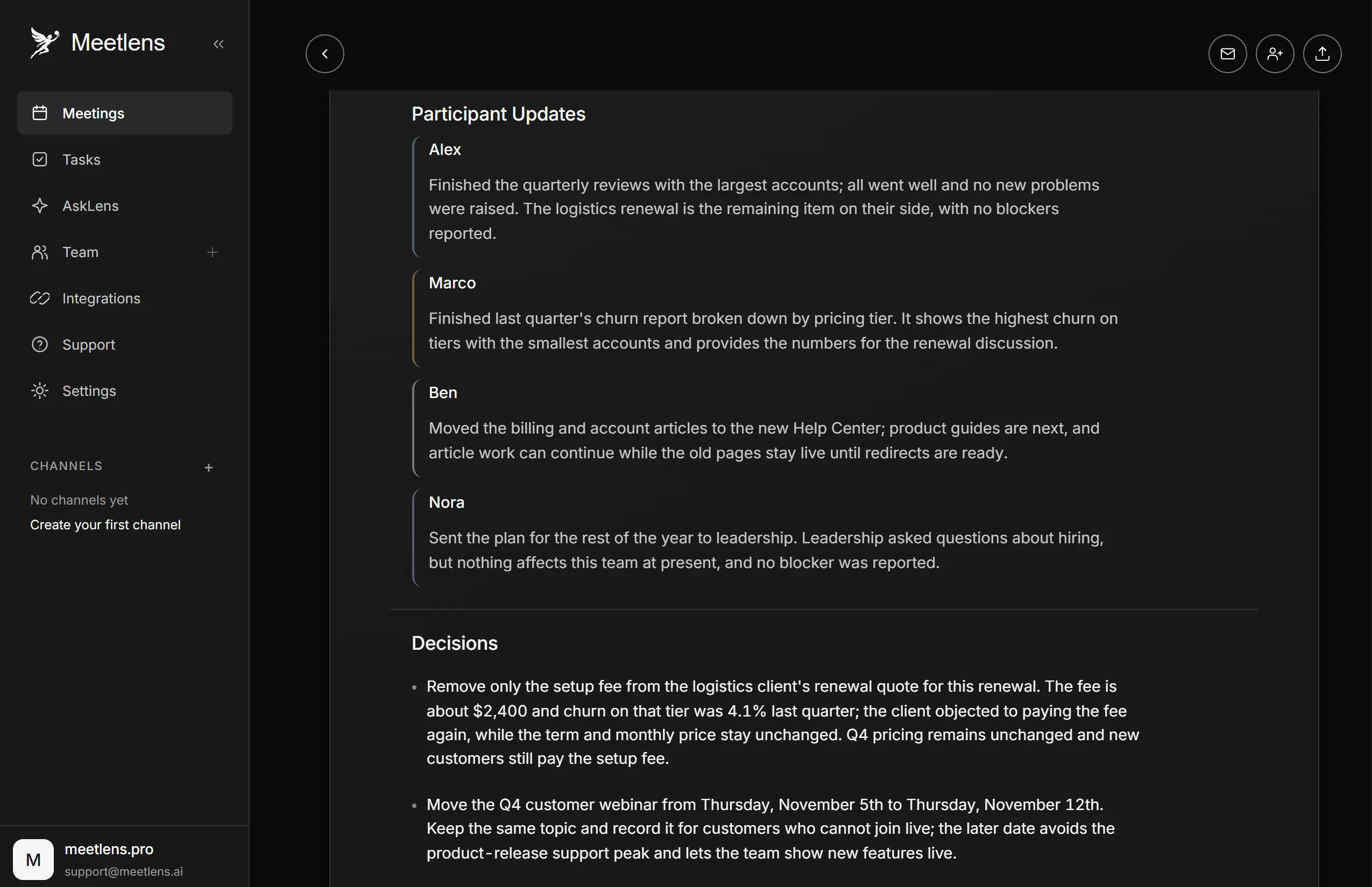
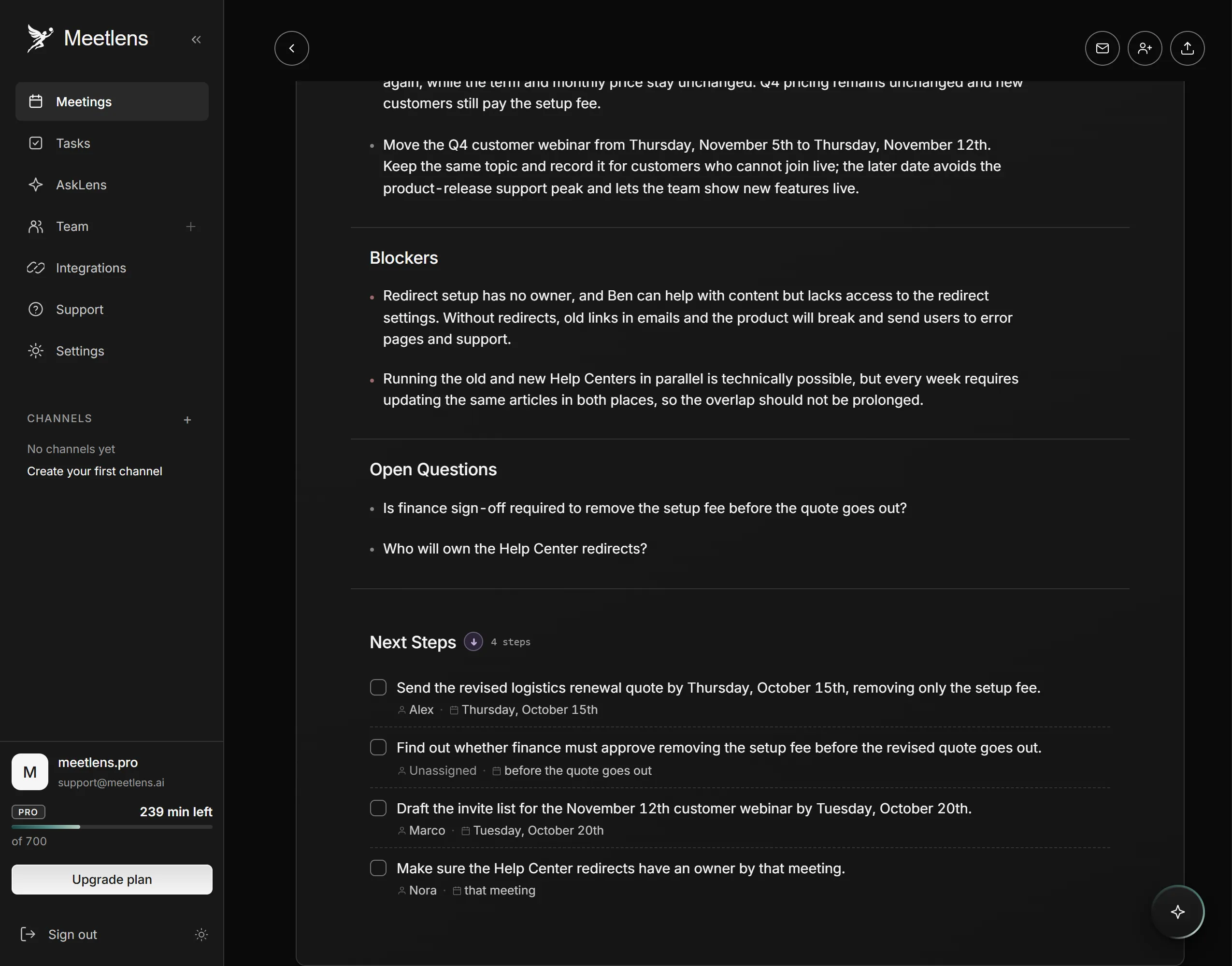
- Choose the format in the drop-down above Start recording. General Meeting, the default report format, has Brief, Meeting Topics, Decisions and Tasks with an owner and a due date, plus Open Questions when any came up.
- Announce the recording. No bot means no recording notice from the platform: allow microphone access so your announcement is recorded, start recording, announce it, get each person's yes, and stop if anyone objects.
- Check the draft against the transcript, export it as Markdown, TXT or PDF (paid plans) and paste it into your template; Meetlens doesn't write into Word or Google Docs.
Each Meetlens report format maps to a template here:
| Template | Meetlens report format | Sections that fill it |
|---|---|---|
| Simple | General Meeting | Meeting Topics, Decisions, Tasks, Open Questions |
| Team | Team Sync | Team Summary, Participant Updates, Decisions, Blockers, Next Steps |
| Client | Client Meeting | What the Client Needs, Agreed, Blockers & Objections, Next Steps |
| Conference | General Meeting (talks and webinars) | Brief, Meeting Topics |
Team Sync has its own Decisions section and Client Meeting lists decisions under Agreed; both list the tasks with owners and due dates under Next Steps when the call produced any. Like other AI note takers, this automation gives you auto-filled meeting notes to check, not a final record.
Need a formal record or a one-screen summary instead of working notes?
Summary templates for people who missed the meeting
People who missed the meeting need only the outcome of a meeting notes template: decisions and action items with owners, on one screen. Start from a meeting summary template, which keeps those fields and drops the discussion.
Meeting minutes for formal meetings
When a board or committee makes motions, votes and approves its record, it needs meeting minutes, not a meeting notes template. Meeting notes are a working record for you or your team that nobody approves. Start from a minutes template instead.
Call notes for sales and phone calls
For a sales or phone call, the client meeting notes template above works as call notes: requests, commitments and follow-ups with dates are the same fields.