One-on-One Meeting Template: 6 Copyable 1:1 Agendas for Managers and Employees (+ Filled Example)
 Meetlens Editorial12 min readUpdated October 17, 2026
On this page
- One-on-one meeting template for managers and supervisors
- 30-minute one-on-one meeting agenda
- How to use a 1:1 template
- Weekly one-on-one meeting template
- First one-on-one meeting template (new employee)
- 1-on-1 meeting with manager template (for employees)
- Career development one-on-one template
- One-on-one meeting notes template (with a filled example)
- Where to keep your 1:1 template: Docs, Word, Excel, Notion or OneNote
- What the template doesn't replace
A one-on-one meeting template is a reusable 1:1 agenda (check-in, the employee's topics, wins, blockers, feedback both ways, action items with owners) that you copy into a shared doc and fill in every week. A template suits this recurring work meeting because the same topics come back in one-on-one meetings week after week. Below: the main template, a 30-minute agenda, usage rules, four more versions, a filled-in notes example and where to keep it.
One-on-one meeting template for managers and supervisors
A good one-on-one meeting template covers a check-in, the employee's topics, wins, blockers, feedback in both directions, the manager's topics and action items with owners, plus a carry-over line for the next 1:1. Copy it once per direct report as your default 1 on 1 meeting template. British English calls the meeting a one-to-one (Cambridge Dictionary), so in the UK this is a one to one meeting template. Supervisors use the same layout as a supervisor meeting agenda template.
1:1 — [Employee] / [Manager] · [Date]

Check-in (how are you, in one line)

Employee topics (added before the meeting, max 3)
-
Wins since our last 1:1
-
Challenges, blockers, support needed
-
Feedback
- Manager → Employee:
- Employee → Manager:
Manager topics
-
Action items
- [ ] [Owner] will [action] by [date]
Carry over to next 1:1
-The main one-on-one template as a one-page form
1:1
Employee
Manager
Date
Check-in how are you, in one line
Employee topics added before the meeting, max 3
- Topic 1
- Topic 2
- Topic 3
Wins since our last 1:1
Challenges, blockers, support needed
Feedback
Manager → Employee
Employee → Manager
Manager topics
Action items
| Checkbox | Owner | Action | Date |
|---|---|---|---|
Carry over to next 1:1
- Check-in: one line on well-being, not a status report.
- Employee topics come first. Baylor University's HR guidance says "The employee prepares the agenda" and sends it in advance. These are the discussion points; write any decision next to the topic it settles.
- Three topics at most. candost.blog's 1:1 template caps a thirty-minute 1:1 at three points, "and less is better."
- Every feedback line has a direction, so the 1:1 stays a two-way conversation.
- Carry-over items are topics you ran out of time for; they open the next 1:1.
Once a month or quarter, use the career template below instead.
30-minute one-on-one meeting agenda
In a 30-minute one-on-one, give the first 15 minutes to the employee (a short check-in and their topics) and keep the last five minutes for action items. Time-box every block of the one-on-one meeting agenda, so an overrun eats into the next block, not the action items.
| Block | 30-minute 1:1 | 45-minute 1:1 | 60-minute 1:1 | What happens |
|---|---|---|---|---|
| Check-in | 0–3 | 0–5 | 0–5 | One line each |
| Employee topics | 3–15 | 5–20 | 5–25 | In the employee's order |
| Feedback both ways | 15–20 | 20–27 | 25–35 | One piece each way |
| Manager topics | 20–25 | 27–35 | 35–45 | Context, priorities, requests |
| Growth and career | Monthly career 1:1 | 35–40 | 45–55 | One next step, with a date |
| Action items and recap | 25–30 | 40–45 | 55–60 | Read back each owner and date |
During the employee's block, the manager's job is active listening: ask questions and summarize before you suggest a fix. Copy the timings into your 1:1 template, and it doubles as an agenda template.
Baylor's HR guidance says "In most cases this is a 30-minute meeting" and suggests 45 minutes or even an hour for employees in complex roles or who manage others (same Baylor page). Manager Tools splits the half hour three ways; in its book The Effective Manager, the agenda is "first, 10 minutes for your direct, then 10 minutes for you, then 10 minutes to talk about the future." This meeting agenda keeps the direct-first order and moves the future to a monthly career 1:1.
How to use a 1:1 template
Keep one shared document per person, newest meeting on top, and let the employee add topics before you do. That running document becomes the history of your 1:1s.
- Create one shared document per person, newest 1:1 on top, as candost.blog does: "create a new table on top of the shared document" (same page as above). Last week's action items then sit right under this week's agenda.
- Let the employee add topics by the day before. You add yours after theirs.
- Delete empty sections instead of filling them for the sake of the form.
- Carry unfinished action items forward and mark them "(carried from [date])".
- Skip status updates that already live in your project tracker.
- Keep private notes in a separate file. Your observations on performance or personal matters don't belong in a shared document.
What is the 40/20/40 rule?
The 40/20/40 rule splits your attention for a meeting into 40% preparation, 20% the meeting itself and 40% follow-through. Graham Allcott and Hayley Watts call it the "40–20–40 Continuum" in How to Fix Meetings (Icon Books, 2021); the publisher's summary says "only 20 per cent of your attention for each meeting is spent in the meeting itself," and the Think Productive blog lists all three shares. For a 1:1 template, the document works before the meeting (topics added) and after it (action items done), not only during it.
How to send a one-on-one meeting invite
Send one recurring meeting invite titled "[Name] / [Name] 1:1" with the link to the shared document in the description. In Google Calendar, click the arrow next to "Does not repeat" and choose how often the event repeats (Google Calendar Help). Paste this into the description:
Agenda and notes for our 1:1: [link to our shared doc]. Please add your topics by the day before; I'll add mine after yours.
Weekly one-on-one meeting template
A weekly 1:1 template should be short enough to fill in five minutes: priorities, progress on last week's action items, blockers and one request. The employee fills it in before the meeting, so the conversation starts from what's already on the page.
Weekly 1:1 — [Employee] / [Manager] · [Date]

Top 3 priorities this week
1.
2.
3.
Last week's action items
- [item]: done / not done → [carry over or drop]
Blockers
-
One thing I need from you
-
Action items
- [ ] [Owner] will [action] by [date]
For bi-weekly 1:1s, change "this week" to "these two weeks" and "Last week's action items" to "Action items from our last 1:1" in the weekly template.
First one-on-one meeting template (new employee)
The first 1:1 template replaces status topics with getting-to-know-you questions and agreements on how you'll work together. Use it in a new hire's first week of onboarding, or with each person when you take over a team.
First 1:1 — [Employee] / [Manager] · [Date]

About you
- Background and what you're best at:
- Outside work (optional):
How you like to work
- Channel for quick questions (chat, email, call):
- Focus hours:
- How you prefer feedback (written or live, right away or at our 1:1):
- Recognition: public or private?
Expectations
- First 30 days:
- First 60 days:
- First 90 days:
How we'll run our 1:1s
- Cadence and length:
- Who owns the agenda:
- Where notes live: [link]
Your questions
-
Action items
- [ ] [Owner] will [action] by [date]
The Expectations block is where you clarify expectations for the first 30, 60 and 90 days in writing. The How you like to work block records how the new hire wants to communicate and be recognized, so open communication starts from their preferences. How to run the conversation itself is a separate topic.
1-on-1 meeting with manager template (for employees)
When you own the agenda, structure it around what you need from your manager: a decision, help with a blocker, feedback or career support. In this employee one-on-one template, each bracket is a talking point prompt; replace it with your own line before the meeting.
1:1 with [Manager] · [Date] — my agenda

What I shipped since last time
- [one win with a number]
What I'm working on next
- [ask to confirm priorities: "Is X still ahead of Y?"]
Where I need your help
- [a decision / a blocker / an intro to someone]
Feedback I'd like
- [one specific question, e.g. "How did my update in Tuesday's review land?"]
Career (monthly)
- [a skill or project I want]
Action items
- [ ] [Owner] will [action] by [date]
Prepare two talking points with care. "What I'm working on next" is where you confirm priorities before a week goes into the wrong one. "Feedback I'd like" turns "any feedback?" into a feedback request about one piece of work, which invites specific, constructive feedback.
Career development one-on-one template
Run a separate career 1:1 once a month or quarter so growth doesn't get crowded out by weekly work. In this career development 1:1 template, the employee talks about long-term goals and professional development; the manager listens for where to help.
Career 1:1 — [Employee] / [Manager] · [Date]

Where you want to be in 1–2 years
- [role, scope or kind of work]
Skills to build
- [skill]: why it matters for that goal
Stretch opportunities in your current role
- [project, presentation or area to own]
Support needed
- [training / a project / a mentor]
Satisfaction check
- What part of your work do you enjoy most right now? Least?
Next step and date
- [ ] [Owner] will [action] by [date]
Fill in "Where you want to be" first: skills only make sense against a career goal. Keep one or two development goals at a time, each with a next step and a date. The satisfaction check is a short job satisfaction pulse; the support line is where you ask for training or mentorship.
One-on-one meeting notes template (with a filled example)
One-on-one meeting notes should record decisions, action items with owners and dates, and what to carry over — not a transcript of the conversation. Use the main template as your meeting notes template and keep an action items log beside it to track progress between 1:1s.
Staged 1:1 voiced with synthetic voices; names are invented.
| Date | Topics | Decisions | Action items | Owner | Due | Status |
|---|---|---|---|---|---|---|
| Oct 6 | Usability test | Test the sign-up flow with 6 participants | Recruit 6 test participants | Priya | Oct 9 | Done |
| Oct 13 | Onboarding flow | Present it at the Oct 20 design review | Send the onboarding flow for review | Priya | Oct 16 | Open |
| Oct 13 | Engineering estimates | No decision | Ask the engineering lead for estimates | Owen | Oct 15 | Open |
| Oct 13 | Design reviews | Agenda goes out a day ahead | Send the Oct 20 review agenda | Owen | Oct 19 | Open |
| Oct 13 | Design system docs | No decision yet | Carry over | Not set | Not set | Carried over |
Read the open rows at the start of every 1:1; that review creates accountability on both sides. A year of this log also gives you dated wins and feedback for performance reviews, so the performance appraisal doesn't rely on memory.
The Oct 13 entry in the main template (Priya is a product designer, Owen her design manager):
1:1 — Priya / Owen · Oct 13, 2026

Check-in: Priya: busy, fine. Owen: back from two days off.

Employee topics
- Onboarding flow redesign → Decision: present it at the Oct 20 design review
- Design system docs: who owns updates? (no decision yet)
Wins since our last 1:1
- Usability test: 5 of 6 participants finished sign-up without help
Challenges, blockers, support needed
- Engineering estimates for the new flow are late; launch date at risk
Feedback
- Manager → Employee: the test readout was clear; next time, open with the recommendation
- Employee → Manager: design reviews run long; send the agenda a day ahead (agreed)
Manager topics
- No new designer on the team until January
Action items
- [ ] Owen will ask the engineering lead for estimates by Oct 15
- [ ] Priya will send the onboarding flow for review by Oct 16
- [ ] Owen will send the Oct 20 review agenda by Oct 19
Carry over to next 1:1
- Design system docs owner
Here are four lines of the dialogue behind these notes. They work as one to one conversation examples, with feedback in both directions:
- Owen (Manager → Employee): "Your test readout was clear. Next time, open with the recommendation."
- Priya (Employee → Manager): "Will do. From my side: design reviews run long. Could you send the agenda a day ahead?"
- Owen: "Yes, I'll send the October 20th agenda on Monday the 19th. Will the onboarding flow be ready?"
- Priya: "Yes, you'll have it by Friday the 16th."
Each commitment became an action item with an owner and a date.
If the 1:1 runs in a browser tab (Google Meet, Zoom in the browser or Microsoft Teams on the web), Meetlens can draft these notes. It's a Chrome extension that records the call's audio without a bot joining, then produces a transcript with speaker labels and an AI report. In the format drop-down above Start recording, choose One-on-One. The platform shows participants no recording notice, so ask first:
I'd like to record the audio of our 1:1 so I can write up the notes and action items afterward. If that's OK with you, please say "Yes, I agree to the recording."
| Template section | One-on-One report |
|---|---|
| Check-in | No section: type it yourself |
| Employee and manager topics | Brief |
| Wins since our last 1:1 | What's Going Well (finished items under Completed) |
| Challenges, blockers, support needed | Concerns |
| Feedback, both directions | Feedback, one block per direction; the next step for the employee under Growth |
| Decisions written next to a topic | Decisions |
| Action items | Tasks, each with an owner and a due date |
| Carry over to next 1:1 | Open Questions: move them to the next 1:1 yourself |
On our staged recording (8 min 23 s, synthetic voices, imported as an audio file), three template sections came straight from the One-on-One report without edits: Wins from What's Going Well, Feedback from Feedback (Owen → Priya, Priya → Owen) and Action items from Tasks, with the same owners and dates; the carry-over item sat under Open Questions, and by hand we typed only the header and the check-in line and sorted the topics, the blocker and the manager's news out of Decisions, Open Questions and Concerns.
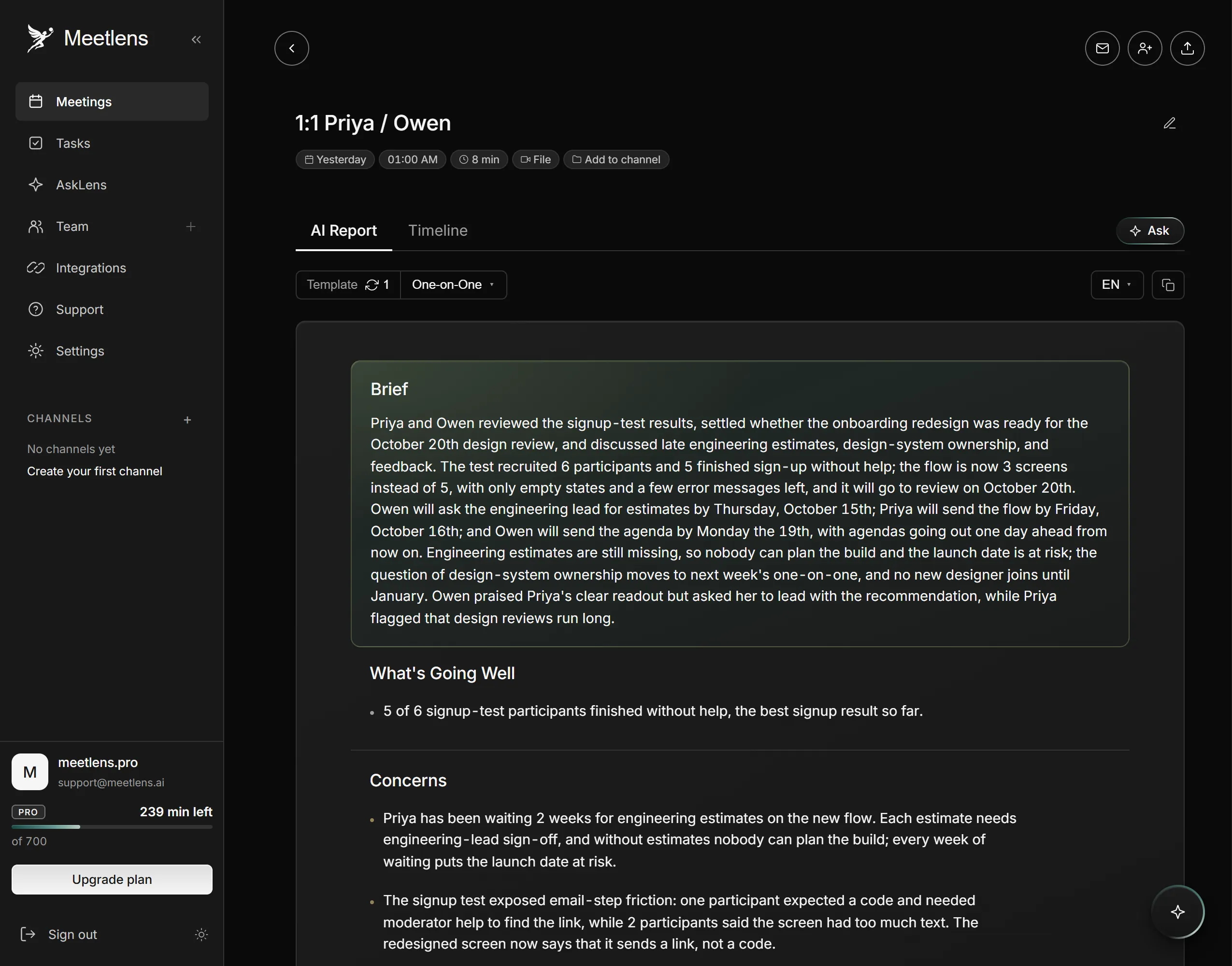
Check every owner and date before pasting into the shared doc: a task without an owner shows as Unassigned. Recordings are only accessible within your account, so paste only what both of you should see. Export is Markdown, TXT or PDF on the Pro and Business plans; Meetlens doesn't write into Google Docs, Word, Notion or OneNote. It records audio only and can't capture the Zoom or Teams desktop apps; for those and for in-person 1:1s, upload an audio or MP4 recording made with consent. See how AI-generated 1:1 notes are built from a recording.
Where to keep your 1:1 template: Docs, Word, Excel, Notion or OneNote
Use a shared doc (Google Docs or Word) for the conversation, a spreadsheet only if you need to track action items across many reports, and a PDF form only for printing. Pick one place per person and keep every 1:1 template there.
| Tool | When it fits | Limitation |
|---|---|---|
| Google Docs or Microsoft Word | One running document per person, shared with both of you | Action items sit inside dated sections; you can't filter them across people |
| Excel or Google Sheets | An action items log for your whole team, one row per task | No room for the conversation itself |
| Notion | A database with one page per person and an entry per 1:1 | The other person needs their own Notion account and an invite to the page (Notion Help) |
| OneNote | A section per person and a page per 1:1 | Saved page templates apply only to new, empty pages |
| PDF or printed form | In-person 1:1s without a laptop | Someone has to type it into the shared doc afterward |
OneNote's built-in page templates include planners and to-do lists (Microsoft Support); for a 1:1, save your own. In the OneNote desktop app, paste the main template into a new page, choose View > Paper Size, then Save current page as a template at the bottom of the pane (Microsoft Support). Each new 1:1 then starts from Insert > Page Templates > Page Templates: pick yours from the My Templates list in the Templates pane.
For in-person meetings, print the PDF of the main template as a one on one form, then type the action items into the shared doc the same day.
What should a template not try to cover?
What the template doesn't replace
A one-on-one meeting template structures each conversation; it doesn't tell you why to hold 1:1s or how often, and it isn't the place for team status. Purpose and cadence belong in a guide to running one-on-ones. Team status belongs in a stand-up meeting, where the whole team hears it once.