Scrum Meetings Explained: The 5 Scrum Events, Timeboxes and Agendas
 Meetlens Editorial13 min readUpdated October 17, 2026
On this page
- What is a scrum meeting?
- What are the 5 scrum events?
- Who attends scrum meetings?
- Sprint planning meeting: purpose and agenda
- Daily scrum: format, questions and a daily standup template
- Sprint review meeting: purpose and agenda
- Sprint retrospective meeting: purpose and agenda
- Backlog refinement: the scrum meeting that isn't an event
- Scrum meeting agenda template
- Common scrum meeting mistakes
- How to keep a record of scrum meetings
- Is Scrum still relevant?
Scrum meetings are the events that teams using Scrum, the agile framework, hold inside every sprint: Sprint Planning, the Daily Scrum, the Sprint Review and the Sprint Retrospective, with the Sprint itself as their container. Like a formal meeting, each one follows written rules: the Scrum Guide sets its purpose, attendees and time limit, or timebox. Below: the events, attendees, agendas, a daily scrum template, mistakes and records.
What is a scrum meeting?
A scrum meeting is any of the events a Scrum team holds during a sprint — Sprint Planning, the Daily Scrum, the Sprint Review and the Sprint Retrospective; the Scrum Guide calls them events, not meetings.
The Guide says events exist "to create regularity and to minimize the need for meetings not defined in Scrum," and a Scrum.org article on meeting overload stresses that the prescribed events are explicitly not called meetings. Each event is a checkpoint for the work, which is how Scrum puts its three pillars into practice: transparency, inspection and adaptation.
People also say Scrum ceremonies, which the Scrum Guide calls events. In everyday speech, "scrum meeting" often means only the Daily Scrum, the short daily check-in of an Agile team. Scrum isn't an acronym, so it's written Scrum, not SCRUM.
What is a scrum call?
A scrum call is a scrum meeting held over video or phone, usually the Daily Scrum of a distributed team. The rules don't change on a call: the Guide asks for the same time and place every working day, and for a remote team the place is the same meeting link.
Why is it called scrum?
Scrum is named after a rugby scrum, where a team's forwards bind together and push for the ball as one unit. Hirotaka Takeuchi and Ikujiro Nonaka compared product development to rugby in "The New New Product Development Game" (Harvard Business Review, January 1986): one cross-functional team moves the work forward together instead of handing it between departments. Ken Schwaber and Jeff Sutherland first co-presented Scrum at the OOPSLA conference in 1995, the Scrum Guide notes.
What are the 5 scrum events?
The Scrum Guide defines five events: the Sprint itself, which contains the other four — Sprint Planning, Daily Scrum, Sprint Review and Sprint Retrospective. So "four scrum meetings" and "five Scrum events" are both right, depending on whether the Sprint counts. Backlog refinement isn't an event; it's an ongoing activity, covered below.
A scrum sprint is a fixed-length event of one month or less, and two weeks is a common sprint length. Each event, in the Guide's words, is "a formal opportunity to inspect and adapt Scrum artifacts." Timeboxing sets a maximum, not a target: an event can end early but shouldn't run over. The Guide gives each timebox for a one-month sprint and adds, "For shorter Sprints, the event is usually shorter."
| Event | Purpose | Who attends | Time limit, 1-month sprint (Scrum Guide 2020) | Common for a 2-week sprint (practice, not a rule) | Output |
|---|---|---|---|---|---|
| Sprint | Container for all work and the other events | Scrum Team | One month or less | 2 weeks | One or more usable Increments |
| Sprint Planning | Decide why, what and how for the sprint | Scrum Team, plus invited advisers | Up to 8 hours | About 4 hours | Sprint Goal and Sprint Backlog |
| Daily Scrum | Inspect progress toward the Sprint Goal, adapt the plan | Developers | 15 minutes | 15 minutes | Plan for the next day |
| Sprint Review | Inspect the sprint's outcome, decide what to adapt | Scrum Team and key stakeholders | Up to 4 hours | About 2 hours | Product Backlog adjustments |
| Sprint Retrospective | Plan ways to increase quality and effectiveness | Scrum Team | Up to 3 hours | About 1.5 hours | Improvements to act on |
The 2-week column halves the one-month maximum: it's an estimate, not a rule from the Guide, and the Daily Scrum timebox doesn't change with sprint length. A scrum of scrums, where representatives of several teams coordinate shared work, is a scaling practice, not a Scrum Guide event.
Scrum events inside one 2-week sprint
Sprint 2 weeks
- Day 1
- Sprint Planning about 4 hours
- Daily Scrum 15 minutes
- Day 2
- Daily Scrum
- Day 3
- Daily Scrum
- Day 4
- Daily Scrum
- Day 5
- Daily Scrum
- Day 6
- Daily Scrum
- Day 7
- Daily Scrum
- Day 8
- Daily Scrum
- Day 9
- Daily Scrum
- Day 10
- Daily Scrum
- Sprint Review about 2 hours
- Sprint Retrospective about 1.5 hours
Backlog refinement ongoing activity, not an event
Who attends scrum meetings?
Scrum events are run by the Scrum Team — Developers, a Product Owner and a Scrum Master, typically 10 or fewer people — and others attend by invitation: key stakeholders at the Sprint Review, advisers at Sprint Planning.
- Developers own the Daily Scrum and the Sprint Backlog.
- The Product Owner is accountable for the Product Backlog and brings the Product Goal and the top items to Sprint Planning.
- The Scrum Master ensures that all Scrum events take place and are "kept within the timebox."
The Product Owner and the Scrum Master join the Daily Scrum as Developers only when they're actively working on Sprint Backlog items.
What is the 3-5-3 rule in Scrum?
The 3-5-3 rule is a memory aid for Scrum's structure: 3 accountabilities, 5 events and 3 artifacts. Scrum Inc. uses it to summarize the Scrum Guide; the Guide itself doesn't use the term. The artifacts are the Product Backlog, the Sprint Backlog and the Increment. Since 2020 the Guide says "accountabilities" instead of "roles," and each artifact carries a commitment: the Product Goal, the Sprint Goal and the Definition of Done.
Sprint planning meeting: purpose and agenda
Sprint Planning answers three questions from the Scrum Guide — why this sprint is valuable, what can be done, and how the work will get done — and ends with a Sprint Goal. The Product Owner brings the most important Product Backlog items. The Developers select what fits their capacity, based on "their past performance, their upcoming capacity, and their Definition of Done." The Sprint Goal, the selected items and the delivery plan together form the Sprint Backlog.
Agenda for this Scrum event, with suggested shares of the timebox (the Guide doesn't split it):
- Review the Product Goal, the last sprint's outcome and the top of the Product Backlog: 10%.
- Draft the Sprint Goal (why): 15%.
- Select Product Backlog items against capacity (what): 35%.
- Break down the first days' work into tasks of one day or less (how): 35%.
- Confirm the Sprint Goal and the Sprint Backlog: 5%.
If your team estimates with planning poker, do it during refinement and keep planning for selection.
Daily scrum: format, questions and a daily standup template
The Daily Scrum is a 15-minute event, held at the same time and place every working day, where Developers inspect progress toward the Sprint Goal and adjust the plan for the next day. The daily standup format is up to the team: Developers "can select whatever structure and techniques they want," as long as the scrum meeting ends with an actionable plan. Standing up is optional too: the Guide doesn't mention it.
How to run a daily scrum meeting:
- Start on time, with the Sprint Goal visible on the scrum board or a shared screen.
- Cover progress toward the Sprint Goal: each Developer says what's done, what's next and what's in the way, or the team walks the board.
- Give every impediment an owner who follows up the same day.
- Move discussions past the timebox, with only the people involved. Mountain Goat Software notes that some teams call this the "sixteenth minute."
- Update the Sprint Backlog with the plan for the next day.
The familiar three questions come from the 2017 Scrum Guide, which offered them as "an example of what might be used":
- "What did I do yesterday that helped the Development Team meet the Sprint Goal?"
- "What will I do today to help the Development Team meet the Sprint Goal?"
- "Do I see any impediment that prevents me or the Development Team from meeting the Sprint Goal?"
The 2020 edition removed them, as its revision notes list. They help a new team keep updates short, but they turn the event into a round of individual reports.
To walk the board instead, Mountain Goat Software, founded by Mike Cohn, suggests starting with the work closest to done and moving backward, asking what each item needs today. Kanban teams read the board the same way, right to left, a habit taught in Kanban in Action (Manning Publications, 2014).
Daily scrum (daily standup) template:
Daily scrum — [Team] · Sprint [#], day [n] · [date]
Sprint Goal: [one sentence]

Progress toward the Sprint Goal
- [Name]: done since yesterday … / next … / impediment …
(or walk the board: Done → In review → In progress → To do)

Impediments
- [impediment] — owner — follow up with [who] after the daily scrum

Changes to the Sprint Backlog
-

After the timebox (parking lot)
-
When a Developer can't attend, the same update works in writing:
Subject: Daily update — [Name] — [date]

Sprint Goal: [one sentence]
Since the last Daily Scrum: [what moved toward the Sprint Goal]
Today: [what I'll work on]
Blockers: [impediment] — who can help: [name]
Outside Scrum, any team can use this short format for a daily check-in.
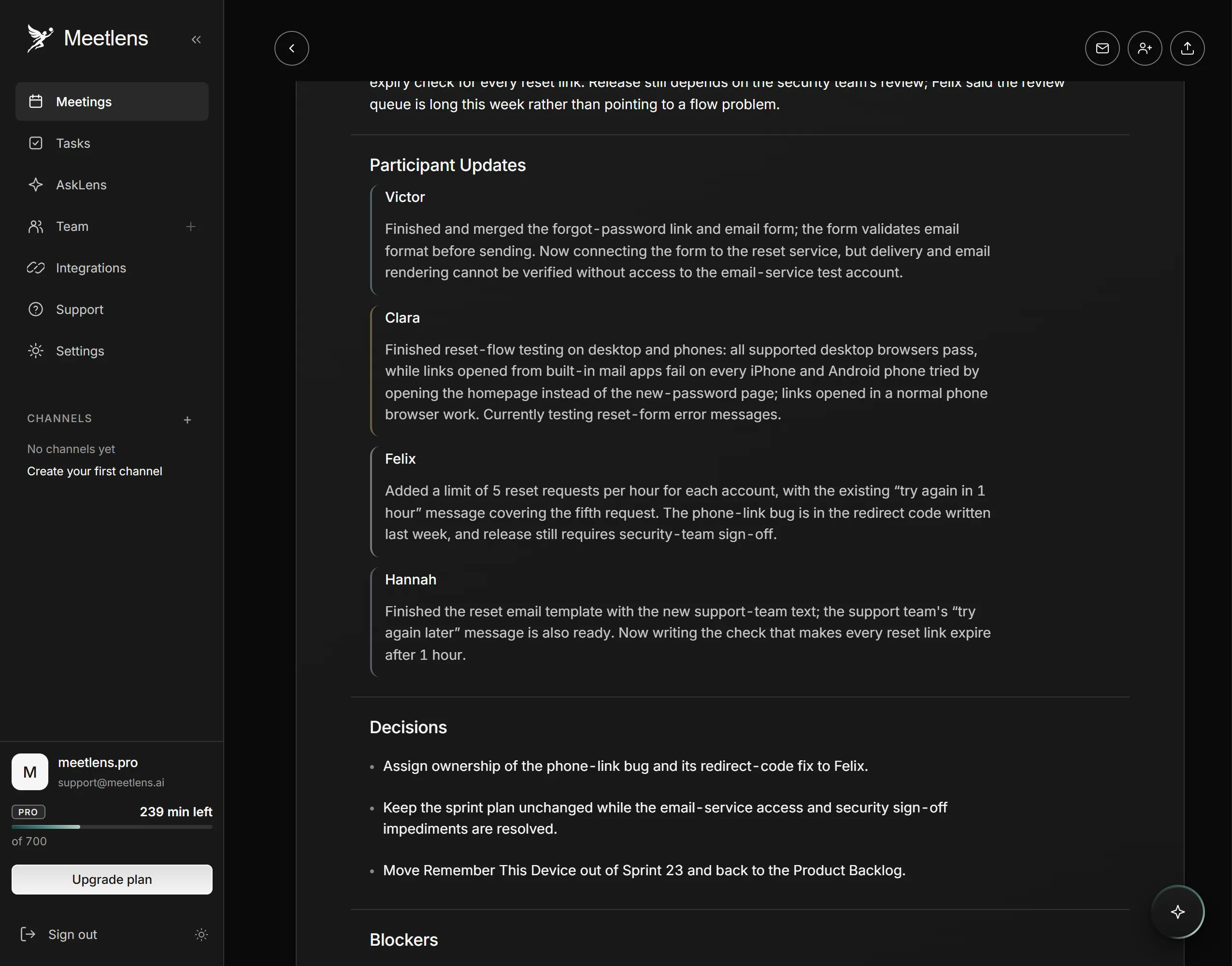
Staged Daily Scrum voiced with synthetic voices; names are invented. Sprint 23 of two weeks, day 8; the recording runs about 8 minutes.
Daily scrum — Accounts team · Sprint 23 (2 weeks), day 8 of 10 · Wed Oct 14, 2026
Sprint Goal: by Fri Oct 16, customers can reset their own password from the sign-in page, without writing to support

Progress toward the Sprint Goal
- Victor: done since yesterday: forgot-password link and email form on the sign-in page, merged / next: connect the form to the reset service / impediment: no access to the email service test account
- Clara: done since yesterday: tested the reset flow on desktop and phones; on phones the reset link opens the home page / next: test the error messages on the reset form, retest the phone link after the fix / impediment: none for her; the phone bug blocks the Sprint Goal
- Felix: done since yesterday: limit of 5 reset requests per hour per account / next: fix the phone link bug / impediment: no sign-off from the security team yet
- Hannah: done since yesterday: reset email template with the new support text / next: reset links expire after 1 hour / impediment: none

Impediments
- No access to the email service test account — Felix — gives Victor access by noon today (Oct 14)
- No security sign-off on the reset flow — Hannah — follows up with the security team today (Oct 14)

Changes to the Sprint Backlog
- Added: the phone link bug — Felix fixes it by noon Thu Oct 15; Clara retests on phones by end of Thu Oct 15
- Removed: "Remember this device" → back to the Product Backlog (not part of the Sprint Goal; the Product Owner said it can wait)

After the timebox (parking lot)
- Send an email after every password change, as a security alert? Victor and Clara, right after the daily scrum; no decision
Sprint review meeting: purpose and agenda
The Sprint Review is a working session — not a demo-only presentation — where the Scrum Team and key stakeholders inspect what was done and decide what to adapt in the Product Backlog. In the Guide's words, the team "should avoid limiting it to a presentation." Stakeholder feedback on the Increment is the main input.
Agenda for this Scrum event:
- Restate the Sprint Goal and what was and wasn't done.
- Show the working Increment in use.
- Collect stakeholder questions and feedback.
- Discuss what changed around the product: users, competitors, budget or dates.
- Update the Product Backlog, check progress toward the Product Goal and agree on next steps.
Sprint retrospective meeting: purpose and agenda
The Sprint Retrospective closes the sprint: the team inspects how it worked — people, interactions, processes, tools and its Definition of Done — and picks the improvements it will actually make. This Scrum event drives continuous improvement: the Guide says "the most impactful improvements are addressed as soon as possible," and they can go straight into the next Sprint Backlog.
Agenda, after the five phases described by Esther Derby and Diana Larsen:
- Set the stage: state the goal and do a quick check-in.
- Gather data: list what went well and what problems came up, with facts from the sprint.
- Generate insights: find out why they happened.
- Decide what to do: pick one to three improvements, each with an owner.
- Close: confirm where the improvements will be tracked.
Start/Stop/Continue and Mad/Sad/Glad are popular formats for gathering data.
Backlog refinement: the scrum meeting that isn't an event
Backlog refinement is an ongoing activity, not a Scrum event: the team adds detail, order and size to Product Backlog items so they're ready for Sprint Planning. Many teams still book a recurring refinement session, so it looks like one more scrum meeting on the calendar. Its old name, backlog grooming, left the Guide in 2013, when the Product Backlog became "refined rather than groomed," per the same revision notes. The 2017 Guide said refinement "usually consumes no more than 10% of the capacity of the Development Team"; the 2020 edition dropped that figure.
Scrum meeting agenda template
One template works for every Scrum event if it captures the event, the timebox, the inputs and the output the Scrum Guide expects from it. Paste it into the calendar invite, then fill in the same block as your scrum notes. The output each event should produce is in the events table above.
[Event] — Sprint [#] · [date] · timebox [x] · facilitator [name]
Attendees:
Inputs: [Sprint Goal / Product Backlog / last retro actions]

Agenda
1. [item] — [minutes]
2.

Output: [Sprint Goal | updated plan | backlog changes | improvements]

Decisions
-

Action items
- [ ] [owner] — [action] — [due]
Give each action item one owner and a calendar date. "The team" as an owner means nobody follows up.
Common scrum meeting mistakes
Scrum events fail when they turn into something else: the Daily Scrum into a status report, the review into a slide presentation, the sprint retrospective into a venting session without actions. Several fixes below follow Mountain Goat Software's list of Daily Scrum problems on the same page.
| Mistake | Fix |
|---|---|
| The Daily Scrum is a status report to the Scrum Master or a manager | Developers talk to each other and the board; the Scrum Master steps back |
| Problem-solving inside the timebox | Name the problem, pick who needs to talk, solve it right after |
| The Product Owner or a manager takes over the Daily Scrum | Observers listen; their questions wait until after |
| Timebox overrun | Stop at the limit and park the rest; refine the backlog before planning |
| A Sprint Review without stakeholders | Invite people who use or fund the product; show working software |
| A sprint retrospective without actions | Give each improvement an owner and add it to the next Sprint Backlog |
How to keep a record of scrum meetings
Record only what the next event needs: the Sprint Goal from planning, impediments from the Daily Scrum, backlog changes from the review and improvement actions from the sprint retrospective. The Sprint Goal heads every Daily Scrum page. An impediments log, with an owner and a status per item, shows which blockers repeat: data for the retro. Review changes feed the next Sprint Planning, and improvement actions go into the next Sprint Backlog. That sprint record takes a few lines per scrum meeting.
If your scrum calls run in the browser versions of Google Meet, Zoom, Microsoft Teams or Webex, Meetlens can keep this record. It's a Chrome extension that records the meeting tab's audio without a bot joining the call, then produces a transcript with speaker labels and a structured AI report. For a Daily Scrum or a Sprint Review, pick Team Sync in the format drop-down above Start recording: the report lists participant updates, blockers, decisions and tasks with owners and due dates. For Sprint Planning and the sprint retrospective, keep General Meeting, the default report format: a General Meeting report lists topics, decisions, open questions and tasks. More on AI scrum meeting notes.
Meetlens records audio only, so a board or the Increment shown on screen reaches the report only if someone says it aloud, and it doesn't record the Zoom or Teams desktop apps. One recording runs up to an hour on Free, 90 minutes on Pro and two hours on Business, so a long Sprint Planning won't fit in one, and the Free plan's 10 AI reports a month won't cover a Daily Scrum every working day. No bot joins, so the platform shows no recording notice: tell the team you're recording.
Is Scrum still relevant?
Scrum is still a working framework: its rules haven't changed since the November 2020 Scrum Guide, still the current edition on scrumguides.org. The usual criticism is meeting load. At maximum timeboxes, a one-month sprint's events take about 20 hours, roughly one-eighth of 160 working hours in a month of 8-hour days. If that feels heavy, the Scrum.org article above suggests a sprint calendar with every event on it and keeping each inside its timebox. Dropping events has a cost the Guide names in its End Note: "While implementing only parts of Scrum is possible, the result is not Scrum."
Scrum events inspect the work, not the people. Feedback, career growth and workload belong in a one-on-one meeting.
Teams that don't run Scrum often keep only the daily check-in — a standup meeting without a Sprint Goal, a Product Owner or a Scrum Master.