Asynchronous Meetings: What They Are and When You Can Skip the Call
 Meetlens Editorial10 min readUpdated October 17, 2026
On this page
- What is an asynchronous meeting?
- Synchronous vs asynchronous meetings: what's the difference?
- Examples of asynchronous meetings
- Pros and cons of async meetings
- When should a meeting be asynchronous — and when should it stay live?
- How to run an asynchronous meeting
- Can a recording replace attending the meeting?
- Asynchronous all-hands and missed meetings
An asynchronous meeting replaces a live call with written updates, recorded video or comments on a shared document that people add at different times before a set deadline. Unlike a live working meeting, where people decide or build together in real time, it doesn't need everyone online at once. Below: the differences, examples, pros and cons, when to switch, how to run one, and when a recording is enough.
What is an asynchronous meeting?
An asynchronous meeting is a meeting where participants contribute at different times — through written updates, recorded video or audio, or comments on a shared document — before a set deadline, instead of joining a live call. "Async meeting" is the everyday short name for the same thing.
It runs on asynchronous conferencing between teammates: messages, documents and recordings answered on each person's own schedule. An async meeting keeps a topic, an owner and an outcome, but swaps the end of the call for a deadline, such as "comments by Thursday noon ET."
Asynchronous meetings matter most in remote work and hybrid work, because distributed teams rarely share a convenient hour. Async-first teams make written and recorded updates the default, and a live call needs a reason; a job post that asks for experience in "async distributed teams" means exactly that.
What does "asynchronous" mean in simple terms?
"Asynchronous" means not happening at the same time. Dictionary.com gives that as its first sense: "not occurring at the same time." Email is the everyday example: you answer when it suits you, not the moment a message arrives. The opposite, synchronous, means happening at the same time.
Synchronous vs asynchronous meetings: what's the difference?
A synchronous meeting happens in real time — in a room, on a video call, or on the phone — while an asynchronous meeting spreads the same discussion over hours or days. In a synchronous, real-time meeting, everyone is present at once and answers come in seconds: that is real-time communication. Video conferencing, an in-person meeting and a conference call are all synchronous.
| Synchronous meeting | Asynchronous meeting | |
|---|---|---|
| When it happens | At one set time, for everyone | At each person's own time, before a deadline |
| Response speed | Seconds | Hours, up to the deadline |
| Best for | Urgent decisions, conflicts, creating together, sensitive conversations | Updates, reviews, comments on drafts, collecting ideas |
| What's left after | Only what someone writes down or records | The written replies, already in one place |
| Main risk | An hour spent to hear two minutes that matter to you | Decisions stall while replies trickle in |
The channel alone doesn't set the type; the expected response time does. Instant messaging is synchronous when everyone in the chat answers within a minute, and asynchronous when replies can wait until tomorrow. A live webinar is synchronous; its recording, watched a week later, is asynchronous. Voicemail is a classic asynchronous channel.
In office slang, a "sync meeting" is narrower: a sync-up, a short team check-in.
One weekly team update, run two ways
Synchronous meeting
At one set time, for everyoneResponse speed: seconds
Five people, one 30-minute block
- San Francisco9:00 a.m. Pacific
- New Yorknoon
- Berlinevening
Asynchronous meeting
At each person’s own time, before a deadlineResponse speed: hours, up to the deadline
- Monday morningOwner posts the question
- MondayWritten update
- MondayRecorded video update
- TuesdayWritten update
- TuesdayRecorded video update
- Wednesday noon deadlineOwner posts the decision
Examples of asynchronous meetings
The most common async meetings are written standups, recorded video updates, document reviews with comments, async brainstorms on a shared board, and recorded presentations. Each one replaces a familiar live meeting and leaves its result in writing. The response windows are editorial suggestions, not a standard:
| Asynchronous meeting | Where it runs | Response window | What comes out |
|---|---|---|---|
| Written standup | A team channel or a message thread, for example in Slack | By a set local time each morning | Status updates: done, next, blocked |
| Recorded video update | Loom, the async video tool, or any screen recorder | One to two working days | Questions and decisions in the comments |
| Document review | Comments in a shared doc, for example Google Docs | Two to three working days | An approved document |
| Async brainstorm | A shared online whiteboard | Two to three days, then a vote | A ranked shortlist of ideas |
| Recorded presentation or demo | A video plus a questions document | Questions by a set date | Written answers from the presenter |
| Live meeting, recorded for those who couldn't join | The call, plus a recording, transcript and summary (Meetlens does this for browser calls) | An agreed review window | Decisions confirmed for everyone |
Written updates suit anything that fits in a few lines. A recorded video update suits anything people need to see; most are screencasts, screen recordings with voice-over. Document collaboration needs no new tool: a draft with comments and a due date is already an asynchronous meeting. Brainstorming works in writing too: collect every idea before anyone votes, so the first ideas don't steer the rest. Slack, Loom and Google Docs stand for tool types; any equivalent works.
Pros and cons of async meetings
Async meetings protect focus time and work across time zones, but they slow down decisions and lose the nonverbal cues and quick back-and-forth of a live conversation. The meetings they replace often weren't working anyway: in Atlassian's survey of 5,000 knowledge workers, meetings were ineffective 72% of the time.
Pros:
- Time zones. In Microsoft's Work Trend Index report Breaking down the infinite workday (June 2025), nearly a third of meetings span multiple time zones, and meetings after 8 p.m. are up 16% year over year. An asynchronous meeting has no 8 p.m. slot, which protects work-life balance; if burnout is a concern, move those late calls first.
- Deep work. Each recurring call you remove frees a block of focus time for deep work; to see the productivity effect, count your uninterrupted two-hour blocks per week before and after.
- Fewer hours on video. Stanford researcher Jeremy Bailenson links Zoom fatigue to nonverbal overload on video calls, an argument he notes still needs direct testing (Technology, Mind, and Behavior, 2021).
- Flexibility and time to think. People answer when it fits their day, and someone working in a second language can write a considered reply.
Cons:
- Slower decisions. A question two people could settle on a short call can take a day of replies.
- Lost nonverbal cues. Nobody sees a frown or hears hesitation, so short replies get misread.
- Lost context and isolation. Readers miss the side remarks behind an update, and some feel cut off from the team.
- Clarification loops. Follow-up questions pile up that a short conversation would end.
When should a meeting be asynchronous — and when should it stay live?
Make a meeting asynchronous when its goal is to inform, nothing is urgent, and one person would do most of the talking; keep it live when the group has to decide, create something together, or handle a sensitive conversation. Atlassian's Team Playbook play Think before you sync turns that decision-making into five questions:
- Is it urgent? No: asynchronous. Yes: live.
- What's the goal? To inform: asynchronous. To create, make a decision or unblock work: live.
- How many people are involved? More than 8: asynchronous. Fewer than 8: live.
- Will one person talk the whole time? Yes: asynchronous. No: live, possibly with an asynchronous part.
- How complex is the topic? Not complex: asynchronous. Complex: live, possibly with an asynchronous part.
Some conversations stay live whatever the answers:
- One-on-one meetings, because trust builds on how things are said and on follow-up questions asked in the moment.
- Performance feedback and HR conversations, because the person needs to react and be heard right away.
- Conflicts and stuck problem-solving: after two rounds of written replies without progress, book a short call.
For recurring meetings, the decision usually looks like this:
| Recurring meeting | Make it asynchronous? | How |
|---|---|---|
| Weekly status meeting | Yes | Written updates by a set time; a live meeting only when a decision is needed |
| Daily standup | Usually | A written standup; a 15-minute live one on days with blockers to untangle |
| Planning meeting | No | Live for those who set priorities; a recording and the written plan for the rest |
| Retrospective | Partly | Collect what worked and what didn't in writing; discuss and vote live |
| All-hands meeting | Partly | A live session with a recording and questions collected in writing |
| One-on-one meeting | No | Live only |
Asynchronous or live: five questions
-
Is it urgent?
AsynchronousNo
LiveYes
-
What’s the goal?
AsynchronousTo inform
LiveTo create, make a decision or unblock work
-
How many people are involved?
AsynchronousMore than 8
LiveFewer than 8
-
Will one person talk the whole time?
AsynchronousYes
LiveNopossibly with an asynchronous part
-
How complex is the topic?
AsynchronousNot complex
LiveComplexpossibly with an asynchronous part
Keep live regardless
- One-on-one meetingstrust builds on how things are said and on follow-up questions asked in the moment
- Performance feedback and HR conversationsthe person needs to react and be heard right away
- Conflicts and stuck problem-solvingafter two rounds of written replies without progress, book a short call
How to run an asynchronous meeting
An async meeting needs the same things as a live one — an owner, an agenda, and an end — plus a written deadline and a clear rule for who makes the final call. Seven steps:
- Name one owner who posts the question, chases late replies and closes the meeting.
- Write the question or agenda in one place: one document or one channel post, not scattered messages.
- Attach the pre-read (data, a draft or a recording) with its reading time. GitLab's handbook page on all-remote meetings asks for agendas 72 hours ahead, 24 hours at minimum, and notes that agendas shared that early make asynchronous participation efficient.
- Set the reply format, such as "Approve, Approve with changes, or Object plus one reason." Written feedback on a draft goes in doc comments, next to the line in question.
- Set a deadline with a time zone: "Thursday 12:00 p.m. ET," not "end of week."
- Say who decides and what silence means: for example, the product lead decides Friday morning; no reply counts as no objection.
- Close in writing, in the same place. Post the decision, owners and dates at the top of the doc and in the team wiki, so the documentation sits where people search for it.
A post that covers all seven steps:
Async meeting: pricing page copy for the November launch
Owner: [your name]
Question: Approve the new pricing page copy?
Pre-read: [link to the draft] (about 5 minutes)
How to reply: comment in the doc; end with Approve, Approve with changes, or Object + one reason
Deadline: Thursday 12:00 p.m. ET
Who decides: [product lead], Friday morning; no reply by the deadline = no objection
Outcome: posted at the top of this doc and in the team wiki
Can a recording replace attending the meeting?
Often, yes: a recorded meeting works as an asynchronous meeting for anyone who only needs to know what was decided and what they own, but not for anyone who needs to influence the decision. Use a record-once, catch-up-later setup:
- Live: only the people who decide or must debate.
- Everyone else: the recording, linked in the agenda within 12 hours as GitLab's handbook asks (same page as above), plus a searchable transcript and a short summary.
- A review window: when a meeting takes place outside some participants' time zones, the same page says to "consider confirming decisions and actions for 24-48 hours," so they can contribute asynchronously. Without that window, catching up means finding out you were overruled.
If you skipped the call, catch up in four steps:
- Read the summary, decisions and open questions first.
- Check the action items with your name, then the ones assigned to your team.
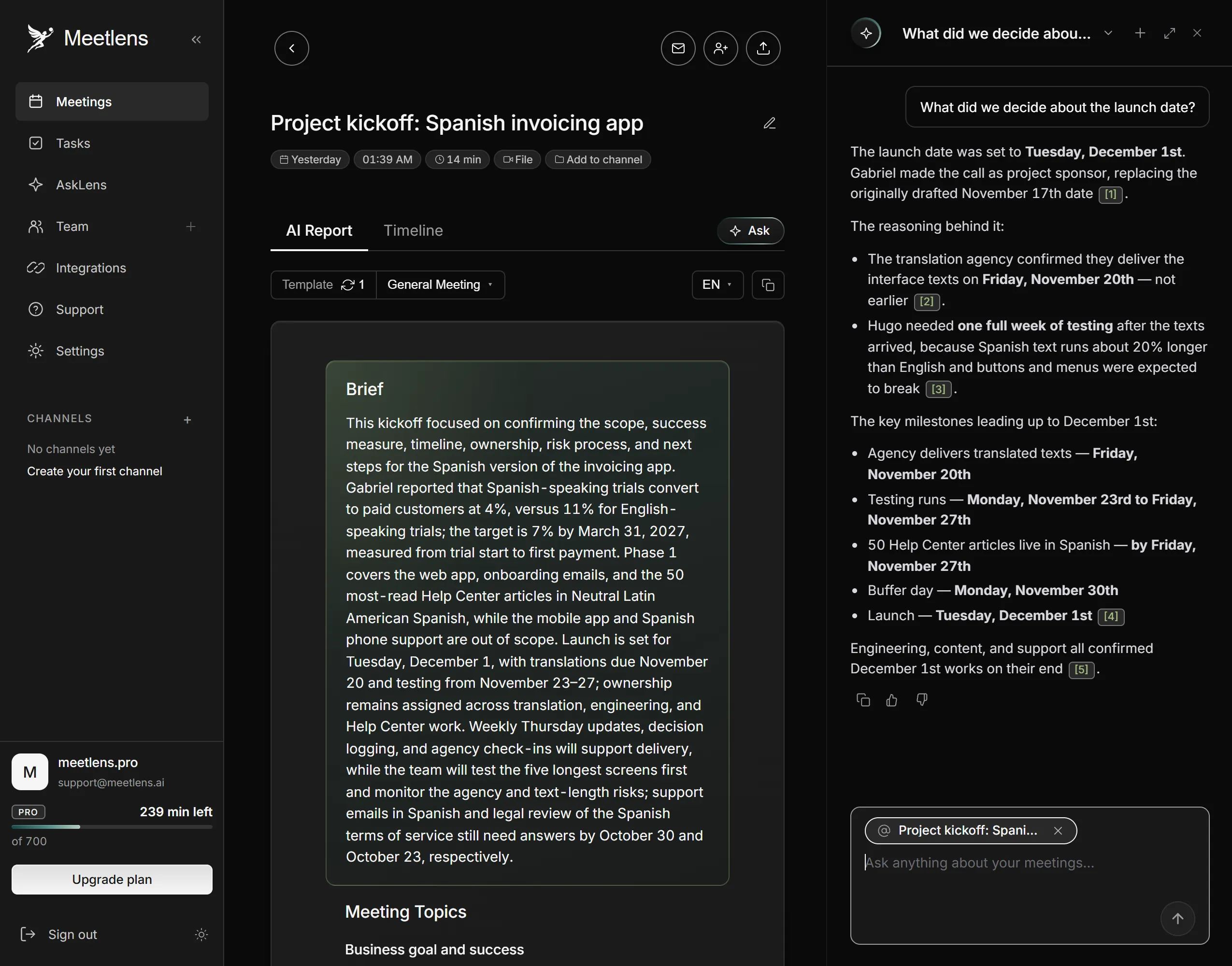
- Ask the recording: "What did we decide about the launch date?" or "Did anyone mention my team?" Open the moment each answer points to.
- Reply in the thread before the deadline: agree, object with a reason, or ask.
Catching up from a summary still loses tone of voice and people's reactions, the side conversations around the call, anything typed in the meeting chat (an audio recording holds only speech), and the chance to change a decision before it's made. Keep one-on-ones and contested decisions live.
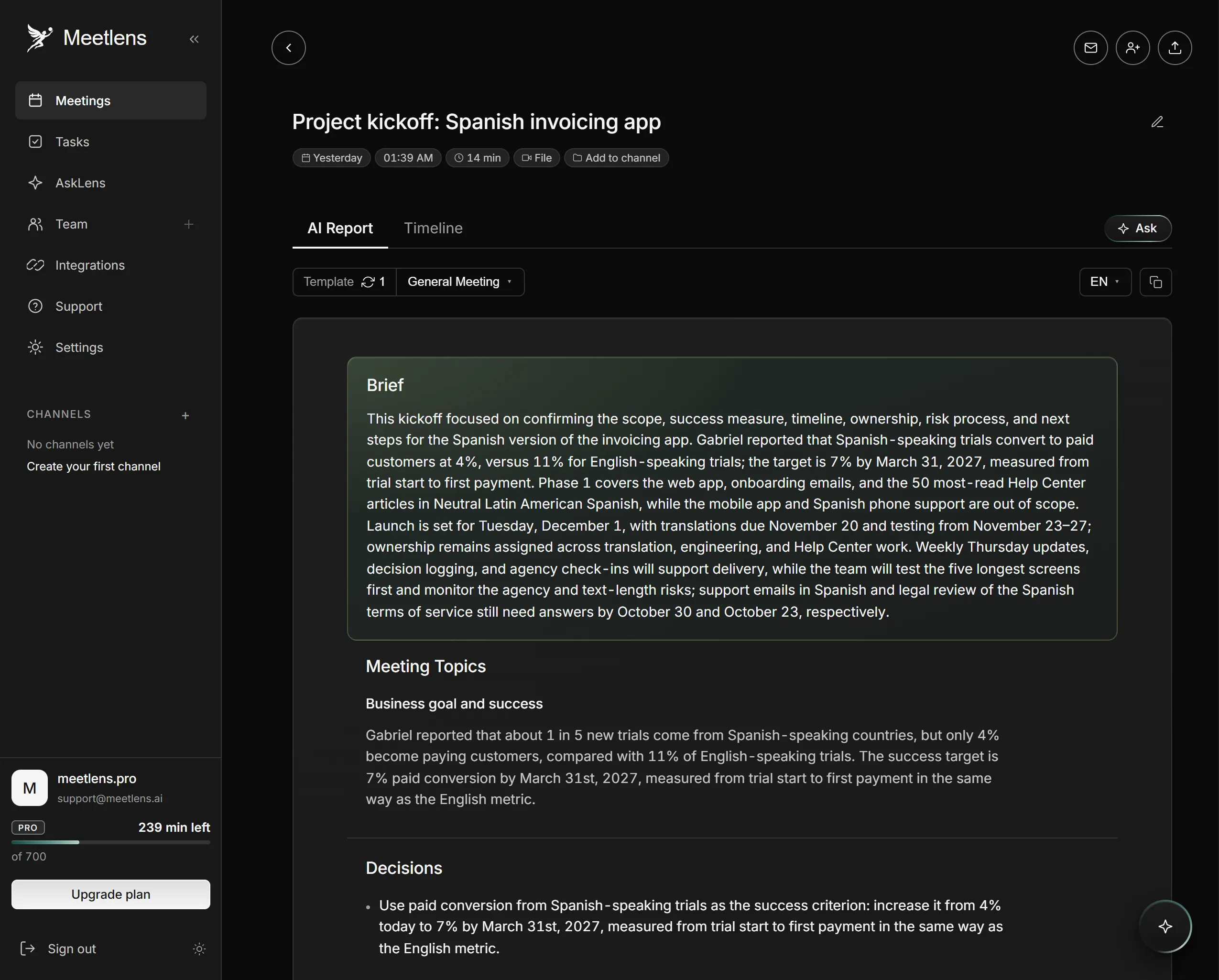
Meetlens is a Chrome extension that lets you record a browser meeting in Google Meet, Zoom Web, Microsoft Teams Web or Webex without a bot joining the call. It captures the tab's audio (plus your microphone, if you allow it) and produces a transcript in 99+ languages with speaker labels, an AI report and tasks with owners and due dates. In General Meeting, the default report format, the Brief and Decisions cover step 1 and the Tasks block covers step 2. Whoever has the meeting in Meetlens can run step 3 in the AI chat over transcripts: add the meeting with Add context and ask. Answers link to the moments in the recording and often quote the exact words; check each one against the linked moment. Send the report to whoever skipped the call: paid plans export it as PDF, Markdown or TXT, and the Business plan adds a shared meeting library.
Meetlens records audio only, not video, the screen or the Zoom and Teams desktop apps, so it doesn't replace a recorded video update; import one as an MP4 file to get its transcript and report. No bot joins, so the platform shows no notice from Meetlens: announce the recording yourself, because some states require everyone's consent. California's Penal Code § 632, for example, bars recording a confidential communication without the consent of all parties.
What if the whole company needs the update, or someone simply missed the meeting?
Asynchronous all-hands and missed meetings
A company-wide update can run as an asynchronous all-hands: one live session, a recording for everyone else, and questions collected in writing before and after, answered in the same document. Attendance becomes optional, so nobody has to join at midnight to hear the news.
When one person simply missed a meeting, send them a short note with the decisions that affect them, their tasks and the recording:
You missed Tuesday's planning meeting, so here's what affects you: we moved the launch to [date], and you own [task] by [date]. The recording and summary are here: [link]. If you disagree with anything, reply in the thread by [deadline].