How to Run a Client Meeting: Before, During, and After
 Meetlens Editorial6 min readUpdated October 17, 2026
On this page
To run a good client meeting, prepare from the last meeting's notes, open with the purpose and the outcome you want, and close by reading back who does what by when. Unlike internal manager meetings, a client meeting puts someone from outside the company at the table, so a missed detail costs more. Below: the definition, types, preparation, opening lines, closing and what to capture.
What is a client meeting?
A client meeting is a scheduled conversation between a business and a current or potential client to agree on needs, progress, and next steps. A customer meeting is the same thing. It's an external meeting: at least one person on the call works for the customer, not for you.
Each client meeting confirms the expectations both sides hold or exposes a gap, so the relationship is at stake along with the work. Client trust builds when every meeting ends with commitments that are then kept. Regular meetings also keep customer engagement up between deliverables.
Types of client meetings
Most client meetings fall into five types: discovery calls, project kickoff meetings, regular status check-ins, quarterly business reviews, and problem-solving or escalation calls.
| Client meeting type | When | Purpose | Result |
|---|---|---|---|
| Discovery call | Before a deal | Learn the problem, check the fit | A next step or a clear no |
| Project kickoff meeting | After signing | Start client onboarding: scope, roles, timeline | Owners for the first weeks |
| Status check-in | Weekly or every two weeks | Progress and approvals | Approved work, next tasks |
| Quarterly business review (QBR) | Once a quarter | Results against the plan | Next quarter's priorities |
| Problem-solving or escalation call | When something breaks | Agree on a fix | A recovery plan with one owner |
Discovery calls belong to sales; the other four follow the deal.
How to prepare for a client meeting
Prepare by rereading the last meeting's notes and open action items, deciding the one outcome you need, and sending a short agenda a day or more before. Block 30 minutes of preparation the day before:
- Reread the account history: recent notes, open tasks on both sides, promises not yet delivered.
- Pick one outcome, such as "approval of the design." Your goals for the call follow from it.
- Send a short meeting agenda: two or three items, the outcome on top, in a shared Google Docs file or the calendar invite.
- Split the roles. The account manager leads; a second person is the note-taker. Boomer Consulting advises deciding "who will take notes so the leader can focus on engaging the client."
- Check the call setup: call link, files to share, screen sharing.
- Decide whether to record, and if you will, say so in the invite.
How to start a client meeting: what to say
Open a client meeting by thanking them for their time, stating the purpose and the outcome you want by the end, confirming the agenda and the time, and asking what they want to add. Say these five lines in order:
- Thanks for making time today, [name].
- Before we start: I'd like to record the audio of this call for accurate notes. If that's OK, please say "Yes, I agree to the recording."
- The goal today is [purpose]. By the end, I'd like us to agree on [outcome].
- We have [two] items, [item 1] and [item 2], and [30] minutes. Does that still work?
- Is there anything you'd like to add?
Skip line 2 if you aren't recording. Lines 3 to 5 form an up-front contract — a quick agreement on purpose, time and outcome, a technique from Sandler sales training.
Put bad news right after the agenda, such as a slipped date along with the new one. Transparency up front keeps the rest of the client meeting on the fix.
Questions to ask a client
Ask open questions that can't be answered with yes or no: they bring out client feedback while you can still act on it.
- "What has changed on your side since we last spoke?"
- "What would success look like for you by [date]?"
- "What's getting in the way right now?"
- "Who else is involved in this decision?"
- "What should we do before our next meeting?"
How to end a client meeting and follow up
End a client meeting by reading back decisions and next steps for both sides — who does what by when — and send a written recap within one business day. Reading back creates accountability: each owner hears their tasks and deadlines aloud and can correct them on the spot. It also limits scope creep: a new request is either agreed, with an owner and a date, or parked for a separate estimate.
Karl Sakas of Sakas & Company sends the action items "immediately, or within one business day," with an owner and a deadline for each. Copy this five-line recap:
Goal of the call: [what we met to settle]
What we decided: [decision]
What we'll do: [owner] — [task] — [date]
What you'll do: [owner] — [task] — [date]
Next call: [day, date, time]
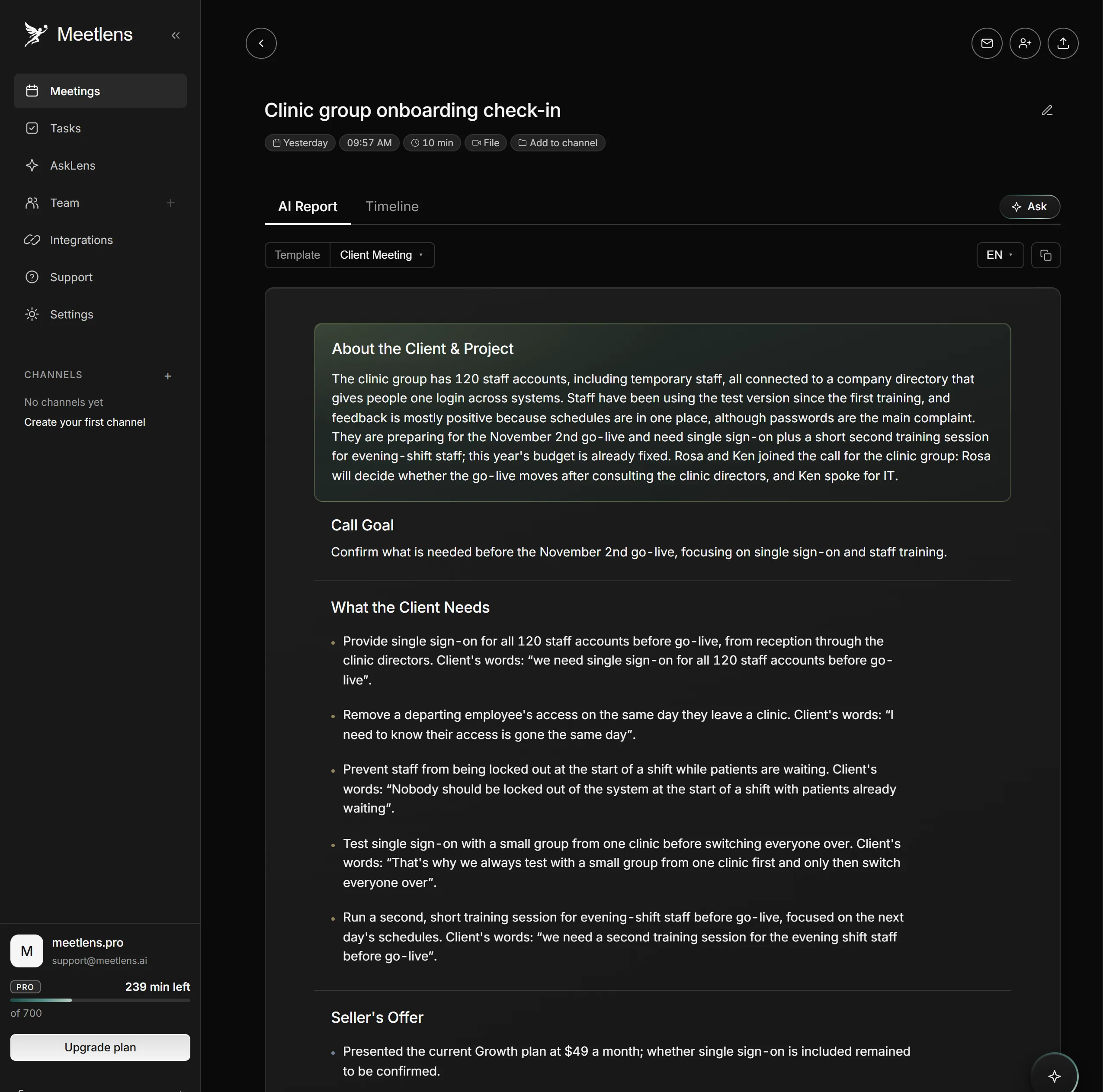
Illustrative example from a staged go-live check-in call with a clinic group (scripted conversation, synthetic voices):
Goal of the call: confirm what you need before the Nov 2 go-live
What we decided: Growth plan stays at $49 a month; second training for evening-shift staff
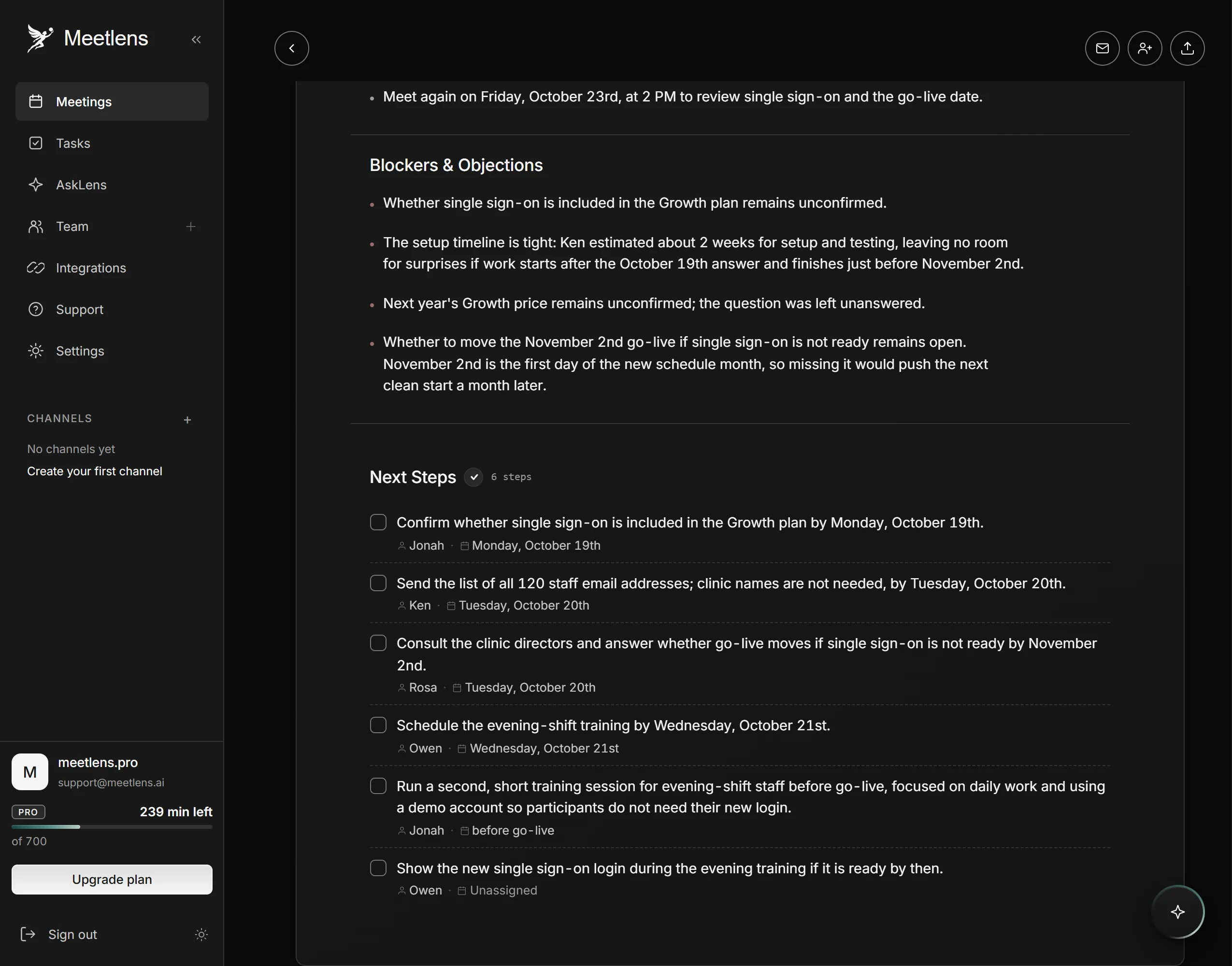
What we'll do: Jonah — check whether your plan includes single sign-on (SSO) — Oct 19; Owen — schedule the evening-shift training — Oct 21
What you'll do: Ken — send 120 staff email addresses — Oct 20; Rosa — decide whether go-live moves without SSO — Oct 20
Next call: Fri, Oct 23, 2:00 p.m.
Then follow up on each item before its date, in the same client follow-up email thread. Sent early, the recap lets the client correct a misheard request before work starts, which protects customer satisfaction.
What to capture from a client meeting
Capture the client's needs in their own words, the risks and objections they raised, what you proposed, and the commitments on both sides. The recap is a summary; this full record settles later disputes. A proposal said aloud counts, so note the option, price or date you offered.
Meetlens can draft this record when the client meeting runs in Google Meet, Zoom, Microsoft Teams or Webex in Chrome: the extension records the call's audio without a bot joining and produces a transcript with speaker labels and an AI report. For AI notes for client calls, pick Client Meeting in the format drop-down above Start recording. The report includes What the Client Needs with the client's quotes, Seller's Offer, Agreed, Blockers & Objections, and Next Steps with owners and dates. Pro and Business plans add a follow-up email draft (15 a month on Pro, 50 on Business) that you edit and send yourself.
On the staged call, the report caught a need the recap left out ("I need to know their access is gone the same day") and listed Ken's two-week SSO setup estimate under Blockers & Objections. Before you send the recap, check each line against the transcript.
With no bot, the platform shows no recording notice, so the notice comes from you: in the invite and out loud at the start. The extension can't capture desktop Zoom or Teams apps or in-person meetings; for those, import an audio recording made with the client's consent (audio or MP4, up to 1 GB; 3 GB on Business) and pick the same format.