Quarterly Business Review (QBR) Template: Agenda, Slides, and Examples
 Meetlens Editorial15 min readUpdated October 17, 2026
On this page
A quarterly business review (QBR) template is a fixed outline — goals, results, value, risks, next-quarter priorities and next steps — that you fill in for each customer every quarter. Like a project management meeting at the end of a phase, a QBR checks results against a plan agreed with a customer. Below: what to include, a copy-ready quarterly business review template, an agenda, examples, and how to run and record one.
What is a quarterly business review (QBR)?
A quarterly business review (QBR) is a business review meeting held once a quarter in which an account team and a customer — or a team and its leadership — review the last quarter's results against goals and agree on priorities for the next one. Salesforce calls it "a meeting with customers every three months to review the partnership." It lists benefits for both sides, among them face time with the customer's executives, an open flow of communication, and a regular progress check on the most important objectives. The point, in its words, is to "remind your customer why they went with you to begin with."
A customer success manager (CSM) or an account manager usually runs a customer QBR. Inside a company, the same format serves strategic planning: Mooncamp defines internal QBRs as "meetings held once per quarter between teams or departments in a business" and says OKRs make them easier to prepare.
Customer QBR vs internal QBR vs EBR
A customer QBR reviews an account with the customer, an internal QBR reviews a team with its own leadership, and an executive business review (EBR) is a rarer, higher-level review with senior leaders. Gainsight notes that a QBR is "sometimes called an executive business review"; where the two differ, "EBRs typically involve senior leadership and may occur annually or biannually."
| Customer QBR | Internal QBR | EBR | |
|---|---|---|---|
| Who attends | Account team, customer's stakeholders | A team and its leadership | Executives on both sides |
| Focus | Results against the customer's goals | Team targets or OKRs, resources | Long-term business objectives |
| Who prepares | CSM or account manager | Team lead or operations | Account team with the executive sponsor |
| What comes out | Shared action plan, next QBR date | Decisions on priorities and resources | Agreed long-term objectives |
In a supplier QBR, the customer runs the review with its vendor.
Who attends a QBR
From your side, invite the account manager or CSM, the executive sponsor and, if delivery is involved, the project manager; from the customer's side, invite day-to-day users and the stakeholders who decide where the account goes. Salesforce advises limiting your own headcount so the customer "will feel comfortable being transparent." Gainsight recommends "both day-to-day users who know the product and strategic stakeholders who can influence future direction."
What should be in a quarterly business review?
A QBR should cover seven things: the customer's goals, results against them, the value delivered, how the product or service is being used, open issues and risks, plans for next quarter, and agreed next steps with owners. Start with customer goals, not your product: every other block measures progress toward them. The last column adds a source dashboards don't cover: the recordings of the quarter's customer calls.
| Component | Question it answers | Where to find it |
|---|---|---|
| Customer goals | What is the customer trying to achieve, in their words? | Success plan, last QBR's record, recorded calls |
| Results against goals | Are the agreed metrics (KPIs) on target? | Metrics dashboard, product analytics |
| Value delivered | What did they gain, as ROI in their units: hours, dollars? | The customer's reports, figures quoted on calls |
| Product usage | Who uses what, and what sits unused? | Usage reports, customer engagement reports |
| Issues and risks | What broke, and which challenges remain open? | Support tickets, escalations, call transcripts |
| Next-quarter plans | What will each side work on? | Your roadmap, plans the customer mentioned on calls |
| Next steps | Who does what by when? | Last QBR's action items, the meeting itself |
Three numbers make the value and usage rows specific:
- Product adoption: active seats and features in use; low product adoption is the earliest warning.
- Customer satisfaction: CSAT or Net Promoter Score (NPS), with the comments behind the score.
- Customer health score: your internal account rating; show it only if you can explain what moved it.
Gainsight's template adds benchmarks: how the account compares with similar customers.
QBR template (copy and paste)
A QBR template is a fixed outline of sections — summary, goals, results, value, usage, risks, roadmap, next-quarter goals, and action items — that you fill in for each customer every quarter. This version adds section 0, the last QBR's commitments, so every review starts by checking promises. Entries in parentheses are illustrative, for a fictional help-desk software customer, Quillfield Home Services.
QUARTERLY BUSINESS REVIEW — [Customer] — Q[ ] [Year]
Date: [date]    Next QBR: [date, booked before we close]
Our side: [account manager / CSM], [executive sponsor]
Customer side: [decision-maker], [day-to-day users]

0. COMMITMENTS FROM LAST QBR
   [commitment] — [owner, side] — done / not done / moved to [date]
   (Connector to Quillfield's reporting tool — our support engineer — done)

1. EXECUTIVE SUMMARY
   Biggest win, biggest gap, the decision we need today.
   (First response beat target; reporting barely used; decide who replaces their admin)

2. CUSTOMER GOALS
   What is the customer trying to achieve, in their words?
   ("First response under 4 hours before our June busy season")

3. RESULTS AGAINST GOALS
   Each KPI: target vs. actual vs. last quarter.
   (First-response time: target 6 h, actual 5.6 h, last quarter 7.1 h)

4. VALUE DELIVERED
   What did the customer gain, in their own numbers?
   (Their support lead: auto-routing saves 120 agent hours a month)

5. USAGE
   Who uses what? What is unused, and why?
   (46 of 60 seats active weekly; 2 people use reporting)

6. RISKS AND OPEN ISSUES
   What went wrong, what is open, what did the customer flag?
   (Two escalations in August; their admin leaves in November)

7. ROADMAP
   What ships next quarter that serves a goal in section 2?
   (SLA breach alerts — release quarter confirmed by product team)

8. NEXT-QUARTER GOALS
   Two or three goals, each with a metric and a target.
   (First response under 5 h; every team lead uses reporting weekly)

9. ACTION ITEMS
   [action] — [owner, side] — [due date]
   (Run reporting training for team leads — our CSM — Nov 7)
   (Name a new admin — Quillfield support director — Oct 31)
The template is plain text, so it pastes into Google Docs or Word without reformatting.
Illustrative: filled from a scripted QBR, compressed to about 14 minutes and voiced with synthetic voices.
QUARTERLY BUSINESS REVIEW — Quillfield Home Services — Q3 2026
Date: Oct 20, 2026    Next QBR: Jan 19, 2027, 10:00 a.m. (booked on the call)
Our side: Nadia (account manager), Theo (CSM), Graham (executive sponsor)
Customer side: Marisol (support director, decision-maker), Declan (support lead)

0. COMMITMENTS FROM LAST QBR
   Connector to Quillfield's reporting tool — Priya, our support engineer — done (live since August)
   Auto-routing for the plumbing and electrical queues — Declan, Quillfield — done
   List of team leads who need reporting access — Declan, Quillfield — not done, moved to Oct 27

1. EXECUTIVE SUMMARY
   Biggest win, biggest gap, the decision we need today.
   First response beat the target; reporting is barely used; decide who replaces the admin who leaves in November

2. CUSTOMER GOALS
   What is the customer trying to achieve, in their words?
   "First response under four hours before our June busy season" (Marisol)

3. RESULTS AGAINST GOALS
   Each KPI: target vs. actual vs. last quarter.
   First-response time: target 6 h, actual 5.6 h, last quarter 7.1 h
   Customer satisfaction: target 90%, actual 88%, last quarter 86%

4. VALUE DELIVERED
   What did the customer gain, in their own numbers?
   Declan (support lead): auto-routing saves 120 agent hours a month

5. USAGE
   Who uses what? What is unused, and why?
   46 of 60 seats active weekly; 14 seats empty since the summer seasonal agents left in September;
   2 people use reporting (Declan and Marisol's analyst); team leads keep their own spreadsheets

6. RISKS AND OPEN ISSUES
   What went wrong, what is open, what did the customer flag?
   Two escalations in August: weekend water-heater tickets unassigned from Saturday to Monday
   Admin (Joanna) leaves; last day Nov 20
   Customer asked to cut to 50 seats now: declined, 60 seats until the March renewal
   Open: more than 60 seats for the June busy season? Marisol answers at the January QBR

7. ROADMAP
   What ships next quarter that serves a goal in section 2?
   SLA breach alerts — first quarter of 2027, quarter confirmed by our product team

8. NEXT-QUARTER GOALS
   Two or three goals, each with a metric and a target.
   First response under 5 h; every team lead uses reporting at least once a week;
   customer satisfaction back to 90% by the end of December

9. ACTION ITEMS
   [action] — [owner, side] — [due date]
   Send the recap to all attendees — Nadia, our account manager — Oct 21
   Run reporting training for team leads — Theo, our CSM — Nov 6
   Run two handover sessions for the new admin — Theo, our CSM — Nov 18
   Add Quillfield to the early-access list for SLA breach alerts — Graham, our executive sponsor — Oct 30
   Send the list of team leads — Declan, Quillfield support lead — Oct 27
   Name a new admin — Marisol, Quillfield support director — Oct 30
Set up help-desk accounts for the 12 after-hours agents — Declan, Quillfield support lead — Nov 13QBR slide outline (10 slides)
Turn the template into a 10-slide QBR deck, with the header on slide 1, the last QBR's commitments next to the summary on slide 2, and one slide for each remaining section, so the presentation and the written review say the same thing:
- Title, attendees and the goal of the meeting
- Executive summary and the last QBR's commitments: done or not done
- Customer goals, in their words
- Results against goals: each KPI's target, actual and trend
- Value delivered: ROI in the customer's numbers
- Product usage: active seats, features in use, gaps
- Support and open issues
- Product roadmap: what ships next quarter that serves their goals
- Next-quarter goals with targets
- Next steps with owners and the date of the next QBR
Build the slides in PowerPoint or Google Slides, one message per slide, with detail in the pre-read. Each slide must stand on its own: Salesforce notes that some executives attend only an annual EBR and ask for summarized versions of each QBR.
The 10-slide QBR deck
QBR agenda: a 60-minute example
A 60-minute QBR agenda can run: 5 minutes of introductions and goals, 15 of results against goals, 10 of value and usage, 10 of risks and customer feedback, 15 of next-quarter priorities, and 5 to confirm next steps. The split is our template; the hour comes from Salesforce ("this one-hour meeting") and Gainsight ("try not to let the meeting go longer than an hour"). Copy this meeting agenda into the invite:
| Time | Block | Who leads | What gets decided |
|---|---|---|---|
| 0–5 min | Introductions, customer goals | Account manager | What the hour must decide |
| 5–20 min | Results against goals, last QBR's commitments | CSM | Which goals are on track |
| 20–30 min | Value and product usage | CSM and a customer user | Where usage lags |
| 30–40 min | Risks, issues, customer feedback | Customer speaks first | Top risks, each with an owner |
| 40–55 min | Next-quarter priorities, roadmap | Both executive sponsors | Two or three goals |
| 55–60 min | Next steps, next QBR date | Account manager | Owners and dates on both sides |
Pre-read, 48 hours before: the executive summary, results, usage and the decisions you'll ask for. That timing comes from ClearPoint Strategy: "Pre-reads solve the 'what.' The QBR solves the 'so what.'"
An internal QBR, such as a sales or operations review, keeps the time boxes and changes three blocks:
- Leadership takes the customer's seat; the team reports its own KPIs.
- Value and usage become resource allocation: headcount, spend, and what to stop.
- Customer feedback becomes input from other teams on what they need next quarter.
The 60-minute QBR agenda, to scale
Pre-read: 48 hours before
- 5 min
0–5 minIntroductions, customer goalsAccount manager
- 15 min
5–20 minResults against goals, last QBR’s commitmentsCSM
- 10 min
20–30 minValue and product usageCSM and a customer user
- 10 min
30–40 minRisks, issues, customer feedbackCustomer speaks first
- 15 min
40–55 minNext-quarter priorities, roadmapBoth executive sponsors
- 5 min
55–60 minNext steps, next QBR dateAccount manager
Quarterly business review examples
The examples below show the same template filled in for three different situations: a SaaS customer, a client-services account, and an internal sales team. All three are illustrative: the companies and figures are invented. A supplier QBR uses the same lines with the roles reversed.
SaaS customer QBR example
Illustrative example: scheduling software vendor; customer Halbrook Dental Group, 14 clinics, renewal due in two quarters.
- Goal: cut patient no-shows from 12% to 8% by year-end.
- Results: 9.5% in Q3, down from 11% in Q2.
- Usage: SMS reminders live in 11 of 14 clinics; the 3 clinics added after customer onboarding ended were never trained.
- Customer retention risk: the executive sponsor left in August, so customer churn at renewal is possible.
- Next steps: train the 3 clinics by Nov 15 (vendor CSM); name a new sponsor by Oct 31 (Halbrook COO). The upsell to online payments waits until the no-show goal is met.
Client-services QBR example
Illustrative example: paid-search agency; client Brennick Cycles, an online bike retailer.
- Goal: grow paid-search revenue 20% year over year at a cost per acquisition (CPA) under $45.
- Results: revenue up 14% year over year at a $41 CPA; $5.20 in revenue per ad dollar.
- Delivered: three campaigns; the spring landing page slipped three weeks waiting for client approval.
- Budget and scope: the client wants to move $10,000 a month from search to video; the agency proposes a $4,000 test first and adds a pre-season campaign.
- Next steps: video test plan by Oct 24 (agency strategist); one approver named by Oct 20 (Brennick marketing director).
Sales QBR example
Illustrative example: a 12-rep mid-market team reviews Q3 with the VP of Sales. These five lines also work as a sales QBR template.
- Revenue: $1.84M closed against a $2.0M quota (92%).
- Win rate: 22%, down from 26% in Q2; most lost deals stalled at the buyer's security review.
- Q4 pipeline: $6.3M against a $2.1M quota, or 3x coverage.
- Forecast: $1.9M commit, $2.3M best case.
- What changes: a solutions engineer joins deals before the security review (sales manager, from Nov 1); one sales development rep moves to enterprise (VP of Sales, by Oct 31).
How to run a QBR
Run a QBR in three stages: build the story of the quarter two to three weeks ahead, spend the meeting on decisions rather than reading numbers, and close by booking the next QBR, with the recap out within 24 hours. ClearPoint's checklist uses "a two-week preparation cycle"; add a week for the quarter's calls.
Before:
- Pull the KPIs for the previous quarter and compare them with the last QBR's goals.
- Reread the quarter's customer calls for what dashboards miss, such as promises made in passing.
- Ask your customer champion "what story they want to tell and what their management will likely focus on," as Salesforce advises.
- Agree internally on the decisions you'll ask for, and brief your executive sponsor.
- Send the pre-read with the agenda.
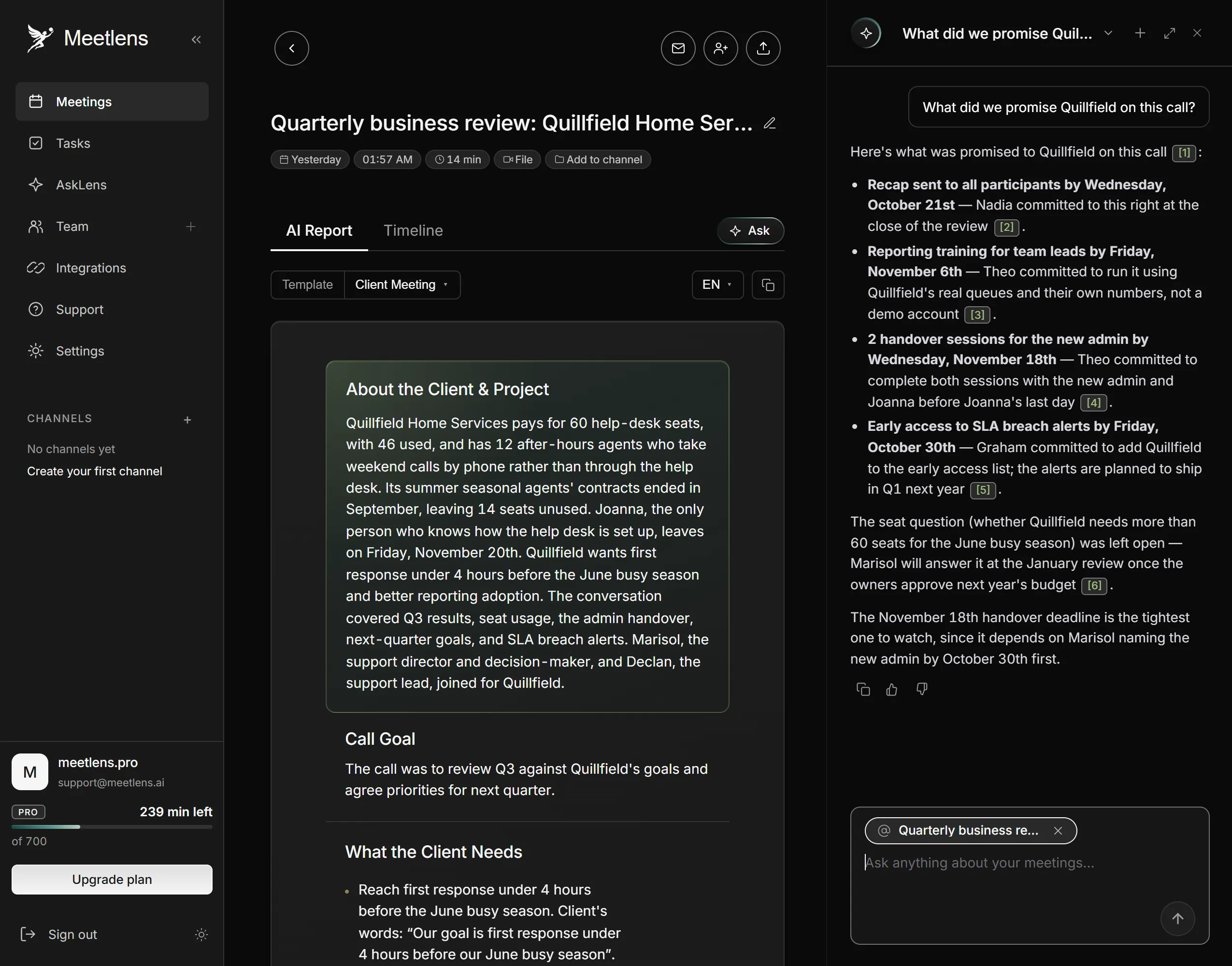
If those calls were recorded with Meetlens, a Chrome extension that records browser meetings without a bot, ask the AI chat instead of rereading transcripts. Add each call to the chat with Add context and ask "What did we promise Quillfield on this call?", then merge the answers. Answers link to the moments in the recording and often quote the exact words. Check each answer at the linked moment before it goes into section 0, and treat a long list as possibly incomplete.
During:
- Open with the customer's goals and the last QBR's commitments, not your product.
- Name the risks before the customer does, and keep the wins to one sentence each. Transparency about a missed target earns more trust than a polished slide.
- Spend the time on decision-making. ClearPoint's rule for an off-track metric: "you need a recovery action—not an explanation." Operational issues get an owner and move offline.
- Confirm decisions out loud and write them down immediately, as ClearPoint advises, on a shared screen.
- Book the next QBR before you hang up. Gainsight: "Don't leave the meeting without scheduling the next QBR."
After:
- Send the recap to all attendees within 24 hours, with the deck attached, as Salesforce recommends.
- Update the decision log: decision, owner, deadline and next steps, ClearPoint's four fields.
- Debrief with your customer champion within a week, Salesforce suggests, "so everything is still fresh in their mind."
What a good QBR looks like
A good QBR ends with at least one decision, owners on both sides and the next date booked. Check five signs:
- The last QBR's commitments were reviewed first.
- At least one decision has an owner and a date.
- The customer spoke in every block; a transcript with speaker labels shows this at a glance.
- Next steps have owners on the customer's side too.
- The next QBR is in both calendars.
Common QBR mistakes
The five common QBR mistakes, as Gainsight lists them, are dwelling on the negative, getting defensive about criticism, letting the meeting drag on, relying on generic or outdated content, and ending without clear next steps. The steps above fix each one: a recovery action per problem, criticism restated in the customer's words, time boxes, the customer's own numbers, and a closing block for next steps.
How to capture what was agreed in a QBR
Record the QBR's decisions, the risks and objections the customer raised, what you proposed, and every next step with an owner on either side — that list opens the next QBR. Write action items as verb, owner and due date: "Run reporting training for team leads — our CSM — Nov 7." Accountability needs a name on each side: "the customer" is not an owner.
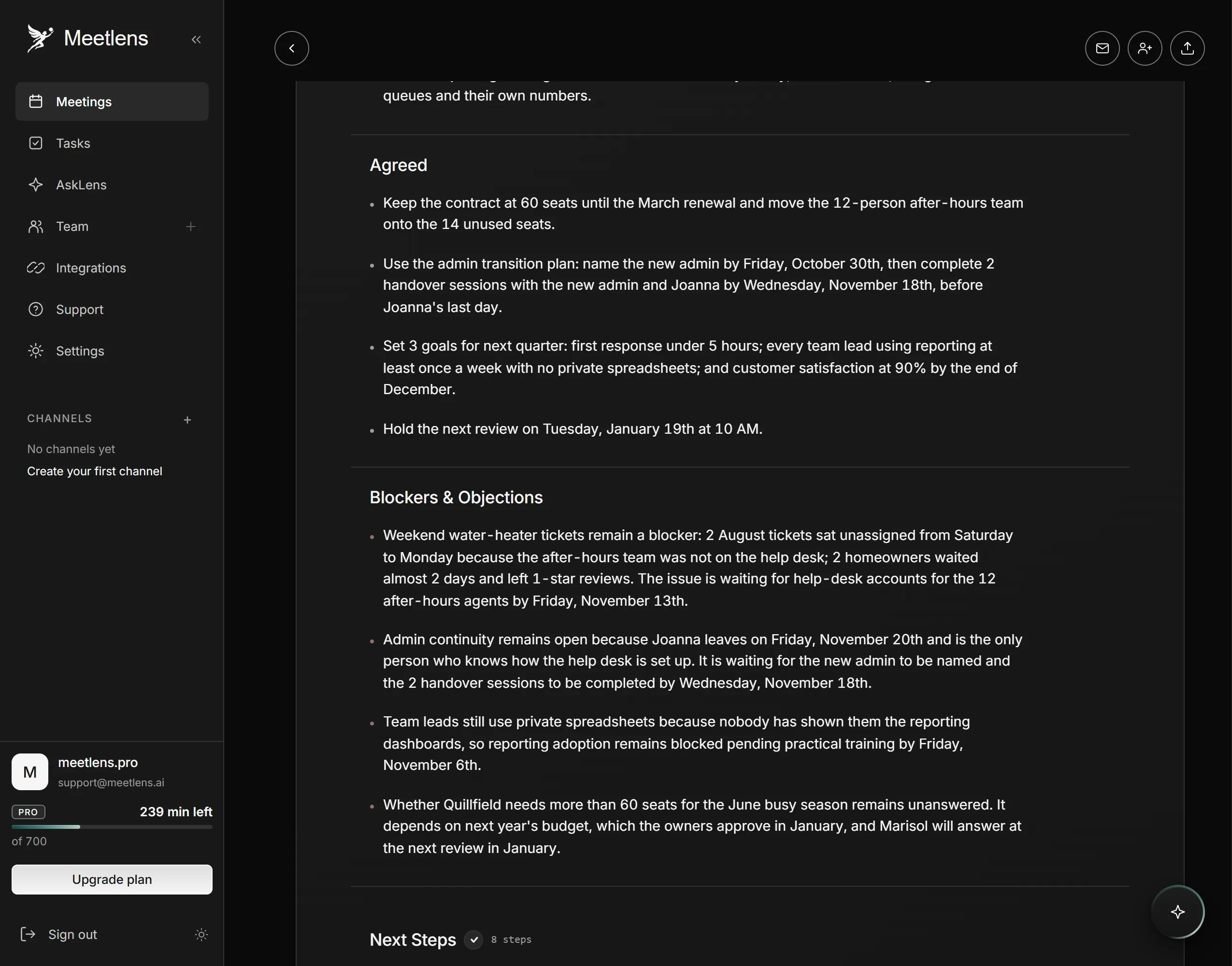
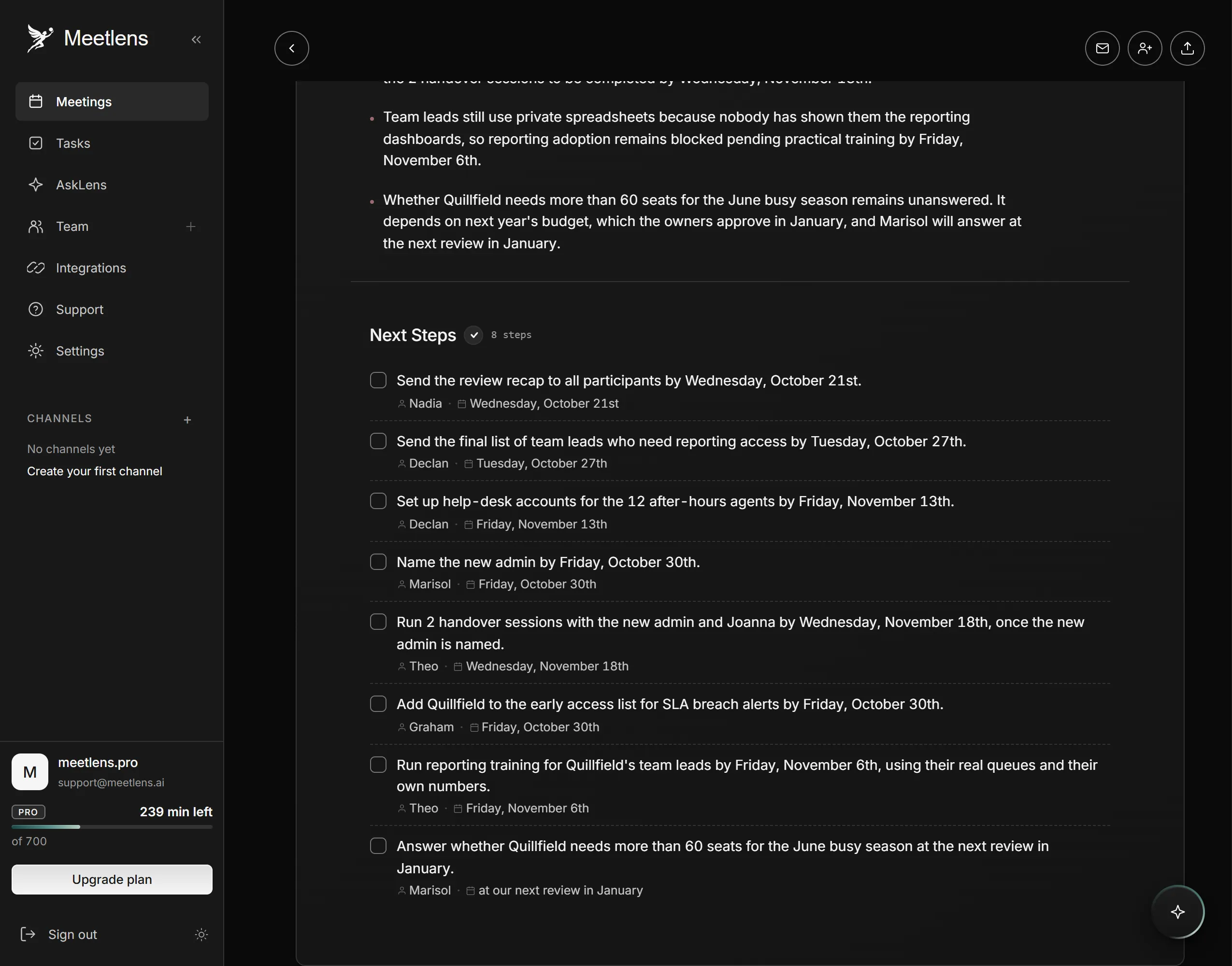
If the QBR runs in Google Meet, Zoom Web, Microsoft Teams Web or Webex, Meetlens records the tab's audio without a bot and turns it into a transcript with speaker labels and an AI-generated meeting report. For a customer QBR, choose Client Meeting in the format drop-down above Start recording: the report covers About the Client & Project, Call Goal, What the Client Needs (with the client's quotes), Seller's Offer, Agreed, Blockers & Objections, and Next Steps with owners and dates. For an internal QBR, keep General Meeting, the default report format: Decisions, a Tasks block with owners and due dates, and Open Questions. Say each owner's name out loud when you confirm a next step, so the report can attribute it.
Meetlens records audio only, so a number shown only on a slide stays out of the report, and it works in desktop Chrome, not in the Zoom or Teams desktop apps. One recording runs up to an hour on Free, 90 minutes on Pro and 120 on Business. With no bot, the platform shows no recording notice, so ask for consent at the start:
Before we start: we'd like to record this review so the decisions and next steps we send you afterward are accurate. Is everyone OK with that? If so, please say "Yes, I agree to the recording."
Is a QBR the right meeting, or do you need a different client meeting?
QBR vs project kickoff meeting vs regular client check-ins
A project kickoff meeting sets the goals and success criteria, regular client check-ins move the work forward, and the QBR checks the results once a quarter. When a goal changes mid-quarter, agree on it in a check-in and carry it into section 2 of the next QBR. When the relationship needs a reset, such as a new scope, sponsor or contract, a new project kickoff meeting fits better than a QBR. Delivery details, such as a late file or a blocked approval, belong in the check-ins, so the QBR stays on results and decisions.