What Is a Stand-Up Meeting? Format, What to Say and a Weekly Standup Template
 Meetlens Editorial10 min readUpdated October 17, 2026
On this page
- What is a stand-up meeting?
- Standing meeting vs stand-up meeting: what's the difference?
- How long should a stand-up meeting last?
- Stand-up meeting format
- What to say in a stand-up meeting (examples)
- Stand-up meeting best practices (and pitfalls)
- Remote and async stand-up meetings
- Weekly standup notes template
- Stand-up meetings, Scrum and 1:1s
A stand-up meeting is the shortest regular meeting most teams hold: a few minutes in which every team member says what moved, what's next and what's in the way. Unlike a weekly manager meeting, it is run for the team itself, not for reporting upward. Below: the definition, standing vs stand-up, length, format, what to say, best practices, remote stand-ups and a weekly template.
What is a stand-up meeting?
A stand-up meeting is a short, recurring check-in where each team member shares progress, next steps and blockers; people traditionally stand to keep the meeting short. Its purpose is coordination: when team members share updates, everyone sees the work, and that transparency replaces chasing people for status. Standing itself is optional: anyone who can't stand sits, and the meeting stays just as short.
The practice comes from Agile software development. Extreme programming's rule reads: "Everyone stands up in a circle to avoid long discussions" (ExtremeProgramming.org). The same page names the payoff: one short meeting everyone must attend "is more efficient" than "many meetings with a few developers each." Scrum, the agile framework, calls it the daily scrum. In project management, the Project Management Institute's PMBOK Guide defined a daily standup in its 7th edition (2021) as "a brief, daily collaboration meeting" to review progress, plan the day and flag obstacles; the current 8th edition followed in November 2025.
Other names: team huddle, daily check-in, and stand-up call over video.
Is it a stand-up or standup meeting?
Both spellings are correct, and "stand-up meeting" is the main form. Merriam-Webster lists stand-up first, with standup as a variant. The verb is two words: you stand up at a stand-up meeting. Templates and tools often write "standup"; it is the same meeting.
Standing meeting vs stand-up meeting: what's the difference?
A standing meeting is any meeting that repeats on a fixed schedule, every Tuesday at 2 pm for example, while a stand-up meeting is a short meeting where people literally stand. A standing meeting is a recurring meeting that "creates an ongoing obligation" on participants' calendars (Lucid Meetings glossary). In Google Calendar, you make one by switching "Does not repeat" to a repeat rule (Google Calendar Help); the rule sets how often it repeats, weekly or monthly for example.
| Standing meeting | Stand-up meeting | |
|---|---|---|
| Meaning | Repeats on a fixed schedule | Short check-in, traditionally on your feet |
| Example | Standing weekly meeting with your manager, Tuesdays at 2 pm | Team check-in at 9:30 am every workday |
| Length | Whatever the agenda needs | A few minutes |
| Also called | Recurring meeting, regular meeting | Daily standup, huddle, check-in |
The two overlap: a weekly stand-up every Monday is both a standing meeting and a stand-up meeting.
How long should a stand-up meeting last?
Keep a stand-up meeting to 15 minutes or less; some coaches aim for 10. The limit works as a timebox: the Scrum Guide calls Scrum's stand-up "a 15-minute event," and timeboxing means the meeting ends on time even if topics remain. Rob Bowley, who has worked with close to a hundred product teams over 25 years, says to "aim for 10 minutes or less" (Stand Up Meeting Best Practices, 2025). If you run over, move discussions out of the round or split a team too large for one short, focused group.
Stand-up meeting format
The classic stand-up meeting format is three questions per person (what I did since the last stand-up, what I'll do next and what's blocking me), followed by a parking lot for anything that needs discussion. Jason Yip's guide on martinfowler.com phrases them as "What did I accomplish yesterday? What will I do today? What obstacles are impeding my progress?" (It's Not Just Standing Up).
A clear agenda has four steps:
- Opener (1 minute): the goal and the speaking order.
- Round of updates: each person answers the three questions.
- Blockers: each one gets an owner.
- Parking lot: discussions move after the meeting, with only the people involved.
Stand-up meeting format in four steps
Stand-up meeting 15 minutes or less
-
Opener 1 minute
The goal and the speaking order
-
Round of updates
Each person answers the three questions:
- What I did since the last stand-up
- What I’ll do next
- What’s blocking me
-
Blockers
Each one gets an owner
After the stand-up
Parking lot
Discussions move after the meeting, with only the people involved
Kanban and other agile teams can walk the board instead, the format Bowley prefers: they go through the kanban board from right to left, starting with work closest to release, so stuck items get discussed even when nobody is working on them.
The questions are optional: the 2017 Scrum Guide offered them as "an example of what might be used," and the 2020 edition dropped them.
What to say in a stand-up meeting (examples)
Say what changed, what you'll finish next and exactly what you need from whom, in under a minute. Illustrative examples, not real data:
- Weak: "Yesterday I had meetings and worked on some tickets. Today, more of the same." No result, no ask.
- Developer, daily stand-up: "Yesterday I merged the password-reset fix. Today I'm pairing with Ana on the billing webhook. I'm blocked on staging access. Tom, can you grant it after this?"
- Marketing, weekly stand-up (Maya, from the template example below): "Last week I sent the October newsletter. This week I'm building the webinar landing page, live Thursday. I need the speaker bios from Sam by Tuesday."
- Support, daily stand-up: "I closed 18 tickets since yesterday, 6 of them on the refund bug. Today I'm writing its help article. Lena, can you give me a fix date by noon?"
Each strong update has a result, the next result with a day, and a specific ask with a name.
Stand-up meeting best practices (and pitfalls)
Good stand-up meetings start on time, stay about the work rather than the people, and move every problem-solving thread out of the round. Six best practices and the pitfalls they prevent:
| Practice | Pitfall it prevents |
|---|---|
| Same time and place; start without latecomers | Everyone learns to arrive late |
| Rotate the facilitator | One person "owns" the meeting |
| Talk to the team, not the manager or stakeholders | The stand-up becomes a status report |
| Take problem-solving after the round | Two people debate while the team waits |
| Put the board on screen | Updates drift from the actual work |
| Give every blocker an owner | The same blocker returns for days |
Bowley rotates the facilitator because "when the same person always runs them, it can start to feel like their meeting." Owners add accountability: each blocker leaves the meeting as someone's job.
A grounded theory study of 12 software teams (60 interviews, 79 observed stand-ups) tied negative attitudes to status reporting to a manager and to meetings that ran too long or too often, and positive ones to information sharing and problem-solving (Stray, Sjøberg and Dybå, 2016). So solve problems right after the round, with only the people concerned.
Stand-up meeting ideas to keep it fresh
Three changes keep a stand-up from going stale without making it longer:
- Switch formats for a week: walk the board instead of going person by person.
- Add a theme of the day: everyone names one risk, in one sentence.
- End the week with kudos: spend 30 seconds thanking someone by name.
Remote and async stand-up meetings
Distributed teams run stand-up meetings on a video call, or replace them with written async updates when time zones don't overlap. For remote work over video conferencing, keep cameras on, since body language shows who is lost or waiting to speak; post the speaking order in the chat and share the board. For an asynchronous update, each person posts the three answers in the team's Slack channel by a set local time; the lead calls a video call only for blockers.
If your stand-up runs in Google Meet, Zoom Web, Microsoft Teams Web or Webex, Meetlens, a Chrome extension, records the tab's audio without a bot joining the call. For AI standup notes, pick Team Sync in the format drop-down above Start recording: the report groups updates by person under Participant Updates, collects Blockers, and lists tasks with owners and due dates (titled Next Steps or Tasks).
It records audio only, so the shared board doesn't reach the report, and it doesn't record the desktop Zoom or Teams apps; for an in-person stand-up, upload the audio file. The Free plan's 10 AI reports a month cover a weekly stand-up, not a daily one. No bot means no recording notice: allow microphone access, start recording, ask the team, and stop if anyone objects.
Heads-up: I'd like to record today's stand-up for the notes, audio only. Please say "Yes, I agree to the recording" if that's OK with you.
Weekly standup notes template
A weekly standup works like the daily version stretched to a week (15 to 30 minutes, one round of updates), and its notes should keep only plans, blockers, decisions and owners. That length is our suggestion, not a framework rule. Good meeting notes keep decisions, blockers and action items with owners, not every word. A lower meeting frequency means more changes between rounds, so the weekly template adds a team focus line and a Decisions block.
Weekly standup — [Team] · Week of [date]
Attendees:
Team focus this week:

[Name]
- Done last week:
- Plan this week:
- Blockers / help needed:

Decisions
-
Action items
- [ ] [Owner] — [action] — [due]
Parking lot
-
Filled example for a marketing team (illustrative: team, names and dates are invented):
Weekly standup — Marketing · Week of Oct 19, 2026
Attendees: Sam (team lead, facilitator), Maya (content), Luis (paid ads)
Team focus this week: webinar on Thu Nov 5 — landing page and promotion

Maya
- Done last week: sent the October newsletter
- Plan this week: build the webinar landing page, live Thu Oct 22
- Blockers / help needed: speaker bios from Sam by Tue Oct 20

Luis
- Done last week: launched the retargeting campaign
- Plan this week: write the webinar ads
- Blockers / help needed: final webinar title — Sam to confirm by Wed Oct 21

Decisions
- Webinar ads start Mon Oct 26, after the landing page is live
Action items
- [ ] Sam — send speaker bios to Maya — Tue Oct 20
- [ ] Sam — confirm the final webinar title — Wed Oct 21
- [ ] Luis — launch the webinar ads — Mon Oct 26
Parking lot
- Record the webinar for on-demand viewing? Sam and Luis, after the stand-up
A Meetlens Team Sync report has matching blocks: Participant Updates, Blockers, Decisions, Open Questions (the closest match for the parking lot) and Next Steps (or Tasks) for action items. It covers only people who spoke, so fill in Attendees yourself.
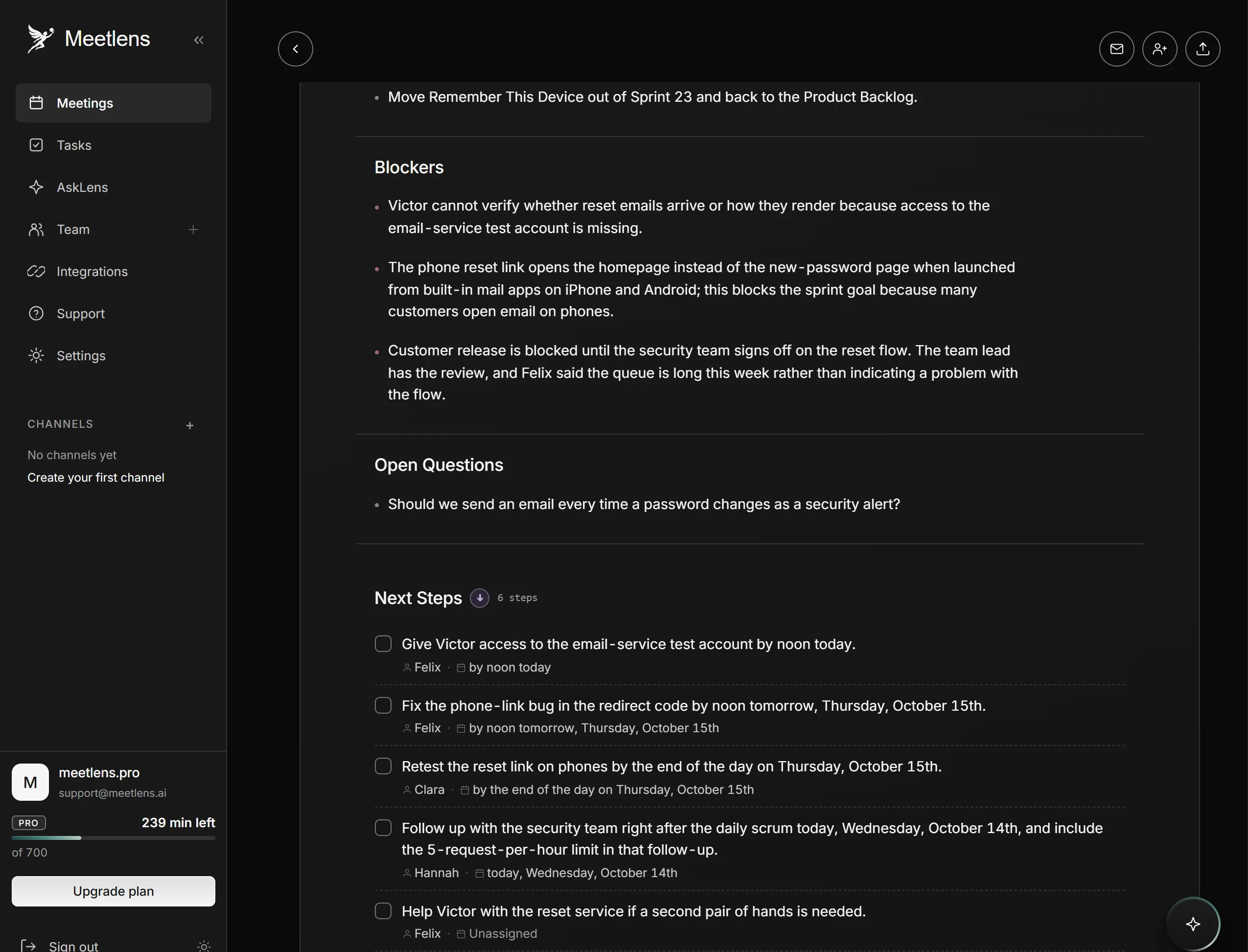
Notes from a staged daily stand-up in the same template, with daily field names (scripted conversation voiced with synthetic voices, invented names, imported into Meetlens as a recording): 4 people, 8 minutes 14 seconds. Each person said what was done since yesterday, what's next and what's in the way, in a fixed order with the facilitator last; both impediments, and the phone link bug Clara found, got an owner during the round, and the one open question went to the parking lot.
Daily standup — Accounts team · Wed Oct 14, 2026 (Sprint 23, day 8 of 10)
Attendees: Hannah (facilitator), Victor, Clara, Felix
Team focus (Sprint Goal): customers can reset their own password
from the sign-in page by Fri Oct 16

Victor
- Done since yesterday: forgot-password link and email form, merged
- Plan today: connect the form to the reset service
- Blockers / help needed: access to the email service test account —
  Felix, by noon today

Felix
- Done since yesterday: limit of 5 reset requests per hour per account
- Plan today: fix the phone link bug
- Blockers / help needed: security team sign-off — Hannah follows up today

Decisions
- "Remember this device" moves out of Sprint 23, back to the product backlog
- The phone link bug goes onto the board as a new Sprint 23 item, owner Felix
Action items
- [ ] Felix — give Victor access to the email service test account — Wed Oct 14, noon
- [ ] Felix — fix the phone link bug — Thu Oct 15, noon
- [ ] Clara — retest the reset link on phones — end of Thu Oct 15
- [ ] Hannah — follow up with the security team on the sign-off — Wed Oct 14
Parking lot
- Security alert email after every password change? Victor and Clara,
  right after the stand-up
The Team Sync report from the same recording had a Participant Updates entry for each of the four, three Blockers (the test account access, the phone link bug and the security sign-off), "Remember This Device" under Decisions, the security alert email under Open Questions, and the four action items above, with the same owners and dates, among its six Next Steps.
How is a stand-up meeting different from Scrum's daily event or a 1:1?
Stand-up meetings, Scrum and 1:1s
In Scrum, the same check-in is the Daily Scrum, the most frequent scrum meeting, held to inspect progress toward the Sprint Goal. It is one of four formal events inside the Sprint and belongs to the Developers; the Product Owner and Scrum Master take part as Developers only when they work on Sprint Backlog items. Outside Scrum, a sales or support team can borrow the format without these rules.
A stand-up stays about the work. Career growth, feedback and personal topics belong in a 1:1 between manager and employee, which needs privacy and more time.