Staff Meeting: What It Is, How Often to Hold It, and How to Run It
 Meetlens Editorial9 min readUpdated October 17, 2026
On this page
- What is a staff meeting?
- What is the purpose of a staff meeting?
- How often should you have staff meetings, and how long should they last?
- What to discuss in a staff meeting: topics and ideas
- How to run a staff meeting: a 60-minute format
- What to record after a staff meeting
- Staff meeting vs all-hands vs one-on-one
A staff meeting is the regular check-in where a manager and their team look back at results, share what others need to know and agree on what comes next. It is not a managers meeting, where team leads meet each other: here one manager meets the people they lead. Below: the definition, purpose, frequency, topics, a ready meeting format, and what to record.
What is a staff meeting?
A staff meeting is a recurring meeting where a manager and the people who report to them review results, share updates, and agree on priorities for the next week or month. Those people are the manager's direct reports. The Collins English Dictionary defines the term more broadly: a meeting of the people who work at a company, school or similar organization to discuss how it is run.
Other names for a staff meeting
A staff meeting also goes by team meeting, employee meeting, department meeting, "weekly staff" or team huddle. A team huddle is the short version, often daily and held standing up. An all-staff or all-hands meeting covers the whole company instead.
Work meeting vs working meeting
A work meeting is any meeting held for work; a working meeting, or working session, is one where people do the work together during the call instead of reporting on it. Other words for a work meeting: business meeting, check-in, sync. A staff meeting is a work meeting; editing a document together or fixing a bug on screen is a working meeting. If your staff meeting keeps turning into one, split that work off.
What is the purpose of a staff meeting?
A staff meeting exists to keep everyone on the same priorities: look back at results, share what others need to know, and surface the decisions the team has to make next. Kim Scott, author of Radical Candor, gives a staff meeting three goals in her 3+3 formula:
- Review how the previous week went.
- Let people share important updates.
- Clarify the most important decisions and debates for the coming week.
On large teams, she moves those decisions to separate meetings with their own owners.
A good staff meeting also does work for the team:
- Employee recognition: wins get named in front of peers, which supports morale.
- Accountability: people stay accountable by reporting against last week's commitments.
- Shared context: everyone, including people at home, hears the same news at once.
- Feedback from the team: the manager hears what's blocked or unclear early.
As the one leadership moment the whole team sees together, the staff meeting also shapes team culture.
How often should you have staff meetings, and how long should they last?
Hold a staff meeting once a week for half an hour to an hour if you manage one team; for a department of 20+ people, a monthly meeting plus weekly check-ins inside smaller teams works better. These are editorial recommendations, not research data:
| Team size | How often | How long | Format |
|---|---|---|---|
| Up to 8 people | Weekly | 30–45 min | Everyone gives a short update; one or two decisions |
| 9–20 people | Weekly | 45–60 min | Written updates before the meeting; live time goes to numbers and decisions |
| More than 20 people | Monthly | 60 min | One department meeting; each smaller team keeps its own weekly check-in |
The 20-person line follows Kim Scott, who moves decisions to separate meetings past about 20 people.
A work meeting has no standard length: book a staff meeting for the time in the table and end it a little early, so people get a break before the next call. Google Calendar's Speedy meetings setting, under Event settings, does this for you: a 30-minute event ends 5 minutes early and an hour-long one 10 minutes early, as Google describes it.
What to discuss in a staff meeting: topics and ideas
A staff meeting should cover the few things that need the whole team: results against goals, wins worth recognizing, priorities for the next period, blockers that need someone else's help, and announcements. Eleven meeting topics work as standing items:
- Results against goals.
- Wins and kudos, each with a name attached.
- Priorities for the next period, ranked.
- Blockers that need someone else's help: a problem-solving slot, not a status line.
- Dependencies on other teams.
- Changes to processes, tools or policies.
- Customer feedback: a quote, a complaint, a request.
- Deadlines, launches and time off.
- A short learning slot: one person teaches a tool or a lesson.
- Open questions from the last staff meeting.
- Announcements that need discussion; the rest go out in writing.
Ideas for the first staff meeting of the year
The first staff meeting of the year works as a reset: look back, set direction, and agree on how the team will meet.
- Review last year: three wins and three lessons.
- Name three priorities for the year: strategic planning on one slide.
- Refresh meeting norms: start time, written updates, cameras.
- Mark key dates: launches, peak seasons, holidays.
- Ask each person for one goal for the quarter.
For a new manager's first team meeting, replace the review with two questions for each person: "What should I keep?" and "What should change?"
Ideas to keep staff meetings engaging
A staff meeting keeps engagement up when team members run parts of it instead of only listening.
- Rotate the facilitator every week.
- Open with an icebreaker question, such as "What's one thing you learned this week?"
- Run a recognition round: each person thanks someone by name for something specific.
- Ask for "one thing I need help with" and match helpers on the spot.
- Split into pairs for brainstorming on one question, then share each pair's best idea.
- Once a quarter, ask what to drop, keep or add in this meeting, in a shared document or an anonymous survey, then change one thing.
Save longer team building activities for a separate session.
How to run a staff meeting: a 60-minute format
Run a staff meeting in three moves: collect updates in writing before the meeting, spend the live time on metrics and decisions, and end by confirming who owns each next step.
Before the meeting:
- Share the meeting agenda early. GitLab's handbook page on all-remote meetings says agendas should be shared 72 hours in advance, 24 hours at minimum. Write agenda items as questions, each with an owner.
- Collect status updates in writing. Each person adds three to five lines to a shared document or a Slack channel: done, next, blocked.
- Update the metrics dashboard. In Kim Scott's version, it's a spreadsheet with a few numbers.
The live part below adapts Kim Scott's 3+3 agenda (20 min of key metrics, 15 of written updates, 30 to identify decisions and debates) to one hour with an opening and a wrap-up:
| Time | Block | Who leads | Output |
|---|---|---|---|
| 0–5 min | Opening: purpose, decisions needed today | Meeting lead | Shared goal and timebox |
| 5–20 min | Metrics against targets, then wins | Each metric owner | Off-track numbers flagged, wins named |
| 20–30 min | Read the written updates (adapted from her "study hall") | Everyone | Follow-up questions noted for later |
| 30–55 min | One or two key decisions or one debate | Decision owner | A decision, or a separate meeting with an owner |
| 55–60 min | Wrap-up: decisions, owners, due dates | Meeting lead | Action items read back |
Decision-making gets the biggest block because written updates can't replace it. In Kim Scott's version, people write and read updates in the meeting itself; if updates don't arrive in advance, use the first half of this block for writing.
The 60-minute staff meeting, block by block
-
0–5 min
Opening
Who leads Meeting lead
Output Shared goal and timebox
-
5–20 min
Metrics and wins
Who leads Each metric owner
Output Off-track numbers flagged, wins named
-
20–30 min
Written updates
Who leads Everyone
Output Follow-up questions noted for later
-
30–55 min
Decisions
Who leads Decision owner
Output A decision, or a separate meeting with an owner
-
55–60 min
Wrap-up
Who leads Meeting lead
Output Action items read back
Three habits separate an effective staff meeting from a status readout:
- No one-on-ones in front of everyone. When two people go deep on one topic, take it offline.
- No status updates read aloud. They're already written.
- Remote team members speak first. With hybrid work, people on video lose the thread when the room talks over them.
Plan it with the 5 P's
The 5 P's of meetings have no single standard list: iSixSigma uses Purpose, Participants, Preparation, Process and Progress, while a four-P version based on the work of researchers Kim Cameron and David Whetten uses Purpose, Product, People and Process. The iSixSigma 5Ps entry lists five variants, all starting with Purpose; Toastmasters Magazine described the four-P version in January 2024. Together, the two lists give six questions for a staff meeting:
| P | Question to ask |
|---|---|
| Purpose | What must this meeting settle that writing can't? |
| Product | What leaves the room: decisions, owners, dates? |
| People | Does everyone invited own a number, a decision or a blocker? |
| Preparation | Are updates and numbers in the shared document before the start? |
| Process | Is every block timeboxed? |
| Progress | Did last week's action items get done? |
What to say to open a staff meeting
Open a staff meeting with three sentences: the purpose, what must be decided by the end, and the timing.
Thanks for joining. Today we check our numbers and settle two things: [decision 1] and [decision 2]. We'll do metrics until :20, read updates until :30, then decide, and finish on time with owners and dates.
During the meeting, three questions keep it moving: "Who owns this?", "By when?" and "What do you need from the team?"
What to record after a staff meeting
After a staff meeting, write down four things: decisions made, action items with an owner and a due date, open questions, and anything a person who missed the meeting needs to know. For a staff meeting, meeting notes like these are enough; send them the same day. If your school, nonprofit or board must keep formal meeting minutes, the record also lists attendance, motions and votes, and the group approves it later.
Illustrative example: names and details are invented.
Staff meeting notes: customer support team, Tue Nov 3

Decisions
- Weekend coverage moves to a two-person rotation from Nov 14.

Action items
- Dana — publish the November rotation — Nov 6
- Luis — ask billing about the duplicate-charge bug — date not set

Open questions
- Pause chat during the Nov 20 maintenance? Dana answers next meeting.

For anyone who missed it
- The new refund policy starts Nov 9.
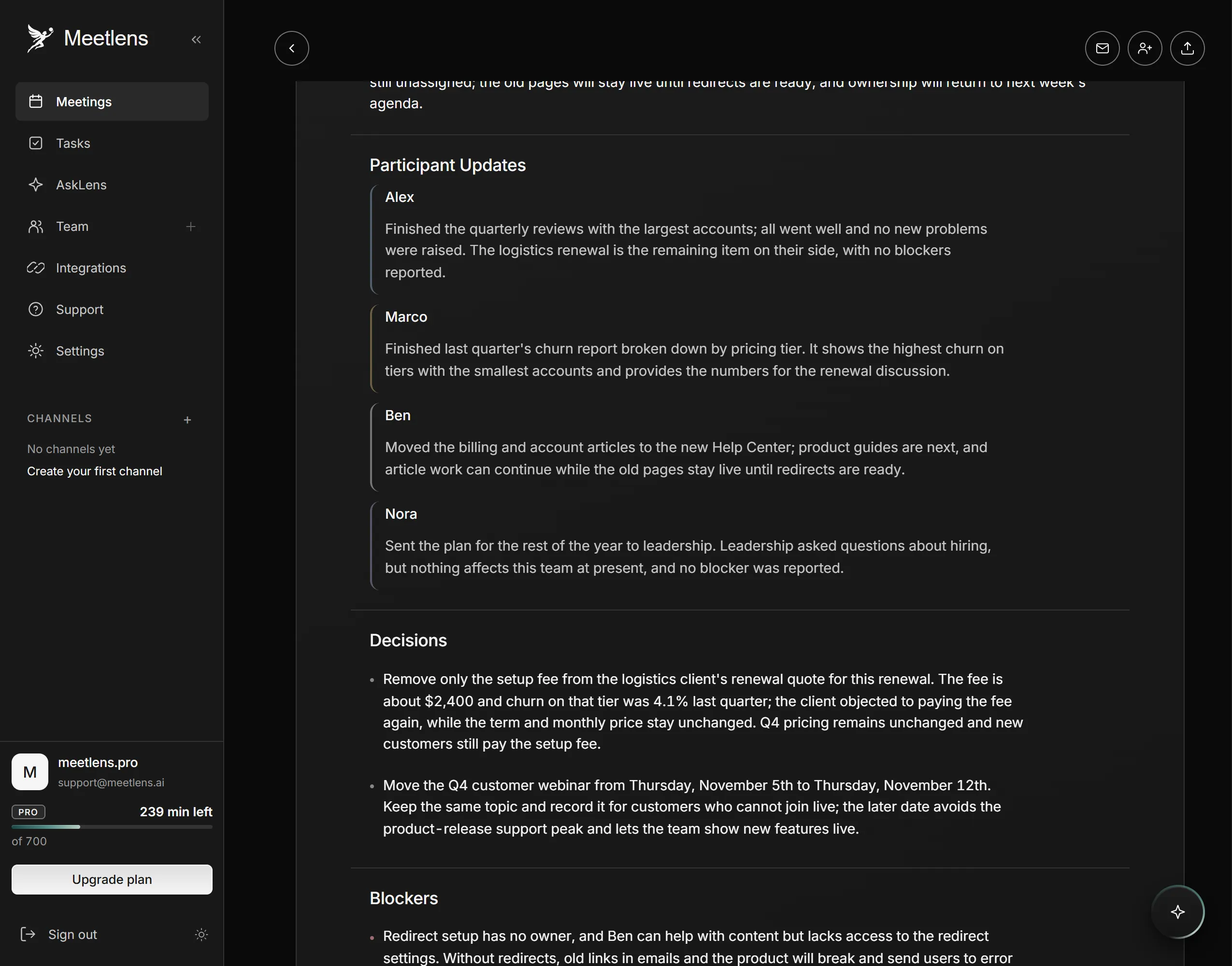
If your staff meeting runs in the browser version of Google Meet, Zoom, Microsoft Teams or Webex, a bot-free AI note taker can draft this record. Meetlens is a Chrome extension that records the meeting tab's audio without a bot joining the call, then produces a transcript with speaker labels and an AI report. Pick Team Sync in the format drop-down above Start recording: its report has a Brief, Team Summary, Participant Updates, Decisions, Blockers, Open Questions when any came up, and tasks with an owner and a due date. Check each owner and date before you share it. For formal minutes, use General Meeting, the default format, and add attendance, motions and votes yourself.
Meetlens records audio only, from desktop Chrome, not from the Zoom or Teams desktop apps; for an in-person staff meeting, import an audio recording if everyone agrees. On the Free plan, one recording runs up to an hour. With no bot, the call shows no recording notice from Meetlens, so announce it yourself:
I'm recording the audio of this meeting so I can send notes and action items afterward. If that's OK with you, please say "Yes, I agree to the recording."
Staff meeting vs all-hands vs one-on-one
You need a staff meeting when one manager's team has to share results and make decisions together; company news belongs in an all-hands, and personal topics belong in a one-on-one. Cancel the live meeting in any week when no number is off track and no decision is waiting, and let the written updates stand. An all staff meeting gathers the whole company, so it carries news and strategy rather than team decisions. Frequencies here are recommendations too:
| Meeting | Who attends | How often | What comes out |
|---|---|---|---|
| Staff meeting | One manager and their direct reports | Weekly; monthly for large departments | Team priorities, decisions, action items |
| All-hands (all staff meeting) | Everyone in the company | Less often, set by leadership | Company news, strategy, Q&A |
| One-on-one | A manager and one direct report | Weekly or every two weeks | Feedback, growth, personal blockers |
| Managers meeting | Managers of several teams | Weekly or every two weeks | Cross-team priorities and trade-offs |
Staff meeting, all-hands, one-on-one, managers meeting
-
Staff meeting
Who attends: One manager and their direct reports
How often Weekly; monthly for large departments
What comes out Team priorities, decisions, action items
-
All-hands
Who attends: Everyone in the company
How often Less often, set by leadership
What comes out Company news, strategy, Q&A
-
One-on-one
Who attends: A manager and one direct report
How often Weekly or every two weeks
What comes out Feedback, growth, personal blockers
-
Managers meeting
Who attends: Managers of several teams
How often Weekly or every two weeks
What comes out Cross-team priorities and trade-offs