What Is a Sync Meeting? Meaning, Agenda, and How to Run a Sync-Up
 Meetlens Editorial10 min readUpdated October 17, 2026
On this page
A sync meeting, or sync-up, is a short team check-in where people line up on progress, blockers, and next steps. Of the 15 types of meeting on a typical team calendar, it is one of the most loosely defined. Below: what sync means, its purpose and types, how it differs from a daily stand-up meeting, an agenda, how to run one, and what to record.
What is a sync meeting?
A sync meeting, or sync-up, is a short recurring team check-in where people compare progress, raise blockers, and agree on next steps so everyone works from the same picture. Its output is alignment: everyone leaves knowing what changed and who does what next.
Geekbot and Krisp both put a sync meeting at 10 to 15 minutes. A portfolio-wide sync runs longer: the agency Fishhook holds "a weekly internal 1-hour meeting" that checks in on every active project and client. Other names: alignment meeting, team check-in, catch-up.
What does "sync" mean at work?
At work, "sync" means bringing people to the same understanding of the work; the word is short for "synchronize." Merriam-Webster defines the verb sync as "synchronize," and its entry for in sync gives the workplace sense: people who "agree with or match one another and work together properly." In simple terms, "let's sync" means "let's agree on where things stand." It is not "synchronous," which only means happening in real time: every video call is synchronous, but only one held to line people up is a sync.
Sync, synch, or sync-up?
Write "sync": Merriam-Webster lists "synch" only as a less common variant, in both of its "sync" entries. With "up," the hyphen depends on how you use the phrase:
| How you use it | Spelling | Example |
|---|---|---|
| As an action (a verb phrase) | sync up | Let's sync up on Thursday. |
| As the meeting itself | sync-up | The weekly sync-up moved to 10 am. |
| Before a noun (a compound modifier) | sync-up | Share the sync-up meeting notes. |
Merriam-Webster has no entry for "sync-up," but it splits the parallel phrase the same way: "follow up" is the action; "follow-up" is the thing itself or describes one ("a follow-up email"). Wordvice reads "sync up" as a verb phrase and says "sync-up meeting," with a hyphen, may be preferred in formal writing.
What is the purpose of a sync meeting?
The purpose of a sync meeting is to surface what one person can't solve alone, such as blockers, dependencies, and decisions, rather than to read out status that could be written. A sync-up earns its slot when it does one of five jobs:
- Align priorities: two people each think their task comes first this week.
- Clear roadblocks: a stalled review gets an owner who will chase it.
- Expose dependencies: design can't finish the page until the copy is final.
- Make decisions that need two or more people: decision-making on a launch date takes one conversation instead of a day of messages.
- Give quick feedback on work in progress: a look at a draft catches a wrong direction early.
Problem-solving starts in the sync and continues afterward with only the people involved. If every item could be answered by reading a message, you have a status readout, not a sync.
Types of sync meetings
Sync meetings differ mostly by how often they repeat and who attends: quick ad hoc syncs, daily syncs, weekly team syncs, one-on-one syncs, cross-team syncs, and client syncs. How often a sync repeats follows from how fast the work changes: a team that ships daily needs a daily sync; work measured in weeks needs a weekly one. Set the meeting frequency first and the length second: more time between syncs means more to cover.
| Type | Who attends | How often | Typical length | What it produces |
|---|---|---|---|---|
| Quick sync | 2–3 people who share one question | Ad hoc | 15 min or less | One decision or answer |
| Daily sync | One team | Every workday | 15 min | Blockers, each with an owner |
| Weekly team sync | The team and its lead | Weekly | 30 min | Priorities, decisions, next steps |
| One-on-one sync | Manager and direct report | Every 1–2 weeks | 30 min | Feedback, support, next steps |
| Cross-team sync | Stakeholders from two or more teams | Every 1–2 weeks | 30 min | Dependencies, hand-off dates |
| Client sync | Account team, sometimes the client | Weekly | 30–60 min | Status per client, approvals |
In a cross-team sync, a cross-functional team (engineering and sales, say) trades dependencies; invite only stakeholders who own a blocker or a decision.
What is a quick sync?
A quick sync is an ad hoc 10–15 minute call to resolve one question. In Google results for "quick sync meeting," Reddit threads and LinkedIn posts about dreading the invite sit next to the guides. The Economic Times traced that workplace stress to the invite, not the call: "the meeting itself is not the problem, but the lack of clarity around it is."
A clear invite names the topic, the decision needed, and what to bring. Illustrative rewrites:
| Vague invite | Clear invite |
|---|---|
| Quick sync? | Quick sync: pricing page launch date, 15 min. Bring the two date options. |
| Can we sync today? | Can we sync at 3 pm on the Q4 hiring plan? I need a yes or no on one extra designer. |
| Got a minute tomorrow? | Quick sync tomorrow at 10 to plan your next project. Nothing is wrong; I want your input. |
Quick sync: [topic], [15] min. I need [the decision or answer] by [time]. Please bring [document or options].
One 15-minute meeting, two invites
Vague invite
Quick sync?
15 min
Empty
Clear invite
Quick sync: pricing page launch date
15 min
- Decision needed: pick one of two dates
- Bring: the two date options
- Length: 15 min
Sync meeting vs daily standup vs status meeting
A daily standup is a fixed 15-minute round of individual updates, a status meeting reports progress to someone, and a sync meeting is a flexible team check-in built around what needs alignment right now. The daily stand-up meeting comes from Agile software teams: in Scrum, the agile framework, it is the Daily Scrum, "a 15-minute event for the Developers of the Scrum Team" (Scrum Guide). Scrum teams sync too: the Daily Scrum inspects progress toward the Sprint Goal, and a cross-team sync handles dependencies on other teams.
| Format | How often | Who talks | Structure | What it produces |
|---|---|---|---|---|
| Daily stand-up meeting | Every workday | Each team member in turn | Fixed: done, next, blocked | Blockers, each with an owner |
| Status meeting | Weekly or at milestones | The team, to a manager or client | Progress against the plan | A status: on track or not |
| Sync meeting | Daily, weekly, or ad hoc | Whoever owns a blocker or a decision | Flexible, set by the agenda | Decisions and next steps with owners |
| One-on-one sync | Every 1–2 weeks | Manager and direct report | The report's topics first | Feedback, support, next steps |
The difference that matters is direction: in a status meeting, information flows up to someone who checks it; in a sync meeting, it flows across, between people who depend on each other. The two overlap: many teams call their weekly status update meeting the team sync, and it works as a sync when updates go out in writing and the call goes to blockers and decisions.
Sync meeting agenda (15 and 30 minutes)
A 15-minute sync meeting agenda has four parts: progress since last time, blockers and asks, decisions needed, and next steps with owners. Updates go in writing before the call, so the live minutes go to what needs people.
Sync: [team or topic] · [date] · 15 min
Written updates posted in [channel] by [time]

1. Progress since the last sync (3 min)
   - Only what changes the plan; nobody reads updates aloud
2. Blockers and asks (5 min)
   - [Blocker]: who can remove it, by when
3. Decisions needed (5 min)
   - [Decision]: the options, who decides
4. Next steps (2 min)
   - [Owner]: [action], due [date]
The 15-minute sync agenda, to scale
Written updates posted before the call
A weekly team sync stretches the same parts to 30 minutes and adds the week's priorities. Lift Business Resources uses that length and gives its largest block, 10–12 minutes, to roadblocks.
Weekly team sync: [team] · [date] · 30 min
Written updates posted in [channel] by [day, time]

1. Wins and progress on this week's priorities (5 min)
2. Metrics or milestones that moved (5 min)
3. Blockers and asks, one at a time (8 min)
4. Decisions needed (7 min)
5. Priorities for next week (3 min)
6. Next steps: owner, action, due date (2 min)
Questions for the written updates or the live part:
- What changed since our last sync?
- What is blocked, and who can unblock it?
- What do you need from whom, and by when?
- Which decision do we need today, and who makes it?
- What is at risk of slipping?
- What should the team know before their next task?
Each answer that needs someone to act becomes one of the action items in the last block.
How to title a sync meeting
Title a sync meeting with the team or topic and, for a one-off sync, the decision it should produce. "Quick sync" tells people nothing; "Launch sync: pricing page date" tells them what to prepare. More examples: "Weekly design sync," "Daily support sync," "Eng–Sales sync: Q4 renewals."
How to run a sync meeting people don't dread
Keep a sync meeting small, short, and written-first: share updates before the call, spend the live minutes on blockers and decisions, and cancel it when there is nothing to sync. Geekbot names three common sync-up mistakes: too long, too many people, no focus. Five rules prevent them:
- No agenda, no sync. If nobody can name a topic, cancel.
- Write status before the call. Each person posts two or three lines in the team channel.
- Timebox every item. Timeboxing gives each agenda item fixed minutes; an item that runs over moves to a separate call. Geekbot's ceiling for the whole sync-up is "15 or 20 minutes."
- Invite owners, not observers. Ask only people who own a blocker or a decision; Geekbot suggests splitting the group above 10 attendees.
- Close with owners. Before anyone leaves, the facilitator reads back each next step with its owner and date.
Spend real-time minutes only on what needs a conversation; a sync held so a manager can check on each person feels like micromanagement.
When should a sync-up be an asynchronous update instead?
Replace a sync-up with an asynchronous update when nothing is urgent, the goal is to share information, and one person would do most of the talking. Atlassian's Team Playbook turns this into five questions in Think Before You Sync, where "sync" means meeting in real time:
| Question | Write an update when | Meet live when |
|---|---|---|
| Is it urgent? | No | Yes |
| What's the goal of collaborating? | Sharing information, such as status | Creating, deciding, or unblocking |
| How many collaborators are involved? | More than 8 | Fewer than 8 |
| Will one person be talking the whole time? | Yes: record a video update | No |
| How complex is the topic? | Not complex | Complex |
Time zones often settle it: when working hours barely overlap, each person posts an asynchronous update in a Slack channel by a set local time, and the live sync shrinks to the blockers. To cancel a sync-up or swap it for written updates, the same play says to message everyone: what's changing, why, and how to stay informed.
What to write down after a sync meeting
Write down three things after every sync meeting: each person's update in one line, the blockers with who will remove them, and the next steps with owners and dates. Add any decision as its own line so nobody reopens it. Post the notes in the team channel the same day as the follow-up for anyone who missed the sync.
Sync notes: [team] · [date]

Updates
- [Name]: [one line]

Blockers
- [Blocker]: removed by [owner] by [date]

Decisions
- [Decision]

Next steps
- [ ] [Owner]: [action], due [date]
Accountability starts when each next step has a name and a day, and the next sync opens by checking those steps.
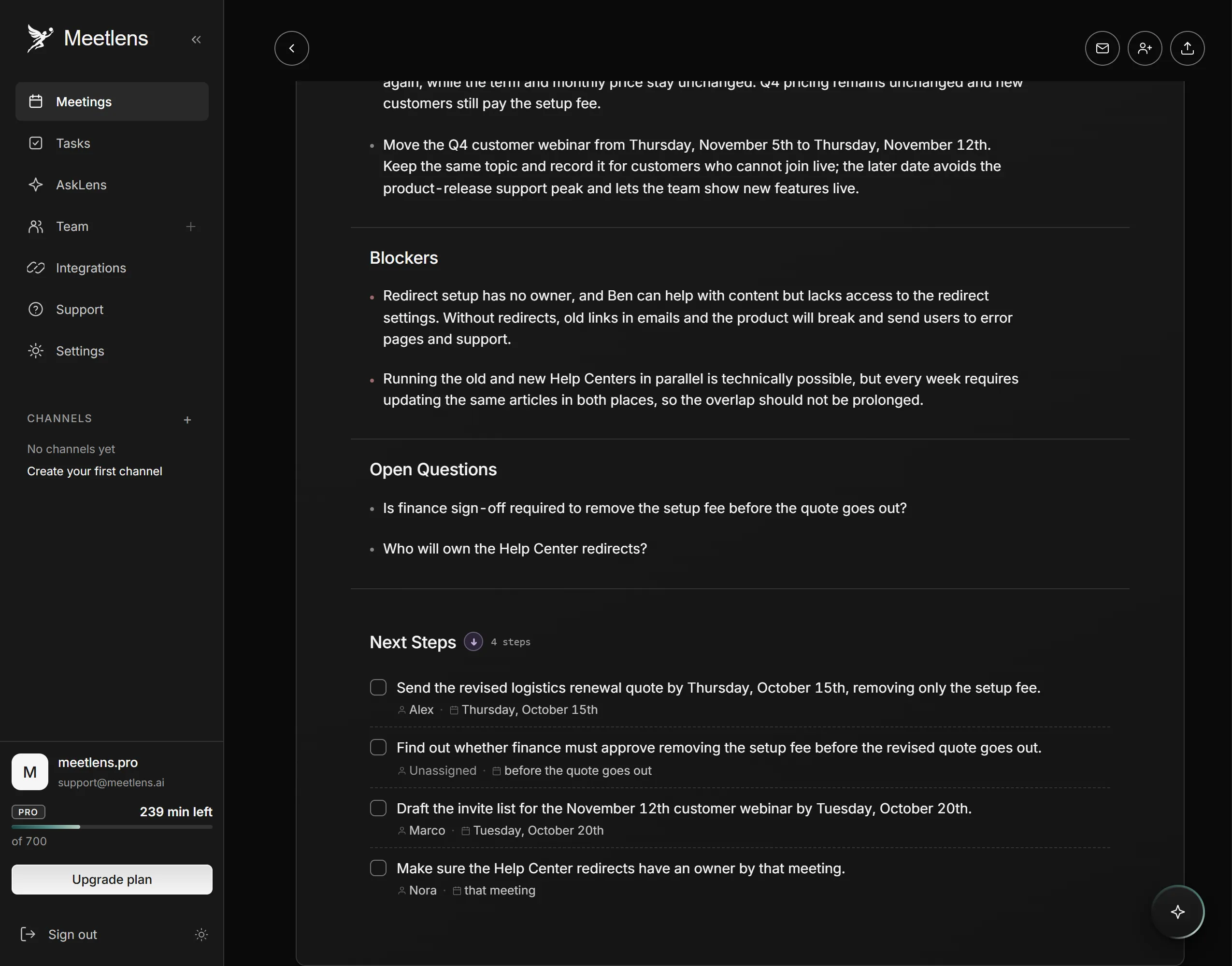
If the sync runs in Google Meet, Zoom Web, Microsoft Teams Web, or Webex, Meetlens, a Chrome extension, records the tab's audio without a bot joining the call and produces a transcript with speaker labels and a report. For AI notes for team syncs, pick Team Sync in the format drop-down above Start recording. The Meetlens Team Sync report has a Brief, a Team Summary, Participant Updates with one entry per speaker, Decisions, Blockers, and Open Questions, plus tasks with owners and due dates (titled Next Steps or Tasks). A task nobody took shows as Unassigned: give it an owner before you post the notes.
Meetlens records audio only and doesn't record the desktop Zoom or Teams apps; for an in-person sync, upload an audio file. The Free plan's 10 AI reports a month cover a weekly sync, not a daily one. With no bot, the platform shows no recording notice, so ask first:
I'd like to record this sync for the notes, audio only. If that's OK, please say "Yes, I agree to the recording."