Types of Meetings: 15 Common Meetings at Work and What Each One Should Produce
 Meetlens Editorial13 min readUpdated October 17, 2026
On this page
- What is a meeting at work?
- Formal vs informal meetings: what's the difference?
- How are meetings classified? Three, four and five types
- Types of meetings in project management
- Types of meetings for managing people and the company
- Which record does each meeting type need?
- How to choose the right meeting type (or skip the meeting)
- How to capture any meeting type without a note-taker
The main types of meetings at work are status updates, decision-making, problem-solving, planning and relationship meetings, and each type should end with a different kind of record. Below: what counts as a work meeting, formal versus informal meetings, how lists of meeting types are built, 15 project, people and company meetings, the record each one needs, and how to pick the right type or skip the meeting.
What is a meeting at work?
A work meeting (or office meeting) is a planned or ad hoc conversation between two or more colleagues, held to share information, make a decision, solve a problem or build a working relationship. Those four purposes run through every list of meeting types below. Other names for it: business meeting, staff meeting, team meeting.
Any meeting type runs in one of four formats:
- One room: an in-person meeting.
- All on video: a virtual meeting on video conferencing, such as Google Meet, Zoom, Microsoft Teams or Webex.
- Room plus video: a hybrid work meeting, the everyday setup when a team mixes office and remote work, with some people in the room and others joining by video.
- No live call: an asynchronous meeting, with updates in writing or as a recording.
Information sharing is the purpose a written update can often cover alone; deciding, solving and building trust usually need a live conversation. To run any work meeting well, pick its type first; the steps are in the last section of this guide.
Formal vs informal meetings: what's the difference?
A formal meeting runs on a set meeting agenda, under a chairperson and written rules of procedure, and keeps meeting minutes; an informal meeting has a loose agenda, no fixed procedure and usually no official record. Formality is the first split between meeting types: boards, committees, shareholders and public bodies hold formal meetings because they must later show what they decided. Most of a team's week is informal meetings.
| Formal meeting | Informal meeting | |
|---|---|---|
| Agenda | Set and sent in advance; items taken in order | Loose or none |
| Chair | A chairperson runs the meeting and recognizes speakers | Whoever called it, or no one |
| Rules of procedure | Bylaws, plus a parliamentary authority such as Robert's Rules of Order | The team's habits |
| Quorum and voting | A quorum must be present; decisions by motion and vote | No quorum; decisions by agreement |
| Record | Meeting minutes, approved by the group | Notes or a recap message, if anything |
| Examples | Board meeting, annual general meeting (AGM), committee meeting, formal disciplinary hearing | Stand-up meeting, one-on-one, brainstorm, quick catch-up |
Organizations that adopt Robert's Rules of Order Newly Revised (12th edition) use it as their default procedure, while their bylaws and applicable law take precedence, as the FAQ on the official Robert's Rules site explains. A quorum is the minimum number of members who must be present to do business: "it is never permissible to transact substantive business in the absence of a quorum" (same page).
So the formal meeting meaning is about procedure, not tone. A relaxed board meeting with a quorum and a vote is still formal; a tense stand-up meeting is still informal. A formal meeting is usually called by the body that holds it: a board meeting, a general meeting, a committee meeting, a session or a hearing. A typical informal meeting is two engineers settling an API question at a whiteboard.
What is an official meeting?
In the strict sense, an official meeting is a meeting of a governing body, such as a board of directors, a city council or a public commission, that is properly called, has a quorum and is recorded in meeting minutes. In everyday office talk, "official meeting" simply means a formal meeting, as opposed to a hallway chat.
How are meetings classified? Three, four and five types
There is no single official list: most frameworks sort meetings by purpose, and the classic four types are status update, decision-making, problem-solving (innovation) and team-building meetings. That four-type list comes from the Austin Community College business communication textbook, where innovation meetings develop a creative solution to a specific problem and team building meetings build camaraderie.
Other frameworks count types of business meetings differently:
| Framework | Sorts by | Types |
|---|---|---|
| Austin Community College textbook | Purpose | 4: status update meetings, innovation meetings, decision-making meetings, team building |
| Amy Bonsall, American Association for Physician Leadership | What the gathering is for | 3: transactional (getting things done), relational (strengthening connections), adaptive (complex or sensitive topics) |
| Lucid Meetings | When and why the group meets | 16 types in 3 families: recurring meetings of an existing group doing known work, meetings called as needed for one goal, meetings that pass information from one group to another |
| Parabol | Area of work | 26 types in 5 groups: project management, agile, operations, HR and people management, leadership |
| Formality | Procedure | 2: formal, informal |
| Format | Where people are | 4: in one room, on video, a mix of both, or asynchronous |
| Schedule | How often | 2: recurring (standing) or ad hoc |
For "the three types of meetings," one published answer is Bonsall's transactional, relational and adaptive gatherings; for "the four types," the textbook list above. There is no standard five-type or seven-category list: published frameworks range from 3 to 26 types.
How often a meeting repeats is a separate axis: a recurring meeting such as a weekly sync keeps its slot, while an ad hoc meeting is called for one issue. Labels such as skip-level or virtual describe who attends or where, not a new purpose. This guide covers 15 types of meeting: eight project meetings, then seven meetings for people and the company.
The 15 meeting types, sorted by purpose
- Type 2Stand-up meeting
- Type 4Status update meeting (team sync)
- Type 10Staff meeting
- Type 12All-hands meeting
- Type 15Asynchronous meeting
Decide decision-making
- Type 1Project kickoff meeting
- Type 5Planning meeting
- Type 7Decision-making meeting
- Type 11Management meeting
- Type 13Board and committee meetings
Solve problem-solving
- Type 6Brainstorming and problem-solving meeting
- Type 8Sprint retrospective and post-mortem
Type 3Scrum meetings serve all three purposes above: share information, decide and solve. Sprint Planning, Daily Scrum, Sprint Review, Sprint Retrospective
Connect team-building
- Type 9One-on-one meeting
- Type 14Client meeting and QBR
Types of meetings in project management
Project teams run a predictable set of meetings: one to start the work, short ones to stay in sync, longer ones to plan, decide and look back. Every project management meeting below has one job, and each meeting type should leave one kind of record.
1. Kickoff meeting
A project kickoff meeting is the first meeting of the project team, the sponsor and key stakeholders, held once to agree on goals, scope and roles. Slack puts a typical kickoff meeting for a moderately complex project at an hour to an hour and a half; the University of Waterloo's project management office allows one to two hours, including questions. What should remain: goals, scope, roles, the first decisions and action items with owners. Agenda and checklist: our kickoff meeting guide.
2. Stand-up meeting
A stand-up meeting is a short team check-in where each person says what they did, what's next and what blocks them. Teams hold it daily or weekly and keep it to a 15-minute timebox, the one the Scrum Guide sets for its Daily Scrum. Only the people doing the work attend. What should remain: the blockers and who removes each one. Formats and questions: stand up meeting guide.
3. Scrum meetings
Scrum, the agile framework, splits work into sprints of one month or less, and each scrum sprint holds four events: Sprint Planning, the Daily Scrum (the stand-up meeting above), Sprint Review and Sprint Retrospective. For a one-month sprint, the same guide caps Sprint Planning at eight hours, Sprint Review at four and Sprint Retrospective at three; for shorter sprints, these events are usually shorter. The Scrum Team attends, and stakeholders join the review. What should remain: the Sprint Goal, impediments and the improvements the team agreed to try. Each event in detail: scrum meetings.
4. Status update meeting (team sync)
A status update meeting, or team sync, is a recurring meeting where each person reports progress, flags blockers and agrees on next steps. It runs on a fixed schedule, such as weekly, with the team and its lead. What should remain: updates by person, blockers and next steps with owners. Agenda and when to cancel one: sync meeting.
5. Planning meeting
Planning meetings turn a goal into a plan: priorities, timeline, budget and who does what. They happen at the start of a quarter, a release or a project phase, with the team and whoever owns the budget. What should remain: the plan, its priorities and an owner for each piece of work.
6. Brainstorming and problem-solving meeting
Brainstorming sessions generate options; problem-solving meetings pick one and plan the fix. Both are called as needed, with the people closest to the problem and someone who can approve the fix. What should remain: the options considered, the chosen solution and the first step to test it.
7. Decision-making meeting
A decision-making meeting exists to choose between options, so the people with authority to decide must attend. Call it as needed, once the options are clear, and send them with their trade-offs beforehand, so the time goes to deciding rather than briefing. What should remain: the decision, the reason behind it and who carries it out.
8. Sprint retrospective and post-mortem
A sprint retrospective closes each sprint; its purpose, in the Scrum Guide's words, is "to plan ways to increase quality and effectiveness." A post-mortem does the same after a project ends or an incident is resolved, as a lessons learned review. What should remain: what worked, what didn't and the actions that change the next round.
Types of meetings for managing people and the company
The rest of the calendar is about people and alignment: meetings with one person, with a team, with other managers, with the whole company, with the board and with clients. These meeting types depend less on the project and more on who is in the room.
9. One-on-one meeting
A one-on-one meeting is a private, recurring conversation between a manager and an employee who reports to them, about work, growth and feedback. Baylor University's HR team recommends a 30-minute meeting once a week, or a 45- or 60-minute one for complex roles, with an agenda the employee prepares. A weekly meeting with your manager is a one-on-one. What should remain: private notes, the feedback given and follow-ups for both people. What to cover: the one on one meeting guide; a ready structure: the one on one meeting template.
10. Staff meeting
A staff meeting, also called a team meeting, brings a manager and their whole team together on a regular schedule. Employee meetings like this carry announcements, priorities and decisions that affect everyone. What should remain: announcements, decisions and action items. How to keep it from becoming a status readout: staff meeting.
11. Management meeting
A management meeting brings managers, often the leadership team, together to settle what no single team can. In a weekly manager meeting, cover cross-team priorities, metrics, hiring, budget, risks and escalations. What should remain: cross-team decisions and the owner of each.
A meeting of several managers is a "managers' meeting" or, as a descriptive phrase, a "managers meeting": the AP Stylebook drops the apostrophe when a plural ending in s is "used primarily in a descriptive sense" (Columbia Journalism Review). A "manager's meeting" belongs to one manager. Manager meetings with one report are one-on-ones.
12. All-hands meeting (company town hall)
An all-hands meeting, also called a company town hall meeting, gathers the whole company for leadership updates, wins and open Q&A. Slack ties how often to hold one to company size: weekly for small teams or startups, biweekly for mid-size companies, monthly for larger organizations, quarterly for enterprises. What should remain: the announcements, the answers given and the questions still open. More on the all hands meeting meaning, agenda and Q&A.
13. Board and committee meetings
A board meeting is a formal meeting of the board of directors, held as often as the bylaws require, where directors decide by motion and vote; committee meetings follow the same procedure for a narrower remit. What should remain: meeting minutes with the motions, votes and decisions, approved by the group at its next meeting.
14. Client meeting and QBR
A client meeting covers what the customer needs, how the work is going and what happens next. A quarterly business review (QBR) is the formal business review held once a quarter with the client's decision-makers to compare results with goals. What should remain: the client's needs, what each side committed to and next steps with dates. How to run both: client meeting guide and quarterly business review template.
15. Asynchronous meeting
An asynchronous meeting replaces the live call with written or recorded updates that people answer on their own time, by an agreed deadline. What should remain: the update itself and the decisions made in the thread. When it works: asynchronous meeting.
Which record does each meeting type need?
Formal meetings need meeting minutes, working meetings need decisions and action items, and people meetings need private, follow-up-focused notes. The table matches each meeting type to what to capture, the record to keep and the Meetlens report format that fits; the last two rows are calls outside the team calendar.
| Meeting type | What to capture | Record | Meetlens format |
|---|---|---|---|
| Project kickoff meeting | Goals, scope, roles, first decisions | Notes and action list | General Meeting |
| Stand-up meeting | Blockers and who removes each | Action list | Team Sync |
| Scrum events | Sprint Goal, impediments, improvements | Sprint notes | Team Sync for the Daily Scrum and Sprint Review, General Meeting for Sprint Planning and the retrospective |
| Status update meeting | Updates by person, blockers, next steps | Notes and action list | Team Sync |
| Planning meeting | Plan, priorities, owners | Plan document | General Meeting |
| Brainstorming or problem-solving meeting | Options, chosen solution, first step | Notes | General Meeting |
| Decision-making meeting | Decision, reason, owner | Decision log | General Meeting |
| Sprint retrospective or post-mortem | What worked, what didn't, actions | Notes and action list | General Meeting |
| One-on-one meeting | Feedback, concerns, follow-ups | Private notes | One-on-One |
| Staff meeting | Announcements, decisions, tasks | Notes or recap email | Team Sync or General Meeting |
| Management meeting | Cross-team decisions, owners | Decision log or meeting minutes | General Meeting |
| All-hands meeting | Announcements, answers, open questions | Recap email | General Meeting; check Open Questions for unanswered Q&A |
| Board or committee meeting | Motions, votes, decisions | Approved meeting minutes | General Meeting as a first draft; you add attendance, quorum, motions and votes |
| Client meeting or QBR | Client needs, commitments, next steps | Recap email to the client | Client Meeting |
| Asynchronous meeting | The update, decisions in the thread | The thread | General Meeting, if the update is recorded |
| Job interview | Candidate profile, signals, risks | Interview scorecard | HR Interview |
| Sales or discovery call | Client needs, agreements, next steps | Call notes | Client Meeting |
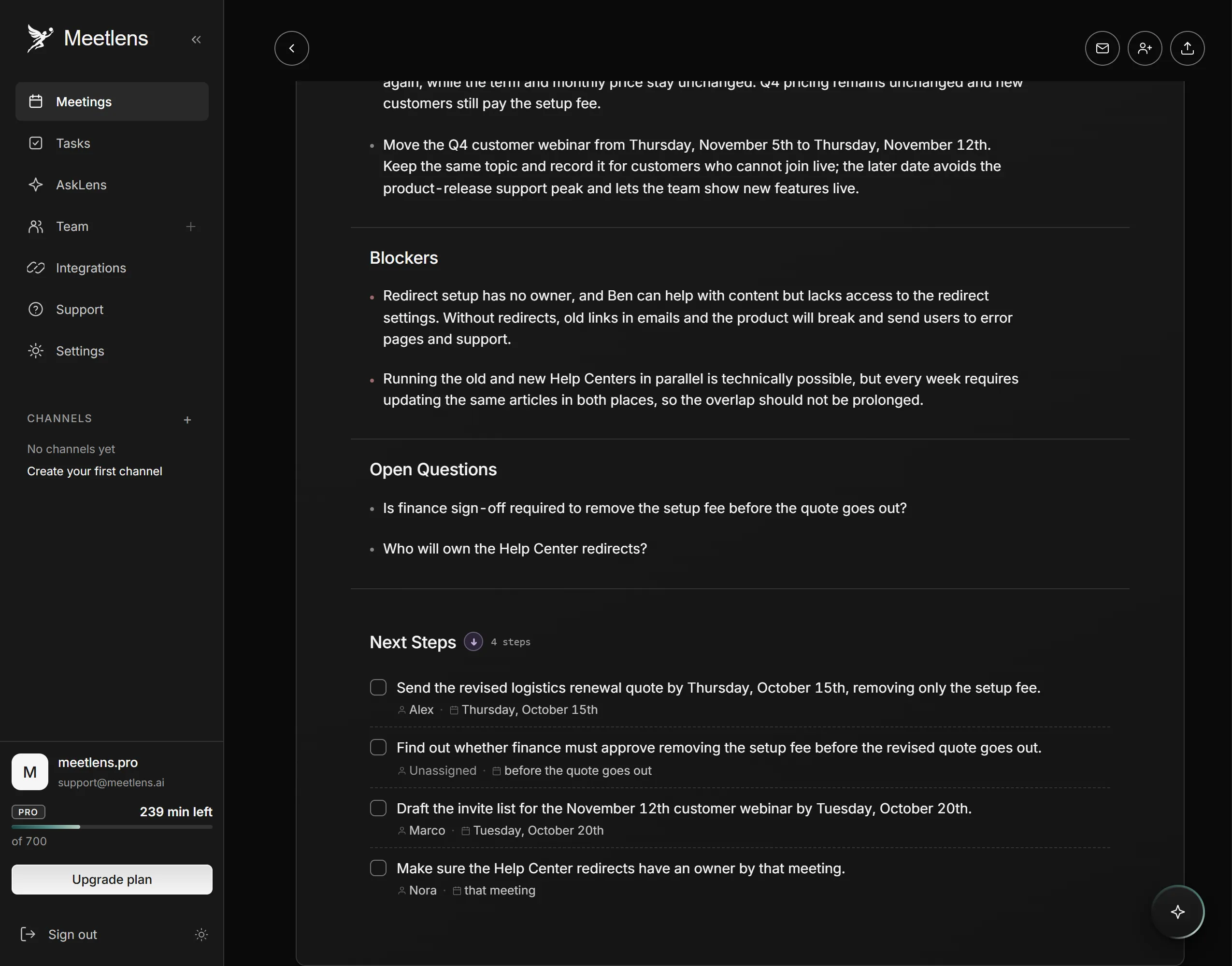
Whatever the record, accountability comes from well-written action items: each needs an owner and a due date said aloud in the meeting, not filled in afterward. People who missed the meeting need only the key takeaways, sent in a recap message.
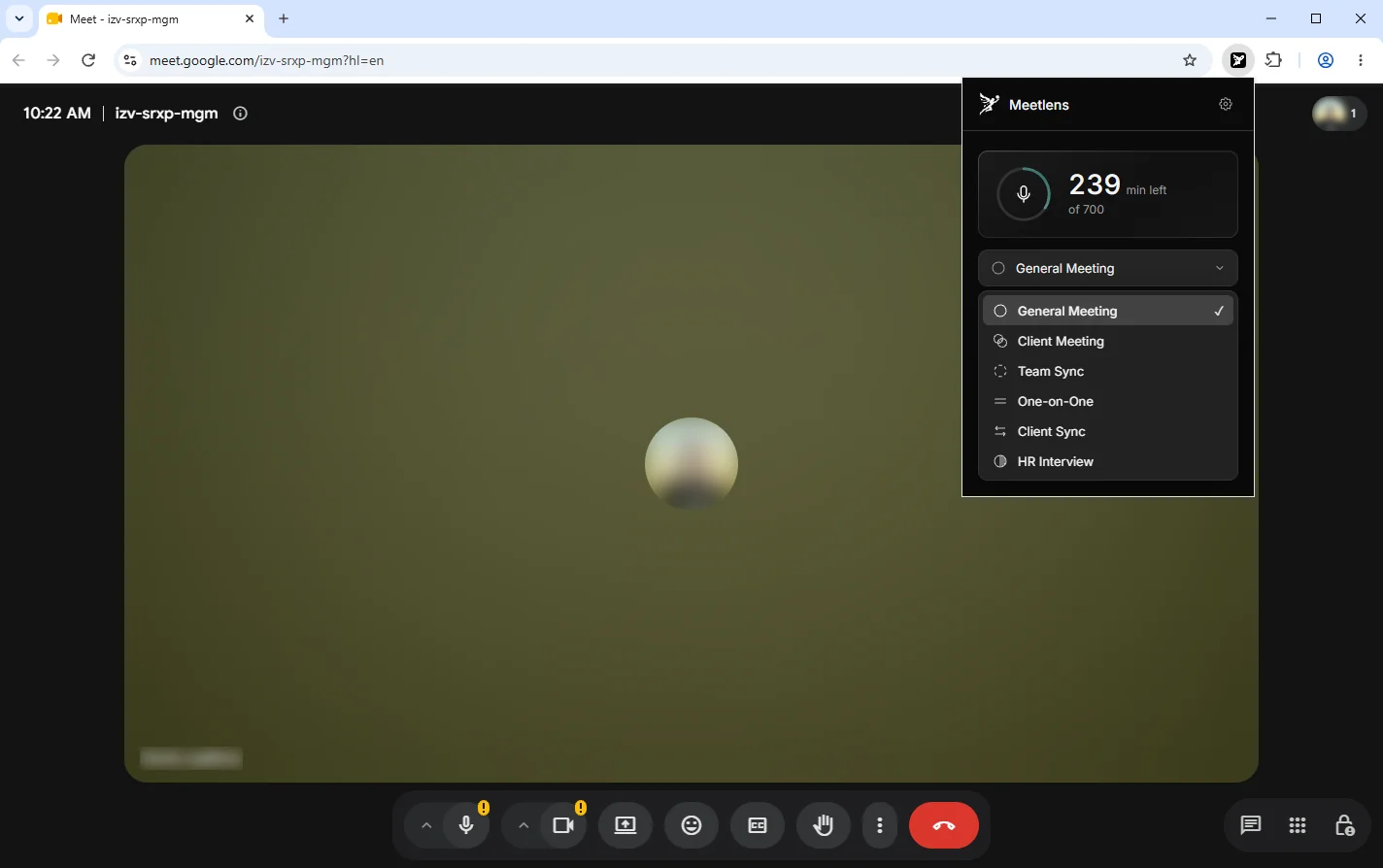
In Meetlens, you pick the report format for the meeting type in the drop-down above Start recording, and the format sets the report's structure. General Meeting, the default report format, has Brief, Meeting Topics, Decisions and Open Questions, plus a Tasks block (task, owner, due date). Team Sync is built around Team Summary, Participant Updates and Blockers, alongside Brief, Decisions and Open Questions, with tasks, owners and due dates under Next Steps or Tasks; Client Meeting has What the Client Needs, Agreed and Blockers & Objections. That is how AI meeting notes follow the table above instead of one generic summary. Meetlens doesn't detect the meeting type: you choose it, and you can switch formats during the recording.
How to choose the right meeting type (or skip the meeting)
Start from the outcome: if nobody needs to decide, solve or build trust in real time, send an asynchronous update instead of booking a meeting. In Atlassian's survey of 5,000 knowledge workers, meetings were ineffective 72% of the time, and 62% of workers often attended meetings whose invite stated no goal.
- Write the outcome in one sentence. A clear goal names a result: "choose the Q1 launch date," not "discuss the launch."
- Check that it needs a live conversation. Status reports and announcements go out as an asynchronous update in Slack or email. A decision, a conflict or a sensitive conversation needs a meeting; work that needs several people at once, such as editing a plan together, needs a working meeting.
- Invite only the stakeholders who decide, do the work or must hear it live. Everyone else gets the record.
- Set the length and decide whether the meeting repeats. Give a repeating meeting a date to review whether it still needs to exist.
- Decide what record stays and who keeps it, using the table above.
The meeting type follows from steps 1 and 2: a decision calls for a decision-making meeting, a fix for a problem-solving meeting, a plan for a planning meeting, trust for a one-on-one, and plain information for an asynchronous update.
Once the right meeting is on the calendar, who keeps the record?
How to capture any meeting type without a note-taker
Meetlens, a Chrome extension, records the audio of a browser meeting in Google Meet, Zoom Web, Microsoft Teams Web or Webex without a bot joining the call, transcribes it in 99+ languages and builds the report in the format you chose for the meeting type. For an in-person meeting, upload a phone recording as an audio or MP4 file, up to one hour long on Free, 1.5 hours on Pro and 2 hours on Business. The extension records audio only and can't capture the Zoom or Teams desktop apps. No bot joins, so the platform shows no recording notice for Meetlens: tell participants you're recording and get their OK.