What Are Action Items? How to Write Ones That Actually Get Done
 Meetlens Editorial12 min readUpdated October 17, 2026
On this page
- What is an action item?
- What are action items in a meeting?
- Action items vs. tasks, decisions, next steps and action plans
- How to write an action item
- What do good action items look like? Bad vs. good rewrites
- How do you record action items in meeting minutes?
- How do you make sure action items get done?
- How can you capture action items automatically?
- Sharing action items by email
- When someone wasn't in the meeting
- Automating the after-meeting work
Action items are the tasks a meeting hands to named people, each with a clear result and a due date, so the work continues after everyone hangs up. Below: the definition, where action items come from in a meeting, how they differ from decisions and other tasks, how to write one, vague examples rewritten, a format for meeting notes, how to see them through, and how to capture them automatically.
What is an action item?
An action item is a specific task that one named person agrees to complete by a set date, usually as an outcome of a meeting. Wikipedia defines it as "a documented event, task, activity, or action that needs to take place" and adds that action items "are discrete units that can be handled by a single person." Documented means written where others can see it. Discrete means one result you can check off, not an ongoing area of work.
A complete action item has four required parts:
- A concrete action and its result: "Send the revised quote," not "pricing."
- One owner: the person accountable for getting it done.
- A due date: a deadline on the calendar, not "soon."
- A definition of done: what anyone can check to see that the item is finished, such as "the client has the quote."
Optional parts add context: a one-line description of why, a link to the source document, a priority, a status.
In task management terms, an action item is a task with a short life cycle: it is opened in a meeting, worked by its owner and closed as done or dropped.
What are action items in a meeting?
In a meeting, action items are the commitments people make out loud — "I'll send the revised quote by Thursday" — written down with an owner and a date before the call ends. These phrases mark a commitment:
- "I'll…" or "I can have… by…"
- "Can you… by Friday?" followed by "Yes, I'll…"
- "Leave that with me."
- "Let's have Sam…," once Sam agrees.
- "I'll check and come back to you by…"
"We should…" and "Let's find out…" are not commitments yet. They become action items only when a name is attached.
Two people share each action item. The note-taker, or the facilitator in a small meeting, fills it in during the call; the owner named in it completes the work afterward. Note-taking records the commitment. It doesn't move the work to the person holding the pen.
Save the last 2 minutes of the call for a read-back: the facilitator reads each item aloud as action, owner, date, and each owner confirms or corrects it. The action items from the meeting then go into the notes everyone receives, in the words the owners just confirmed.
Action items vs. tasks, decisions, next steps and action plans
Every action item is a task, but not every task is an action item: an action item is a task someone agreed to in front of others, so the group holds them to it. That public agreement creates the accountability. A task on your private list has none.
A meeting produces five kinds of output, and each needs a different home. The examples come from one staged test meeting with a scripted conversation and synthetic voices: a customer success weekly sync on Tue, Oct 13.
| Output | What it is | Example from the same call | Where it lives |
|---|---|---|---|
| Decision | A choice the group made; nobody has to do anything for it to be true | Drop the setup fee for the logistics client's renewal | Decisions section of the notes |
| Action item | One task, one owner, one due date | Send the revised quote — Alex — Thu, Oct 15 | Action items list, then the owner's tracker |
| Follow-up | A topic to come back to, with no task attached yet | The help center redirects go back on next week's agenda | The next meeting's agenda |
| Open question | Something nobody in the room could answer | Does dropping the fee need finance sign-off? | Open questions, with whoever will find out |
| Action plan | Several tasks in order toward one goal | Help center migration: billing and account articles (moved), product guides (next), redirects (no owner yet) | A project plan |
The rows feed each other. A decision often creates action items: dropping the fee is the decision, sending the revised quote is the action item. An open question becomes an action item the moment someone agrees to find the answer by a date. In project management, action items also come from reviews, audits and escalations, under the same rules.
What's another word for action items?
The common synonyms for action items are next steps, to-dos, action points and, loosely, follow-ups. Cambridge Dictionary marks action item as US usage and lists action point as the other form, the one more common outside the US. "Next steps" suits a client-facing email; "to-dos" suits a personal to-do list. In meeting notes, though, a follow-up usually means a topic to revisit, as in the table above.
"Actionable items" means items someone can act on; it works in conversation, while written notes are clearer with "action items." "Takeaways" is not a synonym: a takeaway is a conclusion, not work anyone owns.
How to write an action item
Write each action item as one sentence that names the owner, a specific verb, the deliverable and the due date: "[Owner] will [verb] [deliverable] by [date]." In a list, the same item starts with the verb: "Send the revised quote — Alex — Thu, Oct 15."
Anatomy of one action item
As one sentence[Owner] will [verb] [deliverable] by [date]
Alexowner will sendverb the revised quote to the logistics clientdeliverable by Thu, Oct 15due date
In a list[Verb + deliverable] — [Owner] — [Due date]
Sendverb the revised quotedeliverable — Alexowner — Thu, Oct 15due date
- Choose a specific verb. The verb tells the owner what done looks like. Replace verbs that have no visible result with ones that do:
| Verb to avoid | Why it fails | Specific verb |
|---|---|---|
| look into | no end point | compare, list, price |
| discuss | needs another meeting, not an owner | decide, propose |
| think about | nobody can see it happen | draft, outline |
| handle | hides the result | send, book, fix |
| follow up on | names no result | confirm, ask [person] for [thing] |
Write in active voice. Passive voice hides the owner: "The quote will be sent" has no sender, "Alex will send the quote" has one.
Name the deliverable. State what will exist when the item is closed: a sent quote, a booked room, a published page, a signed contract. If you can't name it, the item is still a topic for discussion.
Name a single owner. The owner is one individual, never a team or a department, and stays answerable even after delegating the work. In a RACI matrix (responsibility assignment matrix), the owner is the A, accountable: the person "ultimately answerable for the correct completion of the deliverable or task," even when someone else does the work.
Set the due date. Turn "next week" into a calendar date before the call ends. If nobody can commit to a date yet, write "date TBD — [owner] confirms by [date]." If nobody has taken the item, write "owner TBD — [meeting lead] names one by [date]." The gap stays visible instead of hidden.
Add context only if the item will be unclear in a week. One line of why, or a link to the document, is enough.
SMART criteria, 4 W's or GTD?
All three methods lead to the same one-line action item; choose by the size of the work.
- The 4 W's are who, what, when and why, a shortened form of the Five Ws that vendor guides use as a checklist. Use them for everyday items, while you write each line during the call.
- SMART criteria come from George T. Doran's 1981 article in Management Review: Specific, Measurable, Assignable, Realistic, Time-related. Assignable means defining responsibility clearly. Use them for action items that run longer than a week.
- Getting Things Done (GTD), David Allen's 2001 book, asks whether each item is actionable and, if so, says to "decide the next action and project (if more than one action is required)." Use GTD when an item is too big for one owner and one date: make it a project and record only its next action.
What do good action items look like? Bad vs. good rewrites
Most weak action items fail the same test: a week later, nobody can tell who was supposed to do what by when. Ambiguity is why vague items stall: each person assumes someone else has it. The fixes below need answers only the room can give, so ask "who?" and "by when?" before the meeting moves on.
Illustrative examples: names, dates and details are invented.
| Team | Before | What's missing | After |
|---|---|---|---|
| Engineering | Fix the login bug | Owner, date, which bug | Omar will ship a fix for the Safari login error by Wed, Oct 21 |
| Sales | Look into pricing | A visible action, result, owner, date | Dana will send the client 3 pricing options with discounts by Fri, Oct 16 |
| Marketing | Someone should update the landing page | Owner, what changes, date | Lena will publish the new headline and pricing table by Tue, Oct 20 |
| HR | Think about onboarding | A visible action, result | Grace will draft a first-week schedule for the two new hires and send it to their managers by Mon, Oct 19 |
| Product | Discuss the roadmap with design | A result, not another discussion | Theo will book a 30-minute roadmap review with design and send the invite by Thu, Oct 15 |
| Customer success | Follow up with the client | What the follow-up should produce | Maya will ask the client to confirm the renewal date in writing by Thu, Oct 22 |
| Finance | The budget will be reviewed | An owner (nobody is named), date | Carlos will compare Q4 spend with the budget and mark lines more than 10% over by Mon, Oct 26 |
| Operations | Handle the office move | It's a whole plan, not one item | Sam will get quotes from two moving companies by Fri, Oct 23 |
Three patterns repeat in the "Before" column: no person ("Fix the login bug"), a verb with no end point ("Look into pricing") and an item the size of a project ("Handle the office move"). For the last one, the first step becomes the action item and the rest moves to the plan.
How do you record action items in meeting minutes?
Put action items in their own section at the end of the meeting minutes, one line per item, in the same order every time: action, owner, due date, status. A fixed format lets each owner scan for their name. Numbered lines let the next meeting refer to "item 2" without confusion.
Plain text, for email and Slack:
Action items
1. [Verb + deliverable] — [Owner] — [Due date] — Open
2. [Verb + deliverable] — [Owner] — date TBD, [owner] confirms by [date] — Open
Markdown table, for a document or a wiki:
| # | Action | Owner | Due | Status |
|---|---|---|---|---|
| 1 | [Verb + deliverable] | [Owner] | [Due date] | Open |
| 2 | [Verb + deliverable] | [Owner] | [Due date] | Open |
In Google Docs, use a table with the same five columns. Filled in from the staged sync, the section is two lines long:
Action items
1. Send the revised quote to the logistics client — Alex — Thu, Oct 15 — Open
2. Draft the webinar invite list — Marco — Tue, Oct 20 — Open
Decisions and open questions go in their own sections above it. The rest of the minutes, such as attendance, motions and approval, is a separate topic, covered in writing meeting minutes step by step; this section carries only the work.
How do you make sure action items get done?
Action items get done when someone reviews them on a fixed schedule — the simplest version is opening every meeting with the open items from the last one. Each owner gives a one-line update: done, on track, or a new date.
Give every item one of four statuses:
- Open: agreed, not started.
- In progress: the owner is working on it.
- Done: the result exists.
- Dropped: the item no longer makes sense; it closes with a one-line explanation.
The four statuses of an action item
Open
Agreed, not started
In progress
The owner is working on it
Done
The result exists
closed with a one-line explanation
Dropped
The item no longer makes sense
“Dropped Oct 27: the trade show was canceled”
Dropped counts as a resolution. The Wikipedia article cited above states the rule: "we track to resolution and not to completion," because some items become irrelevant or impossible to complete. An item the group no longer needs should leave the list with a line like "Dropped Oct 27: the trade show was canceled," instead of sitting there overdue for a month.
Keep one list, not five. Items spread across personal notebooks, chat threads and inboxes can't be reviewed in one pass. A shared spreadsheet in Microsoft Excel or Google Sheets works for one team; a project in your project management software works when the items feed a bigger plan. Stakeholders who weren't in the meeting read the same list instead of asking for updates.
Handle an overdue item before it's overdue. Ask the owner two days before the due date whether the date still holds. A date moved early is a calendar change; a miss discovered at the next weekly meeting has already cost a week.
How can you capture action items automatically?
AI meeting assistants can pull action items from a meeting transcript by spotting commitments like "I'll… by Friday," but a person still has to confirm each owner and date before the list goes out. Speech recognition turns the audio into text; extraction then finds the lines where someone takes on work.
Meetlens, an AI meeting assistant that runs as a Chrome extension, records the audio of a browser meeting in Google Meet, Zoom Web, Microsoft Teams Web or Webex without a bot joining the call; the platform shows no recording notice, so tell participants yourself. General Meeting, the default report format, puts Decisions, Tasks and Open Questions in separate sections, though an open question can also turn up as a task. A task shows an owner and a due date only when they were said clearly; otherwise it reads Unassigned. The transcript, each line with its timestamp, stays next to the report for checking.
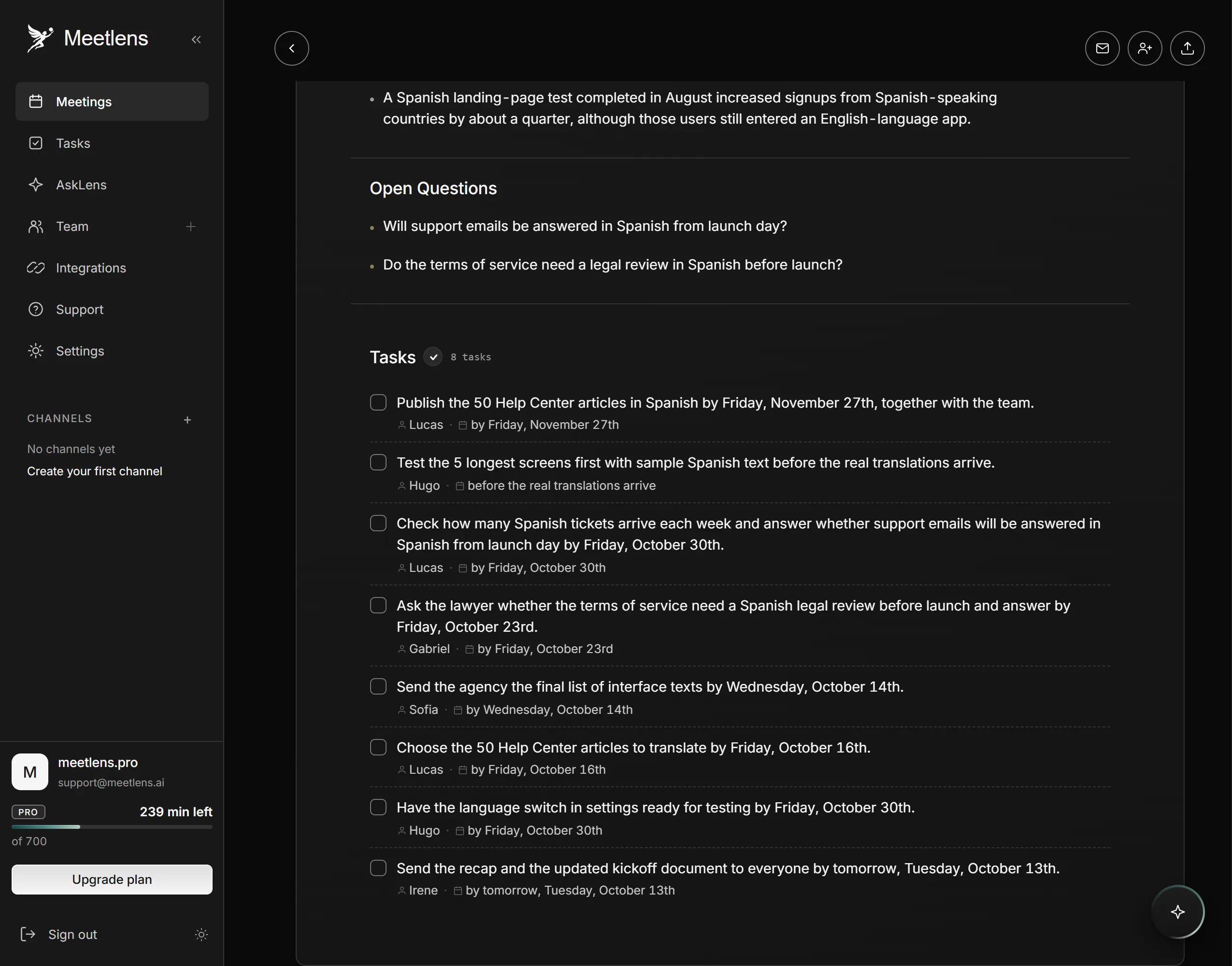
Before the list goes out, compare the Tasks section with the read-back at the end of the call. Four checks turn a draft into the final list:
- Owner. On the staged sync from the table above, "Let's find out before the quote goes out" named nobody, so the finance check came out Unassigned. Name an owner, or move the line to open questions.
- Date. Due dates in words, like "before the quote goes out" or "next week's agenda," need a calendar date: next week's agenda means the Tue, Oct 20 sync, and the finance answer is due no later than the quote, Thu, Oct 15.
- Extra items. Delete any line nobody committed to, such as an offer to help or a status update, and any item the group dropped later in the same call.
- Duplicates. If a task repeats a question already listed under Open Questions, keep it there and on the next meeting's agenda, not on the action items list.
Meetlens doesn't send tasks to a tracker: copy the confirmed items, or export the report as Markdown, TXT or PDF on the Pro and Business plans. To see how it drafts meeting action items, record your next browser call on the Free plan, which includes 10 AI reports a month, and compare the Tasks section with your own notes.
Once the list exists, who needs to see it — and how?
Sharing action items by email
Send a follow-up email when one relationship is the point, and a recap email when the whole group needs the record. A follow up email after meeting with a client or a candidate thanks them, restates the action items that involve them, and asks for one next step. A recap goes to everyone who attended, with each action item, its owner and its date; a meeting recap email example shows the full layout.
When someone wasn't in the meeting
Someone who missed the meeting needs their own action items first, then the outcomes that change their work. An item assigned to an absent person is a proposal until that person accepts it, so ask them to confirm the owner and the date within a day. For the message itself, see what to send after a missed meeting.
Automating the after-meeting work
Software can take over the recording, the transcript and the first draft of the action items; confirming owners, setting dates and chasing progress stay with people. Drafting is easy to hand to a tool; agreeing who does what needs the people who will do the work. Meeting automation covers which after-meeting steps to hand off and which to keep.