Meeting Recap Email Examples (Plus a Template and a Minutes Email Format)
 Meetlens Editorial10 min readUpdated October 17, 2026
On this page
- What is a meeting recap email?
- What should a meeting recap email include?
- Meeting recap email template
- Meeting recap email examples
- How to send meeting minutes by email
- When to send a recap email and who should get it
- How to write a recap email from notes or an AI summary
- Follow-up email instead of a recap email
- Meeting recap beyond email
- A recap email for people who missed the meeting
A meeting recap email — a short written summary sent after the meeting — puts every decision and action item from it in one message, each task with an owner and a due date. Below: how a recap email after a meeting differs from a follow-up and from meeting minutes, what to include, a recap email template, meeting recap email examples, emailing meeting minutes, timing and recipients, and drafting it from notes.
What is a meeting recap email?
A meeting recap email is a short message sent after a meeting that lists what was decided, who owns each next step, and what is still open, so everyone works from the same version. It's also called a meeting summary. A team meeting recap posted in Slack or Teams does the same job inside the team. The formal record a board or committee approves is a different document: the minutes of meeting (MoM).
| Meeting recap email | Follow-up email | Meeting minutes | |
|---|---|---|---|
| Job | Record decisions and next steps | Move one relationship forward | Official record of what the group did |
| Sent to | Participants and task owners | One person or client contact | Members of the body |
| Opens with | The decisions | Gratitude: a thank-you line | Meeting details and attendance |
| Tone | Plain | Personal | Formal, approved by the group |
The recap email also becomes institutional memory: a dated record of each decision for people who join the project later.
Meeting Recap in new Outlook for Windows and Outlook on the web is not an email: it's a view on a past Teams meeting in your calendar, with links to its files, transcript and recording. Microsoft Teams shows a similar Recap in the meeting chat and, with Teams Premium or a Microsoft Copilot license, can draft an email from its AI summary.
What should a meeting recap email include?
A recap email needs six things: the meeting name and date in the subject, a one-line purpose, the decisions, action items with owners and due dates, open questions, and links to notes or the recording. That is also how to summarize a meeting in an email:
- Subject: the meeting name and date.
- Purpose line: the goal of the meeting in one sentence.
- Decisions: what was agreed, one per line. Decision-making is what the meeting was for, so decisions come right after the purpose line.
- Action items: each task with one owner and a due date.
- Open questions: what is unresolved, who answers it, and by when.
- Links: the notes, the recording, the deck.
Give every action item one named owner: a person can be held to a date, "the team" can't, and that is where accountability starts. Start each task with a verb — "Send," "Book," "Confirm" — because verbs tell the owner what done looks like.
Leave out what was discussed, who said what, and the full transcript; link the recording instead. A meeting that produced only tasks needs just an action items email: subject, tasks with owners and dates, links.
Meeting recap email template
Copy this recap email template, keep the section order, and delete any section that is empty rather than writing "none." It's plain text, so it pastes into any email client without losing its structure. Replace each bracketed placeholder. For readability, keep paragraphs to one or two lines and everything else in bullet point lists.
The recap email template, block by block
Subject: Recap: [Meeting name] — [Day, Mon DD]

Hi [team or name],

Purpose: [why we met, in one line]

Decisions
- [What was decided, one per line]

Action items
- [Verb + task] — [Owner] — [Day, Mon DD]

Open questions
- [Question] — [Who answers] — [By when]

Links
- Notes and recording: [link]

Next meeting: [Day, Mon DD]

If I got an owner or a date wrong, reply by [Day, Mon DD].
[Your name]
- Purpose one line
- Decisions one per line
- Action items task — owner — due date
- Open questions question — who answers — by when
- Links
- Next meeting
Subject: Recap: [Meeting name] — [Day, Mon DD]
Hi [team or name],
Purpose: [why we met, in one line]
Decisions
- [What was decided, one per line]
Action items
- [Verb + task] — [Owner] — [Day, Mon DD]
Open questions
- [Question] — [Who answers] — [By when]
Links
- Notes and recording: [link]
Next meeting: [Day, Mon DD]
If I got an owner or a date wrong, reply by [Day, Mon DD].
[Your name]Two other subject line patterns: "[Project]: decisions and next steps, [Mon DD]" and "Action items from [Meeting name], [Day, Mon DD]."
Meeting recap email examples
Here are four recap emails for the situations people ask about most — a team meeting, a client meeting, a 1:1 with your manager, and a meeting that ended without a decision. Each meeting recap email example follows the order of the recap email template, drops what its recipient doesn't need, and names any other change in its When line.
Dates like Friday, Oct 16, replace "next week" and remove the ambiguity. An internal recap can carry team shorthand or an emoji; a client recap leaves out internal jargon, code names, slang and emojis.
Illustrative examples: names, dates and details are invented.
Internal team meeting recap
When: after a weekly team meeting that everyone attended.
Subject: Recap: New signup form — Wed, Oct 14

Purpose: agree on the scope and launch date of the new signup form.

Decisions
- Launch the new form on Tue, Oct 27.
- The mobile version waits for the next release.

Action items
- Send the final form copy to design — Lena — Fri, Oct 16
- Book usability tests with five customers — Omar — Mon, Oct 19

Open questions
- Does the form still need the phone number field? — Omar asks legal — Fri, Oct 16

Notes and recording: [link]
Next meeting: Wed, Oct 21
Client meeting recap
When: after a client call, or when a client asks for a minutes of meeting email after one. Write it for them: one thank-you line, then the decisions, with Action items renamed Next steps.
Subject: Recap: Training plan for your support team — Thu, Oct 15

Hi Karen,

Thank you for your time today. Here is what we agreed.

Decisions
- Two live training sessions: Tue, Oct 27 and Thu, Oct 29, 10:00 a.m. ET.
- We record both for agents who can't attend.

Next steps
- Send the attendee list — Karen — Wed, Oct 21
- Send invites and the agenda — Dan — Thu, Oct 22

Open question
- Do team leads need a separate admin session? — Dan confirms — Thu, Oct 22

Recording of today's call: [link]
Please reply by Fri, Oct 16 if anything differs from your notes.

Dan
Recap to your manager after a 1:1
When: after a 1:1 with your manager. Action items split into yours and your manager's. A manager can send the same recap email after a meeting with an employee: swap "My" and "Your."
Subject: Recap: our 1:1 — Mon, Oct 19

Hi Rachel, here's what I took from today.

Decisions
- The vendor review comes before the Q4 report; the report moves to Fri, Nov 6.
- I'll train the two new analysts.

My action items
- Send the vendor shortlist — Fri, Oct 23
- Draft the analysts' training plan — Wed, Oct 28

Your action item
- Approve the conference budget request — Fri, Oct 23

Open question
- Do I take over the weekly metrics email? We decide at our 1:1 on Mon, Nov 2.

Chris
Recap of a meeting with no decision yet
When: the meeting ended without a decision. The recap email records what is missing, who will get it, and when the group decides. Open questions move above Action items here: they are the reason for the next meeting.
Subject: Recap: Office lease options — Tue, Oct 20 — no decision yet

Purpose: choose between renewing our lease and moving.

No decision today: we need two numbers first.

Open questions
- What will the landlord offer for a three-year renewal? — Paul — Fri, Oct 23
- What would a move cost, including IT setup? — Mei — Tue, Oct 27

Action items
- Book the decision meeting with leadership — Paul — Wed, Oct 21

Decision meeting: Thu, Oct 29, with both numbers in hand.
Notes: [link]
How to send meeting minutes by email
To send meeting minutes by email, keep the body short — the date, the meeting and a two-line summary — attach or link the minutes of meeting, and ask for corrections by a specific date. Unlike a meeting recap email, a meeting minutes email is a cover note for a document the group still has to approve. The secretary, or whoever took the meeting minutes, usually sends it.
The minutes of meeting email format:
- Subject: "Meeting minutes: [Body or meeting] — [Date] — for review."
- Body: a two-line summary of what was done. The Robert's Rules of Order FAQ sets the rule: "Minutes are a record of what was done at a meeting, not a record of what was said."
- Email attachment or link: a PDF fixes the version under review; a shared document keeps one copy for comments.
- Corrections and approval: one deadline for corrections, then who approves the record and when. Mark the file DRAFT until then.
Sending minutes of meeting email sample
Subject: Meeting minutes: Finance Committee — Thu, Oct 8 — for review

Hi all,

The draft minutes of meeting from Thu, Oct 8 are attached as a PDF and saved in the shared folder: [link].

In short: the committee approved the Q4 budget and asked staff for two audit firm quotes.

Please send corrections by Wed, Oct 14. The committee votes on the meeting minutes at its next meeting, Thu, Nov 12.

Megan, Committee Secretary
When to send a recap email and who should get it
Send the meeting recap email the same day, to everyone who attended plus anyone who owns an action item or missed the meeting. The host or the note-taker sends it. Sent the same day, a recap email after a meeting reaches people before they act on their own version of the call; after a late meeting, send it the next morning, within 24 hours.
The etiquette fits in one line: To means act, Cc means know.
- To: attendees and action item owners.
- The Cc (carbon copy) line: stakeholders who need the outcomes but have no task.
- Absentees: in To, with a first line that points to what concerns them.
- Formal meeting minutes: the body's distribution list, the mailing list that reaches every member.
For privacy, a client gets a separate recap email without internal items such as margin numbers or who disagreed. An internal recap can go to the team's Slack channel instead; a client still gets email.
Reply to all with only the corrected line when someone fixes an owner or a date after you send the recap email, so everyone keeps one current version.
How to write a recap email from notes or an AI summary
Write the meeting recap email from notes taken during the meeting, not from memory, and check every decision, owner and due date against the record before you send it.
Meetlens, an AI meeting minutes generator that runs as a Chrome extension, records the audio of a browser meeting in Google Meet, Zoom Web, Microsoft Teams Web or Webex without a bot joining the call; it also takes uploaded recordings. With no bot, the platform shows no recording notice, so announce the recording yourself. General Meeting, the default report format, has Decisions, Open Questions and Tasks sections that map onto the recap email template above; review each line against the transcript before you copy it.
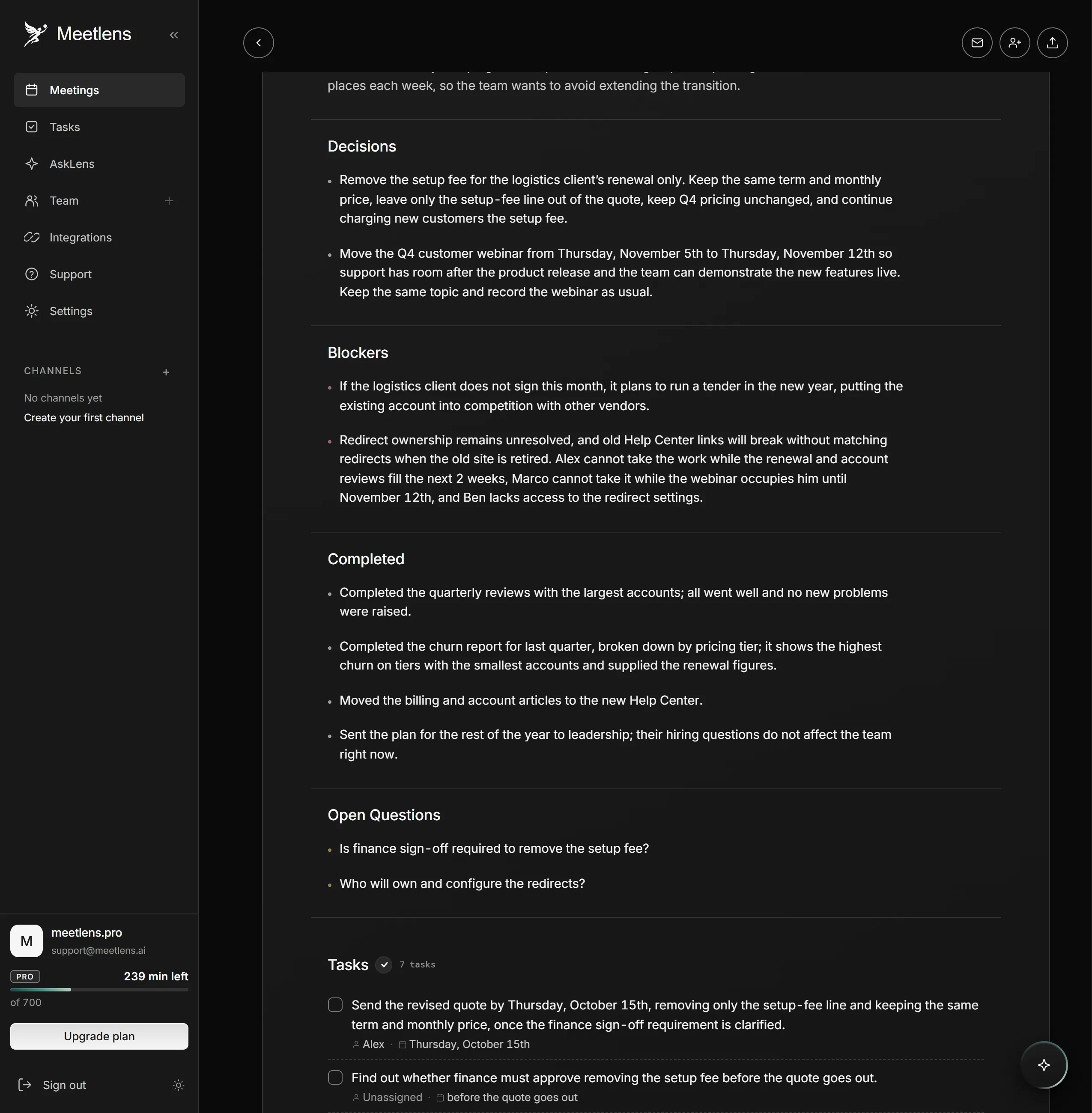
On a staged test meeting, a customer success weekly sync, the report listed two decisions, two open questions and a Tasks block. The recap email built from it:
Subject: Recap: Customer success weekly sync — Tue, Oct 13

Purpose: decide on the logistics client renewal, the Q4 webinar date and the help center migration.

Decisions
- Drop the setup fee for the logistics client's renewal only; the term, monthly price and Q4 pricing stay the same.
- Move the Q4 customer webinar from Thu, Nov 5 to Thu, Nov 12.

Action items
- Send the revised quote — Alex — Thu, Oct 15
- Draft the webinar invite list — Marco — Tue, Oct 20

Open questions
- Does dropping the fee need finance sign-off? — owner not set — before the quote goes out
- Who owns the help center redirects? — Nora gets an owner named — Tue, Oct 20

Notes and recording: [link]
Next meeting: Tue, Oct 20
What changed between the report and the email:
- Action items kept the two tasks with an owner and a calendar date, matching the note-taker's read-back at the end of the call. The finance sign-off and the redirect owner went under Open questions; the other tasks stay in the linked notes.
- "Next week's agenda" became Tue, Oct 20, the date said at the end of the call, checked in the transcript.
- Each decision shrank to one line; the purpose line came from the host's opening words.
Before you send, run a short checklist: proofreading for a typo in names, amounts and dates; one owner and one due date per action item, with "owner not set" or "date not set" where one is missing; nothing internal in a client version.
On Pro (15 drafts a month) and Business (50 a month), Meetlens also drafts a follow-up email with the decisions and action items, a starting point for the relationship email below. It doesn't send the draft, so check every owner before you do. Paid plans also export the report as Markdown, TXT or PDF.
What if the email's job isn't to document, but to move a relationship forward?
Follow-up email instead of a recap email
A follow-up email fits when one person or one deal is the point: a prospect after a demo or a candidate after an interview. It opens with thanks, recalls one or two points, and asks for one next step. A meeting recap email serves a group; a one-to-one follow-up email serves one relationship.
Meeting recap beyond email
A meeting recap doesn't have to be an email: teams also post it in a chat channel, add it to the shared project doc, or use the built-in recap views covered above. The content stays the same in every channel: decisions, action items with owners and dates, open questions and links.
A recap email for people who missed the meeting
From the recap email, someone who missed the meeting needs three things: the decisions that change their work, their own action items with dates, and the recording link. Besides the recap email, send them a short personal note with those three, and ask them to confirm any task assigned while they were away.