How to Write a Follow-Up Email After a Meeting (8 Templates)
 Meetlens Editorial13 min readUpdated October 17, 2026
On this page
- What should a follow-up email after a meeting include?
- When should you send a follow-up email after a meeting?
- How to write a follow-up email after a meeting, step by step
- 8 follow-up email templates after a meeting
- What follow-up actions should happen after a meeting?
- How to write a follow-up email from your notes (or an AI draft)
- Follow-up email vs. recap email vs. meeting minutes
- A follow-up email for someone who missed the meeting
A follow-up email after a meeting thanks people for their time, recaps what was decided, lists next steps with owners and dates, and makes one clear ask. It is how the action items you agreed on actually reach people's inboxes. Below: what to include, when to send it, how to write it step by step, 8 templates, the other meeting follow-up actions, and drafting it from your notes.
What should a follow-up email after a meeting include?
A good follow-up email after a meeting has five parts: a specific thank-you, a one-line reminder of what you met about, the decisions, the next steps with owners and dates, and one clear ask. In order:
- A specific thank-you. Gratitude for one thing that happened in this meeting. "Thank you for taking the time to walk me through your onboarding process" shows appreciation; "Thanks for your time" shows nothing.
- What you met about. One line of context, so the email still makes sense when forwarded.
- The key decisions. What the meeting's decision-making produced, one per line.
- The next steps. Each action item with one owner and a due date.
- One clear ask. The single reply you need, with a date. This is the email's call to action; with two asks, the reader answers the easier one.
The five parts in one email (illustrative; names and details are invented):
Subject: Next steps from today's pilot planning call

Hi Nadia,

(1) Thank you for walking me through how your support team
handles weekend tickets. The Monday backlog example made the
problem concrete.

(2) We met to plan a 30-day pilot for your support team.

(3) Decisions
- The pilot starts Mon, Nov 2, with 10 agents.
- We measure time to first reply.

(4) Next steps
- Send the pilot agreement — Theo — Wed, Oct 21
- Share the list of 10 agents — Nadia — Fri, Oct 23

(5) Could you confirm by Fri, Oct 23 who signs the agreement
on your side?

Best,
Theo
The five parts in one follow-up email
Subject: Next steps from today's pilot planning call
Hi Nadia,
Thank you for walking me through how your support team handles weekend tickets. The Monday backlog example made the problem concrete.
We met to plan a 30-day pilot for your support team.
Decisions
- The pilot starts Mon, Nov 2, with 10 agents.
- We measure time to first reply.
Next steps
- Send the pilot agreement — Theo — Wed, Oct 21
- Share the list of 10 agents — Nadia — Fri, Oct 23
Could you confirm by Fri, Oct 23 who signs the agreement on your side?
Best,
Theo
- Specific thank-you
- What you met about
- Decisions
- Next steps with owner and date
- One clear ask
What to leave out:
- The full transcript or a blow-by-blow of what was discussed. Link the notes or recording instead.
- Internal notes: your margin, pricing room, your read of who disagreed.
- Promises nobody confirmed. A "maybe" on a date or discount goes in as an open question.
A thank-you note only thanks; a follow-up email after a meeting also carries the next steps.
When should you send a follow-up email after a meeting?
Send the follow-up email the same day — within 24 hours at the latest — while details are fresh and before anyone forms their own version of what was agreed. The 24-hour window is common practice, not a research finding. Fellow's guide to meeting follow-up emails puts it this way: "The ideal window is within 24 hours of the meeting."
Hermann Ebbinghaus's experiments in Memory (1885), the origin of the forgetting curve, found that forgetting is fastest soon after learning. A same-day email fixes owners and dates in writing before they fade.
Two exceptions:
- After a networking event, wait a few days. Biscred's event follow-up guide advises: "Safest bet: Send 3 to 4 days post event."
- After a late Friday meeting, send it Monday morning, at the top of the week's inbox.
Follow up after a meeting even if you missed that window: a late follow-up email beats none. Open with the next step, not an apology.
How to write a follow-up email after a meeting, step by step
Write the follow-up email from your meeting notes in six steps: subject line, a specific opener, a two-to-three-bullet recap, next steps with owners and dates, one ask, and a short close.
- Write the subject line. Name the meeting and the next step, so the email is easy to find later.
- Open with a specific line. Thank the reader for one thing they did in the meeting.
- Recap in two or three bullets. Only points that change what someone does next.
- List next steps with owners and dates. One name per task; a calendar date, not "next week."
- Make one ask. One reply should answer it: "Could you confirm the signer by Friday, Oct 23?"
- Close briefly. The next touchpoint ("Talk Friday at 2") and your name.
Short wins with a busy reader: Fellow's FAQ, on the same page, says "usually 150–250 words is enough."
Subject lines that get opened
A good subject line names the meeting and the next step, so the reader knows what the email is before opening it. Eight formulas:
- Next steps from today's [topic] call
- [Company] × [Company]: recap and next steps — [date]
- Following up: [decision needed] by [date]
- Action items from [meeting name] — [date]
- Thank you for today, [Name]
- Great connecting at [event]
- [Project]: what we agreed on [date]
- Next meeting on [topic]: [option 1] or [option 2]?
Avoid a bare "Follow-up" or "Quick question": neither says which meeting the email belongs to.
Professional ways to say "following up"
The professional way to say you're following up is to name the meeting and what you're sending, in one opening sentence. Openers that work:
- As a follow-up to our meeting today, here are the next steps we agreed on.
- Following up on our call about [topic], I've attached [document].
- Thanks for walking me through [process] this morning.
- Picking up where we left off on [topic]: [update].
- As promised in today's meeting, here is [item].
- To recap our conversation on [day]: [one-line summary].
- I'm writing to confirm the next steps from our [topic] meeting.
- I will follow up by [day] with [deliverable].
Three to avoid:
- "Just checking in" gives the reader nothing to act on.
- "Per my last email" reads as a reprimand.
- "Sorry to bother you" apologizes for doing your job.
On tone, polite means specific. Follow-up email etiquette comes down to the reader's time: name the meeting, the task and the date, and skip apologies for writing.
8 follow-up email templates after a meeting
Pick the template by who you met and how the meeting ended, then replace every bracket with a detail only that meeting could produce. That detail is the personalization that separates a follow-up email from a form letter. Each meeting follow-up email template starts with its subject line.
Illustrative templates: brackets mark what to replace.
1. After a client meeting
When to use: after a working session with a client you already serve.
Subject: [Company] × [Your company]: recap and next steps — [Mon DD]

Hi [Name],

Thank you for taking the time today. Your example of [specific
detail] made [their problem] much clearer.

What we agreed
- [Decision 1]
- [Decision 2]

Next steps
- [Task] — [Owner on your side] — [Day, Mon DD]
- [Task] — [Owner on their side] — [Day, Mon DD]

Could you confirm [the one thing you need] by [Day, Mon DD]?

I look forward to [what comes next, e.g., the rollout].
[Your name]
2. After an internal team meeting, with action items
When to use: after a team meeting that assigned tasks.
Subject: Action items from [meeting name] — [Day, Mon DD]

Hi team,

Thanks for a focused session. Here's where we landed.

Decision: [what was decided]

Action item                  Owner        Due
[Verb + task]                [Name]       [Day, Mon DD]
[Verb + task]                [Name]       [Day, Mon DD]
[Verb + task]                [Name]       [Day, Mon DD]

Open: [question] — [who answers] — [Day, Mon DD]

If an owner or date is wrong, reply by [Day, Mon DD].
Otherwise these go into [tracker] tomorrow.
[Your name]
3. Thank-you follow-up after a meeting
When to use: when gratitude is the main message: to a mentor, or as a thank-you email to a client after a meeting where they shared advice.
Subject: Thank you for today, [Name]

Hi [Name],

Thank you for taking the time to meet with me today. I appreciated
your insights on [topic], especially [specific point], and I've
already [small action you took because of it].

As promised, here is [link, document or introduction].

I look forward to [next step or staying in touch].

Best,
[Your name]
4. After meeting someone at a networking event
When to use: after a conference, meetup or other business networking event, written from the notes on the back of their business cards.
Subject: Great connecting at [event name]

Hi [Name],

It was a pleasure meeting you at [event] on [day]. I enjoyed our
conversation about [topic], and your point about [specific
detail] stuck with me.

[One line of value: the article, introduction or answer you
promised.]

Would you be open to a 20-minute call about [purpose]?
My calendar: [link].

Best,
[Your name]
[Role, company]
5. After a first meeting with a prospect
When to use: after a first call with a prospect. One email, one next step. For later stages of a deal, see these sales follow-up templates.
Subject: Next steps from today's [topic] call

Hi [Name],

Thanks for walking me through [their current process] today.
You mentioned [their main problem, in their words], so I've
attached [one-page summary or case study] that addresses it.

What we agreed: [next step, e.g., a demo for your team lead].

Does [Day, Mon DD] at [time] work for that? I'll send the
invite as soon as you confirm.

[Your name]
6. When the meeting ended without a decision
When to use: the meeting ended with "let us think about it."
Subject: Following up: [decision needed] by [Day, Mon DD]

Hi [Name],

Thank you for the open discussion today. We didn't settle
[the question], so here is where it stands.

Options
- [Option A] — [main trade-off]
- [Option B] — [main trade-off]

Still missing
- [Information] — [who gets it] — [Day, Mon DD]

Could we decide on [Day, Mon DD], once [information] is in?
If something else is holding the decision, tell me what it is.

[Your name]
7. Short follow-up email after a meeting
When to use: a quick call with one task on each side.
Subject: Next steps — [topic]

Hi [Name], thanks for today. As agreed, I'll [your task] by
[Day, Mon DD], and you'll [their task] by [Day, Mon DD].
Talk on [Day, Mon DD].
[Your name]
8. To schedule the next meeting
When to use: the meeting ended with "let's meet again" and no date.
Subject: Next meeting on [topic]: [option 1] or [option 2]?

Hi [Name],

Thanks for today's discussion of [topic]. To keep [project]
moving, let's meet again once [what has to happen first].

Would either of these work?
- [Day, Mon DD], [time] [time zone]
- [Day, Mon DD], [time] [time zone]

Agenda: [item 1], [item 2]. I'll send the invite as soon as
you pick one.

[Your name]
What if they don't reply?
Send one short reminder after about a week, the interval Biscred suggests for event contacts, and restate the ask so a one-line reply answers it:
Hi [Name], bringing this back to the top of your inbox: could you confirm [ask] by [Day, Mon DD]?
What follow-up actions should happen after a meeting?
The follow-up email is one of five follow-up actions: confirm the notes, send the follow-up, move action items into your tracker, book the next meeting, and check in before the first deadline.
| Follow-up action | Who | When |
|---|---|---|
| Confirm the notes: decisions, owners, dates | Host or note-taker | Right after the meeting |
| Send the follow-up email | Whoever ran the meeting or owns the relationship | Once the notes are confirmed |
| Move action items into your tracker: a project board, ticket queue or shared sheet | Each task owner, or the sender | The day the email goes out |
| Book the next meeting and send the calendar invite | Host | As soon as a date is agreed |
| Check in before the first deadline | Sender | A day or two before the earliest due date |
A follow-up email without tasks in a tracker is a reminder, not a process. People read the email once; the tracker shows the task again before its date. The check-in is one line to the task owner: "Still on track for Thursday?"
How to write a follow-up email from your notes (or an AI draft)
The fastest follow-up email is written from notes taken during the meeting: the decisions and next steps are already there, so you only add the thank-you and the ask.
In Meetlens, getting from a recorded call to a draft takes four steps:
- Record the call. Meetlens, a Chrome extension, records the audio of a browser meeting in Google Meet, Zoom Web, Microsoft Teams Web or Webex without a bot joining the call. For calls with clients, pick Client Meeting in the format drop-down above Start recording. With no bot, the platform shows no recording notice, so announce the recording and get each person's yes.
- Open the report. It holds your meeting notes with action items: decisions under Agreed, tasks with owners and dates under Next Steps.
- Click Follow-up. Once the report is ready, Follow-up opens an editable draft with Decisions and Action items filled in. Closing the window discards your edits, and opening the meeting again later writes a new draft that counts toward your monthly limit, so finish your edits in one sitting.
- Copy it or click Open email. Copy works with any email client, including Gmail in the browser. Open email starts a message in your default mail app, such as Microsoft Outlook, with the subject "Follow-up: [meeting title]." Meetlens doesn't send the email; you do.
Follow-up drafts come with the paid Meetlens plans: 15 a month on Pro, 50 on Business, none on Free.
Here is that path on a staged client call: an onboarding check-in between a software vendor (Jonah, account manager; Owen, trainer) and a clinic group (Rosa, operations manager; Ken, IT lead).
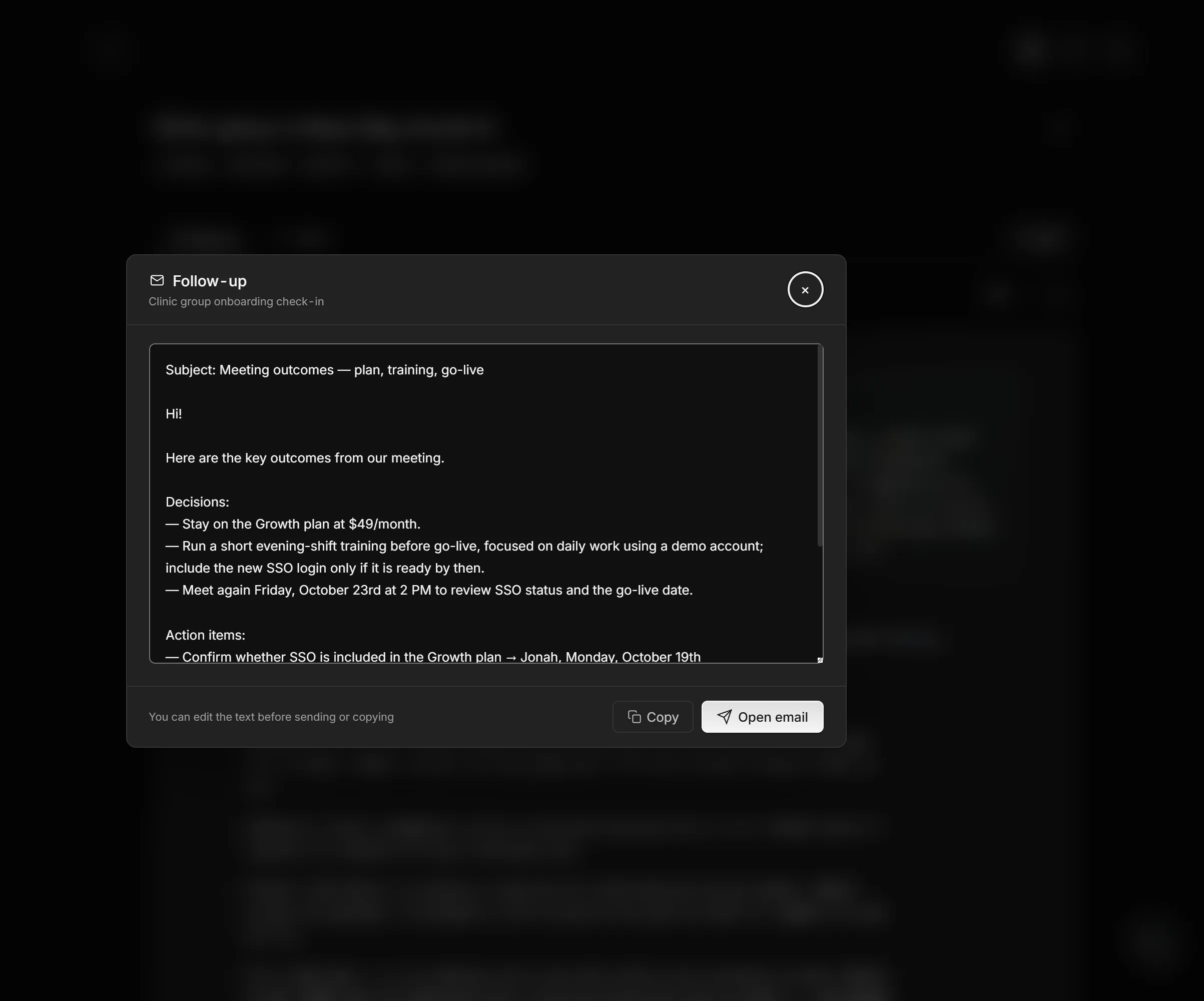
The draft had three decisions and four action items with owners and dates, but no thank-you, no purpose line and no ask. After editing:
Subject: Next steps from today's onboarding check-in — Fri, Oct 16

Hi Rosa and Ken,

Thank you for taking the time today, and for the feedback from
the first weeks. Good to hear the day staff like having
schedules in one place.

We met to confirm what you need before the Nov 2 go-live.

Decisions
- You stay on the Growth plan at $49 a month.
- We run a short evening-shift training before go-live, on a
  demo account, so it doesn't depend on single sign-on.

Next steps
- Confirm whether single sign-on is included in the Growth
  plan — Jonah — Mon, Oct 19
- Send the list of all 120 staff email addresses — Ken —
  Tue, Oct 20
- Schedule the evening-shift training — Owen — Wed, Oct 21

Rosa, after you talk to the clinic directors, could you reply
by Tue, Oct 20 with whether go-live moves if single sign-on
isn't ready by Nov 2?

Talk to you Friday, Oct 23, at 2 p.m.
Jonah
What changed, and why:
- Subject line. "Meeting outcomes — plan, training, go-live" became a dated subject the client can search for. Open email fills in its own subject, so delete the draft's "Subject:" line from the body.
- Thank-you and purpose line. The generic greeting became both names, the thanks points to Rosa's feedback, and the purpose comes from Jonah's opening words.
- Four action items became three next steps and one ask. Rosa's task, deciding whether go-live moves, became the ask, and the next call, which the draft listed as a decision, closes the email instead.
A draft from ChatGPT or another chatbot, made from pasted notes, needs the same review. Give the chatbot rules along with the notes, so it leaves the thank-you and the ask to you and doesn't guess owners:
Write a follow-up email from the meeting notes below. Start with a subject line that names the meeting and the next step. Use only the decisions, owners and dates that appear in the notes; if a task has no owner or no date, list it under "Open questions" instead of guessing. Order: a [THANK-YOU] line for me to fill in, one line on what we met about, the decisions, next steps as "task — owner — date," and an [ASK] line for me to fill in. Notes: [paste notes]
Before you hit send, do a round of proofreading against the report or your notes:
- Names: spelled right, with no "Speaker A" left in place of a person.
- Numbers and prices: each matches what was said.
- Who promised what: an AI draft can give a task to the wrong person, or to someone nobody named.
- Dates: each weekday matches its date.
- Nothing internal: no margins or debate the client didn't hear.
What if the email has to document the meeting for everyone, or reach someone who wasn't there?
Follow-up email vs. recap email vs. meeting minutes
A follow-up email after a meeting moves one relationship forward and asks for the next step; a recap email and meeting minutes record the outcome for the whole group. A recap goes to everyone who attended, with decisions, owners and open questions but no personal thank-you; minutes are the formal record a board or committee approves. When one message would do both jobs, send the recap to the group and a short follow-up email to the person whose answer you need.
A follow-up email for someone who missed the meeting
Someone who missed the meeting needs their own tasks, the decisions that change their work, and the recording link, not a thank-you. Put their tasks in the first line, then the decisions, then the link to the notes or recording. Ask them to confirm any task assigned while they were away, because they never agreed to it in the room.