12 Sales Follow-Up Email Templates for Every Stage of the Deal
 Meetlens Editorial19 min readUpdated October 17, 2026
On this page
- What is a sales follow-up email?
- How to write a sales follow-up email
- Sales follow-up email subject lines
- 12 sales follow-up email templates
- When to send a sales follow-up email and how many to send
- How to say "I will follow up" professionally
- Using AI to draft sales follow-up emails from the call
- Sales follow-up email mistakes and the CAN-SPAM basics
- Following up after other meetings
A good sales follow-up email points back to what the prospect actually said, adds one new piece of value and asks for one dated next step. With sales conversation recording, you already have what a follow-up needs to sound like the call you just had. Below: how to write one, 12 copy-ready sales follow-up email templates for every stage of the deal, then timing, phrasing, AI drafts and CAN-SPAM.
What is a sales follow-up email?
A sales follow-up email is any message you send after a first touch — a call, demo, proposal or event — to move the deal to a specific next step. The reader is a sales lead or customer who already knows you, so the email builds on what they told you instead of introducing your company. Each one ends with a single next step: a meeting, a decision, a document or an introduction.
A recap email after an internal meeting does a different job: it records decisions for everyone who attended. A sales follow-up email is written by one salesperson to one prospect and asks for one thing.
How to write a sales follow-up email
A good sales follow-up email has five parts: a specific subject line, a reference to your last conversation, one new piece of value, one clear call to action and a short sign-off. Write each part from your call notes, not from memory:
| Call notes field | Email line it becomes | Example line |
|---|---|---|
| Pain point, in the prospect's words | The opening reference | "You said rebuilding the Monday schedule takes your coordinators most of the morning." |
| Numbers: team size, budget, deadline | The value line | "For the 40 technicians you mentioned, the annual price is [price]." |
| Stakeholder named on the call | The loop-in line | "You said your IT lead reviews security, so I've attached our security overview." |
| Agreed next step | The call to action | "Does Thursday at 2 p.m. still work for the technical review?" |
From call notes fields to email lines
Call notes fieldEmail line
-
Pain point, in the prospect's words
The opening reference
You said rebuilding the Monday schedule takes your coordinators most of the morning.
-
Numbers: team size, budget, deadline
The value line
For the 40 technicians you mentioned, the annual price is [price].
-
Stakeholder named on the call
The loop-in line
You said your IT lead reviews security, so I've attached our security overview.
-
Agreed next step
The call to action
Does Thursday at 2 p.m. still work for the technical review?
1. A subject line that names the topic
The subject line should tell the prospect what the email is about and what you want. "Pilot scope and Thursday's technical review" says both; "Following up" says neither. The next section lists subject lines to copy.
2. A reference to your last conversation
Personalization in a sales follow-up email is one detail that only this conversation could produce: a phrase the prospect used, a number they gave, a worry they raised. "You said rebuilding the Monday schedule takes most of the morning" shows you listened; "I saw your company is growing fast" could go to anyone.
3. One new piece of value
Give the prospect something they didn't have when the call ended: the answer to a question you couldn't answer live, a price for their exact team size, a document a colleague of theirs asked for. Without it, the email is only a reminder.
4. One call to action (CTA)
A call to action (CTA) is the one thing you ask the reader to do, with a date. Phrase it as a yes-or-no question, so a one-word reply answers it: "Can we hold Thursday, Oct 22, at 2 p.m. for the technical review?" Two asks compete, and the reader answers the easier one or neither.
5. A short sign-off
Close with your name, title and one way to reach you. For readability, keep each paragraph to one or two sentences and drop jargon the prospect didn't use: if they said "scheduling," don't write "workforce orchestration." A commercial email also needs your postal address here (see the CAN-SPAM section).
How do you write a sales follow-up email politely?
Write politely by being specific and giving the prospect an easy way out, not by apologizing. Open with gratitude for one concrete thing ("Thanks for walking me through your dispatch process"), not a generic "Thanks for your time." Drop "just checking in," which gives nothing to act on; guilt, as in "I haven't heard back from you"; and apologies such as "Sorry to bother you."
Offer the exit instead: "If the timing is wrong, tell me and I'll check back in March." An easy no is still a reply, and a reply tells you where the deal stands.
Sales follow-up email subject lines
The best sales follow-up email subject lines name the topic or the next step, not the fact that you are following up. Along with your name and the first words of the body, the subject line is what the prospect sees before opening, so it shapes your open rates. Keep it short enough to read on a phone and specific enough to find in their inbox a month later.
After a call or demo:
- Next steps from Tuesday's [topic] call
- [Their company] pilot: scope and dates
- The answer on [question from the call]
- [N] seats: the pricing you asked for
After no response:
- Still aiming for [goal] by [date]?
- [Topic]: one question before [deadline]
- How [similar company type] handled [problem]
- Should I close the file on [project]?
After an event:
- Good to meet you at [event]
- Your question at [webinar name]
- [Mutual contact] suggested we talk
- After [event]: [topic] in 15 minutes?
Skip "Following up," "Checking in" and "Quick question": none of them says what the email is about.
12 sales follow-up email templates
Pick the template that matches the last real interaction, replace every bracket with something the prospect actually said or did, and send one call to action. The 12 templates follow the sales funnel, from the first call with a new lead to the handoff after a signed deal. Each sales follow-up email template lists when it fits, when it doesn't, two subject lines and a body of 60 to 100 words.
Illustrative templates written by the Meetlens editorial team. Brackets mark what to replace. Each template ends with [Your name]: use your full email signature there, and when the email promotes your product (templates 6–8 clearly do), add your postal address and a line on how to opt out, as the CAN-SPAM section explains.
1. After a discovery call
Use when: the first conversation ended with an agreed next step, such as a demo. Don't use when: the discovery call showed no project or budget this year. Send a two-line thank-you instead. Subject lines: "Next steps from today's [topic] call" or "[Their goal]: a demo for you and [Name]"
Hi [Name],

Thanks for walking me through [their current process] today.
You said [pain point, in their words], and that it costs
[the time, money or risk they named].

What I heard matters most:
- [Requirement 1]
- [Requirement 2]
- [Requirement 3]

We agreed on a [30-minute] demo focused on [requirement 1],
with [stakeholder's name] joining. Does [Day, Mon DD] at
[time] work? I'll send the invite once you confirm.

[Your name]
Template 1: after a discovery call
Subject: Next steps from today's [topic] call
Hi [Name],
Thanks for walking me through [their current process] today. You said [pain point, in their words], and that it costs [the time, money or risk they named].
What I heard matters most:
- [Requirement 1]
- [Requirement 2]
- [Requirement 3]
We agreed on a [30-minute] demo focused on [requirement 1], with [stakeholder's name] joining. Does [Day, Mon DD] at [time] work? I'll send the invite once you confirm.
[Your name]
2. After a product demo
Use when: the buyer saw at least one feature tied to the problem they described. Don't use when: the demo surfaced a blocker you can't solve yet. Answer it honestly in its own email first. Subject lines: "Your question from today's demo: [topic]" or "After the demo: [next step] with [their team]"
Hi [Name],

Thanks for the time today, and for bringing [Name] and [Name].

Two moments from the demo that match what you told us:
- [Feature] handles [problem, in their words].
- [Feature] removes [manual step they described].

You asked [question you couldn't answer live]. The answer:
[one or two sentences].

The next step is [trial / technical review / proposal].
Could you tell me by [Day, Mon DD] who on your side should
join it?

[Your name]
3. After sending a proposal or quote
Use when: the proposal or price quote went out a few days ago and got no reply. Don't use when: the prospect already objected to the price. Answer the objection instead. Subject lines: "Questions on the [their company] proposal?" or "Pricing for [N] seats: the short version"
Hi [Name],

On [Day] I sent the proposal for [scope]. The short version:

- [Plan]: [price] per [unit], [term]
- Includes: [the two things they asked for on the call]
- Pricing valid until: [Mon DD]

If the quote needs a second look, such as a different seat
count or start date, I can revise it the same day.

Would 15 minutes on [Day, Mon DD] help you walk your team
through it?

[Your name]
4. When the buyer needs to loop in stakeholders
Use when: your contact has to bring finance, IT or their boss into the decision-making. In larger deals this group is the buying committee: everyone who signs off, up to the decision maker. Don't use when: you don't know yet who the decision maker is. Ask "Who else weighs in on this?" first. Subject lines: "A one-page summary for [stakeholder's team]" or "For [stakeholder's name]: [project] in four bullets"
Hi [Name],

You mentioned [stakeholder's name, role] needs to weigh in
before [decision]. To save you rewriting it, here's a
summary you can forward as is:

- Problem: [pain point, in their words]
- What we proposed: [scope]
- Cost: [price, term]
- What [role] usually asks about: [security / contract /
  integration]. Answer: [one line]

If it's easier, I can join a 20-minute call with
[stakeholder's name] on [Day, Mon DD]. Would that help?

[Your name]
5. After no response: first nudge
Use when: an email with a clear ask got no response within a few business days. Don't use when: your last email had no clear ask. Rewrite the ask instead of nudging. Subject lines: reply in the same thread to keep the original subject, or "[Topic]: does [Day] still work?"
Hi [Name],

Bringing this back to the top of your inbox. The one
question from my last email: does [Day, Mon DD] at [time]
work for [next step]?

If another day suits you better, reply with it and I'll
send the invite. And if [next step] has moved down your
list, a one-word "later" is a fine answer too.

[Your name]
6. After no response: second nudge with new value
Use when: the first nudge also went unanswered and you have new sales collateral on their problem: a case study, a white paper, a short comparison. Don't use when: you have nothing new to send. Skip to the last attempt (template 11). Subject lines: "How [similar company type] handled [their problem]" or "[Their problem]: a two-page case study"
Hi [Name],

On our call you said [pain point, in their words]. This
[case study / white paper] shows how [a company like
theirs] handled the same problem: [one-line result, with
the number from the document].

[Link]

If it applies to [their team], here are two times for a
15-minute look: [Day, Mon DD, time] or [Day, Mon DD, time].
If it doesn't, tell me and I'll stop sending material.

[Your name]
7. After a cold email that got no reply
Use when: your first cold email to someone you've never spoken with got no reply after several days. Don't use when: you have already sent two follow-ups without an answer. Stop there. Subject lines: "Re: [original subject]" (sent as a reply in the same thread) or "[Trigger event]: one idea for [their team]"
Hi [Name],

Adding one thing to my note from [Day]: I saw [trigger
event: a new location, a job post for [role], a product
launch]. Teams in that spot often have to solve [problem].

Is [problem] on your list this quarter? If yes, I can show
you in 15 minutes how [customer type] handles it. If not,
reply "not now" and I won't keep writing.

[Your name]
8. After a networking event or conference
Use when: you talked with the person at a conference, meetup or trade show, or they asked a question at your webinar. Don't use when: you only scanned their badge and never spoke. That's a cold email; write it like template 7. Subject lines: "Good to meet you at [event]" or "Your question at [webinar name]"
Hi [Name],

Good to meet you at [event] on [day]. You mentioned
[specific detail from the conversation], and I promised to
send [resource]. Here it is: [link].

I've also sent you a connection request on LinkedIn, so
you can put a face to the name.

If [topic] is on your plan for [quarter], would a 20-minute
call on [Day, Mon DD] or [Day, Mon DD] work?

[Your name]
9. After a missed meeting or no-show
Use when: the prospect didn't join a booked call. Send it within the hour. Don't use when: they have missed two booked meetings in a row. Treat it as no response. Subject lines: "Missed you today: two new times" or "Rescheduling our [topic] call"
Hi [Name],

I was on the [platform] link at [time] today, but we didn't
connect. No problem; days like that happen.

Two new times for the same [30 minutes] on [topic]:
- [Day, Mon DD], [time] [time zone]
- [Day, Mon DD], [time] [time zone]

Or pick any open slot here: [calendar link]. If [topic] has
slipped down your list, tell me, and I'll check back in
[month].

[Your name]
10. When a positive deal goes quiet
Use when: the deal was moving, with a good demo or a verbal yes, then went silent for longer than the buyer's own timeline allows. Don't use when: the prospect told you about a budget freeze or a later start. Write on the date they gave. Subject lines: "Still aiming for [goal] by [date]?" or "[Project]: where things stand"
Hi [Name],

When we spoke on [date], you were aiming to [goal] by
[date], and the next step was [step]. I haven't seen [step]
come through, so I'd rather ask than guess. Which is closest?

1. Still on track, just busy
2. Timing moved to [later date]
3. Priorities changed

A one-number reply is plenty, and I'll plan around it.

[Your name]
11. Last attempt (breakup email)
Use when: several touches, including one with new value, went unanswered. A breakup email ends the sequence politely and tells the prospect how to restart it. Don't use when: you mean it as a push ("last chance at this price"). Send it only if you will actually stop writing. Subject lines: "Should I close the file on [project]?" or "Closing the loop on [topic]"
Hi [Name],

I haven't heard back since [date], so I'll assume [project]
isn't a priority at the moment and close my file on it.

If I've got that wrong, reply with a date and I'll pick it
up from there. If it's a timing issue, tell me when to check
back, and I'll write then and not before.

Thanks again for the time you gave me on [topic].

[Your name]
Template 11: last attempt (breakup email)
Subject: Should I close the file on [project]?
Hi [Name],
I haven't heard back since [date], so I'll assume [project] isn't a priority at the moment and close my file on it.
If I've got that wrong, reply with a date and I'll pick it up from there. If it's a timing issue, tell me when to check back, and I'll write then and not before.
Thanks again for the time you gave me on [topic].
[Your name]
12. After the deal closes: handoff and next steps
Use when: the contract is signed and the customer relationship moves to onboarding with a colleague. Don't use when: your onboarding team sends its own welcome email. Then write a two-line introduction instead. Subject lines: "Welcome aboard: your onboarding contact and first steps" or "[Their company] kickoff on [Mon DD]"
Hi [Name],

Thank you for choosing [product]. Here's what happens next.

Your onboarding contact is [colleague's name, role], copied
here. [Colleague's name] already has the notes from our
calls, including [the requirement they care about most].

First steps:
- Kickoff call — [Day, Mon DD], [time]
- [Their task, e.g., send the user list] — [Name] — [Day, Mon DD]
- [Our task, e.g., set up accounts] — [Name] — [Day, Mon DD]

I stay your contact for [renewal / billing questions].

[Your name]
When to send a sales follow-up email and how many to send
Send the first sales follow-up email the same day as the call, space the next ones further apart, and stop after a clear last attempt. The schedule below has five touchpoints over about a month. It's a starting point, not a benchmark: shorten the gaps when the buyer set a deadline, and stretch them when they named a later date.
| Day | Touch | Why this timing |
|---|---|---|
| 0 | Recap with the next step (templates 1, 2 or 4) | The prospect still remembers what they agreed to |
| 2–3 | First nudge (template 5) | Time to check calendars, while your email is still near the top of the inbox |
| 7 | Second nudge with new value (template 6) | A new reason to reply, not the same ask |
| 14 | Update request (template 10) or a phone call | A second channel, in case email isn't where this buyer answers |
| 21–30 | Last attempt: a breakup email (template 11) | Closes the loop and clears your pipeline |
Send every nudge as a reply in the same email thread, so the prospect sees the original ask without searching. Log each touch in your customer relationship management (CRM) system with the date of the next one: the CRM reminder, not your memory, keeps your follow-ups going.
Five follow-up touches from day 0 to day 30
- Day 0Recap with the next steptemplates 1, 2 or 4
- Day 2–3First nudgetemplate 5
- Day 7Second nudge with new valuetemplate 6
- Day 14Update request or phone calltemplate 10
- Day 21–30Last attempt: a breakup emailtemplate 11
What is the 2-2-2 rule in sales?
The 2-2-2 rule is Mark Hunter's follow-up schedule for new customers: contact them 2 days, 2 weeks and 2 months after the purchase. In his 2013 post on The Sales Hunter, each touch is a phone call: at 2 days, thank the customer and check they got what they wanted; at 2 weeks, ask how things are going; at 2 months, revisit their needs and find a reason to meet. The goal is repeat business, so the rule starts after template 12.
Others use the same label for a mix of two follow-ups, two channels and a two-unit time window; HelloExit says "There is no single universal version." When someone cites the rule, ask which version they mean.
How to say "I will follow up" professionally
Name the date and the reason: "I'll send the revised quote by Thursday" works better than "I'll follow up soon." A dated promise tells the prospect what to expect and gives your next sales follow-up email a reason to exist. The first four phrases fit the end of a call, the last four an email:
- "I'll send the revised quote by Thursday."
- "I'll check [question] with our security team and email you the answer by Friday."
- "I'll send the calendar invite for [next step] before 5 p.m. today."
- "I'll call you Tuesday at 10 to hear what [stakeholder] said."
- "As promised, here is [item]."
- "I'll follow up on [Day] with [deliverable]."
- "You'll have [item] from me by [Day]. If you need it sooner, tell me."
- "I'll check back on [Day, Mon DD], the date you suggested."
Four to avoid, because none of them commits to anything: "I'll follow up soon," "I'll circle back," "I'll be in touch" and "Let me know your thoughts."
Using AI to draft sales follow-up emails from the call
An AI draft written from the call recording already contains the decisions and next steps; your job is to cut it to one goal and add a line only you could write.
Meetlens, a Chrome extension, records the audio of a browser video call in Google Meet, Zoom Web, Microsoft Teams Web or Webex without a bot joining. Choose Client Meeting in the format drop-down above Start recording, and the report gives you AI notes from sales calls: What the Client Needs with the client's own quotes, Agreed, Blockers & Objections, and Next Steps with owners and dates. With no bot, the platform shows no recording notice, so announce the recording and ask for a full-sentence yes. For a Zoom or Teams desktop-app call, import the recording file instead.
Follow-up drafts come only with the Pro plan (15 a month) and the Business plan (50 a month). Click Follow-up once the report is ready: it opens an editable draft with a subject line, Decisions and Action items. Meetlens doesn't send it: copy it into Gmail or Microsoft Outlook, or click Open email, and send it from your own address. Closing the window discards your edits, and clicking Follow-up after you reopen the meeting writes a new draft that counts toward your monthly limit, so finish your edits in one sitting. Draft the first follow-up from the call itself, then run it through the four checks at the end of this section.
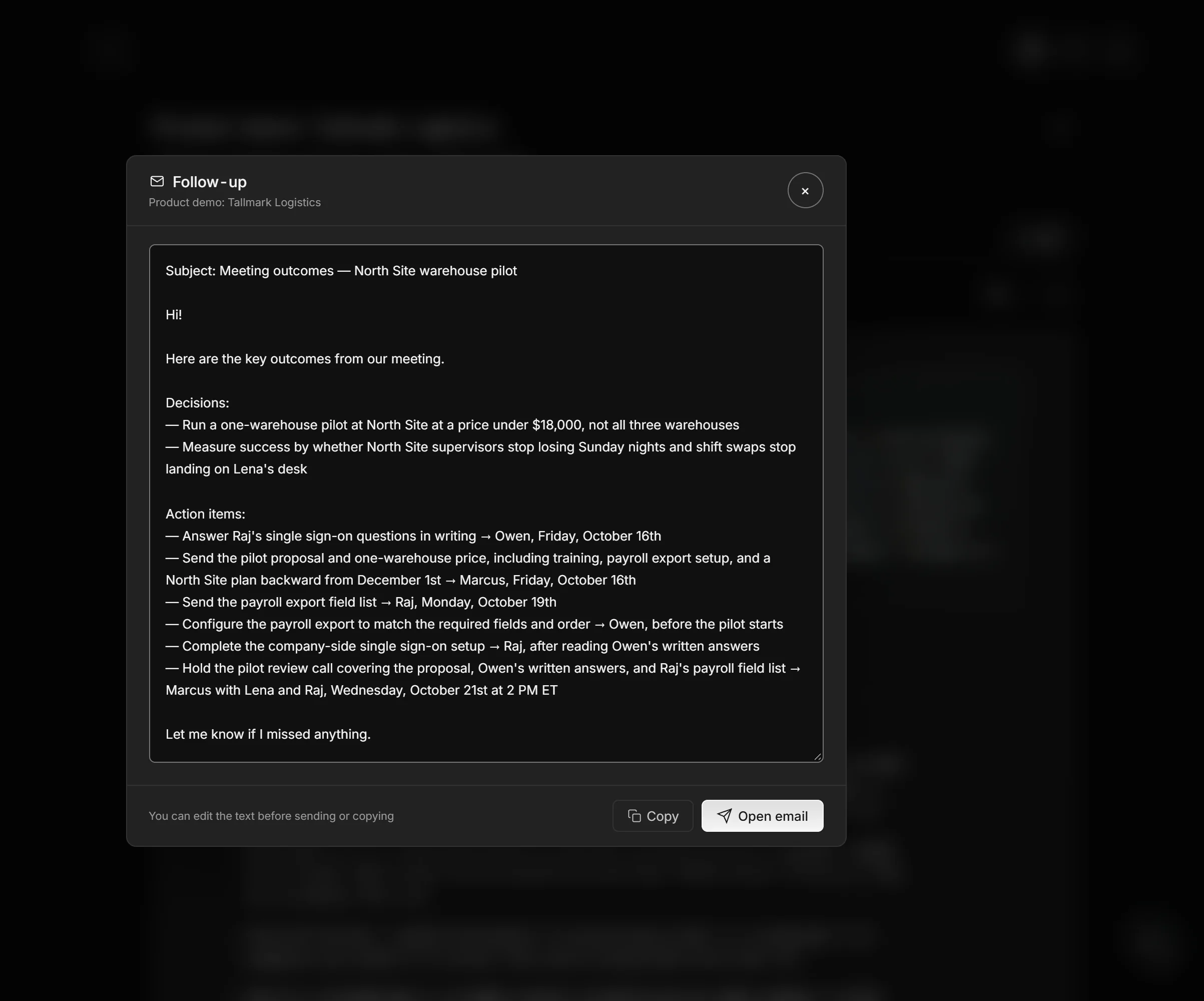
Staged demo call voiced with synthetic voices and imported into Meetlens as a recording; the company, people and figures are invented. The AI draft is copied exactly as Meetlens generated it.
AI draft:
Subject: Meeting outcomes — North Site warehouse pilot

Hi!

Here are the key outcomes from our meeting.

Decisions:
— Run a one-warehouse pilot at North Site at a price under $18,000, not all three warehouses
— Measure success by whether North Site supervisors stop losing Sunday nights and shift swaps stop landing on Lena's desk

Action items:
— Answer Raj's single sign-on questions in writing → Owen, Friday, October 16th
— Send the pilot proposal and one-warehouse price, including training, payroll export setup, and a North Site plan backward from December 1st → Marcus, Friday, October 16th
— Send the payroll export field list → Raj, Monday, October 19th
— Configure the payroll export to match the required fields and order → Owen, before the pilot starts
— Complete the company-side single sign-on setup → Raj, after reading Owen's written answers
— Hold the pilot review call covering the proposal, Owen's written answers, and Raj's payroll field list → Marcus with Lena and Raj, Wednesday, October 21st at 2 PM ET

Let me know if I missed anything.
Edited and sent:
Subject: North site pilot: review call on Wed, Oct 21?

Hi Lena,

Thanks for the demo time today, and for bringing Raj. You said
that with the spreadsheets "every Sunday night is gone"; the
shift-swap requests you liked are built to give those evenings back.

Agreed: a pilot at the north site first, not all three warehouses.

Next steps
- Pilot proposal and price for one warehouse — Marcus — Fri, Oct 16
- Written answers to Raj's single sign-on questions — Owen — Fri, Oct 16
- List of payroll export fields — Raj — Mon, Oct 19

Does Wed, Oct 21, at 2 p.m. ET still work for the pilot review call
with you and Raj?

Marcus
What changed:
- Subject and greeting: "Meeting outcomes — North Site warehouse pilot" and "Hi!" became the next step, addressed to Lena, who decides on the pilot.
- Added: Lena's words "every Sunday night is gone," the line only Marcus could write.
- Cut: two of the six action items, Owen's payroll export setup and Raj's single sign-on setup, which come after the three listed; and the success measure and price, which belong in the proposal.
- Asked: the review call, the last action item, became the dated question at the end.
AI draft and the edited version that was actually sent
AI draft (as generated)
Subject: Meeting outcomes — North Site warehouse pilot
Hi!
Here are the key outcomes from our meeting.
Decisions:
- Run a one-warehouse pilot at North Site at a price under $18,000, not all three warehouses
- Measure success by whether North Site supervisors stop losing Sunday nights and shift swaps stop landing on Lena's desk
Action items:
- Answer Raj's single sign-on questions in writing → Owen, Friday, October 16th
- Send the pilot proposal and one-warehouse price, including training, payroll export setup, and a North Site plan backward from December 1st → Marcus, Friday, October 16th
- Send the payroll export field list → Raj, Monday, October 19th
- Configure the payroll export to match the required fields and order → Owen, before the pilot starts
- Complete the company-side single sign-on setup → Raj, after reading Owen's written answers
- Hold the pilot review call covering the proposal, Owen's written answers, and Raj's payroll field list → Marcus with Lena and Raj, Wednesday, October 21st at 2 PM ET
Let me know if I missed anything.
Edited and sent
Subject: North site pilot: review call on Wed, Oct 21?
Hi Lena,
Thanks for the demo time today, and for bringing Raj. You said that with the spreadsheets "every Sunday night is gone"; the shift-swap requests you liked are built to give those evenings back.
Agreed: a pilot at the north site first, not all three warehouses.
Next steps
- Pilot proposal and price for one warehouse — Marcus — Fri, Oct 16
- Written answers to Raj's single sign-on questions — Owen — Fri, Oct 16
- List of payroll export fields — Raj — Mon, Oct 19
Does Wed, Oct 21, at 2 p.m. ET still work for the pilot review call with you and Raj?
Marcus
What changed
- Subject and greeting: "Meeting outcomes — North Site warehouse pilot" and "Hi!" became the next step, addressed to Lena, who decides on the pilot.
- Added: Lena's words "every Sunday night is gone," the line only Marcus could write.
- Cut: two of the six action items, Owen's payroll export setup and Raj's single sign-on setup, which come after the three listed; and the success measure and price, which belong in the proposal.
- Asked: the review call, the last action item, became the dated question at the end.
Before you send any AI draft, check four things:
- One goal. Delete every action item that doesn't lead to your next step.
- Owners and names. Check each owner against the report; replace any role or label nobody used.
- Numbers and dates. Prices, seat counts and weekdays match what was said.
- Your line, nothing internal. Add one detail in the prospect's words; remove notes meant for your team.
Sales follow-up email mistakes and the CAN-SPAM basics
Most sales follow-up emails fail for the same reasons: no new value, several asks at once and messages that never stop. Five mistakes to catch before you send:
- Nothing new: a nudge that repeats the last ask gives no reason to answer now.
- Several asks: a demo, a document and an intro to finance in one email. Send the one that moves the deal.
- No end: writing after a clear no or a breakup email reads as spam, and after an opt-out the law sets a deadline for stopping.
- Mail-merge personalization: "I see you're the [title] at [company]" is email marketing to a list, not a note to one person.
- Facts from memory: check every price, name and date against your notes or the recording.
Does CAN-SPAM apply to a sales follow-up email?
Yes, when the email's primary purpose is commercial: the FTC's CAN-SPAM Act compliance guide says the law "covers all commercial messages," not just bulk email, and "makes no exception for business-to-business email." An email that promotes your product is commercial. One that only facilitates or confirms a deal the recipient already agreed to is transactional or relationship content, exempt from most provisions; the FTC reads that category narrowly. In a mixed email, the subject line and what comes first decide which purpose is primary.
A commercial email needs:
- An accurate header and subject line: "From," "To" and "Reply-To" identify you, and the subject line "must accurately reflect the content of the message."
- Your physical postal address: a street address, a P.O. box registered with the U.S. Postal Service or a registered private mailbox.
- A clear way to opt out, such as a return email address. Honor each opt-out request within 10 business days, and keep the mechanism working for at least 30 days after you send.
- Identification as an ad, unless the recipient expressly agreed in advance to receive the message (15 U.S.C. § 7704(a)(5)(B)).
Each separate email in violation can cost up to $53,088 in penalties (the FTC figure on the same page, checked October 14, 2026). In practice: put your company's postal address in your email signature, end a commercial follow-up with a line such as "If you'd rather not hear from me, reply 'stop' and I won't write again," and keep that promise.
Not every follow-up is a sales email.
Following up after other meetings
After an internal or partner meeting, the follow-up records decisions, owners and dates for everyone who attended instead of asking one buyer for one step. Keep the sales follow-up email for prospects and customers in an open deal. After a team meeting, send a recap to the whole group; after a mentor or partner gave you their time, send a short thank-you that says what you'll do next.