Sales Call Recording: How to Record, Transcribe and Review Video Sales Calls
 Meetlens Editorial12 min read
Last reviewed: October 13, 2026. Laws and platform details checked against the statute texts and help pages linked in this article.
On this page
Sales call recording means capturing your conversations with prospects so you can review them later: the buyer's exact words, your promises, the agreed next step. This guide covers a video sales call on Zoom, Google Meet or Microsoft Teams, not phone dialers: why to record, when it's legal, how to record whoever hosts, how to transcribe the file and what to do with it.
What is sales call recording?
Sales call recording is the practice of capturing the audio, and sometimes the video, of conversations with prospects and customers so sales reps and managers can revisit what was said. Sales teams usually record discovery calls, product demonstrations, negotiations and renewals: the points in a sales conversation where the buyer's own words carry the most weight.
On a video call, the platform's built-in recorder makes a video recording of the meeting; other tools capture only the audio and turn it into text. Conversation intelligence is a separate class of tools that also analyze calls across a team, for example by tagging topics. This guide covers the recording and the review you can do without that layer.
Why record sales calls?
Recording sales calls gives you an exact record of what the buyer said, which makes notes, hand-offs and coaching better than anything written from memory. Five uses matter most:
- Accurate notes. You listen instead of typing, and the buyer's words about pain and priorities stay in the file.
- Hand-offs without retelling. When a deal moves from the account executive to a sales engineer or customer success, the next person hears the requirements firsthand.
- Coaching on real calls. Managers give feedback on a specific moment instead of general advice about performance.
- Onboarding and training. A playlist of strong discovery calls and demos shows new reps how the team closes deals before their first call.
- The buyer's words for marketing. Recordings are voice of the customer material: the phrases prospects use become copy for ads, landing pages and sales decks. Quote the phrases, not the person or the company.
A file helps only if someone listens to it: sales call recording without a review habit is storage, not insights.
Is it legal to record a sales call?
Recording a sales call is legal in the US when you have the consent to record that the law requires: federal law and most states need only one party's consent, but California and several other states require everyone on the call to agree.
Federal law. The Wiretap Act, Title I of the Electronic Communications Privacy Act, lets a party to a call, or anyone with a party's prior consent, record it unless the purpose is a criminal or tortious act (18 U.S.C. § 2511(2)(d)). That is one-party consent: as the salesperson on the call, you are that party.
California. Rules differ by U.S. state. California Penal Code § 632 bars recording a confidential communication "without the consent of all parties", the rule known as all-party consent, or two-party consent.
Calls across state lines. No federal rule settles which state's law applies to an interstate call, so the safe practice is to follow the strictest state involved; courts disagree on jurisdiction (RCFP). In Kearney v. Salomon Smith Barney (2006), the California Supreme Court applied § 632 to calls a brokerage's Atlanta, Georgia, office was accused of secretly recording with California clients: it let the clients' claim for an order against future recording go forward but declined to impose damages for past calls. The court added that advising all parties at the outset of a call that you intend to record would not violate § 632.
Oregon. A phone call needs one participant's consent (ORS 165.540(1)(a)), but a "conversation", which includes communication through a video conferencing program (ORS 165.535(1), on the same page), can't be recorded unless all participants are "specifically informed" (ORS 165.540(1)(c)). With a buyer in Oregon, announce the recording at the start of the sales call.
Notices. Built-in recorders notify everyone when recording starts (Zoom, Google Meet, Microsoft Teams), and people warned of a recording who keep talking are generally presumed to consent (RCFP, on the same page). That is implied consent. A recorder that works without a bot shows no notice, so disclosure is your job, and the spoken answer lands in the recording itself: RCFP calls recording each person's verbal agreement a best practice, and for compliance that answer stays with the call.
How to ask for consent to record on a sales call
Ask at the start of the call, mention it in the calendar invite, and ask again whenever someone joins. Name every use you plan for the recording, such as your notes and team training. Three lines you can copy:
At the start of the call:
Before we dive in: I'd like to record the audio of this call so I can focus on you instead of my notes, and our sales team may use it for training. The recording stays inside our team. Are you OK with that?
In the calendar invite:
I record the audio of our calls for my notes and our team's training, and I'll ask for your OK when we start. If you'd rather I didn't, just tell me.
When someone joins late:
Hi [name], quick note: I'm recording the audio of this call for my notes and our team's training. Is that OK with you?
Ask for a full-sentence answer, such as "Yes, I'm fine with the recording": a one-word "yes" can get merged into the neighboring speaker's line in a call transcript.
What if the prospect says no?
Don't record the sales call. Take notes by hand, write the buyer's key phrases down word for word, and offer to send a short written summary after the call so the prospect can correct it. If someone objects partway through, stop recording at that moment.
Sales calls with prospects outside the US
In the EU and the UK, recording a sales call means processing the prospect's personal data, so one-party consent is not the test. The GDPR counts "recording" as processing (Article 4), requires a lawful basis such as consent or legitimate interests (Article 6), and requires telling people the purposes and legal basis when you collect the data (Article 13). The UK applies the same articles under the UK GDPR (Article 6, Article 13). The working rule: announce the recording, say why you record, and let the person opt out.
How to record a sales call on Zoom, Google Meet and Teams
If you host the sales call and your plan allows it, use the platform's built-in recorder; if the prospect hosts it, built-in recording usually isn't yours to start, so use a browser recorder that captures the call audio on your side, with consent. Buyers often send the invite, so check who the organizer is before you plan to record sales calls.
| Platform | Who can start a recording | Where the file goes | If the prospect hosts |
|---|---|---|---|
| Zoom | The host; a participant needs the host's recording permission. Cloud recording: host or co-host on a paid plan | Cloud recording: the host's account. Local: the computer that recorded | You need the host's permission or co-host rights; the Zoom Web App can't record locally |
| Google Meet | Host, co-host, or the host's colleagues when Host Management is off; eligible plans only, such as Business Standard or Google One with 2 TB or more | The organizer's Google Drive | Outside guests can't record unless made co-host; the file lands in the prospect's Drive |
| Microsoft Teams | The organizer and people from the same organization | The organizer's OneDrive | Guests and people from other organizations can't record or open the file until the organizer shares it |
Sources: Zoom (recording without the host, cloud recording, features by platform), Microsoft Learn (recording storage and permissions), and the Google and Microsoft help pages linked in the legal section.
Recording a sales call with Meetlens
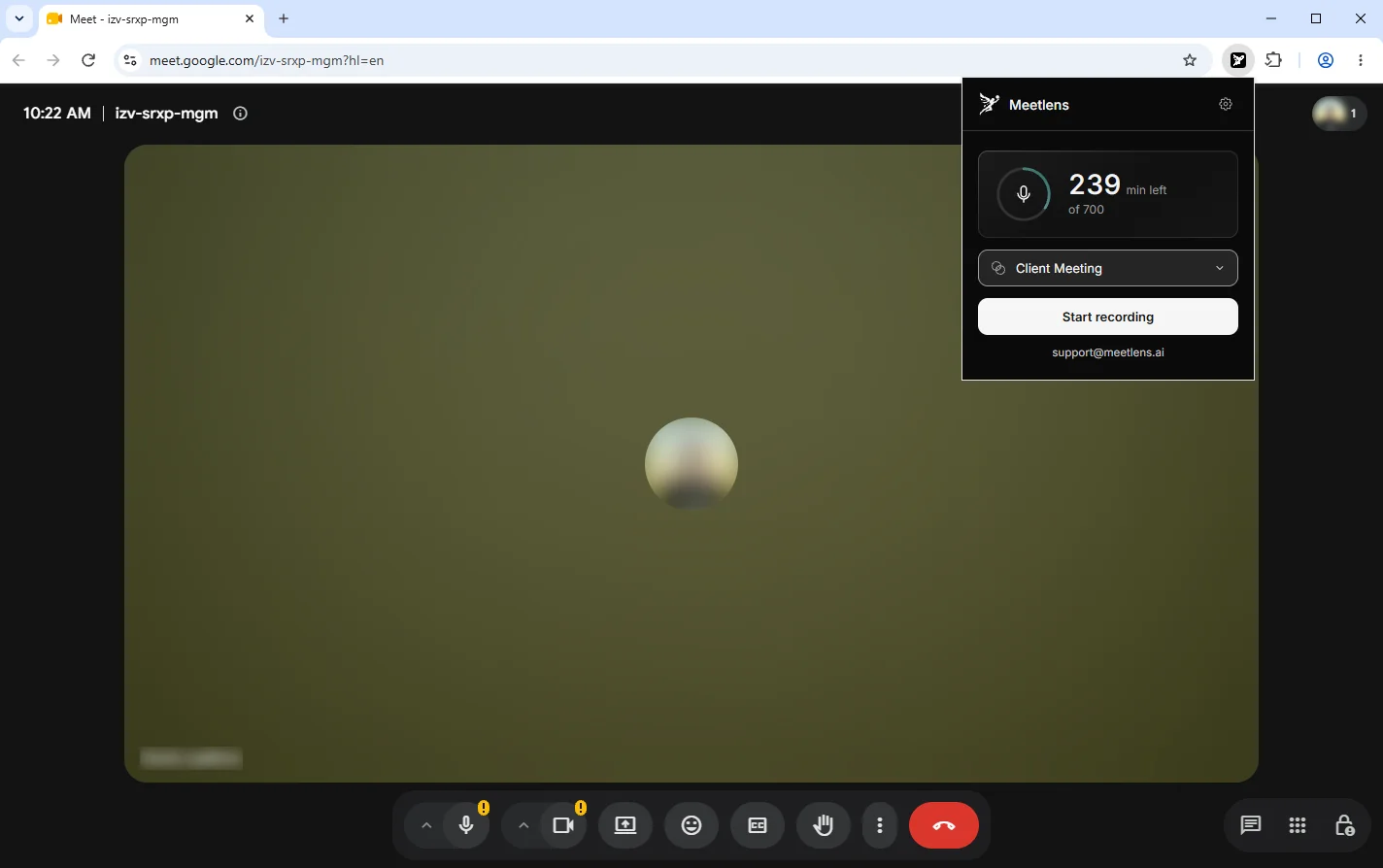
Meetlens is a browser extension for Chrome that records the audio of a browser meeting in Google Meet, Zoom Web, Microsoft Teams Web or Webex without a bot joining the call, so it needs everyone's consent rather than the host's recording permission. To record a sales call with it:
- Open the call in Chrome, not the desktop app. On a Zoom link, click Join from your browser; if the link is missing, the host hasn't enabled browser joining (Zoom Support).
- Click the Meetlens extension icon and choose Client Meeting in the format drop-down above Start recording.
- Allow microphone access so your voice is recorded along with the tab audio, then press Start recording.
- Announce the recording with the opening line above and wait for each person's answer.
- Press Stop recording when the call ends; the transcript and report follow.
One recording runs up to 60 minutes on the Free plan, 90 on Pro and 120 on Business. Meetlens records audio only, with no video or screen, and doesn't capture the Zoom or Teams desktop apps. See what the meeting recorder and transcriber captures.
What about phone and dialer calls?
Phone and dialer calls are recorded by the phone system itself, not by a browser tool. A voice over IP (VoIP) phone system or sales dialer has its own recording settings; in Zoom Phone, for example, an account owner or admin enables ad hoc call recording (Zoom Support). Meetlens doesn't record telephone calls.
How to transcribe sales calls
Transcribe a sales call either with the transcription built into your recorder or by uploading the recording file afterwards, and check speaker labels, names and numbers before the call transcript goes into your notes. Speech recognition turns any sales call recording into text; speaker labels (speaker diarization) show who said what, timestamps take you back to the moment, and search finds where a competitor came up. A transcription tool hears the same audio as a recorder, so get the same consent to record before you transcribe a call.
Meetlens transcribes in 99+ languages with speaker labels and timestamps. For a file made elsewhere, such as the MP4 of a Zoom cloud recording the host shared with you, import an existing recording: MP3, WAV, M4A, OGG, WebM or MP4, up to 1 GB per file (3 GB on Business) and within your plan's recording length.
Before the call transcript goes into notes, check its accuracy against the audio in three places where transcription software can mishear and a deal depends on getting it right:
- Names: people, the company, competitors, products.
- Numbers: prices, discounts, seat counts.
- Dates: deadlines, start dates, renewals.
A wrong price in your notes becomes a wrong price in your follow-up.
What to do with recorded sales calls
A sales call recording pays off only when it turns into notes, a confirmed next step and one coaching point within a day of the call. Review your recorded sales calls with the same checklist every time:
Sales call review
- Pain: the problem, in the buyer's words
- Decision-making: who decides, who else signs off, how they buy
- Timeline: the date the buyer is working toward
- Budget: any signal (a number, a range, "not budgeted yet")
- Objections: each one (pricing, timing, a competitor) and your answer
- Next step: what was agreed, who owns it, by what date
- Talk balance: who did most of the talking
- Coaching point: one moment you'd handle differently
Staged sales demo voiced with synthetic voices and imported into Meetlens; the company, people and figures are invented.
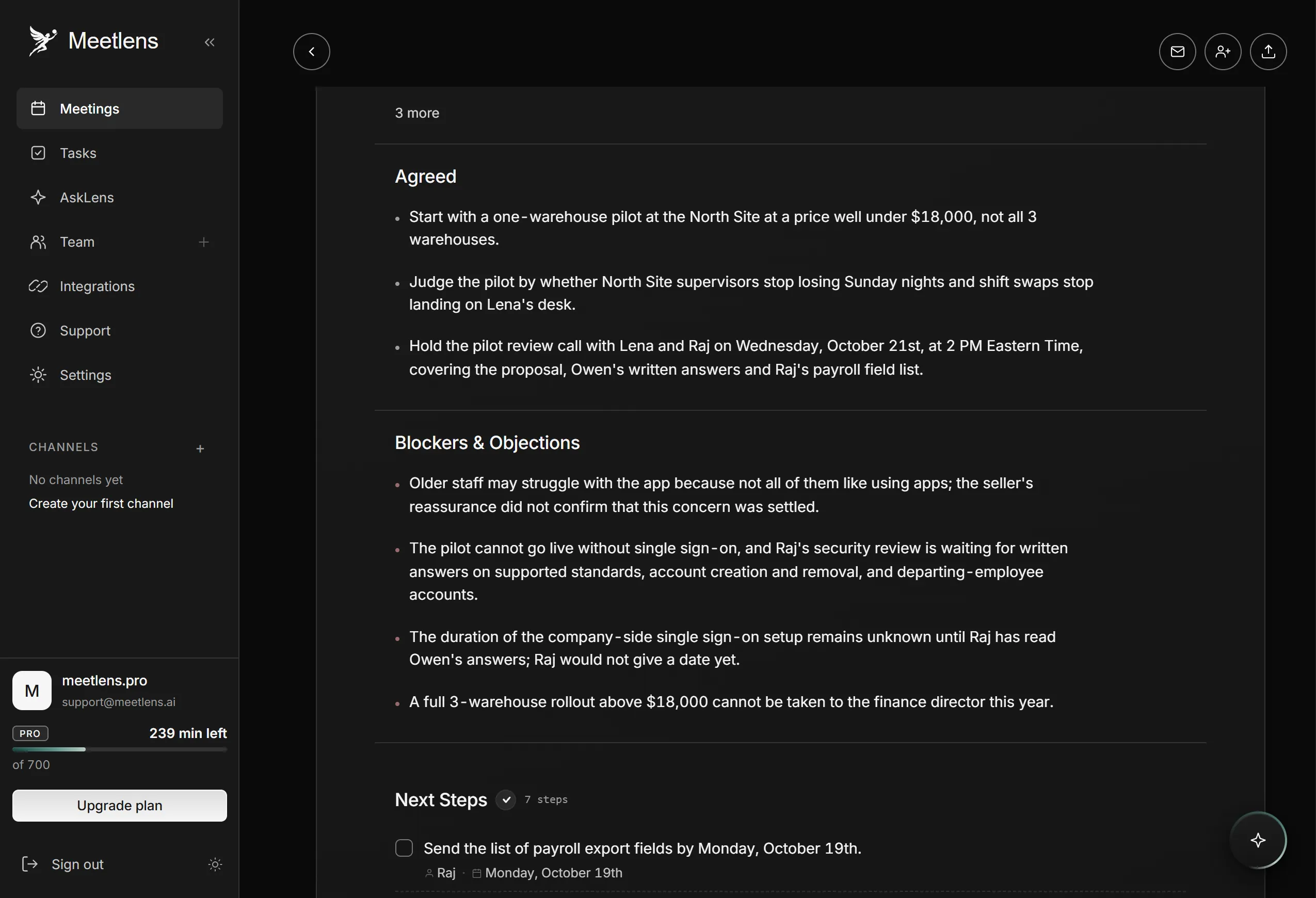
Sales call review: product demo, Tallmark Logistics
- Pain: "Every Sunday night is gone." (Lena, 2:04)
- Decision-making: "I decide on the pilot myself. A rollout to all 3 warehouses
  needs sign-off from our finance director. And Raj signs off on anything that
  touches our logins." (Lena, 12:29); they buy on "Yearly contracts, paid
  upfront." (Lena, 12:49)
- Timeline: "We need it running before December first. That's peak season."
  (Lena, 3:34)
- Budget: "Year one has to stay under eighteen thousand dollars." (Lena, 12:49)
- Objections: price, "I can't take a full rollout above eighteen thousand
  dollars to our finance director this year." (Lena, 13:13); answer: "Start with
  a pilot at one warehouse. The price for one warehouse stays well under
  $18,000" (Marcus, 13:21). Single sign-on, "I need single sign-on before any
  pilot." (Raj, 10:44); answer: written answers by Friday, October 16 (Owen, 11:26)
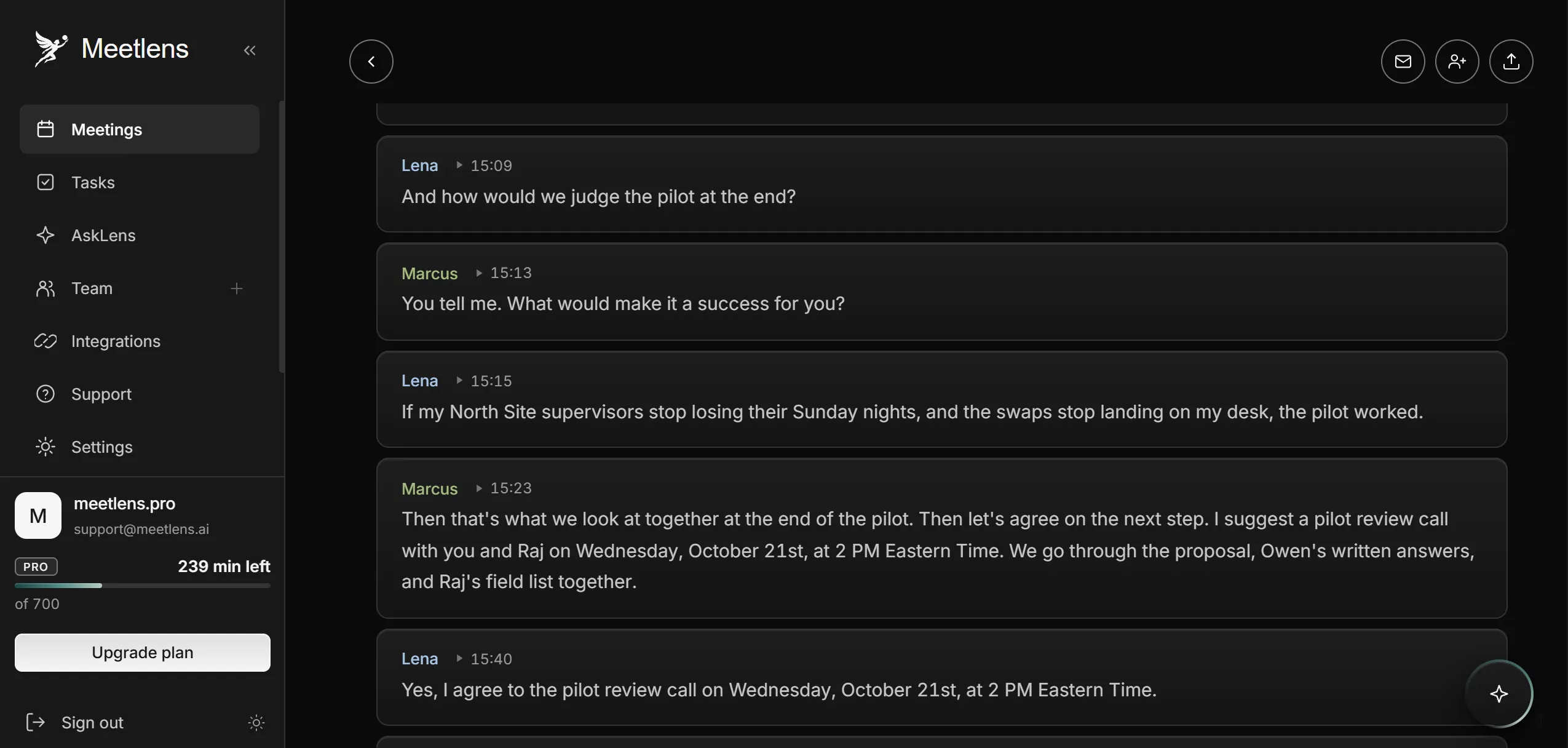
- Next step: pilot review call with Lena and Raj, Wednesday, October 21,
  2 p.m. ET, owner Marcus; Lena agreed at 15:40
- Talk balance: Marcus 47%, Owen 9% (sellers 56%); Lena 30%, Raj 14%
  (share of words in the transcript)
- Coaching point: at 6:29 Marcus pitches the reports section nobody asked
  about; at 6:58 Lena: "Let me stop you there. Reports aren't our problem."
Managers can turn the checklist into team metrics, or performance indicators, such as the share of calls that ended with a dated next step. For first conversations, our guide to what is a discovery call lists what that call should uncover.
In Meetlens, the Client Meeting report fills the pain, objections and next step lines of the checklist: What the Client Needs (with the client's own quotes), Blockers & Objections, and Next Steps with owners and dates; decisions go under Agreed. For the coaching point, add the call to the AI chat with Add context and ask, for example, "Where did the client push back on pricing, and what did I answer?" Answers link to the moments in the recording; check each one there. To spot patterns, ask the same question about each call, for example "Which pricing objections came up on this call?", and compare the answers. The Free plan includes 10 such questions a month, Pro 60, and Business has no limit.
Where to keep recordings and for how long
Keep sales call recordings under a written data retention rule that sets how long you keep them, who can open them and when they're deleted. Delete audio a set number of months after the deal closes or is lost, keep the notes longer, and delete at once when a prospect asks. For privacy, tell reps which calls are recorded and who listens: reps open their own calls, managers their team's.
In Meetlens, recordings are only accessible within your account; Business adds a shared library with roles. Move notes, not audio files, into your customer relationship management (CRM) system: copy the summary, or export Markdown, TXT or PDF on a paid plan. Meetlens has no CRM integration, so this step is manual.
Once a sales call is recorded and reviewed, two things are left to write: your notes and your follow-up.
Notes for every sales call
Use the same fields in your notes after every sales call, with or without a sales call recording, so calls compare across a deal and a teammate can pick it up cold. Keep the buyer's problem in their words, the buying process, the timeline, objections and the next step with an owner and a date. A call notes template gives you those fields ready to copy.
The follow-up email after a sales call
Send the follow-up email the same day, while the sales call recording is fresh: thank the buyer, restate the problem in their words, confirm the next step with a date, and attach what you promised. Keep it short enough to read on a phone, and start from a sales follow up email template filled from your notes, not from memory.