Call Notes Template: 5 Copy-Ready Templates and a Call Log
 Meetlens Editorial10 min readUpdated October 17, 2026
On this page
- Call notes template (copy and use)
- How do you write call notes?
- Call notes templates for different calls
- Call log template: one row per call
- Call notes example: a filled-in sales call
- What to write during the call and what to write after
- How to automate call notes for video calls
- After the call: turn call notes into a follow-up
A call notes template is a fixed set of fields (date, contact, purpose, key points, decisions, action items and next step) that you fill in for every call; copy the free version below. Even with sales call recording in place, notes are what the team reads: who, why, what was agreed, what happens next. Then: writing rules, call types, a call log, an example and auto-fill.
Call notes template (copy and use)
Copy this call notes template, fill in the header before you dial, and complete the rest in the five minutes after the call. The header holds the client information you know in advance; the blocks below it fill from the conversation.
CALL NOTES
Date and time: [Month D, YYYY], [start]–[end] [time zone]
Contact: [Name, role] · [email or phone]
Company: [Company]
Call type: [discovery / demo / check-in / phone / internal]
Attendees: [their side] · [our side]

Call purpose: [one line: what this call must settle]

Key points:
- [what they need, in their words]

Decisions:
- [what was agreed, one line each]

Exact numbers and quotes:
- [figure, date or phrase, word for word (who said it)]

Action items:
- [Owner] — [task] — [due date]

Next step: [meeting or action] — [Month D, YYYY]- Call purpose is one line; if you can't write it before the call, the call has no agenda yet.
- Exact numbers and quotes holds prices, seat counts, deadlines and promises as spoken, ready to cite later.
- Action items cover both sides: what you owe the client and what the client owes you.
The Google Docs copy, the Microsoft Word file and the PDF have the same fields.
The call notes template on one page
CALL NOTES
Key points what they need, in their words
Decisions what was agreed, one line each
Exact numbers and quotes figure, date or phrase, word for word (who said it)
Action items
| Owner | Task | Due date |
|---|---|---|
How do you write call notes?
Write call notes as decisions and commitments, not as a play-by-play: what the other side needs, what was agreed, who does what by when. A call notes page is not a transcript of the conversation.
- Write the call purpose in one sentence before you dial. "Agree on pilot scope" tells you when the call is done; "Demo" doesn't.
- Copy numbers, dates and promises word for word. "40 seats by March" is evidence; "a mid-size rollout soon" is a guess.
- Keep facts apart from your conclusions. Write what the client said as said, and label your interpretation "My read:" so nobody quotes it back as the client's words.
- Give every action item an owner and a due date. "Send pricing" becomes "Dana — send pricing for 40 seats — Oct 16."
- End with the next step and its date. If the call ended without one, write "No next step agreed": that is an outcome your manager needs to see.
Record each decision as an outcome of the decision-making on the call ("Pilot at one site first"), not as a topic ("Discussed the pilot").
Call notes templates for different calls
Keep the same call notes header and swap the body for the type of call: discovery, client check-in, phone or internal sales team meeting. The discovery and check-in bodies go under the main header; the phone and sales team templates are short enough to stand alone.
Sales discovery call notes template
Use this sales discovery call notes template on a first call with a prospect, when you still need to learn whether there is a deal.
SALES DISCOVERY CALL NOTES
[Header from the main template]

Situation: [how they do it today, team size]
Pain points (their words): ["..."]
Impact: [what the problem costs: hours, money, lost deals]
Current tools: [what they use, what they dislike about it]
Decision process and people: [decision maker, who else signs off, steps]
Budget and timeline signals: [figures and dates they said]
Next step: [meeting or action] — [Month D, YYYY]
Fill the budget and timeline line only with what the prospect said; an empty line beats a guess.
Client check-in call notes template
Use this one for regular calls with an existing customer, the kind account managers and customer success managers hold every week or month.
CLIENT CHECK-IN CALL NOTES
[Header from the main template]

Progress since last call: [what shipped or changed]
Open requests: [request — status — owner]
Risks: [what could slip, and why]
Approvals: [what the customer approved on this call]
Next check-in: [Month D, YYYY]Phone call notes template
Use this short phone call notes template for a quick telephone call or a message you take for a colleague.
PHONE CALL NOTES
Date and time: [Month D, YYYY], [time]
Caller: [name, company]
Number: [phone number]
Reason for the call: [one line]
Message: [what they need]
Call back by: [day and time] · Taken by: [your name]
On a customer support line, add Ticket ID and Resolution lines, and the slip works as a call center notes template.
Sales team meeting notes template
This sales meeting notes template is for the internal weekly meeting of the sales team, not for a call with a client.
SALES TEAM MEETING NOTES
Date and time: [Month D, YYYY], [start]–[end]
Attendees: [names]

Pipeline changes: [deal — stage before → after — value]
Deals at risk: [deal — risk — who owns the save plan]
Blockers: [what stops a deal — who can clear it]
Action items:
- [Owner] — [task] — [due date]
For other internal meetings, a general meeting notes template fits better than this one.
Call log template: one row per call
A call log records every call as one row (date, contact, direction, purpose, outcome and follow-up date), so you can see the history at a glance. Call notes hold the details of one call; the call log lets you track all of them and shows every interaction with an account in date order.
Illustrative example: the people and companies are invented; the Tallmark Logistics row comes from the staged demo call below.
| Date | Time | Contact | Company | In/Out | Purpose | Outcome | Next step | Owner | Follow-up date |
|---|---|---|---|---|---|---|---|---|---|
| Oct 13 | 10:15 a.m. | Tom | Elmview Clinics | Out | Cold call | No answer | Call again | Marcus | Oct 15 |
| Oct 13 | 3:40 p.m. | Ana | Orchard Row Foods | In | Pricing question | Price sheet sent | Wait for her reply | Marcus | Oct 20 |
| Oct 14 | 2:00 p.m. | Lena | Tallmark Logistics | Out | Demo | Pilot at one warehouse agreed | Pilot review call | Marcus | Oct 21 |
| Oct 15 | 9:30 a.m. | Mei | Velmora Supply | Out | Check-in | Renewal moved to January | Send renewal quote | Dana | Oct 22 |
Log cold calling too: every outbound attempt gets a row, including "No answer," so you can count attempts per contact. The In/Out column shows which customers call you on their own. In sales, one shared log also shows who last talked to an account, so two salespeople don't call the same contact on the same day.
Keep the call log in one spreadsheet that all team members add to: Google Sheets for a shared online sheet, Microsoft Excel if your team works from files. Freeze the header row (View > Freeze in Google Sheets, View > Freeze Panes > Freeze Top Row in Excel). Then turn on a filter (Data > Create a filter; Data > Filter in Excel) and sort by Follow-up date to see who is due today.
The downloadable sheet adds an eleventh column, Notes link, so each row points to its call notes.
The call log: one row per call
| Date | Time | Contact | Company | In/Out | Purpose | Outcome | Next step | Owner | Follow-up date | Notes link |
|---|---|---|---|---|---|---|---|---|---|---|
| Oct 13 | 10:15 a.m. | Tom | Elmview Clinics | Out | Cold call | No answer | Call again | Marcus | Oct 15 | |
| Oct 13 | 3:40 p.m. | Ana | Orchard Row Foods | In | Pricing question | Price sheet sent | Wait for her reply | Marcus | Oct 20 | |
| Oct 14 | 2:00 p.m. | Lena | Tallmark Logistics | Out | Demo | Pilot at one warehouse agreed | Pilot review call | Marcus | Oct 21 | |
| Oct 15 | 9:30 a.m. | Mei | Velmora Supply | Out | Check-in | Renewal moved to January | Send renewal quote | Dana | Oct 22 |
Call notes example: a filled-in sales call
Here is the call notes template filled in after a demo call with a prospect, booked for 30 minutes and finished in 17. Marcus, the sales rep on the account, gave a product demonstration of a shift-scheduling tool to a logistics company. It is the same call as the Tallmark row in the call log above.
Staged demo call voiced with synthetic voices and imported into Meetlens as a recording; the company, people and figures are invented.
CALL NOTES
Date and time: Oct 14, 2026, 2:00–2:30 p.m. ET
Contact: Lena, operations director · lena@tallmark.example
Company: Tallmark Logistics
Call type: Demo
Attendees: Lena, Raj (IT manager) · Marcus (account executive),
Owen (solutions engineer)

Call purpose: Show shift scheduling for three warehouses and agree
on a pilot.

Key points:
- Supervisors build schedules in spreadsheets. Lena: "Every Sunday
  night is gone."
- Lena liked shift-swap requests; Raj asked how payroll export works.
- Raj needs single sign-on before any pilot.
- My read: single sign-on sets the pilot date, and Raj controls it.

Decisions:
- Pilot at one warehouse (the north site) first, not all three.

Exact numbers and quotes:
- 3 warehouses, 140 hourly staff (Lena).
- "About six hours a week" per supervisor on schedules (Lena).
- "We need it running before December 1, that's peak season" (Lena).
- "Year one has to stay under $18,000" (Lena).

Action items:
- Marcus — send the pilot proposal and price for one warehouse — Oct 16
- Owen — answer Raj's single sign-on questions in writing — Oct 16
- Raj — send the list of payroll export fields — Oct 19

Next step: Pilot review call with Lena and Raj — Oct 21, 2026, 2:00 p.m. ET
Two blocks drive the next step of this sales call. Decisions gives the client one line to confirm: one warehouse first. Exact numbers and quotes sets the limits of the proposal: the December 1 start and the $18,000 ceiling for year one.
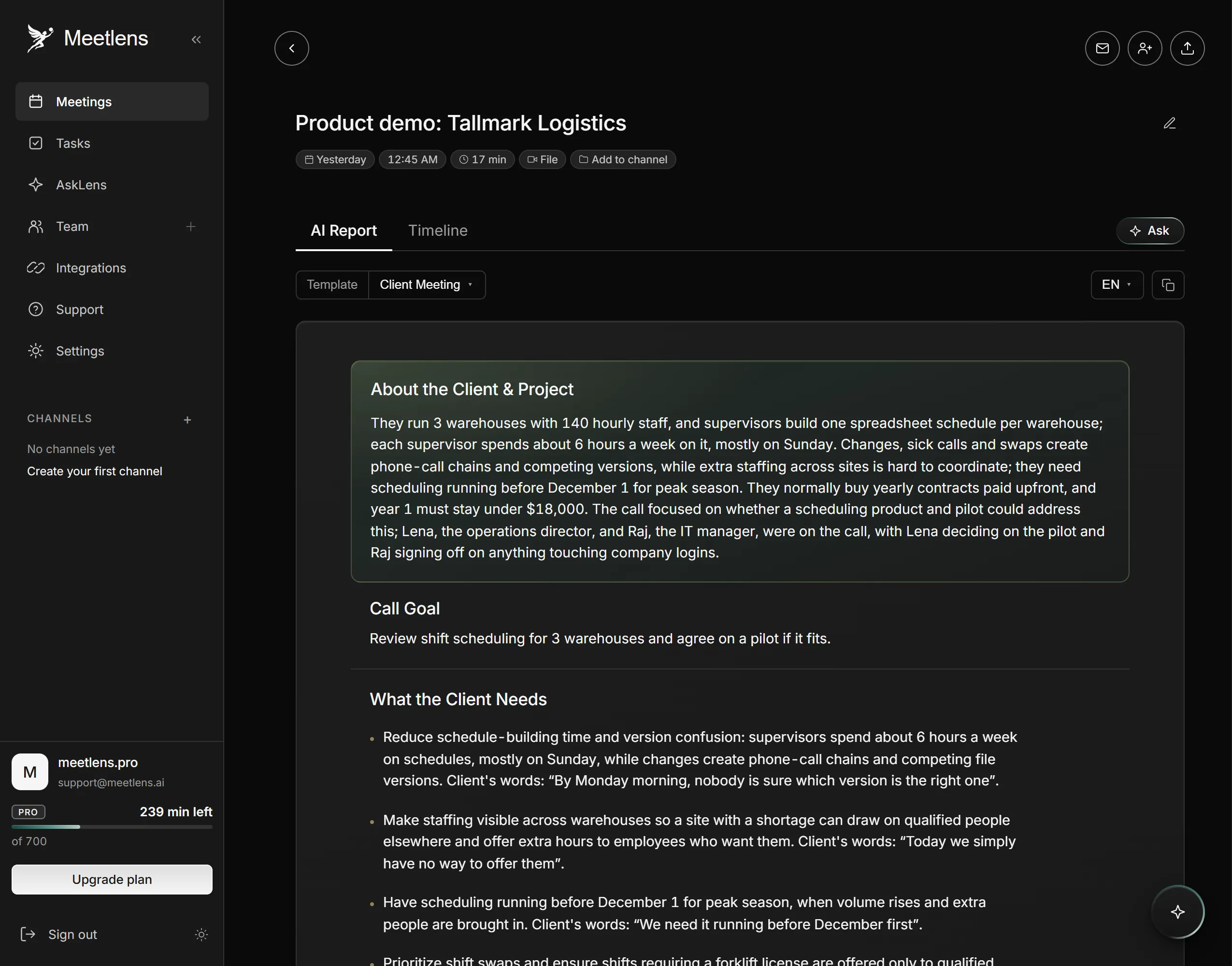
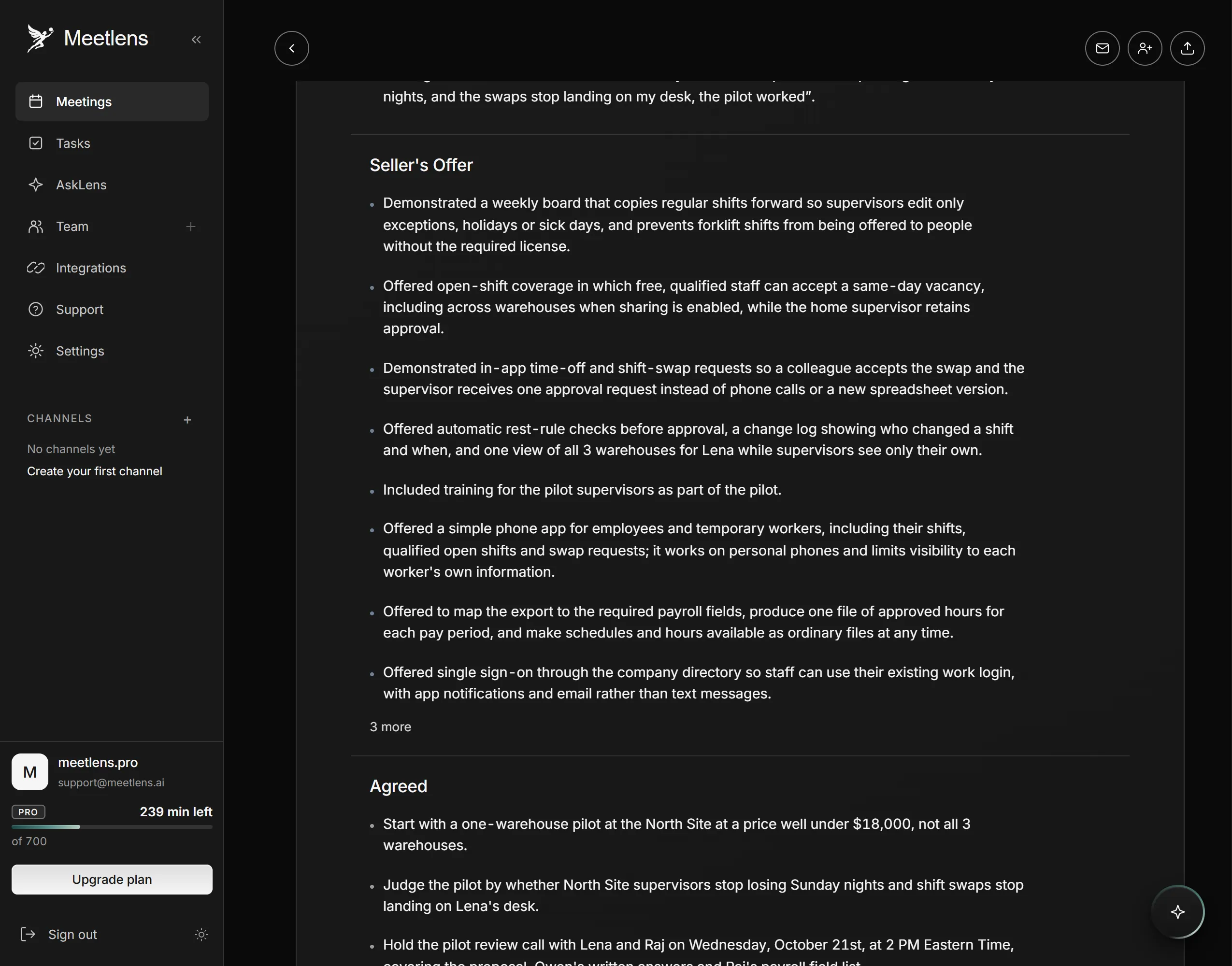
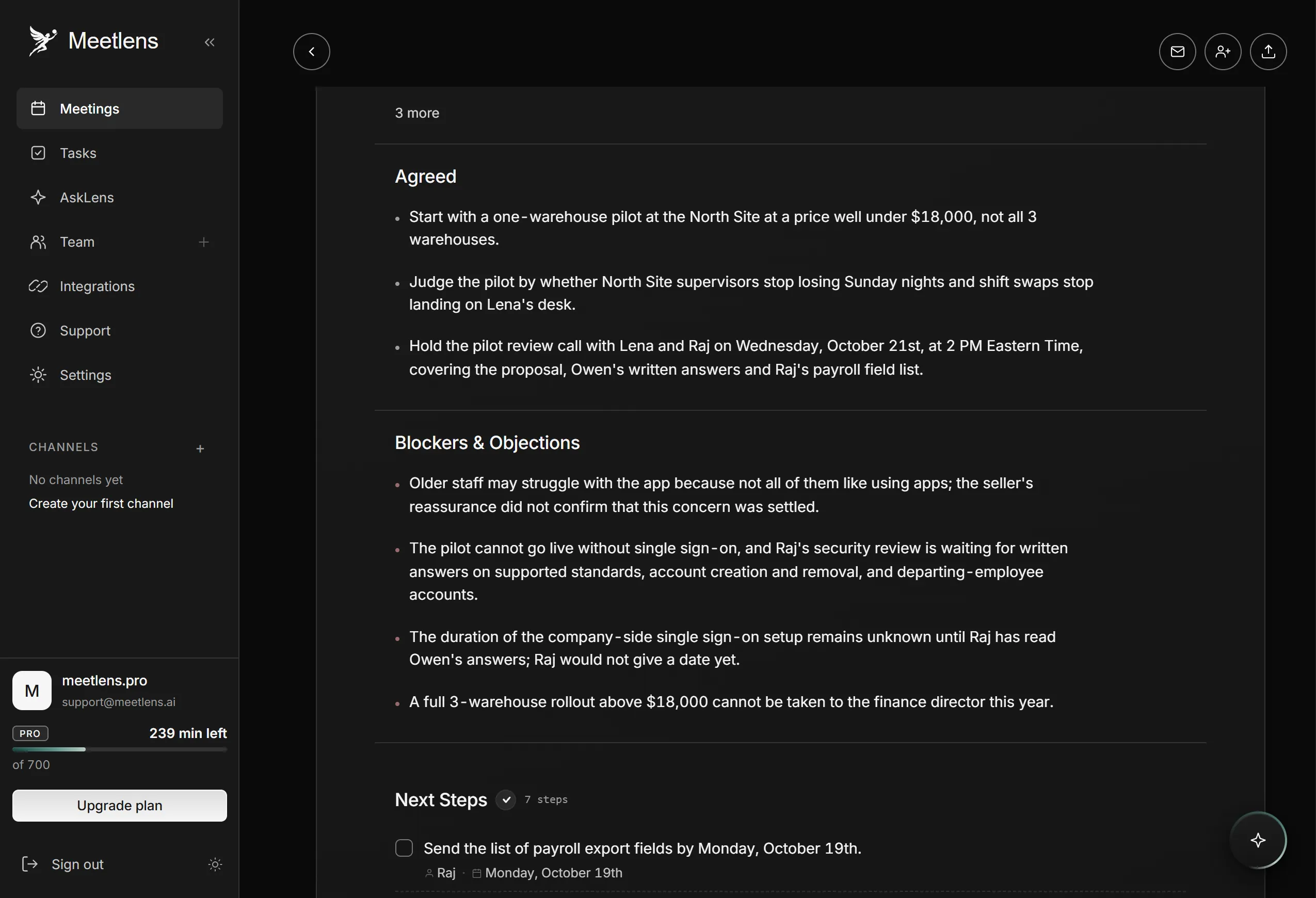
The report filled four of the seven blocks without edits: Call purpose, Decisions, Action items and Next step (it listed seven next steps; the notes keep the three dated tasks and the review call). The header was typed by hand: an imported recording carries the upload date, the email was never said, and the report doesn't give the seller-side roles. Key points needed the "My read" line and two of Lena's lines from the transcript, "Every Sunday night is gone." and her liking the shift-swap requests. In Exact numbers and quotes, the numbers came from the report, but Lena's exact words on peak season and the $18,000 limit came from the transcript, because the report paraphrases them.
What to write during the call and what to write after
Write only numbers, names, dates and exact phrases during the call; structure the call notes and add your conclusions right after. Note-taking in the moment is capture only: on a sales call, if you type full sentences while the client talks, you miss the next question.
| During the call | Right after the call |
|---|---|
| Numbers with units: seats, prices, volumes | Sort each line into the template blocks |
| New names and roles, spelled as they say them | Rewrite each decision as an outcome |
| Deadlines as dates, not "soon" | Turn every "I'll send it" into an action item with a name and a date |
| Objections and promises, word for word in quotes | Add your read, labeled as yours, and set the next step |
Keep finished call notes in one document per client, or paste them into the contact's activity history in your CRM (customer relationship management) system the same day. Client call notes hold prices, contract terms and personal details, so confidentiality applies: store them where only the account team can open them, and don't paste them into tools your company hasn't approved.
How to automate call notes for video calls
Call notes fill in automatically when the call runs in Google Meet, Zoom, Microsoft Teams or Webex in your browser: Meetlens records it and drafts these sections for you. Meetlens is an AI meeting assistant that runs as a Chrome extension. It records the audio of a video call in your browser without a bot joining the call, then produces a transcript with speaker labels and a structured AI report.
- Start the recording. Open the call in Chrome and pick Client Meeting, the report format for sales and account calls, in the format drop-down above Start recording. Allow microphone access so your own voice is recorded, then click Start recording. No bot joins, so the platform shows no recording notice: tell the client you're recording, ask for a full-sentence answer ("Yes, I agree to the recording") and stop if they object.
- Read the Client Meeting report. Its sections line up with the template blocks:
| Call notes block | Client Meeting section |
|---|---|
| Contact, Company | About the Client & Project |
| Call purpose | Call Goal |
| Key points, quotes | What the Client Needs, with the client's quotes |
| Decisions | Agreed |
| Objections in Key points, Risks in the check-in template | Blockers & Objections |
| Action items, Next step | Next Steps, with owners and dates |
- Edit and export. Check every owner and date against the call: a task without an owner shows as Unassigned. Move Seller's Offer, the report's summary of what you proposed, into Key points. On the Pro and Business plans, export the report as Markdown, TXT or PDF; Meetlens has no CRM integration, so you paste it into your CRM yourself.
This automation replaces the typing, not the check; see how AI call notes are built from a recording. One recording runs up to 60 minutes on the Free plan, 90 on Pro and 120 on Business.
Meetlens is a browser extension, so it covers video conferencing in a Chrome tab only: it doesn't record phone calls or the desktop Zoom and Teams apps. For those, upload a recording made with everyone's consent (MP3, WAV, M4A, OGG, WebM or MP4) and get the same report. If you paste rough notes into a chatbot such as ChatGPT instead, it can sort them into these blocks; it sees only what you paste, and the confidentiality rule above applies.
Call notes are worth something only if they turn into the next message to the client.
After the call: turn call notes into a follow-up
The Decisions and Next step blocks of your call notes already hold the follow-up email: restate what was agreed, list who does what by when, and confirm the next date. Copy the action items exactly as they stand in your notes, so the client and your CRM see the same owners and dates.
Thanks for your time today. Here is what we agreed: [decision]. Next steps: [owner] — [task] — [due date]. Our next call is [Month D] at [time].