Missed a Meeting? What to Do Next, Plus Email Templates for Both Sides
 Meetlens Editorial10 min readUpdated October 17, 2026
On this page
- I missed a meeting at work: what should I do first?
- Do you need to apologize for missing a meeting?
- Missed meeting apology templates
- How to catch up on a meeting you missed
- How to email someone who missed a meeting
- Email templates for someone who missed a meeting
- How to keep people from missing meetings
- Recap for the whole group
- Follow-up after a meeting you attended
If you missed a meeting, message the organizer soon with a short apology, ask for the notes or the recording, and find out which tasks are now yours. Missing a meeting matters less than missing what came out of it: the decisions made and the actionable items handed out. Below: your first hour, apologies and templates, catching up, then the missed meeting email for someone who skips yours, and prevention.
Jump to: I missed a meeting · Someone missed my meeting
I missed a meeting at work: what should I do first?
Check whether the meeting is still running and join late if it is; if it's over, message the organizer within the hour with a one-line apology and a request for the notes. A quick message in the first hour turns a missed meeting into a scheduling slip. Saying nothing until the next day leaves the organizer guessing.
Five steps, in this order:
- Check the invite. Open the calendar event and the meeting link. If the Zoom or Google Meet call is still running, join late, type a one-line apology in the chat, and listen for the wrap-up.
- Message the organizer. If the call has ended, send one line: you missed it, you're sorry, you're catching up. Use the channel the organizer reads fastest.
- Ask for the notes or the recording in the same message, so the organizer answers once.
- Find your action items. Anything assigned to you while you were away is yours now; confirm each due date.
- Fix the cause. Accept the invite, correct the time zone, or turn on the calendar alert you were missing.
The first hour after a missed meeting
-
Check the invite
Call still running? Join late and type a one-line apology in the chat.
-
Message the organizer
Call over? One line: you missed it, you’re sorry, you’re catching up.
-
Ask for the notes or the recording
In the same message, so the organizer answers once.
-
Find your action items
Anything assigned to you is yours now. Confirm each due date.
-
Fix the cause
Accept the invite, correct the time zone, or turn on the calendar alert.
One missed meeting at work rarely matters. In a May 2025 Ask a Manager column, Alison Green told a nonprofit board president that a light reply to someone who skipped a call, "Missed you earlier, I hope everything is alright," "is fine if this happens to you a couple of times a year." In workplace communication, people notice a pattern, not a single miss.
Do you need to apologize for missing a meeting?
Apologize when your absence cost someone time or held up a decision, keep it to one sentence, and skip the long explanation. You don't need a long excuse for missing the meeting; one honest sentence is enough: "I had the wrong time zone" or "a client call ran over."
Match the apology for a missed meeting to what your absence cost:
| Situation | Apology | What to add |
|---|---|---|
| You were presenting, or the meeting was about your work | Yes, the same day | An offer of a new time |
| A client or external guest waited for you | Yes, by email | Two new times; your reputation with that client is at stake |
| It's your second missed meeting with the same person | Yes | The fix: "I've added this series to my work calendar" |
| A large meeting where you only listened | A short "sorry I missed it" | A request for the notes |
If you came here full of anxiety, size the apology to the stakes, not to the feeling: a long, self-critical note makes a small slip look bigger than it was.
Missed meeting apology templates
Use the shortest version that fits the stakes: a two-line chat message for an internal sync, a short email with a reschedule offer for a client. Each one says what happened, apologizes once, and asks for or offers the next step. Write it in the active voice: "I missed the meeting" takes responsibility, "the meeting was missed" reads as dodging.
1. Chat message to a colleague or your manager in Slack or Microsoft Teams
Hi [Name], sorry I missed [meeting] this morning, [one-line reason]. Could you send me the notes or the recording? I'll go through them today and pick up anything that's mine.
2. Email to a client or external participant
Subject: Sorry I missed our call today

Hi [Name],

I'm sorry I missed our [topic] call at [time] today. That was my
mistake, and I know you set the time aside.

Could we reschedule? Either of these works on my side:
- [Day, Mon DD], [time and time zone]
- [Day, Mon DD], [time and time zone]

If neither fits, reply with a time that suits you and I'll send
a new invite.

[Your name]
3. "I overslept"
I overslept and missed [meeting], I'm sorry. I'm catching up from the notes now and will message you by [time] with any questions.
If you know you'll miss it: unable to attend meeting email
Send it before the meeting starts: say you can't attend, name who covers for you or send your input in writing, and ask for the recording. Announced in advance, an absence is a planning detail, not a missed meeting.
Subject: Unable to attend [meeting] on [Day, Mon DD], my input inside

Hi [Organizer],

I'm unable to attend [meeting] on [Day, Mon DD] because of
[short reason]. [Name] will cover for me.

My input on the agenda:
- [Item 1]: [your update or position]
- [Item 2]: [your question]

Could you send me the notes or the recording afterward? I'll pick
up any action items assigned to me.

[Your name]
How to catch up on a meeting you missed
Ask for the summary first and the recording second, read the decisions and action items, then search the transcript only for the parts that mention you or your project. Replaying a full video conferencing recording is the slowest way to catch up on a missed meeting; transcription turns it into text you can search.
- Read the summary. Decisions, action items and open questions, from the notes or meeting minutes someone sent.
- List what's yours. Every task with your name on it and its due date. If a date doesn't work, say so now.
- Ask targeted questions. Search the transcript of the call for your name, your project and words like "deadline," and play only those moments. Then send the organizer your input on the open questions.
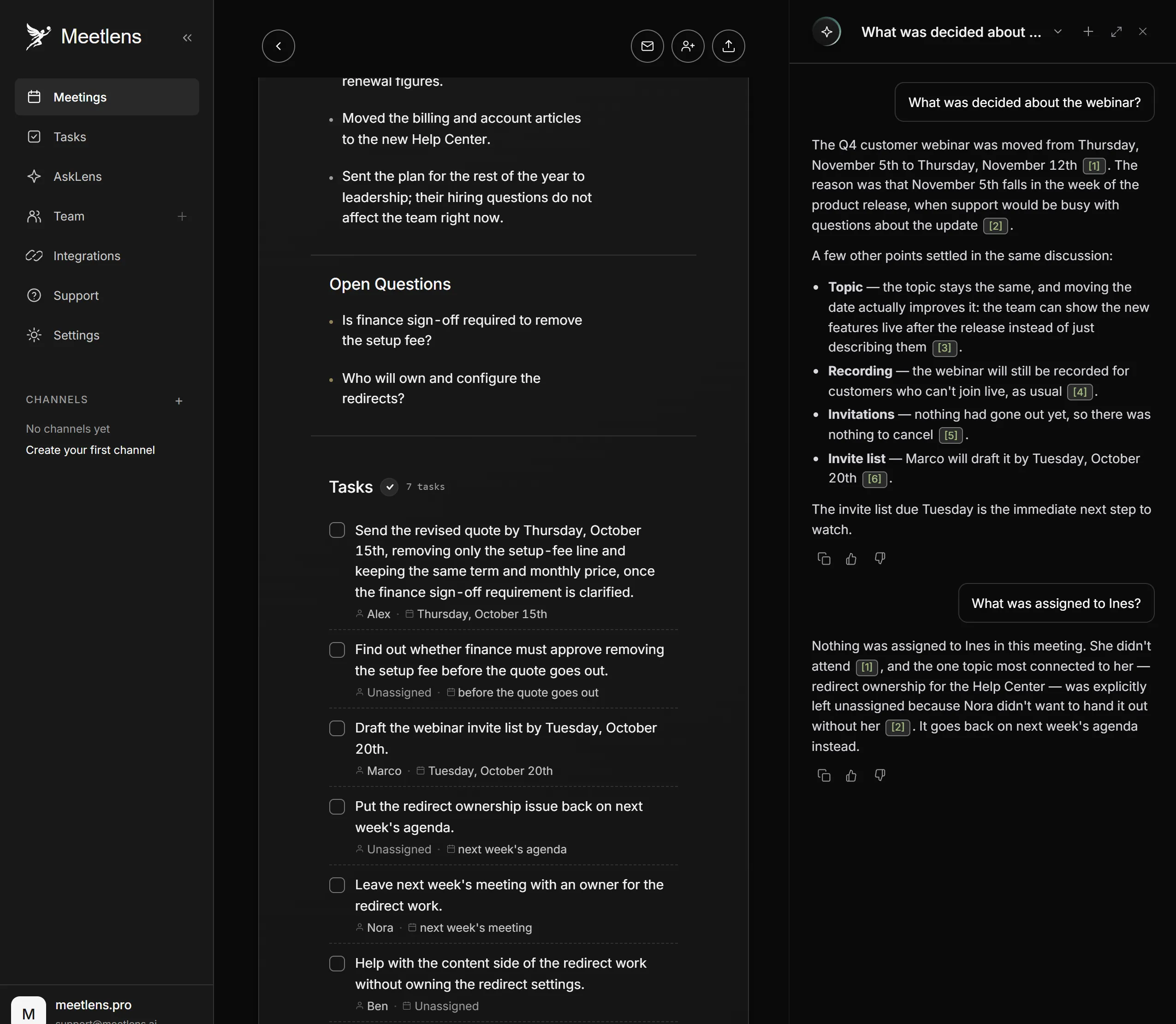
AI meeting assistants and similar note-taking tools write the summary for you, so ask whether anyone ran one on the call. If a colleague recorded it with Meetlens, a Chrome extension that records browser meetings without a bot and turns them into transcripts and AI reports, the report is the meeting summary you need. General Meeting, the default report format, lists Decisions, Open Questions and a Tasks block with owners and due dates.
Meetlens can't record a meeting you weren't in, and a recording stays in the account that made it. On the Business plan, look for the missed meeting in the team's shared meeting library. Otherwise, ask the colleague to export the report (Markdown, TXT or PDF on paid plans). If the host shares a Zoom or Teams recording file, import it into your own account to get the same transcript and report (up to an hour per file on Free).
For a targeted question, ask whoever recorded the meeting to put it to the Meetlens AI chat. They add the meeting with Add context and ask "What was decided about the launch date?" or "What was assigned to [your name]?" Answers link to the moments in the recording and often quote the exact words. Generative AI writes the answer, so check it against the linked moment.
How to email someone who missed a meeting
Send a short, blame-free note the same day: say you missed them, share what was decided and what's now theirs, and offer one way to catch up or reschedule. Keep it brief and the tone neutral. A no-show email has four parts:
- A neutral opening. "Missed you at [meeting] today" instead of "You didn't show up."
- What happened. The decisions, one line each, if the meeting went ahead.
- What's theirs. Each action item assigned to them, with its date.
- One next step. A link to the notes and recording, a new time, or an update by email if a call is hard to fit.
Lead with empathy and understanding, not frustration: a calendar alert that never fired or a call that ran over are ordinary reasons for a missed meeting, and you rarely know which one it was. Skip the guilt trip. "We all waited for you" doesn't get the time back, and it makes the next meeting awkward.
If the meeting went ahead without them, the email carries the decisions and their tasks. If it fell through entirely, as a 1:1 or a client call does when one side is missing, the email is only about a new time.
Don't ask why on a first miss: the reason is their business, and the email works without it. A pattern is a separate conversation: by email for clients and prospects (the fourth template below), in person for colleagues.
Email templates for someone who missed a meeting
Pick the template by who missed the meeting and whether it went ahead without them. Each template ends with one call to action: a reply, a booking link from your appointment scheduling software, or a decision to pause.
| Who missed it | Did the meeting go ahead? | Template |
|---|---|---|
| A colleague | Yes | 1. Decisions and their tasks |
| A client | No | 2. New time via booking link |
| A prospect | No | 3. Why you were meeting |
| A client or prospect, for the second time | No | 4. Gentle escalation |
Illustrative templates: replace every bracket.
1. Colleague missed an internal meeting
Subject: Missed you at [meeting]: decisions and your action items

Hi [Name],

Missed you at [meeting] today; hope all is well. Here's what
concerns you.

Decisions
- [Decision, one line]
- [Decision, one line]

Your action items
- [Verb + task] — due [Day, Mon DD]

Notes and recording: [link]

If a date doesn't work, reply by [Day, Mon DD] and I'll raise it
with the group.

[Your name]
2. Client missed a scheduled call
A client missed meeting email names the project date at stake and makes rebooking one click.
Subject: New time for our [topic] call

Hi [Name],

We didn't connect for our [topic] call at [time] today; these
things happen.

To keep [deliverable] on track for [Day, Mon DD], let's find a new
slot this week. Pick any time that suits you here: [booking link]

[Your name]
3. Prospect didn't show
Remind the prospect why they booked, in their own words. If there's no reply, send one more short note a few days later, then stop.
Subject: Still looking at [their problem]?

Hi [Name],

Looks like today's [time] call didn't work out. When you booked
it, you mentioned [their problem, in their words], and I'd planned
to show you [one specific thing].

If it's still a priority, choose a new time here: [booking link]

[Your name]
4. Second missed meeting: gentle escalation
Subject: Should we pause [topic] for now?

Hi [Name],

We've missed each other on the last two [topic] calls, and I don't
want to keep holding time you may not have right now.

Should we pause this for now? Reply "pause," or reply with a time
that works and I'll book it.

[Your name]
With a colleague or someone you manage, raise the pattern in person instead. Alison Green's wording, from the same Ask a Manager column: "Is there something we can do differently so that doesn't happen?"
How to keep people from missing meetings
Prevent missed meetings at the calendar: a reminder an hour before, an agenda in the invite, and a recording for anyone who truly can't attend.
- Add a second reminder. In Google Calendar, open the event, click Edit event, click Add notification next to Notifications, set it to an hour before, and click Save.
- Confirm calls the same morning. Alison Green suggests a one-line check in the same column: "Just wanted to confirm our call for this afternoon. Does 3:00 today still work for you?"
- Put the meeting agenda in the invite, so people see what they would miss and what to bring.
- Cancel or shorten meetings that don't need everyone, and send those people an email update instead.
- Record for people who can't attend, and tell everyone at the start that you're recording. If you record with Meetlens, no bot joins the call and the platform shows no recording notice, so announcing it is on you. Then send the report to anyone who missed the meeting.
And for everyone who was there?
Recap for the whole group
Everyone who attended gets a meeting recap email instead: the decisions, action items with owners and due dates, and open questions, sent to the whole group. A missed meeting email is its personal cut, limited to what concerns the one person who wasn't there.
Follow-up after a meeting you attended
A follow-up email after a meeting you attended moves one relationship forward: a thank-you line, one or two points from the call, and one next step. It's the same habit as a missed meeting email, aimed at someone who was in the room.