How to Write Meeting Minutes: A 7-Step Guide With Examples
 Meetlens Editorial10 min readUpdated October 9, 2026
On this page
- What should you include in meeting minutes?
- Steps 1–2: How do you prepare to take meeting minutes?
- Step 3: What do you write down during the meeting?
- Step 4: How do you turn your notes into meeting minutes?
- Step 5: How detailed should meeting minutes be?
- Steps 6–7: How do you review, send, and approve meeting minutes?
- Can ChatGPT or AI write meeting minutes?
- Meeting minutes for boards and formal bodies
To write meeting minutes, build a skeleton from the agenda before the meeting, note each decision, vote and action item as it happens, write them up soon after, and send the draft for approval at the next meeting. Good meeting minutes record what a group decided and who owes what — not everything that was said. Below: what to include, then how to write meeting minutes step by step, AI included.
How to take meeting minutes in 7 steps:
- Copy the meeting agenda into a minutes skeleton.
- Gather the attendee list, the quorum rule and open action items.
- Write down decisions, votes and tasks as they happen.
- Turn your notes into short, past-tense entries.
- Trim each entry to the level of detail the meeting needs.
- Have the chair review the draft, then send it to attendees.
- Approve the minutes at the next meeting.
What should you include in meeting minutes?
At minimum, meeting minutes need four things: the meeting details and attendees, the decisions made, the action items with an owner and due date, and the date of the next meeting. That covers a team check-in. A committee, a board or any group that votes needs more, because its minutes become the official record of the meeting.
Use this 8-item checklist for formal meetings:
- Meeting details: organization, meeting type, date, time of the call to order, place or video link.
- Attendance: who was present and absent, and whether a quorum (the minimum number of members needed to conduct business) was present.
- Previous minutes: whether they were approved.
- Agenda items discussed: one or two lines each.
- Motions: a parliamentary motion is a formal proposal put to a vote. Record its exact wording, who moved it, and whether it carried or failed, with the vote count if votes were counted. Under Robert's Rules, the seconder's name is left out unless the group orders otherwise; some bylaws and public bodies require it.
- Decisions: every outcome, including those reached without voting.
- Action items: task, owner, due date.
- Close: next meeting date, adjournment time, the secretary's signature.
What should you leave out of meeting minutes?
Leave out anything that doesn't record an action: verbatim dialogue, opinions and emotions, side conversations, judgments about people, and confidential details beyond the decision itself. Record decisions, not dialogue. The FAQ on the official Robert's Rules of Order website says it directly: "Minutes are a record of what was done at a meeting, not a record of what was said." Personal details such as health or salary stay out for privacy reasons.
Steps 1–2: How do you prepare to take meeting minutes?
To prepare meeting minutes, build an outline from the meeting agenda before the meeting, so that during it you only fill in outcomes.
Step 1. Copy the agenda into a skeleton. Paste the agenda items into your minutes template in order, with the meeting objective on top. Under each item, add two empty lines: Decision: and Action:. The agenda and the minutes become one document.
Step 2. Gather the attendee list, the quorum rule and open action items. List expected attendees with their roles, look up the quorum rule in your bylaws, and copy open action items from the previous meeting so their owners can report status. If the meeting will be recorded, announce it in advance and get participants' consent.
Taking minutes for the first time as a secretary
If nobody has shown you how to do meeting minutes, start with three habits:
- Agree on a signal with the chairperson. Ask the chair, or the facilitator, to state each item's outcome aloud before moving on.
- Sit next to the chair, so you can confirm a name or a figure quietly.
- Ask how votes are recorded: a show of hands, a count or each member's name.
Step 3: What do you write down during the meeting?
During the meeting, write down outcomes, not conversation: each decision, each parliamentary motion and its result, and each task with a name and a date.
Step 3. Write down decisions, votes and tasks as they happen. Taking meeting minutes is note-taking with a filter: you capture the result of decision-making, not the discussion behind it. That filter is how to take minutes for a meeting without drowning in detail.
Keeping minutes gets faster with shorthand codes in the margin:
| Code | Means | Margin note (illustrative) |
|---|---|---|
| D | Decision | D: switch caterer from January |
| A | Action item | A: Maria – cancel offsite booking – 11/15 |
| Q | Open question | Q: does the grant cover travel? |
| M | Motion (proposal put to a vote) | M: Sam – cancel offsite – 5-2 carried |
Margin codes during the meeting, a finished entry after it
- Decision
- Action item
- Open question
- Motion (proposal put to a vote)
Notes during the meeting
Budget — Sam: Q4 events over ~8k
Debate party vs offsite
MVote cancel offsite 5-2
AMaria cancel offsite booking by 11/15?
Website — K: design late, annoyed
DPush launch to Feb? yes
Volunteer policy — long back and forth
Qno agreement
AAna to ask legal, no date
Finished entry
3. Q4 events budget. The treasurer reported that Q4 event spending is projected to exceed budget by $8,000.
Motion (S. Patel): cancel the November offsite and keep the holiday party. Vote: 5 in favor, 2 opposed. Motion carried.
Action: M. Lopez to cancel the offsite booking by November 15.
What changed
- ~8k$8,000
- 5-25 in favor, 2 opposed. Motion carried.
- 11/15?November 15, after the secretary confirmed it with the chair
Three habits make recording meeting minutes easier:
- Add timestamps next to key moments if the meeting is recorded, so you can check the wording later.
- Ask the chair to restate a decision you couldn't capture word for word.
- Leave gaps open: mark a Q and ask after the meeting instead of filling in from memory.
How do you list attendees in meeting minutes?
List attendees in meeting minutes by name and role, in three groups: present, absent and guests. Example (illustrative): "Present: J. Kim (chair), S. Patel (treasurer), K. Brown (communications lead), M. Lopez, A. Ruiz, T. Nguyen, D. Owens. Absent: R. Diaz. Guest: L. Chen (auditor)." Note late arrivals and early departures, with the time, only when they affected the quorum or a vote.
Step 4: How do you turn your notes into meeting minutes?
Write up the meeting minutes within 24 hours, while you still remember the context: one short entry per agenda item, in past tense and neutral third person. The 24-hour window is a working habit, not a rule: after a day, you may no longer remember what the question mark in "Maria cancel offsite booking by 11/15?" was about.
From the agenda to approved minutes
-
Before the meeting
Skeleton from the agenda
Secretary
-
During the meeting
Coded notes
Secretary
-
Within 24 hours
Write-up
Secretary
-
Within 48 hours
Chair review, then DRAFT to attendees
Chair, secretary
-
At the next meeting
Approval
The group
The full cycle, with typical timing (working practice, not a rule):
| Stage | When | Who |
|---|---|---|
| Skeleton from the agenda | Before the meeting | Secretary |
| Coded notes | During the meeting | Secretary |
| Write-up | Within 24 hours | Secretary |
| Chair review, then DRAFT to attendees | Within 48 hours | Chair, secretary |
| Approval | At the next meeting | The group |
Step 4. Turn your notes into short, past-tense entries. Here is how to write minutes for a meeting when all you have is margin notes:
| Raw note | Final minute |
|---|---|
| Budget — Sam: Q4 events over ~8k. Debate party vs offsite. Vote cancel offsite 5-2. Maria cancel offsite booking by 11/15? | 3. Q4 events budget. The treasurer reported that Q4 event spending is projected to exceed budget by $8,000. Motion (S. Patel): cancel the November offsite and keep the holiday party. Vote: 5 in favor, 2 opposed. Motion carried. Action: M. Lopez to cancel the offsite booking by November 15. |
| Website — K: design late, annoyed. Push launch to Feb? yes | 4. Website relaunch. The communications lead reported that design work is behind schedule. The committee agreed to move the launch to February. |
| Volunteer policy — long back and forth, no agreement. Ana to ask legal, no date | 5. Volunteer policy. After discussion, no decision was reached; the item moves to the next meeting. Action: A. Ruiz to request a legal review (due date not set). |
Illustrative example.
In the final versions, the emotion is gone, every action item has an owner and a verb, and a missing deadline stays missing instead of being invented. The question mark in row 1 became a firm date only after the secretary confirmed it with the chair.
How to write up meeting minutes: five guidelines
- Use past tense: "The committee approved," not "approves."
- Stay neutral: drop adjectives that show bias, such as "heated," and don't attribute opinions.
- Start action items with verbs: send, book, draft, review.
- Spell out jargon, acronyms and in-house abbreviations on first use.
- Type in one template every time, in Google Docs or Microsoft Word, and write each name the same way throughout.
Phrase bank (copy and adapt):
- The committee approved [item] as presented.
- After discussion, the board agreed to defer [item] to the [month] meeting.
- [Name] moved to [exact wording]. Motion carried (or failed), [X] in favor, [Y] opposed.
- Action: [Name] to [verb] [task] by [date].
- [Name] reported that [fact].
- The minutes of the [date] meeting were approved as distributed (or as corrected).
- No decision was reached; the item moves to the next meeting.
Step 5: How detailed should meeting minutes be?
Match the level of detail to the type of meeting minutes: for most meetings, action minutes are enough, meaning each decision plus one sentence on the reason.
Step 5. Trim each entry to the level of detail the meeting needs. Pick one of three levels:
| Type | What it records | When to use it |
|---|---|---|
| Action minutes | Decisions, action items, a one-line rationale | Team meetings, project check-ins, most committees |
| Discussion minutes | The same, plus two or three lines on the main arguments | Contested decisions, committees whose work others will review (unless you follow Robert's Rules) |
| Verbatim minutes | Every word | Only when your governing documents or a legal requirement call for it |
Discussion minutes record the rationale, not the debate: "The committee weighed cost against expected attendance and chose the holiday party," not who said what. Bodies that follow Robert's Rules of Order skip this layer: the Robert's Rules FAQ quoted above calls summarizing discussion improper.
As a working benchmark, aim for 1–2 pages per hour of meeting. If a draft runs longer, cut quoted dialogue and repeated background first.
Steps 6–7: How do you review, send, and approve meeting minutes?
Meeting minutes go to the chair first, then to attendees marked DRAFT, and become official only when the group approves them at the next meeting.
Step 6. Review the draft with the chair and send it. Start with proofreading: names, figures, dates and motion wording. Then have the chair confirm that each decision reads as agreed. Distribute the meeting minutes draft with "DRAFT" in the file name and subject line, by email or as a link in Slack. Include stakeholders who own action items but missed the meeting: minutes create accountability only when the owners see them.
Step 7. Approve the minutes at the next meeting. This is also how to present meeting minutes: if the draft went out in advance, it usually isn't read aloud, although the group can still have it read. The chair asks for corrections, fixes go into the text, and the group approves the minutes as distributed or as corrected. Under Robert's Rules of Order, the new minutes then say only that the previous ones were "approved as corrected," without describing the change (FAQ 16 in the Robert's Rules FAQ linked above). An error found after approval needs a separate motion to Amend Something Previously Adopted. Once they are approved, the secretary writes "Approved" with the date and their initials below the minutes and files them in a shared folder or document management system in place of the draft.
Can ChatGPT or AI write meeting minutes?
Yes — AI can draft meeting minutes from a recording or transcript, but a person still has to check decisions, owners, and dates and get the minutes approved.
The AI route has four steps:
- Record the meeting, with participants' consent.
- Transcribe the recording into text.
- Draft the minutes in a fixed structure.
- Verify the draft, then send it for review and approval.
To make minutes with ChatGPT, paste the transcript under this prompt:
From the transcript below, write formal meeting minutes with these sections:
1. Attendees
2. Agenda items (one or two sentences each)
3. Decisions (only what was explicitly agreed)
4. Action items (task – owner – due date)
5. Open questions
Use past tense and a neutral tone. Do not invent owners or dates:
if the transcript does not name one, write "not stated".

Transcript:
[paste transcript here]
Don't paste confidential discussions into a tool your organization hasn't approved.
Before an AI draft becomes an accurate record, run this verification checklist:
- A proposal is not a decision: keep only what the group agreed.
- Every owner was named in the meeting, not guessed.
- Every date was said aloud, not inferred from "next week."
- Names are spelled correctly.
- Confidential and personal details are removed.
Quorum and vote counts stay with the secretary: AI only knows what was said aloud.
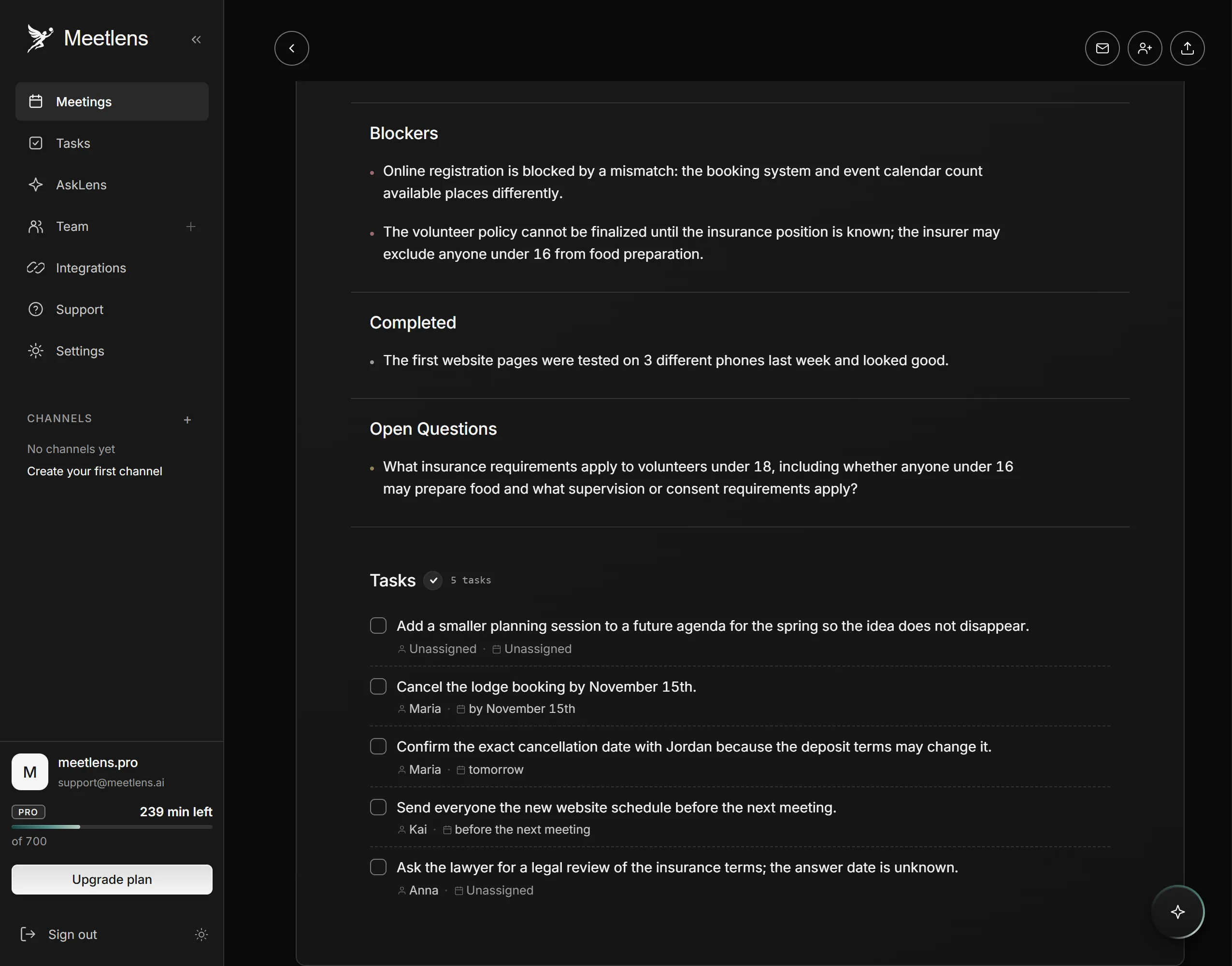
For online meeting minutes from a video conferencing call, Meetlens covers the recording and the first draft. It is a Chrome extension that records the audio of a browser meeting in Google Meet, Zoom Web, Microsoft Teams Web or Webex, without a bot joining the call. Meetlens drafts the record: decisions, open questions and action items with owners and dates, and a clickable timeline jumps from each decision and task to its moment in the recording, which speeds up the checklist above. General Meeting, the default report format, has Brief, Meeting Topics, Decisions, Tasks and Open Questions, enough to draft minutes with AI. You add attendance, quorum, motions and votes, and the signature. No bot means no recording notice from Meetlens, so tell participants yourself.
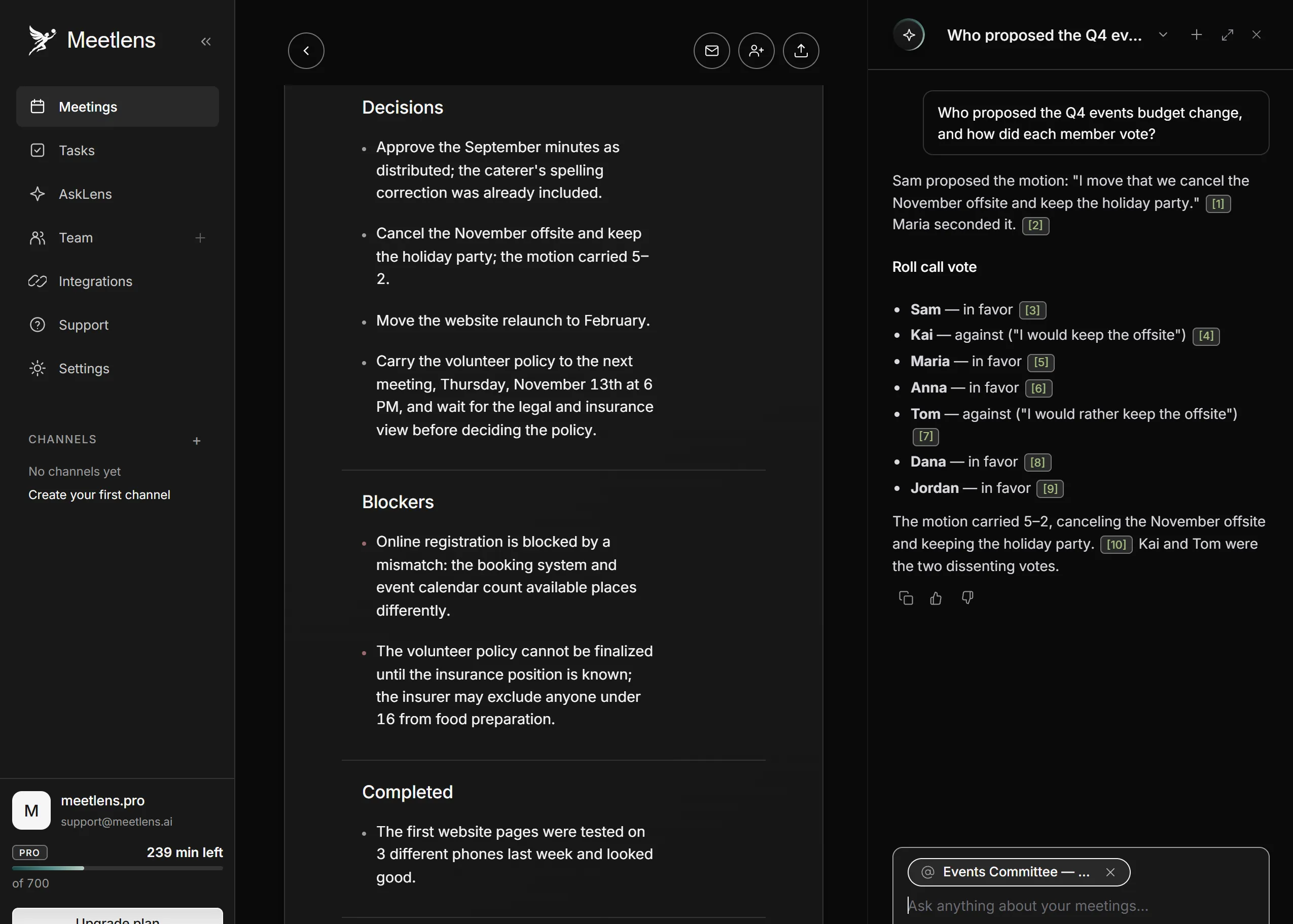
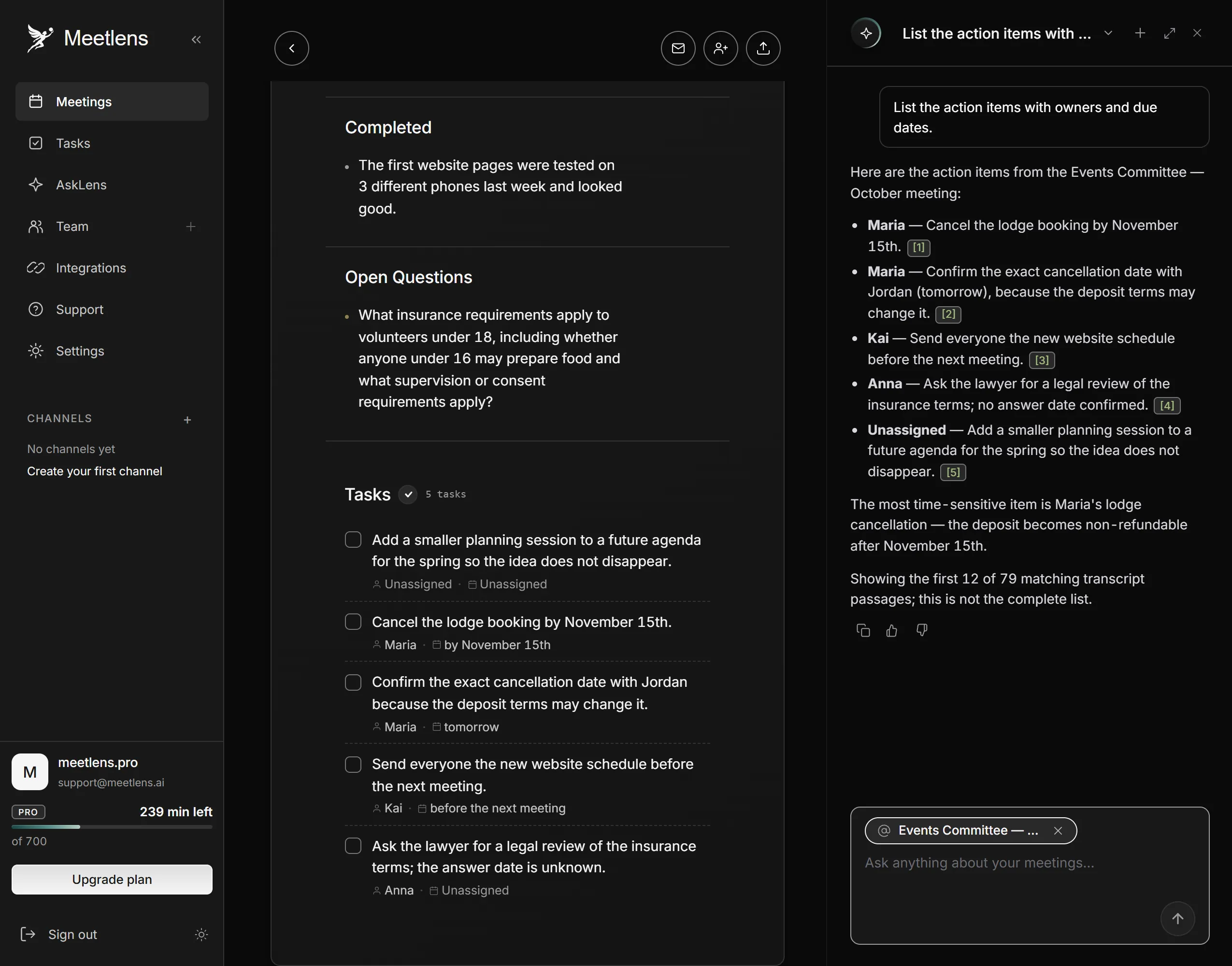
The meeting chat helps with those additions. After the meeting, ask it "Who proposed the Q4 events budget change, and how did each member vote?" or "List the action items with owners and due dates." Pick the meeting with Add context so the chat looks only at it; the answer links to the moments in the recording it draws on and often quotes the exact words; play each one back before a name or a count goes into the minutes.
For an in-person meeting, record it on a phone or voice recorder and upload a meeting recording: audio and MP4 files get the same transcript and report. Each file can be up to an hour long on the Free plan, 90 minutes on Pro and two hours on Business (1 GB per file, 3 GB on Business), so a longer meeting won't upload whole. If you already have a transcript, upload it as a TXT file and get the report without transcription.
Do board meetings need a different process?
Meeting minutes for boards and formal bodies
For a Board of Directors, meeting minutes follow the same seven steps, with stricter wording of motions and votes and record-keeping. In corporate governance, minutes are the contemporaneous record plaintiffs examine when directors' fiduciary duty is challenged, so they serve as evidence of how the board reached each decision. Rules depend on jurisdiction: Delaware's corporation law gives one officer the duty to record the proceedings of stockholder and director meetings, and a nonprofit organization follows its own state's law. Motion wording and executive sessions are covered in board meeting minutes. To see all seven steps in one filled-in record, open the meeting minutes example.