What Is an All-Hands Meeting? Meaning, Agenda, and How to Run One
 Meetlens Editorial11 min readUpdated October 17, 2026
On this page
- What is an all-hands meeting?
- What is the purpose of an all-hands meeting?
- All-hands meeting vs company town hall vs staff meeting: what's the difference?
- What happens in an all-hands meeting?
- All-hands meeting agenda template
- How to run an all-hands meeting
- How to share an all-hands meeting with people who missed it
- Can an all-hands meeting be asynchronous?
An all-hands meeting brings the whole company together, in one room or on one call, to hear leadership's update on results and plans and to question them directly. It is formal by schedule and agenda, not in the formal meeting meaning of motions, votes and minutes. Below: the meaning, the purpose, the company town hall difference, what happens, an agenda template, and how to run and share one.
What is an all-hands meeting?
An all-hands meeting is a company-wide meeting where leadership shares results, goals, and changes with every employee and answers their questions. Scope sets it apart: a staff meeting gathers one team, while an all-hands gathers every team, office and remote employee at once. In a 30-person startup, that is one video call with the founders. In a company of several thousand, it is a livestream from the CEO, watched from offices and homes.
Why is it called an "all-hands" meeting?
The name comes from "all hands on deck," a ship's order calling every sailor up to the deck. The Cambridge Dictionary blog explains that a "hand" here is "a person who does physical work", in the phrase's original sense a sailor. Today the idiom means that everyone must help because there is a lot of work to do. Office language kept the "everyone" part: every employee is expected.
Other names for an all-hands meeting
An all-hands meeting is also called an all-staff meeting, a company meeting, a company-wide meeting or, when the CEO hosts it, a CEO meeting with employees. An invite that says "all staff meeting" means the same event. A company town hall is close but not a synonym, as the comparison below shows.
What is the purpose of an all-hands meeting?
The purpose of an all-hands meeting is to give everyone the same picture of where the company is going and to let employees ask leadership about it directly. It does four jobs:
- Alignment on goals. Every team hears the same goals in the same words, so its priorities trace back to one plan and one mission.
- Transparency. Numbers and decisions come from leadership first-hand, not through rumors or a forwarded slide.
- Company culture and morale. When leaders celebrate wins in front of everyone, employees see which work the company values: that is how organizational culture takes shape.
- Two-way dialogue. The Q&A turns a one-way broadcast into a conversation: employees ask, and leaders answer on the record.
The first three jobs can travel by email; the fourth can't, which is why an all-hands is built for employee engagement, not for reading slides aloud. If nobody would ask a question about an update, send it by email instead.
All-hands meeting vs company town hall vs staff meeting: what's the difference?
An all-hands meeting is a company-wide update with Q&A; a company town hall gives most of the time to questions from employees; a staff meeting is a manager's regular meeting with their own team.
| All-hands meeting | Company town hall | Staff meeting | |
|---|---|---|---|
| Who attends | The whole company | The whole company, or one site or division | One manager and their direct reports |
| Who speaks | CEO, leadership, heads of sales, engineering and other departments | Employees ask, leaders answer | Everyone on the team |
| Time for Q&A | A block at the end | Most of the session | Discussion throughout |
| How often | On a fixed schedule | Fixed, or called around a big change | Weekly; monthly for large departments |
| What comes out | Shared goals, answers, a recap | Answers, plus open questions with owners | Team decisions and action items |
The line between the first two is blurry. Slido and Notion describe an all-hands as "sometimes called a town hall", and RingCentral says all-hands meetings are "also called town hall meetings". The term comes from local politics, where elected officials take questions from voters, and companies borrowed the open floor. The split that matters: if most of the hour belongs to employees' questions, it is a town hall; if most of it is leadership's update, it is an all-hands meeting.
All-hands, company town hall, staff meeting
-
All-hands meeting
Who attends: The whole company
Who speaks CEO, leadership, heads of sales, engineering and other departments
Time for Q&A
A block at the end
-
Company town hall
Who attends: The whole company, or one site or division
Who speaks Employees ask, leaders answer
Time for Q&A
Most of the session
-
Staff meeting
Who attends: One manager and their direct reports
Who speaks Everyone on the team
Time for Q&A
Discussion throughout
What happens in an all-hands meeting?
An all-hands meeting usually moves from a leadership update to news from departments, recognition, and an open Q&A. It runs through six blocks:
- Leadership update. The CEO covers what changed since the last session: results, strategy and big decisions, with the reasons.
- Metrics against goals. A few key metrics compared with the company's OKRs for the quarter, such as revenue, active customers or a product launch.
- News from departments. One or two departments, such as sales or engineering, show what they shipped and what they need from other teams.
- New hires and employee recognition. New people are introduced, and wins are credited to named people and teams.
- Changes. New policies, benefits, reorganizations or office moves: anything that affects every employee.
- Q&A. Employees ask, and leadership answers on the spot or names who will follow up and by when.
How often should you hold an all-hands?
Hold an all-hands meeting monthly or quarterly on a fixed schedule; small companies and startups can meet weekly. Slack's guide to all-hands meetings ties meeting frequency to company size: weekly for small teams or startups, biweekly for mid-size companies, monthly for larger organizations and quarterly for enterprises. Slido, cited above, holds its own all-hands once a month.
Are all-hands meetings mandatory?
An employer can make an all-hands meeting mandatory, and in the US the time employees spend at a required all-hands counts as hours worked. Under the Fair Labor Standards Act (FLSA), meeting time need not be counted as working time only if all four conditions in Title 29 of the Code of Federal Regulations, section 785.27, are met:
- Attendance is outside the employee's regular working hours.
- Attendance is in fact voluntary.
- The meeting is not directly related to the employee's job.
- The employee does no productive work during it.
An all-hands during the workday fails the first condition. An after-hours all-hands fails the second if it is required, or if employees are "led to believe" that skipping it would hurt their working conditions or their job, under section 785.28. This matters most for non-exempt (often hourly) employees: those hours count toward minimum wage and toward overtime for hours worked over 40 in a workweek.
All-hands meeting agenda template
A workable 60-minute all-hands meeting agenda has five blocks: a 5-minute opening, 15 minutes of company results, 15 minutes of team updates and recognition, 20 minutes of Q&A, and a 5-minute wrap-up. This is our template: company results combine the leadership update, numbers and changes from the six blocks above; team updates combine news from departments, new hires and recognition.
| Time | Block | Who leads | What to say or show |
|---|---|---|---|
| 0–5 min | Opening | Moderator | The agenda, how to submit questions, and that the session is recorded |
| 5–20 min | Company results | CEO | 3–5 numbers against goals, one big change and the reason for it |
| 20–35 min | Team updates and recognition | 1–2 heads of departments | What shipped, what's next, what they need; new hires; wins credited by name |
| 35–55 min | Q&A | Moderator reads, leaders answer | Top-voted advance questions first, then live ones |
| 55–60 min | Wrap-up | CEO | Decisions, next steps, when the recap goes out |
Give each speaker a hard time slot, and collect all slides into one PowerPoint or Google Slides deck the day before, so nobody switches screens mid-session.
For a remote company, a 30-minute version keeps the same order:
| Time | Block |
|---|---|
| 0–3 min | Opening and how to ask questions |
| 3–13 min | Company results |
| 13–18 min | One team update and recognition |
| 18–28 min | Q&A |
| 28–30 min | Wrap-up and next steps |
Company town hall meeting agenda (variant): a 5-minute opening, a 20-minute leadership update, 30 minutes of Q&A (half the hour) on questions collected in advance, and a 5-minute wrap-up.
The 60-minute all-hands agenda, block by block
-
0–5 min
Opening
Who leads Moderator
-
5–20 min
Company results
Who leads CEO
-
20–35 min
Team updates and recognition
Who leads 1–2 heads of departments
-
35–55 min
Q&A
Who leads Moderator reads, leaders answer
-
55–60 min
Wrap-up
Who leads CEO
How to run an all-hands meeting
Run an all-hands meeting on a fixed schedule, collect questions in advance, keep presenters to tight time slots, and close with clear next steps. Nine steps:
- Fix the date. Keep the same week and time every cycle, booked months ahead.
- Collect questions in advance. Use a form, allow anonymous questions so people ask what they wouldn't ask by name, and let employees vote.
- Send the agenda and slides early. People then know what will and won't be covered.
- Run a tech check and name a moderator. Test microphones, screen sharing and the livestream; the moderator keeps time and reads questions aloud.
- Rotate speakers. Bring in a different team each session, so the all-hands isn't only the CEO's voice.
- Run the Q&A with live polls. A one-question poll, such as "How clear is next quarter's plan, 1 to 5?", puts the room's answer on screen and gives the Q&A a starting point.
- Close with next steps. Repeat the decisions, who owns each follow-up, and when answers will arrive.
- Record the session. Say so in the invite and again at the start.
- Close the loop within a week. Answer the open questions in writing and ask for employee feedback in a two-question survey: what was useful, and what should change.
Running a remote or hybrid all-hands
A remote or hybrid all-hands works when every employee can hear, see the slides and ask questions the same way, whether they are in the room or join by video conferencing. For hybrid work, route all questions through one channel, such as the form or the call chat, so the room doesn't crowd out people online, and give the room a microphone for live questions.
Microsoft's Work Trend Index special report from June 2025 found that nearly a third of meetings now span multiple time zones and that meetings after 8 p.m. are up 16% year over year. Pick the slot that works for most employees, rotate it if the same region always gets the late call, and record the session for everyone else.
When the all-hands brings bad news
When an all-hands meeting brings bad news, such as layoffs, say the main news in the first minutes, explain what happens next and who is affected, leave time for questions, and send the same message in writing the same day. Waiting fuels speculation and anxiety, so don't hold the news until after the wins; drop the recognition block that day. If answers aren't ready, say when the next update comes.
How to share an all-hands meeting with people who missed it
Send people who missed the all-hands meeting a written recap and the recording within a day: the decisions and numbers that were shared, answers from the Q&A, and the questions still open, each with an owner. GitLab's handbook on all-remote meetings sets a tighter bar: add the recording link to the agenda within 12 hours after the meeting, so people in other time zones can catch up asynchronously. For one person who missed it, a short missed meeting email does the same job.
Subject: All-hands recap, [date]: results, answers, open questions

Recording: [link]   Slides: [link]

What we shared
- [Result against a goal, with the number]
- [Decision or change, and when it takes effect]

Answers from the Q&A
- Q: [question]
  A: [short answer] ([who answered])

Still open
- [Question] — owner: [name], answer by [date]

Next steps
- [What happens next] — [owner] — [date]
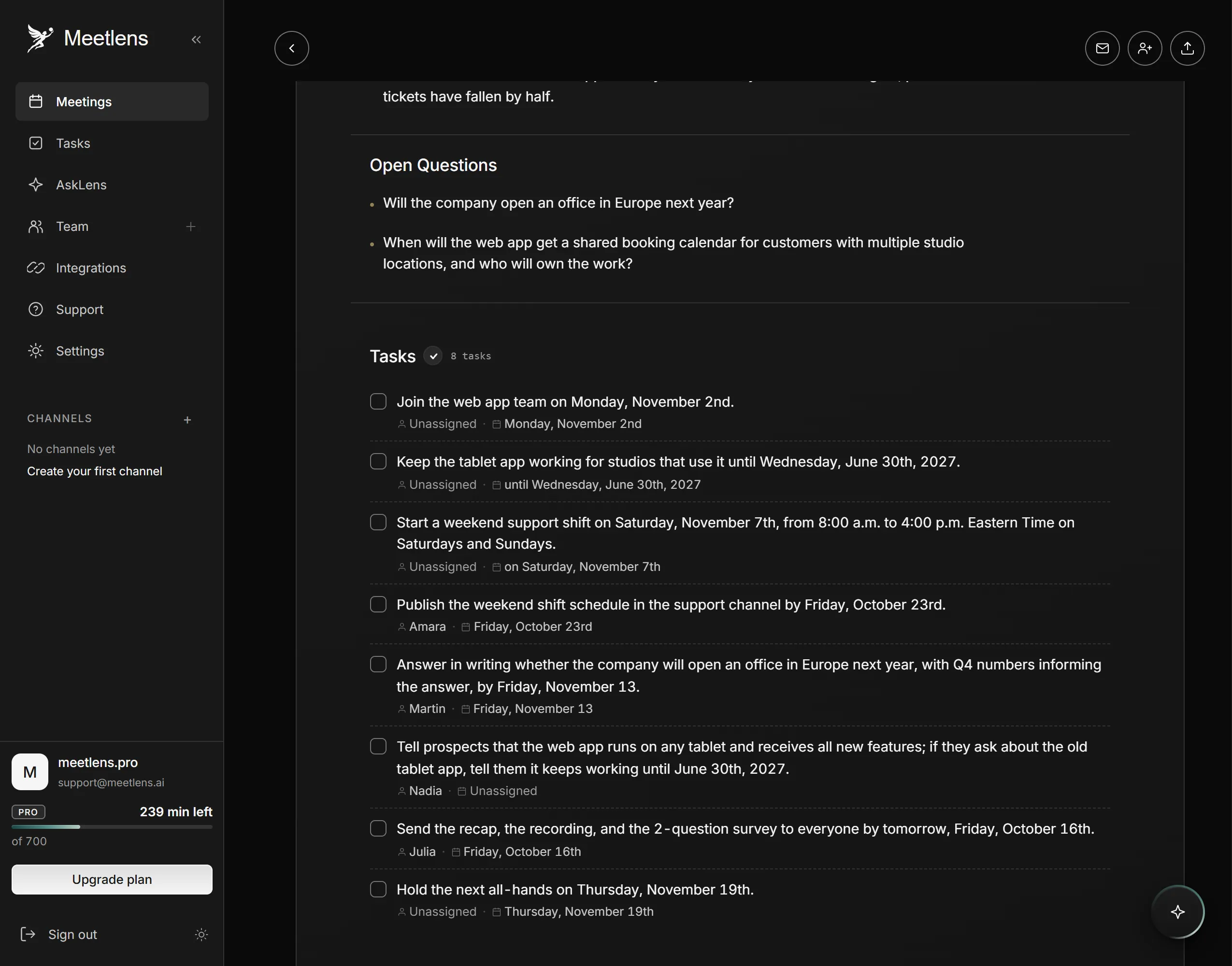
In our staged all-hands (synthetic voices, about 11 minutes), three questions came in through the form (14, 9 and 6 votes), two were asked live, and two stayed without an answer: whether we open an office in Europe (Martin answers in writing by Nov 13) and when multi-location studios get one shared booking calendar (no owner yet).
If the all-hands runs in the browser version of Google Meet, Zoom, Microsoft Teams or Webex, Meetlens can draft this recap. It is a Chrome extension that records the meeting tab's audio without a bot joining the call, then produces a transcript with speaker labels and an AI report. For AI meeting summaries of an all-hands, keep General Meeting, the default format: it lists Decisions, tasks with an owner and a due date, and Open Questions when any came up. Check that section for Q&A questions nobody answered, and check each owner before you send.
To fill "Answers from the Q&A", add the meeting to the AI chat with the Add context button and ask which questions came up and what leadership answered; answers link to the moments in the recording, so check each one against the linked moment. Paid plans export the report as PDF, Markdown or TXT and let you download the audio recording to share with the recap.
Meetlens records audio only, so link the slides in the recap yourself. The Chrome extension doesn't capture the Zoom or Teams desktop apps, and it doesn't send the recap: paste it into an email or a company channel. Free records up to a 60-minute call at a time, Pro up to 90 minutes and Business up to 120: the 30-minute version fits any plan, and the 60-minute agenda fits Free only if it ends on time. With no bot, the call shows no recording notice from Meetlens, so announce the recording yourself:
This all-hands is being recorded, audio only, so colleagues who can't join live can catch up. The recording and a written recap will follow after the meeting.
Can an all-hands meeting be asynchronous?
An all-hands meeting can be partly asynchronous: a recorded leadership update plus a written Q&A in a shared document can replace the live session when the news needs no live discussion. People take in the update on their own schedule, as in any asynchronous meeting. In 2019, GitLab's Support team turned its weekly all-hands of about 40 people into a podcast-style audio update built from a shared document, with discussion in Slack. The team wrote that it compressed an hour of "chair time" for 40 people into 10–15 minutes. Keep bad news live.
Between all-hands, the same news reaches each team through its regular staff meetings, where a manager turns company priorities into the team's own tasks.