How to Write a Meeting Report: Format, Template, and Sample
 Meetlens Editorial9 min readUpdated October 10, 2026
On this page
To write a meeting report, lead with a short summary of the outcome, then list the key discussion points, decisions, action items with owners, and next steps for people who weren't in the room. It picks up where note-taking methods for meetings leave off. Below: the definition, format, steps, a template and a sample, then Zoom and Teams attendance reports and AI drafting.
What is a meeting report?
A meeting report is a short written summary of a meeting's purpose, key discussion points, decisions, and next steps, written for people who need the outcome but didn't attend. Managers, absent teammates, clients and other stakeholders read it to learn what changed and what they have to do. You write it from your meeting notes.
The phrase "meeting report" covers three different things:
| Meaning | What it is | Who uses it |
|---|---|---|
| Written meeting report | A document: outcome, decisions, action items, next steps | Managers, absent teammates, clients |
| Attendance or usage report | Platform data: who joined, when, for how long | Organizers and admins in Zoom or Teams |
| AI-generated meeting report | A draft built from the call recording | Whoever checks it before it goes out |
The second and third have their own sections at the end.
Meeting report vs. meeting minutes
Meeting minutes are the formal record of what a group decided, approved by the group, usually at its next meeting; a meeting report is less formal, opens with the conclusion and can include the writer's recommendations. Meeting minutes follow the agenda and serve the whole group. A meeting report has one audience, so it skips what doesn't concern that reader. If a board or committee needs an approved record, write meeting minutes, not a report.
What should a meeting report include? (Format)
A meeting report usually has six parts: meeting details, purpose, an executive summary, key discussion points, decisions and action items, and next steps. This meeting report format runs from the conclusion down to the detail.
| Part | What goes in | Why the reader needs it |
|---|---|---|
| Meeting details | Date, format, attendees, absentees, author | Whom to ask |
| Purpose | Why the meeting was held, one sentence | Shows whether it did its job |
| Executive summary | Outcome, main decision, what the reader must do | Most readers stop here |
| Key discussion points | One or two lines per topic, with the reasoning | Why decisions went that way |
| Decisions and action items | Each decision; each task with owner and due date | Where decision-making landed, who owes what |
| Next steps | What happens next; next meeting date | When to expect the next update |
The order follows the inverted pyramid that journalists use, also called bottom line up front: the most important information goes first, so a reader who stops after the executive summary still has the outcome. Meeting minutes, by contrast, open with attendance and follow the agenda.
Add optional blocks when they apply: risks or issues, recommendations (your own view, labeled as yours) and links to the deck or data. Aim for one page per hour of meeting. For recurring reporting meetings, such as a monthly business review, keep the same order every time.
How do you write a meeting report? 6 steps
Write a meeting report within 24 hours of the meeting: decide who will read it, write the conclusion first, then add only the details that reader needs. The same steps work for a report after a meeting you ran and for a report of a meeting held while your manager was away.
- Identify the reader and the decision they face. A manager needs the outcome and any request for approval; an absent teammate needs their tasks; a client needs commitments and dates.
- Gather your inputs: your meeting notes, the slides, the chat and the recording. If the call was recorded, get a speech-to-text transcript: it lets you check exact figures and who agreed to what.
- Write the executive summary first, in 2–3 sentences: the outcome, the key decision and what the reader needs to do. If you can't write it, the meeting probably decided nothing; say so and list what's still open.
- Summarize the discussion by topic, not chronologically. If pricing came up three times, the reader wants one pricing paragraph. Give each topic its key points and the reason behind any decision.
- List decisions and action items. Write each decision as an outcome ("Keep the current vendor") and give each action item one owner and a due date. If a task had no owner in the meeting, write "owner not set" instead of picking one yourself.
- Review and send. Check names, numbers and dates against your notes or the transcript, link the source material, and send the report as your follow-up, with the outcome in the subject line.
For a short meeting summary report, send only the executive summary, decisions and action items, and link the rest.
Meeting report template
This meeting report template follows the format above: copy it, fill in the brackets, and delete any optional block you don't need.
Meeting report: [meeting title]
Date / time: [ ]   Format: [in person / Zoom / Teams / Meet]   Prepared by: [name]
Attendees: [names, roles]          Absent: [ ]
Purpose: [why the meeting was held — one sentence]

Executive summary
[2–3 sentences: outcome, key decision, what the reader needs to do]

Key discussion points
• [Topic] — [what was discussed, 1–2 sentences]

Decisions
• [Decision] — [who decided]

Action items
| Action | Owner | Due |

Risks / issues (optional): [ ]
Recommendations (optional): [ ]
Next steps / next meeting: [ ]
Attachments: [slides, recording, transcript link]
Three fields do more work than they look. "Prepared by" tells the reader whom to ask. "Absent" lists the people who need a follow-up first. "Attachments" lets you link the slides and recording instead of retelling them.
The downloadable versions open in Google Docs and Microsoft Word with the action items as a real table; the Markdown file suits wikis and notes apps.
Meeting report sample
A good meeting report sample opens with the outcome — the decision, its condition and the one date the reader may be needed — and gives every task an owner and a due date. Below: a 45-minute vendor review, filled in with the template above, for a VP of operations who wasn't on the call.
Illustrative example: the companies, people and figures are invented.
Meeting report: Q3 vendor review, Larkspan Hosting
Date / time: Oct 8, 2026, 2:00–2:45 p.m.   Format: Zoom   Prepared by: Rhea Castellan
Attendees: Rhea Castellan (operations lead), Jonah Pell (IT manager),
  Mira Odell (finance), Callum Brisco (Larkspan account manager)
Absent: none
Purpose: Decide whether to renew the Larkspan hosting contract, which ends Oct 31.

Executive summary
We will renew Larkspan for 6 months, not the 12 they offered, at 5% more per
month, if they commit to a 99.5% monthly uptime SLA. Q3 uptime met the current
99% contract but not what our online store needs. No action needed from you
unless Larkspan declines by Oct 20.

Key discussion points
• Q3 performance — uptime was 99.1%; two September outages caused most of
  the downtime.
• Pricing — Larkspan offered 12 months at the current rate; a 6-month term
  costs 5% more per month.
• Fallback option — moving to another host takes about 8 weeks of IT time.

Decisions
• Renew for 6 months (Nov 1, 2026 – Apr 30, 2027) if Larkspan commits to a
  99.5% uptime SLA with service credits — Jonah Pell, Mira Odell
• Line up a fallback host before the 6-month term ends — Jonah Pell

Action items
| Action                       | Owner                    | Due          |
| Send SLA terms to Larkspan   | Rhea Castellan           | Oct 13       |
| Confirm the SLA in writing   | Callum Brisco (Larkspan) | Oct 20       |
| Shortlist two fallback hosts | Jonah Pell               | Jan 29, 2027 |

Risks / issues: If Larkspan declines by Oct 20, only 11 days remain before
  the contract ends, too few to move to another host.
Next steps / next meeting: Next vendor review in January 2027, with Q4 uptime.
Attachments: Q3 uptime export, renewal quote, call recording
What makes this vendor review report work:
- The summary states the condition and the date. The SLA (service-level agreement) is the uptime the vendor commits to; Oct 20 is the only day the reader might be needed.
- Every decision names who made it, every task has one owner and a due date, and the risk is a date, not "timeline concerns."
Where do you find meeting reports in Zoom and Microsoft Teams?
In Zoom and Teams, "meeting reports" are attendance and usage data — who joined, when, and for how long — not written summaries; Zoom keeps them under Reports in the web portal, and Teams puts them in the meeting chat's Attendance tab. Both export the data as a CSV (comma-separated values) file.
Zoom: Meeting and webinar history report
Zoom's Meeting and webinar history report is available on Pro, Business, Education and Enterprise accounts. Hosts see the meetings and webinars they hosted; owners, admins and roles with access to Usage reports see the whole account.
- Host: web portal > profile picture > My account > Reports > Meetings & Webinars > Usage reports tab > Meeting and webinar history.
- Admin: Admin Center > Reports > Usage reports > Meeting and webinar history.
Each view covers up to one month. The number in the Participants column opens names, join and leave times and duration; Export downloads the list.
Zoom web portal: Reports › Usage reports › Meeting and webinar history
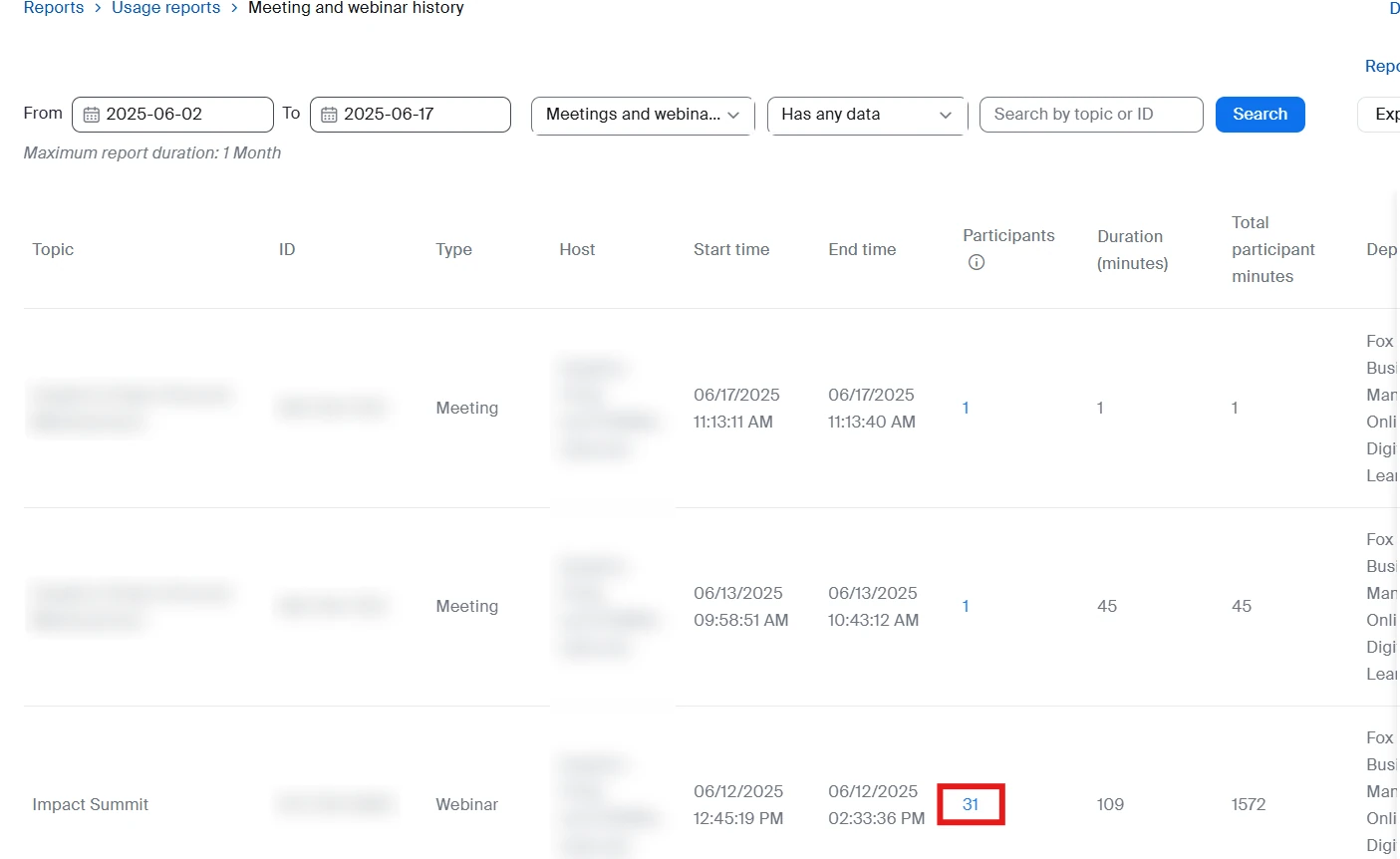
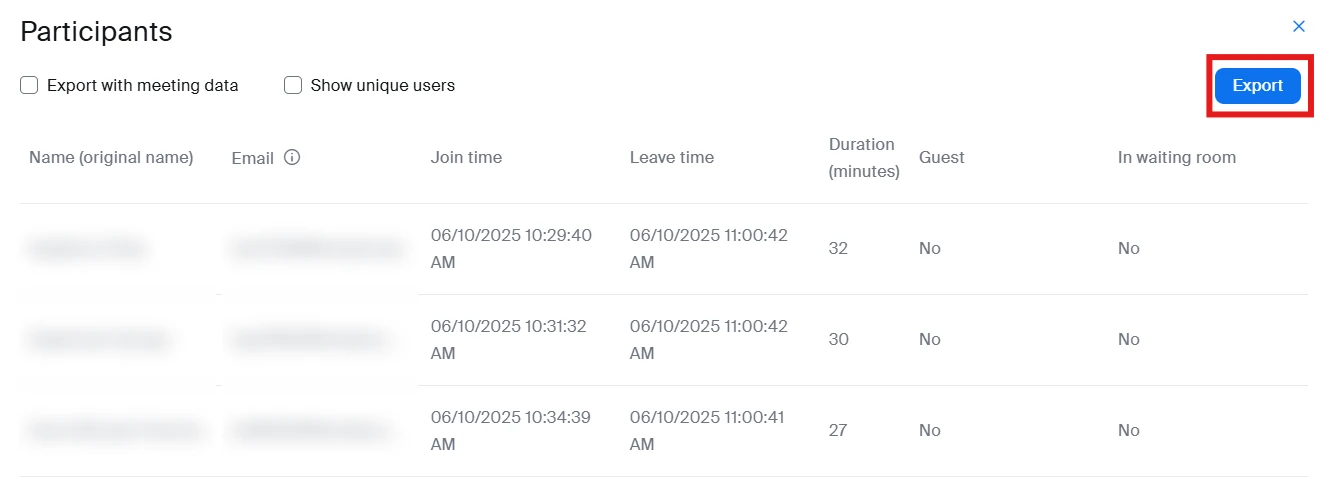
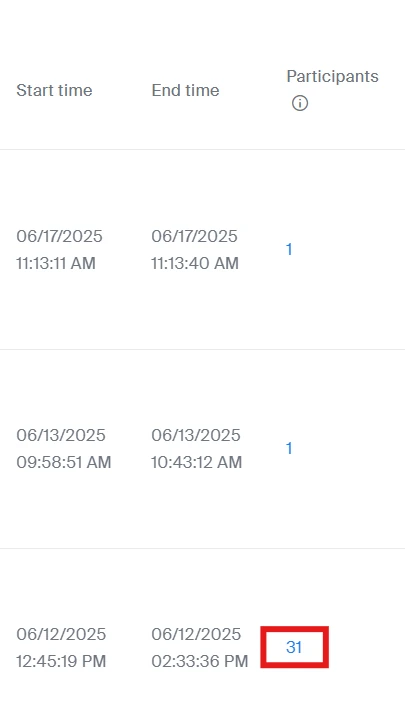
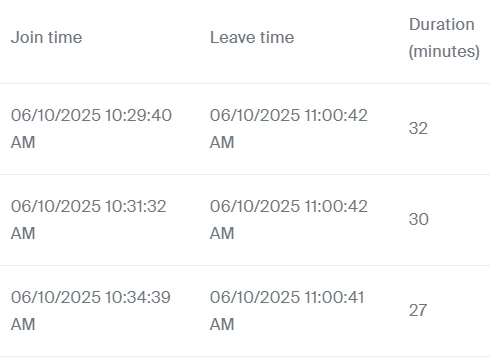
Images: Temple University, Fox Online & Digital Learning. Names, emails and meeting IDs blurred.
Microsoft Teams: attendance report
Only the organizer and co-organizers can open a Teams attendance report.
- Download: Chat > the past meeting's chat > Attendance tab > Download (.csv).
- Turn on or off: Calendar > the event > View event > Options > Participation > Allow attendance report.
The report appears about five minutes after the meeting ends and shows who attended, when they joined and left, and engagement data such as raised hands. If the organizer leaves the organization, the reports are permanently deleted. In meetings with more than 120 participants, the list downloaded during the meeting is partial; the post-meeting report includes everyone.
Microsoft Teams: the Attendance tab of a past meeting
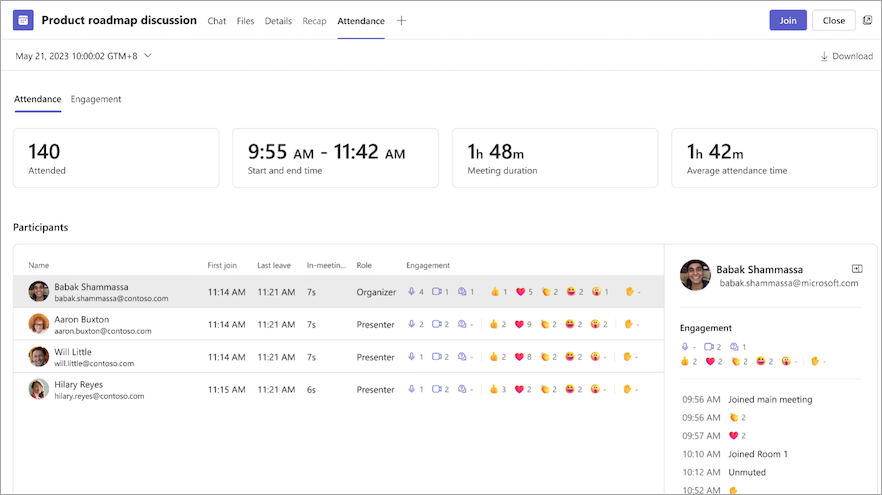
Image: Microsoft Support
Neither platform report says what was decided; that takes a written meeting report or an AI draft. Recordings aren't under Reports either: Zoom keeps cloud recordings in the web portal under Recordings & Transcripts.
Can you get the written report without writing it?
How to get a meeting report automatically with AI
AI can draft a written meeting report automatically from the call recording if you pick a report format that fits the meeting, but you still need to check it before it goes out. Zoom's meeting summary (formerly part of AI Companion) and the Teams intelligent recap (Teams Premium or a Microsoft Copilot license) draft summaries inside those platforms on eligible plans.
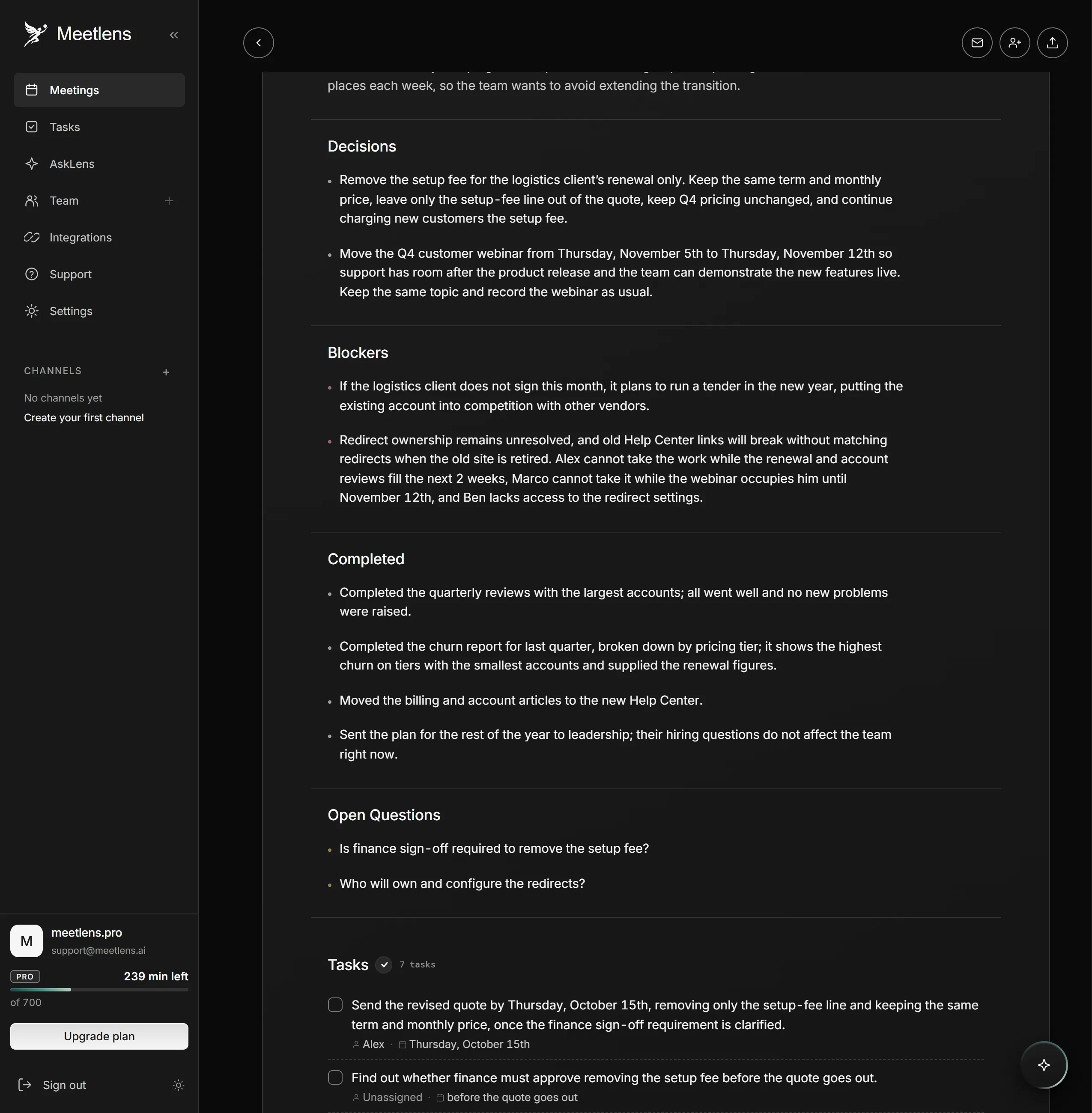
Meetlens is a Chrome extension that records the audio of a browser meeting in Google Meet, Zoom Web, Microsoft Teams Web or Webex without a bot joining the call, then builds AI meeting reports from the transcript. For an in-person meeting, import an audio file or an MP4 video instead (files up to an hour long on Free, an hour and a half on Pro, two hours on Business). General Meeting, the default report format, has Brief, Meeting Topics, Decisions, Tasks with an owner and a due date, and Open Questions when any came up, a structure close to the written meeting report above. For another format, pick it in the drop-down above Start recording, which shows General Meeting until you change it; a finished report can also be rebuilt in another format.
| Report format | Best for |
|---|---|
| General Meeting | Any working meeting: topics, decisions, tasks |
| Client Meeting | Client calls: what the client needs, what was agreed, objections, next steps |
| Team Sync | Status meetings: updates by person, blockers |
| One-on-One | Manager 1:1s: takeaways, concerns, feedback |
| HR Interview | Candidate interviews: profile, signals, risks |
The AI draft doesn't know your reader, so add the ask and any recommendations yourself. Check that each decision was agreed, not just suggested, and that every owner and date was said aloud. On Pro and Business plans, you can export a report to PDF, Markdown or TXT.
No bot joins, so the platform shows no recording notice for Meetlens. Allow microphone access so your own voice is in the transcript, tell participants you're recording, get their OK and stop if anyone objects. The extension records audio only, from Chrome on a computer, not from the Zoom or Teams desktop apps.