Project Management Meeting Notes Template (With a Filled Example)
 Meetlens Editorial7 min readUpdated October 10, 2026
On this page
A project management meeting notes template is a ready-made document you copy for every project meeting: last week's action items, status by workstream, risks and issues, decisions, and new action items with an owner and due date. Knowing what meeting notes should capture is half the job; project meetings also need one fixed structure. Copy or download the project management notes template; an example, variants, upkeep rules and auto-fill follow.
Project meeting notes template (copy or download)
A project meeting notes template should open with last week's action items and end with this week's, with status, risks and decisions in between. Each block answers one question: what got done, where each workstream stands, what could go wrong, what was decided, and who does what next. Paste this word processing template into any editor and replace the brackets.
Project: [name / ID]            Meeting: [weekly status / kickoff meeting / steering committee review]
Date: [ ]   Time: [ ]   Link / room: [ ]
Facilitator: [PM]   Note-taker: [ ]
Attendees: [Name — role / workstream]      Absent: [ ]
Objective: [one sentence: what this meeting must decide or unblock]
Agenda: [1–4 items, time-boxed]

1. Previous action items
| # | Action | Owner | Due | Status (done / in progress / blocked) |

2. Status by workstream
| Workstream | Owner | RAG | Progress since last meeting | Next checkpoint (date) |

3. Schedule & key dates: [on track / at risk — what moved and why]

4. Risks & issues
| Type (risk / issue / dependency) | Description | Impact (H/M/L) | Owner | Next step |

5. Decisions
| # | Decision | Made by | Why |

6. New action items
| # | Action | Owner | Due |

7. Parking lot / open questions
8. Next meeting: [date] — carry over: [items]
How the blocks work:
- Header. The Agenda line is a short meeting agenda; the Objective line says what the meeting must decide.
- Block 2. The RAG status (Red/Amber/Green) rates each workstream: Green is on track, Amber is at risk with a recovery plan, Red is off track and needs help.
- Blocks 5–7. Same order as in any meeting notes: decisions, then action items, then open questions.
Every format keeps the same page layout, so attendees find their row at a glance, and opens without sign-up or email:
| Format | Best for |
|---|---|
| Google Docs (Make a copy) | Editing together during the call |
| Microsoft Word (.docx) | Email attachments, tracked changes |
| Google Sheets or Microsoft Excel (.xlsx) | Tracking blocks 1, 2, 4 and 6 across meetings |
| Printing for handwritten notes | |
| Markdown (.md) | Wiki tools: Notion imports it via Settings > Import > Text & Markdown (Notion Help Center); Atlassian Confluence and others take it pasted via Copy Markdown |
Example: filled-in weekly project status meeting notes
Below is the same template filled in for an 11-minute weekly status meeting on a website redesign, so you can see how much detail each block needs.
Illustrative example: the team, names and dates are invented.
Project: Website redesign (WEB-14)    Meeting: weekly status
Date: Oct 13, 2026, 10:00–10:11, Google Meet
Facilitator: Ines (PM)   Note-taker: Marek
Attendees: Ines — PM; Owen — Design; Talia — Content; Marek — Dev
Objective: Decide whether the content delay moves the Nov 3 launch.
Agenda: previous actions, status by workstream, content delay

1. Previous action items
| # | Action                             | Owner | Due   | Status  |
| 1 | Send homepage mockups for review   | Owen  | Oct 9 | done    |
| 2 | Get legal sign-off on pricing copy | Talia | Oct 9 | blocked |

2. Status by workstream
| Workstream | Owner | RAG   | Progress                     | Next checkpoint |
| Design     | Owen  | Green | Mockups sent                 | Final designs, Oct 16 |
| Content    | Talia | Amber | Pricing copy waits for legal | Copy approved, Oct 23 at the earliest (was Oct 16) |
| Dev        | Marek | Green | Templates on staging         | Staging done, Oct 27 |

3. Schedule & key dates: launch Nov 3 on track; new pricing
   page moved to Nov 10 (decision 1)

4. Risks & issues
| Type (risk / issue / dependency) | Description | Impact | Owner | Next step |
| Dependency | Legal review of pricing copy undated | H | Talia | Get a review date from legal |

5. Decisions
| # | Decision | Made by | Why |
| 1 | Launch Nov 3 with the current pricing page; new one goes live Nov 10 | Ines | Oct 23 approval leaves no time to build and test by Nov 3 |

6. New action items
| # | Action                                 | Owner | Due    |
| 1 | Get a review date from legal           | Talia | Oct 14 |
| 2 | Restyle the current pricing page       | Marek | Oct 27 |
| 3 | Set the new pricing page to Nov 10 in the plan | Ines | Oct 14 |

7. Parking lot / open questions: Email customers about new
   pricing? Owner not set.
8. Next meeting: Oct 20 — carry over: Get legal sign-off on pricing copy
In these project meeting notes, the blocked action item, the Amber Content row and the dependency in block 4 share one cause: legal hasn't scheduled the review.
Which variant fits your project meeting?
The base template fits a weekly status meeting; for a project kickoff meeting or a project steering committee review, keep the header and blocks 5–8 and replace blocks 2–4. A project kickoff meeting is the project team's first meeting, so block 1 stays empty. A project steering committee — the sponsors and leads who approve budget and scope changes — needs project meeting notes built around approvals.
| Meeting | Replace blocks 2–4 with | Who signs off |
|---|---|---|
| Kickoff meeting | Goals and project scope, success criteria, roles (RACI), timeline with key dates, communication plan, initial risks, resources | Project sponsor |
| Weekly status | Nothing: base template as is | Nobody: working notes |
| Steering committee / stakeholder review | Budget vs. plan, change requests for approval, escalated risks, decisions needed | Committee chair, at the next meeting |
At a kickoff meeting, record roles as a RACI chart, a responsibility assignment matrix that names who is Responsible, Accountable, Consulted and Informed for each deliverable. The resources line records resource allocation: who works on which workstream.
At a steering committee review, each change request — a formal ask to change scope, budget or dates — comes with its cost and schedule impact, and the stakeholders' answer goes into block 5. These notes are closer to meeting minutes: the committee approves the record at its next meeting. Use the steering committee variant as your project management meeting minutes template; to turn the base template into a project meeting minutes template for any other meeting, add an "Approved on" line.
How to keep project meeting notes useful week to week
Project meeting notes stay useful when every meeting starts with last week's open action items and every new action item has one owner and a due date. Six rules keep any project manager meeting notes template working:
- Start with previous action items. An item that slipped gets a new date or moves to block 4 as an issue.
- Let the workstream owner set the RAG status. The project manager challenges a color ("what would make this green?") but doesn't assign it.
- Write the why next to each decision. Decision rationale is what people look for when someone wants to reopen a decision.
- Give every risk an owner. Nobody acts on a risk without a risk owner; accountability for action items works the same way, one owner each. Over a long schedule, keep risks, assumptions, issues and dependencies in one RAID log: its risk register holds problems that might happen, its issue log holds problems that already have. Block 4 then lists only what changed this week.
- Send the notes within 24 hours, while attendees can still correct a wrong owner or date.
- Keep all project meeting notes on one running page, the single source of truth, and copy action items into the team's project management software with the same wording.
How to fill the template from a recorded project call
If your status meeting runs in Google Meet, Zoom Web, Microsoft Teams Web or Webex in Chrome, Meetlens can record it without a bot and draft most blocks of the template; the RAG status and risk impact stay with people. Meetlens is a Chrome extension that records the meeting's audio, then produces a transcript with speaker labels and a structured AI report. No bot means no recording notice from the platform, so tell attendees yourself.
For AI project meeting notes, pick Team Sync in the format drop-down above Start recording, or switch to it during the call. Use Team Sync when each person reports status; use General Meeting for a steering committee review.
| Template block | Team Sync report | General Meeting report | Add by hand |
|---|---|---|---|
| Attendees | No section | No section | Names, roles |
| 1. Previous action items | Participant Updates, Blockers | Meeting Topics | Status of each item |
| 2. Status by workstream | Participant Updates | No section | RAG status, if nobody said it aloud |
| 3. Schedule & key dates | Decisions | Decisions | Milestones nobody mentioned |
| 4. Risks & issues | Blockers | Blockers | Impact, if nobody said it aloud; risk owner |
| 5. Decisions | Decisions | Decisions | Made by; why, if unsaid |
| 6. New action items | Next Steps | Tasks | Check owners and dates |
| 7. Parking lot / open questions | Open Questions | Open Questions | Owner, if not set |
Both formats list action items with owners and due dates in the Tasks block (in Team Sync, the Next Steps block). General Meeting, the default report format, has Brief, Meeting Topics, Decisions and Tasks, plus Open Questions when any came up, enough for blocks 5–7.
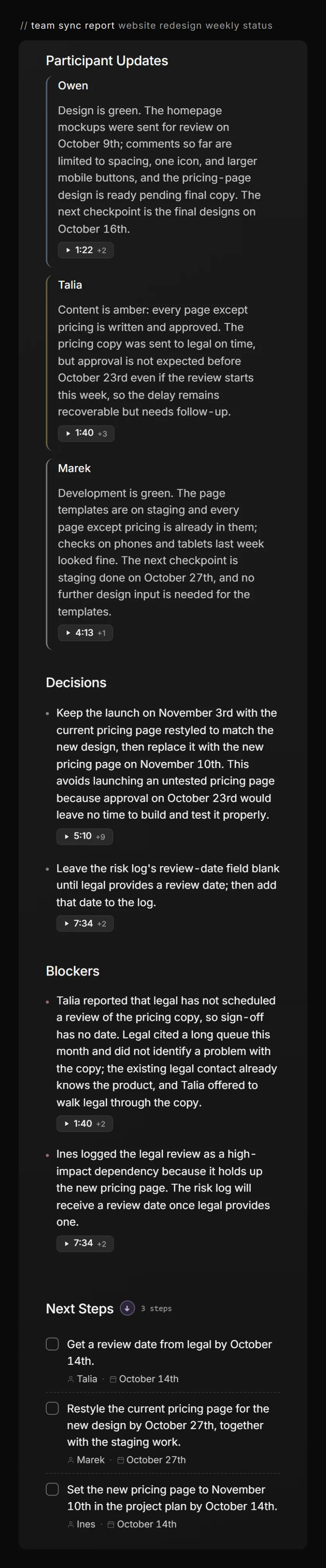
Auto-fill gives you a draft: Meetlens doesn't write into Word or Google Docs, so paste the sections into your copy. Check what the report counts as a decision: for the meeting below, it also listed "leave the risk log's review date blank until legal provides one," which the note-taker kept out of block 5. Downloading the report as Markdown, TXT or PDF needs a Pro or Business plan.
From the Team Sync report to the base template
The same meeting in the base template
Project: Website redesign (WEB-14) Meeting: weekly status
Date: Oct 13, 2026, 10:00–10:11, Google Meet
Facilitator: Ines (PM) Note-taker: Marek
Attendees: Ines — PM; Owen — Design; Talia — Content; Marek — Dev
Objective: Decide whether the content delay moves the Nov 3 launch.
Agenda: previous actions, status by workstream, content delay
| # | Action | Owner | Due | Status |
|---|---|---|---|---|
| 1 | Send homepage mockups for review | Owen | Oct 9 | done |
| 2 | Get legal sign-off on pricing copy | Talia | Oct 9 | blocked |
| Workstream | Owner | RAG | Progress | Next checkpoint |
|---|---|---|---|---|
| Design | Owen | Green | Mockups sent | Final designs, Oct 16 |
| Content | Talia | Amber | Pricing copy waits for legal | Copy approved, Oct 23 at the earliest (was Oct 16) |
| Dev | Marek | Green | Templates on staging | Staging done, Oct 27 |
3. Schedule & key dates: launch Nov 3 on track; new pricing page moved to Nov 10 (decision 1)
| Type | Description | Impact | Owner | Next step |
|---|---|---|---|---|
| Dependency | Legal review of pricing copy undated | H | Talia | Get a review date from legal |
| # | Decision | Made by | Why |
|---|---|---|---|
| 1 | Launch Nov 3 with the current pricing page; new one goes live Nov 10 | Ines | Oct 23 approval leaves no time to build and test by Nov 3 |
| # | Action | Owner | Due |
|---|---|---|---|
| 1 | Get a review date from legal | Talia | Oct 14 |
| 2 | Restyle the current pricing page | Marek | Oct 27 |
| 3 | Set the new pricing page to Nov 10 in the plan | Ines | Oct 14 |
7. Parking lot / open questions: Email customers about new pricing? Owner not set.
8. Next meeting: Oct 20 — carry over: Get legal sign-off on pricing copy
Meetlens Team Sync report
- 1Participant Updates → 1. Previous action items, 2. Status by workstream with each RAG colour
- 2Decisions → 3. Schedule & key dates, 5. Decisions
- 3Blockers → 1. Previous action items (blocked status), 4. Risks & issues
- 4Next Steps → 6. New action items
- 5Open Questions (not in the screenshot) → 7. Parking lot / open questions
- set by the workstream owner RAG column; each owner said the colour aloud, so it came through Participant Updates
What if the meeting isn't about a project?
Templates for other meetings
Project meeting notes are built around workstreams, status and risks; a meeting outside project work needs a general meeting notes template, and a formal meeting with votes needs meeting minutes rather than working notes. The project management meeting template above covers kickoff meetings, weekly status meetings and steering committee reviews.