How to Record an Interview: Consent, Setup, and What Happens to the Recording
 Meetlens Editorial12 min read
Last reviewed: October 14, 2026. Fact-checked against the statute texts and help pages linked in this article.
On this page
- Can you record an interview?
- Is it legal to record a Zoom interview?
- Why do companies record interviews?
- How to ask for consent to record an interview
- How to record a remote interview
- How to record an in-person interview
- How to get clear audio in an interview recording
- What to do with an interview recording afterward
- Can candidates record their own job interview?
- What is a recorded video interview?
- From recording to transcript and notes
To record an interview, use the meeting platform's recorder or a browser recorder on a remote call, or a phone placed between you and the candidate in person, and get every participant's spoken consent at the start of the recording. Whether you're the interviewer or the candidate in a job interview, a clear recording is what you later turn into a transcript of interview answers. Below: the law, consent, setups, storage and candidates.
Can you record an interview?
In most US states you can legally record a job interview you take part in, but several states require consent from everyone on the call, so the safe rule is to ask every participant first.
Federal wiretapping law requires only one-party consent. The Federal Wiretap Act, Title I of the Electronic Communications Privacy Act (ECPA), lets a party to a conversation, or someone with a party's prior consent, record it unless the purpose is a crime or a tort (18 U.S.C. § 2511(2)(d)). Both the interviewer and the candidate are parties.
Rules differ by U.S. state. Under all-party consent, everyone must agree: California Penal Code § 632 bars recording a confidential communication "without the consent of all parties."
No federal rule settles which state's law applies to an interstate call, such as a recruiter in one state interviewing a candidate in California, so the safe practice is to follow the strictest state involved. Courts disagree on jurisdiction, according to the Reporters Committee for Freedom of the Press (RCFP).
Can an employer record an interview without permission? In a one-party consent state, yes; if an all-party state may be involved, not without the candidate's yes.
Is it legal to record a Zoom interview?
Yes, under the same consent rules; Zoom, Meet and Teams show their own recording notice, but in all-party states a spoken announcement and each person's recorded yes is the safer standard.
On web conferencing platforms, the built-in recorder announces an interview recording: Zoom "will always notify meeting participants" of a recording (Zoom Support), and Google Meet and Microsoft Teams notify participants when recording starts. Staying on after a clear notice is often treated as implied consent, but RCFP calls recording each person's verbal consent a best practice.
Recording rights stay on the host's side: Zoom recording needs host permission, and Meet and Teams let the host, co-hosts and, depending on settings, the host's colleagues record. A candidate joining from outside can't start the recorder alone, so the interviewer who hosts usually records.
A note-taker bot may or may not trigger the notice; Teams, for one, requires apps that record through its media API to flag the recording. A browser extension without a bot, such as Meetlens, or a phone on the desk shows no notice, so announce the recording in the invite and out loud.
Why do companies record interviews?
Companies record job interviews so every interviewer judges the candidate on what was actually said, not on memory. A recruiter or hiring manager gets four things from recording job interviews:
- A better debrief. The panel quotes the candidate's actual answer, not a paraphrase.
- Interviewer calibration. Several interviewers rate the same recorded answer and compare, so "strong" means the same thing to all of them.
- Interviewer training. New interviewers hear how experienced colleagues ask follow-up questions.
- A record for disputed decisions. If a candidate challenges an outcome, the recording shows what was asked and answered.
A recording also lets the interviewer listen, not type. A research interview is recorded for the same reason: exact quotes.
Recording interviews has costs, too. Some candidates turn guarded on tape, so mention the recording in the invite, not first when the call starts. If a candidate brings up a health condition, pause the recording and route that topic to HR rather than to a file the panel replays. Every saved file is also candidate data to secure and later delete.
How to ask for consent to record an interview
Ask twice: once in the calendar invite and once at the start of the call, and make saying no cost the candidate nothing. Four lines you can copy:
In the calendar invite:
I'd like to record our interview so the hiring team can review your answers accurately. Only people involved in this hiring decision will have access, and we delete the recording after [retention period]. If you'd rather not be recorded, just tell me; it won't affect your application.
At the start of the call, after you press record:
Before we begin: I've started recording so I can focus on our conversation instead of my notes. Only the hiring team will have access, and we keep it for [retention period]. Are you OK with being recorded?
If an AI tool transcribes or summarizes the recording, add this line to the invite and to your opening:
An AI note-taker will transcribe our conversation and draft notes for the hiring team. People make the hiring decision, not the tool.
If the candidate says no:
No problem at all. I'll stop the recording and take notes instead.
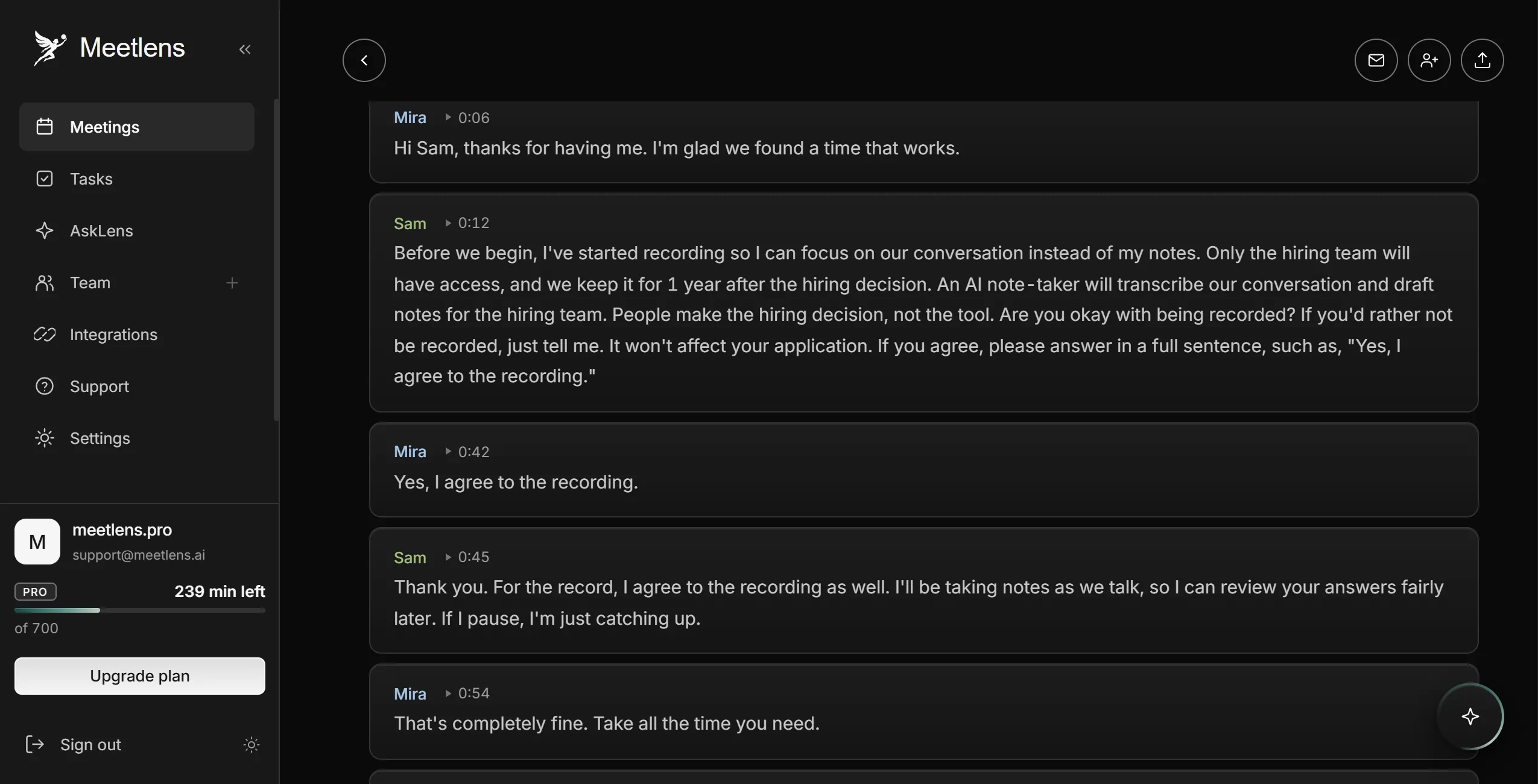
Starting the recorder first puts the verbal consent in the file. Ask for a full sentence, such as "Yes, I agree to the recording": a one-word yes can merge into the neighboring speaker's line in an AI transcript. Log the consent to record in your applicant tracking system (ATS). If the candidate opts out, stop and keep the refusal out of the evaluation.
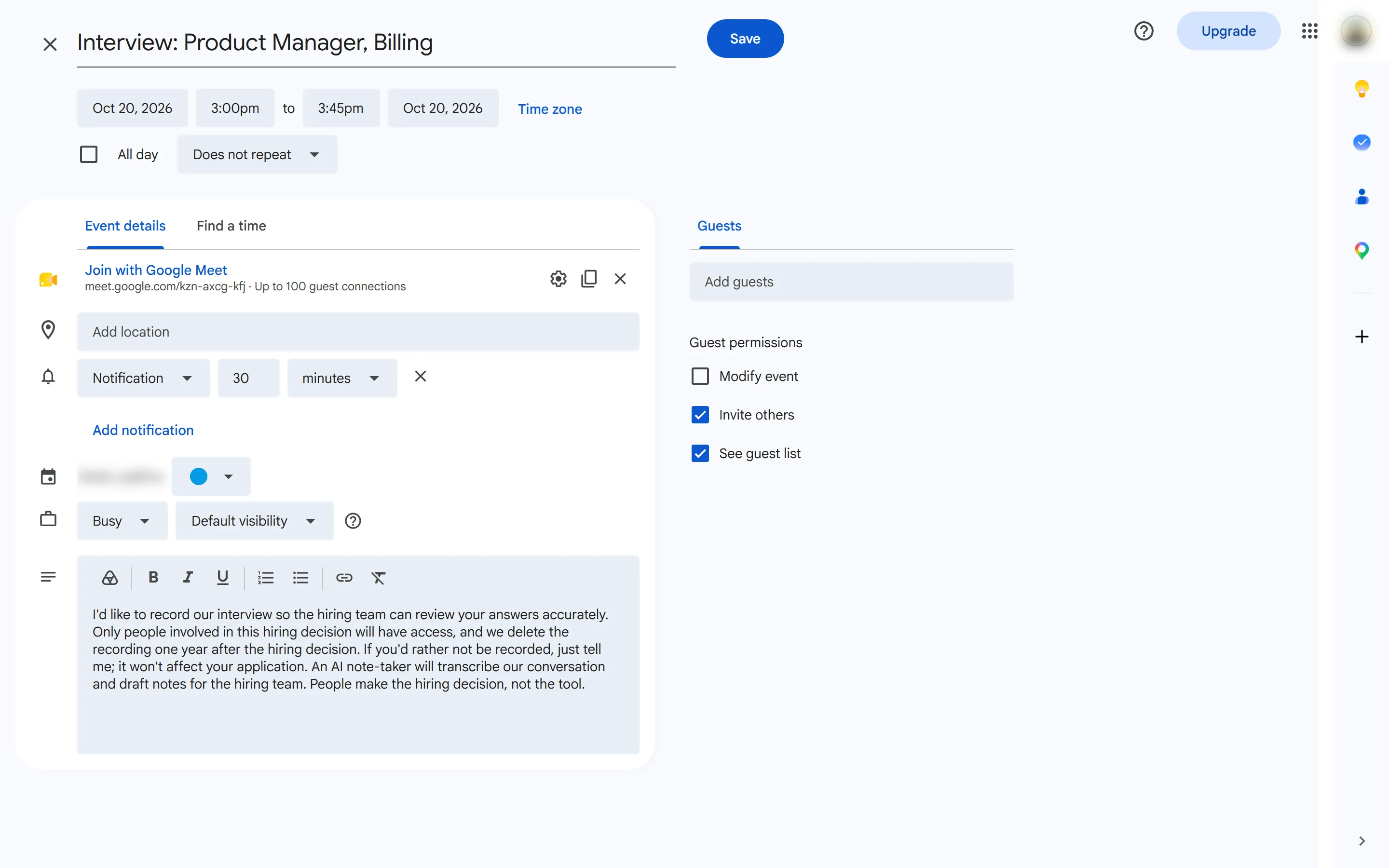
In a staged test interview (scripted, synthetic voices, audio file imported into Meetlens), the consent exchange took 30 seconds, from the interviewer's "Before we begin" at 0:12 to the candidate's "Yes, I agree to the recording." at 0:42, and that yes got its own line in the Meetlens transcript, with its own timestamp.
How to record a remote interview
For a remote job interview, use the meeting platform's recorder or a browser recorder, test it before the candidate joins, and keep a second way to take notes.
Built-in recording
Each built-in recorder saves a video recording:
| Platform | Who can record | Where the file goes |
|---|---|---|
| Zoom | The host, or others with the host's permission; cloud recording needs a paid license | Cloud recording: the host's web portal (Recordings & Transcripts); computer recording: Documents/Zoom |
| Google Meet | Host, co-hosts and, when Host Management is off, the host's colleagues; eligible paid plans only | The organizer's Google Drive |
| Microsoft Teams | The organizer and people from the same organization; not guests | The organizer's OneDrive, even if the organizer didn't attend: a recruiting coordinator's, if they sent the invite |
Sources: Zoom (host permission, cloud recording and file locations), Microsoft Learn and the Meet and Teams pages above.
Browser extension
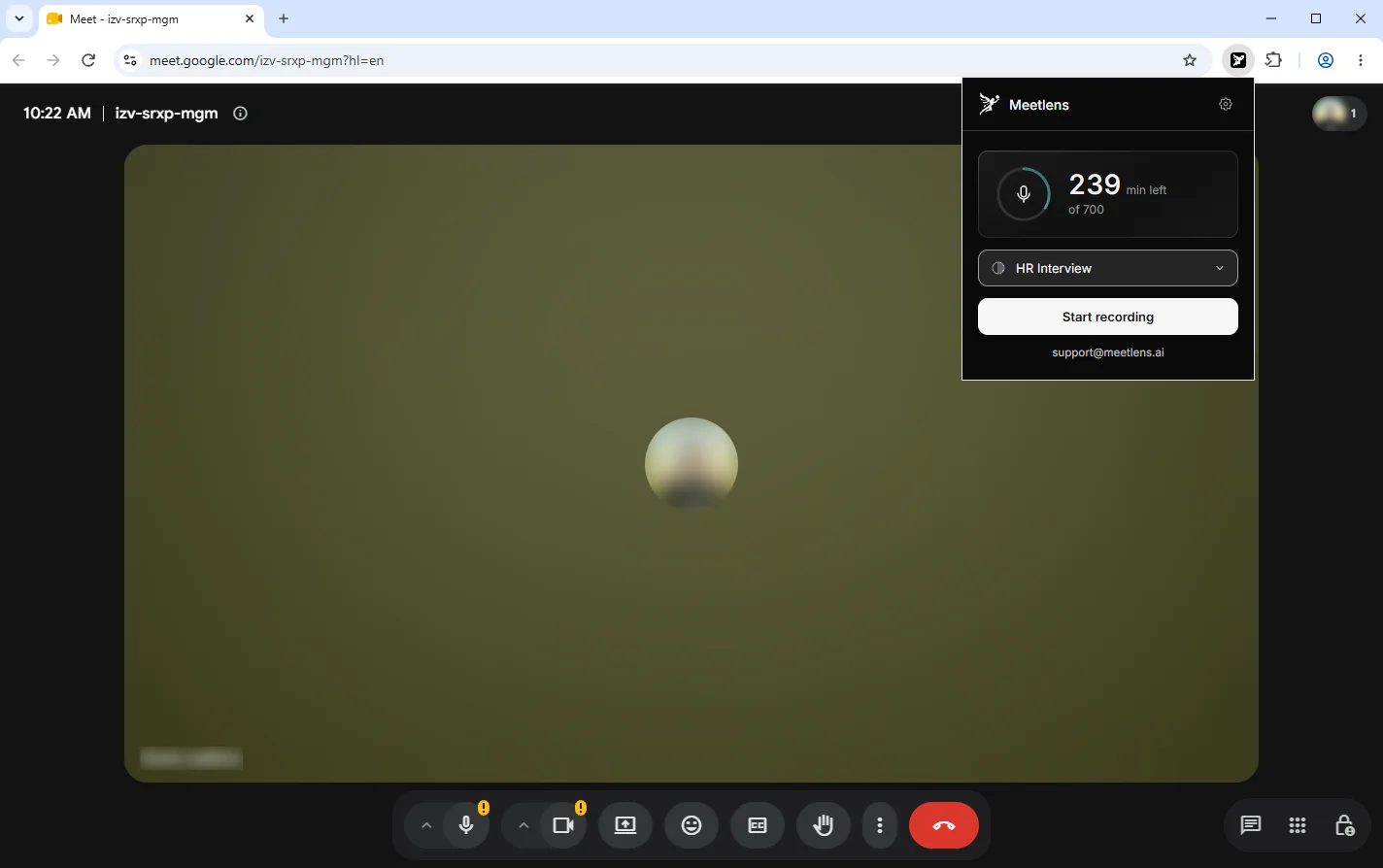
A browser extension records the call from your browser tab, whoever hosts. The Meetlens Chrome extension (desktop Chrome 116+) records the audio of a Google Meet, Zoom Web, Microsoft Teams Web or Webex tab, plus your microphone if you allow access. It records audio only, not video or screen, and not the Zoom or Teams desktop apps, so join the interview in Chrome.
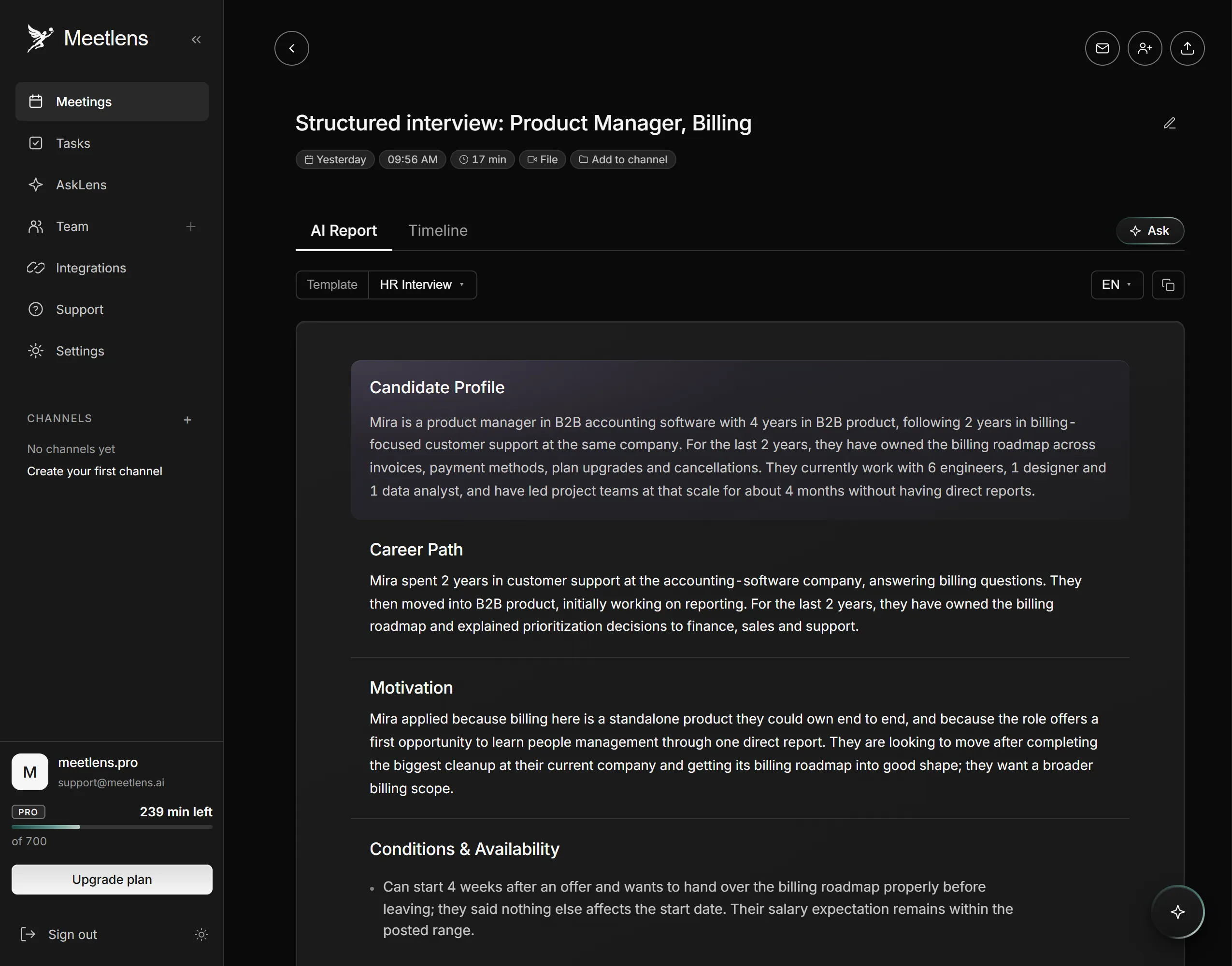
Choose HR Interview in the format drop-down above Start recording. After Stop recording, you get a transcript with speaker labels and timestamps and an HR Interview report: notes to check against the recording, not a hiring decision. One recording runs up to an hour on Free, 90 minutes on Pro and two hours on Business. See how to record interview calls in Chrome.
Checklist: 10 minutes before the call
- Join from the account or browser that will record.
- Confirm host rights, or choose HR Interview in Meetlens.
- Go through the clear-audio checklist below.
- Open a notes document as a backup.
- Keep the consent line on screen.
How to record an in-person interview
For an in-person job interview, record on a phone or a dedicated recorder placed between you and the candidate, with notifications off and a 30-second test first. Any smartphone works.
How to record an interview on your phone
- Turn on Airplane Mode or Do Not Disturb. On iPhone, Voice Memos stops recording if another app starts playing audio (Apple Support).
- Open the voice recorder app: Voice Memos on iPhone, Recorder on Google Pixel, Voice Recorder on Samsung Galaxy.
- Choose the mode. Samsung's Interview mode "captures sound directed at the top and bottom of your phone," so point one end at each of you (Samsung). On iPhone, Voice Isolation filters background sounds; check that it keeps both voices.
- Mind the placement: flat on the table, halfway between you and the candidate.
- Record 30 seconds of both of you, play it back, then start for real.
- Run a spare, such as a second phone or a voice recorder. On Samsung, set the app's battery use to Unrestricted so the audio recording doesn't stop when the screen locks.
In a loud room, clip a lavalier microphone on each speaker.
Meetlens doesn't record in-person meetings, but you can import the file afterward for the same transcript and report: audio file formats such as MP3, WAV, M4A, OGG and WebM, plus MP4, up to 1 GB per file (3 GB on Business), within your plan's recording length.
In-person interview seen from above: where the phone goes
How to get clear audio in an interview recording
Clear audio comes from a quiet room, a close microphone and not talking over the other person. For every interview recording:
- Wear a headset, so the microphone sits close to your mouth.
- Ask the candidate to use headphones, so your voice doesn't echo back through their speakers.
- Make a test recording and listen to it.
- Don't talk over the candidate: overlapping voices blur both.
- Pause for a beat after each answer before the next question.
- Turn off fans and notification sounds to cut background noise.
- Save the file as soon as you stop, and check that it plays.
What to do with an interview recording afterward
Treat a job interview recording as hiring data: limit who can open it, keep it as long as hiring records must be kept, and delete it on a schedule. Write these rules into your data retention policy so every recruiter handles recordings the same way.
Who can access it
Give access only to people in the hiring decision: the recruiter, the hiring manager and the panel. Platform defaults reach further: Google Meet gives participants from the organizer's organization access automatically, and Teams sends a link to everyone invited from inside the organization (help pages above). To protect the candidate's privacy, check sharing after each interview and keep files in one storage location, off personal devices.
The recording is the candidate's personal data, so privacy laws apply. Since the CCPA's employment exemption expired on December 31, 2022, California applicants of a covered business may ask to know, delete or correct their personal information, with exceptions (California Attorney General). If you hire in the EU or the UK, you need a lawful basis to record, such as consent or legitimate interests (Article 6), and must say why you record and how long you keep the file (Article 13): the GDPR in the EU, the UK GDPR in Britain.
How long to keep it
Keep interview recordings at least as long as federal rules require for hiring records, then delete them. For employers with 15 or more employees, the EEOC's rule in the Code of Federal Regulations, 29 CFR 1602.14, covers "records having to do with hiring" for one year from the date the record was made or the personnel action, whichever is later; after a charge of discrimination, keep relevant records until it is finally resolved.
Federal contractors with 150 or more employees and a contract of at least $150,000 keep records, "interview notes" included, for two years under the Section 503 rule of the Office of Federal Contract Compliance Programs (OFCCP), 41 CFR 60-741.80; other contractors, for one year. The older 41 CFR 60-1.12 with the same periods is rescinded effective October 26, 2026.
Neither rule mentions audio. Ask your employment lawyer whether recordings count as hiring records; until then, use the retention period for written interview notes and set the deletion date when you save the file.
Minimum time to keep hiring records under federal rules
interview recorded / hiring decision
-
29 CFR 1602.14, employers with 15+ employees
-
41 CFR 60-741.80, federal contractors with 150+ employees and a contract of $150,000+
charge of discrimination filed:
If you use AI to analyze interviews
AI analysis of an interview recording adds notice, consent and audit rules in some places.
- Illinois. The Illinois Artificial Intelligence Video Interview Act covers employers that have applicants record video interviews and analyze them with AI, for positions based in Illinois: before the interview, notify each applicant, explain how the AI works and what it evaluates, and get consent; share the videos only with people needed to evaluate them; delete them within 30 days of a request. Since January 1, 2026, Illinois civil rights law also bars AI with a discriminatory effect in hiring and requires notice of its use (Public Act 103-0804).
- New York City. NYC Local Law 144 covers automated employment decision tools that substantially assist or replace discretionary hiring decisions: a bias audit within the past year, a public summary of the results, and notice to candidates who live in New York City 10 business days before use (DCWP FAQ).
Can candidates record their own job interview?
A candidate can record only where the law allows it and, in practice, only after asking; a secret recording can be illegal in all-party consent states and can end your candidacy if the employer finds out. As a guest, you usually can't start the platform's recorder anyway.
For self-review, ask at the start:
Would you mind if I record the audio of this call for my own notes? I won't share it with anyone.
If not, write down the questions and your answers right after the call.
What to ask when a recruiter wants to record
Before you agree to an interview recording, ask five questions:
- What is the recording for?
- Who will be able to watch or listen to it?
- How long will you keep it, and can I ask you to delete it?
- Will any AI tool analyze or score it?
- What happens if I'd rather not be recorded?
What is a recorded video interview?
A recorded (one-way) video interview is a screening step where the candidate records answers to preset questions on their own, with no interviewer on the call. Unlike an interview recording of a live conversation, a one-way video interview has nobody talking back: the platform shows a question and records your answer on camera.
The employer sets the time per answer, the number of attempts and the questions, often behavioral ("Tell me about a time you…"). Target, for example, tells candidates to plan about 30 minutes and has a hiring manager or recruiter review the videos (Target). If a disability makes the format hard to use, ask for an accommodation, such as a live interview.
A recording is raw material; what makes it useful is what you write from it.
From recording to transcript and notes
An interview recording becomes useful once it turns into a transcript with speaker labels and timestamps, plus a few interview notes that point to the answers that matter. Jot timestamped notes during the interview, such as "12:40 salary expectations": they cover a failed recording and lead you straight to that answer.