User Research Interview Template: Script, Questions, and a Worked Example
 Meetlens Editorial10 min readUpdated October 17, 2026
On this page
- What is a user interview template?
- User research interview template (copy and adapt)
- How to write a user interview script in 6 steps
- User interview questions for each part of the session
- User interview script example
- Customer interview template: what changes
- User interview outline: a one-page example
- How to take notes and record a user research session
- After the user interviews: from recordings to insights
A user research interview template is a timed guide you reuse in every session — intro and consent, warm-up, core questions with follow-up probes, and wrap-up — and a copy-ready version is below. Keeping every session on the same topics pays off later, when you learn how to write an interview transcript and compare answers across participants. Next come the script-writing steps, questions, example, customer interviews, outline and note-taking.
What is a user interview template?
A user interview template is a reusable interview guide: the order of topics, the core questions, follow-up probes and the opening and closing lines you say in every session. It keeps a series of user interviews comparable: answers differ because people differ, not because your wording changed.
In NN/g's guide to UX interviews, an interview script belongs to a structured interview, while an interview guide (or discussion guide) lets the interviewer reorder, skip or add questions in a semi-structured interview. An unstructured interview has only a topic. Choose a script when several moderators must ask identical questions; choose a guide when one moderator explores a problem, as in most user research.
The template below scripts the intro, consent and wrap-up and keeps the core topics as a guide. User interviews are qualitative research: they explain why people do what they do. Counting how many people do something takes a survey, which is quantitative research.
User research interview template (copy and adapt)
Copy the template below, replace the bracketed parts, and keep the time boxes so a 60-minute session doesn't run out before the core topics. The time boxes are our recommendation for a remote user interview, not a research standard.
USER RESEARCH INTERVIEW TEMPLATE · 60-minute session
Study: [name] · Participant: [P-number] · Date: [Month D, YYYY]
Moderator: [name] · Note-taker: [name]
Research goal: [what the team needs to learn]

1. INTRO AND CONSENT · 0:00–0:05
(Ask about recording in the invite. Start recording, then confirm.)
"Thanks for joining. I'm [name] from [team]. We're learning how
people [topic]. There are no wrong answers."
"Is it okay if I record this session? The recording is only used
by our research team to check notes, and your name stays inside
the team. You can stop at any time."
(Wait for a full-sentence yes. If no, stop recording, delete
what was recorded and take notes only.)

2. WARM-UP · 0:05–0:12
- "Tell me a little about your role and your team."
- "[easy question about their work]"

3. CORE TOPICS · 0:12–0:45 (about 11 minutes per topic)
Topic A: [topic]
  Q: "Tell me about the last time you [behavior]."
  Probes: "What happened next?" / "Why was that important?"
Topics B and C: [topic] — one open-ended question, two probes each

4. CONCEPT OR PROTOTYPE (optional) · 0:45–0:55
"Here's an early [concept]. Talk me through what you see."
(If you skip it, give its 10 minutes to the core topics.)

5. WRAP-UP · 0:55–1:00
- "Is there anything I should have asked?"
- Thank them; confirm [incentive] and when it arrives.
The 60-minute user research interview template on one page
User research interview template60-minute session
- Study
- [name]
- Participant
- [P-number]
- Date
- [Month D, YYYY]
- Moderator
- [name]
- Note-taker
- [name]
- Research goal
- [what the team needs to learn]
-
0:00–0:055 min
Intro and consent
- Ask about recording in the invite. Start recording, then confirm.
- “Thanks for joining. I’m [name] from [team]. We’re learning how people [topic]. There are no wrong answers.”
- “Is it okay if I record this session? The recording is only used by our research team to check notes, and your name stays inside the team. You can stop at any time.”
- Wait for a full-sentence yes. If no, stop recording, delete what was recorded and take notes only.
-
0:05–0:127 min
Warm-up
- “Tell me a little about your role and your team.”
- “[easy question about their work]”
-
0:12–0:4533 min
Core topics about 11 minutes per topic
Topic A: [topic]
- Q
- “Tell me about the last time you [behavior].”
- Probes
- “What happened next?” / “Why was that important?”
Topic B: [topic]
- Q
- one open-ended question
- Probes
- two probes
Topic C: [topic]
- Q
- one open-ended question
- Probes
- two probes
-
0:45–0:5510 min
Concept or prototype optional
- “Here’s an early [concept]. Talk me through what you see.”
- If you skip it, give its 10 minutes to the core topics.
-
0:55–1:005 min
Wrap-up
- “Is there anything I should have asked?”
- Thank them; confirm [incentive] and when it arrives.
For a 45-minute session, keep 5 minutes each for the intro, warm-up and wrap-up, give 30 minutes to two or three core topics, and drop the concept block.
- Intro and consent: informed consent means the participant knows what is recorded, who sees it and that they can stop. Promise confidentiality only if it holds.
- Warm-up: an easy question about their work builds rapport; empathy shows in how you react to each answer.
- Concept or prototype: a concept sketch or a prototype made in Figma comes last, so it doesn't steer the stories.
To plan on a whiteboard instead of the Google Docs file, paste each block onto a sticky note in Miro or in FigJam.
How to write a user interview script in 6 steps
Start from research questions, turn each into two or three open-ended interview questions, then order them from easy to reflective and pilot the script once. The steps adapt NN/g's method linked above; its probing step moved to the question bank below.
1. Write the research questions
List three to five things the team needs to learn. The participant never hears them.
2. Brainstorm interview questions
Write every question that comes to mind for each research question. Brainstorming comes before judging.
3. Turn yes/no questions into open ones
"Do you take notes on calls?" becomes "Walk me through what happens after a call." Cut leading questions, which carry your bias into the answer: "Isn't it annoying when decisions get lost?" tells the participant what to feel.
4. Match research questions to interview questions
Fill any gap with new questions. Here is how it looks for the example study used later in this article:
| Research question (for the team) | Interview questions (for the participant) |
|---|---|
| How do product teams record decisions made on video calls? | "Walk me through the last call where your team decided something." "Where did that decision end up?" |
| Where do call decisions get lost? | "Tell me about a decision from a call that was later forgotten or reopened." "How did you find out?" |
| What makes someone go back to a past call? | "When did you last need to check what was said on an earlier call?" "How did you find it?" |
5. Order from easy to reflective
Put the warm-up first, past events in the middle and reflective questions such as "What would you change?" last. Asked early, reflective questions get generic answers.
6. Pilot the script once
Run one pilot test with a colleague, then fix the user interview script: missing questions, confusing wording, question order and blocks that run over.
User interview questions for each part of the session
Ask about specific past events, not opinions about the future: "Tell me about the last time you…" produces better data than "Would you use…?" Past behavior is something the participant remembers; future use is a guess. Swap [task] for your topic in these open-ended user interview questions.
Warm-up
- "Tell me about your role and who you work with."
- "What does a normal day look like for you?"
Current behavior
- "Walk me through how you [task] today."
- "Who else is involved, and what do they do?"
Last time and critical incidents. The critical incident technique, introduced by John Flanagan in a 1954 Psychological Bulletin article, asks people to recall specific events instead of giving general opinions.
- "Tell me about the last time [task] went wrong."
- "Think of a time [task] went especially well. What made the difference?"
Workarounds and tools
- "What do you use for [task] now?"
- "What do you do outside that tool to make it work?"
- "What have you tried and stopped using? Why?"
Wrap-up
- "If you could change one thing about [task], what would it be?"
- "Who else should I talk to about this?"
Six probing questions fit almost any answer, turning a short reply into storytelling and getting at motivations:
- "What happened next?"
- "Why was that important?"
- "Can you show me?"
- "Tell me more about that."
- "What do you mean by '[their word]'?"
- "What did you try before that?"
User interview script example
Here is the user interview template filled in for one research goal, from the consent line to the last question. Research goal: learn how product teams keep track of decisions made on video calls. Moderator notes are in italics.
Illustrative example: the study was written for this article.
1. Intro and consent · 0:00–0:05 "Thanks for joining. I'm [name] from the research team. We're learning how product teams keep track of what gets decided on calls. There are no wrong answers." Then the consent line from the template, word for word. Wait for a full sentence, such as "Yes, I'm okay with the recording."
2. Warm-up · 0:05–0:12
- "Tell me about your role and your team."
- "What does a typical week of calls look like for you?"
3. Core topics · 0:12–0:45
Topic A, recording decisions (0:12–0:23)
- "Walk me through the last call where your team decided something."
- Probes: "Where did that decision end up?" / "Who wrote it down?"
- If the answer starts with "we usually," ask about that one call again.
Topic B, lost decisions (0:23–0:34)
- "Tell me about a decision from a call that was later forgotten or reopened."
- Probes: "How did you find out?" / "What happened next?"
- A critical incident: let pauses run.
Topic C, going back to past calls (0:34–0:45)
- "When did you last need to check what was said on an earlier call?"
- Probes: "How did you find it?" / "Can you show me?"
- If they share their screen, the note-taker logs what they open.
4. Concept reaction · 0:45–0:55 "Here's a one-page decision log we sketched. Talk me through what you see." Don't explain the page.
5. Wrap-up · 0:55–1:00
- "If you could change one thing about how your team keeps decisions, what would it be?"
- "Is there anything I should have asked?"
- Thank them and confirm the incentive.
Customer interview template: what changes
A customer interview uses the same structure but focuses on money, workflow and past decisions, and it never turns into a pitch. The first four changes to the user interview template above apply Rob Fitzpatrick's The Mom Test, a handbook on customer conversations:
- Ask about the last tool they bought or replaced: "What did you use before this, and why did you replace it?" The book's rule: ask about specifics in the past, not opinions about the future.
- Keep your solution out until the end. Another rule: "Talk about their life instead of your idea." Once you pitch, the customer rates your idea instead of describing their workflow.
- Ask what the problem costs now, not "Would you pay for…?" Answers about paying for something that doesn't exist are optimistic guesses.
- Log commitment signals. The book defines commitment as giving up something the customer values, such as time, reputation or money: a follow-up meeting, an introduction to a colleague, a pre-order.
- Ask who else decides: "Who else would need to agree before your team changed tools?"
These changes matter most in customer discovery, when you test whether a problem is worth solving before you build.
User interview outline: a one-page example
An interview outline is the one-page version of your guide: topics, time boxes and one key question per topic, for the moderator to glance at during the call. Here is the user interview script example above as an outline:
Goal: how product teams keep track of call decisions · P__ · [date]
0:00  Intro + consent      Full-sentence yes on the recording
0:05  Warm-up              "Tell me about your role and your team."
0:12  Recording decisions  "Walk me through the last call where your team decided something."
0:23  Lost decisions       "Tell me about a decision from a call that was later forgotten or reopened."
0:34  Going back           "When did you last need to check what was said on an earlier call?"
0:45  Decision log page    "Talk me through what you see."
0:55  Wrap-up              "Is there anything I should have asked?"
Keep it next to your camera: one glance, one line.
How to take notes and record a user research session
Split the roles: the moderator runs the conversation, a note-taker logs observations with timestamps, and a recording backs up both. A moderator who also handles note-taking looks away from the participant and misses follow-up questions.
The note-taker logs one row per observation, in a doc table or a spreadsheet; the Tag column feeds the analysis.
Illustrative rows from the script example above.
| Time | What the participant did or said | Quote | Tag |
|---|---|---|---|
| 0:16 | Said the decision lives in a chat thread; could not say who wrote it down | "Someone posted it, I think." | decisions-in-chat |
| 0:27 | Paused before describing a pricing decision the team argued about twice | "We had the same meeting two weeks in a row." | reopened-decision |
| 0:38 | Shared screen; searched a shared drive by call date, then scrolled a chat thread for about a minute; did not find the notes | "It's in here somewhere." | search-fails |
Write observations, not interpretations: "scrolled for about a minute," not "frustrated with chat." Log nonverbal communication, such as a long pause or a laugh: these non-verbal cues show where to probe next time.
For remote user interviews, Meetlens is a Chrome extension that records the audio of a browser meeting — Google Meet, Zoom Web, Microsoft Teams Web or Webex — without a bot joining the call, then produces a transcript with speaker labels and an AI report. With no bot, the platform shows no recording notice, so your consent line is the notice. Allow microphone access so your questions are recorded, and ask for a full-sentence yes: a one-word reply may not get its own transcript line. Meetlens records audio only, not the screen or the desktop Zoom and Teams apps, so screen activity stays in the grid.
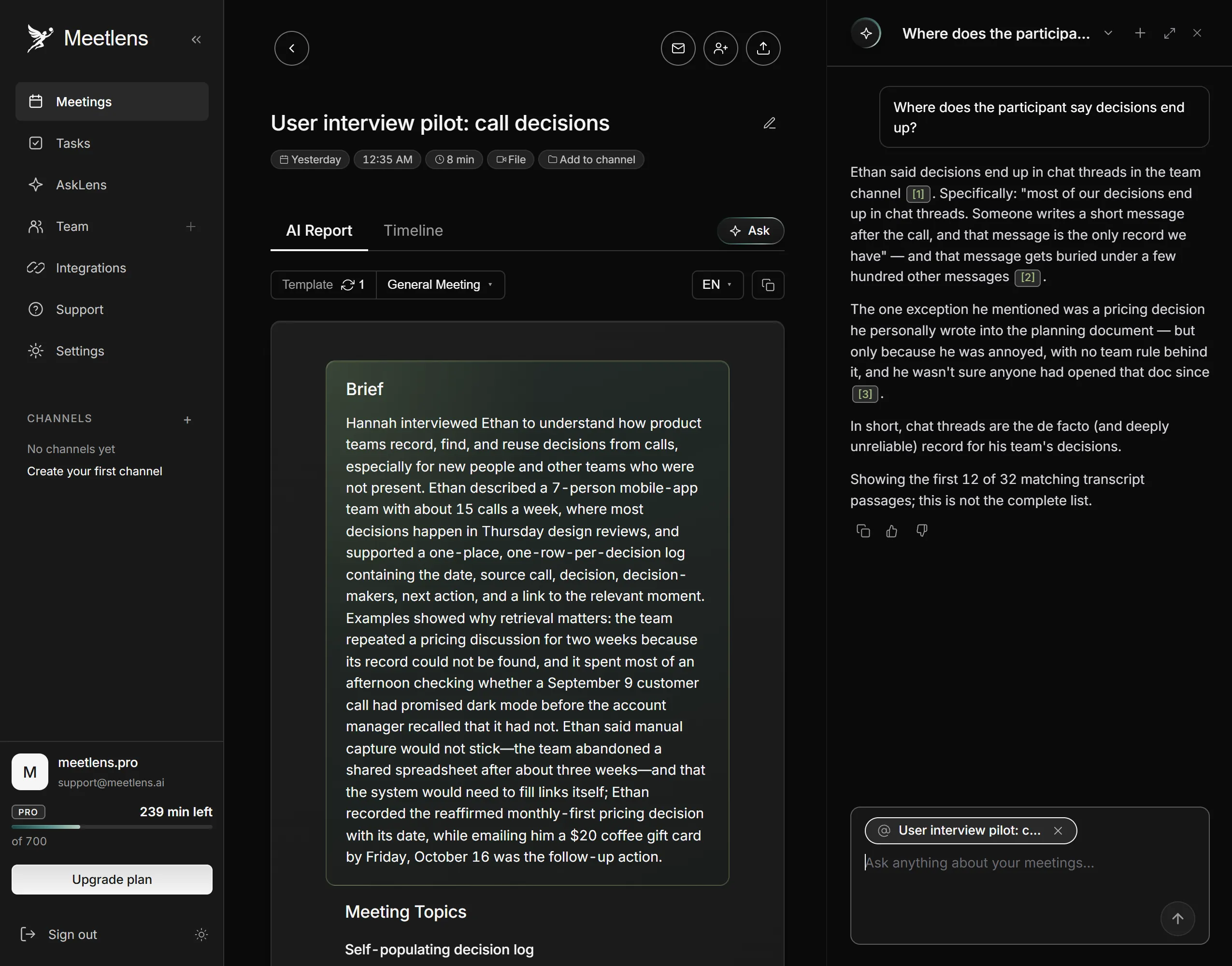
General Meeting, the default report format, gives each session a Brief, Meeting Topics, Decisions and Tasks, plus Open Questions when any came up. Add one session to the AI chat with Add context and ask "Where does the participant say decisions end up?"; the answer links to the moments in the recording, so check it there. The Free plan includes 10 such questions a month and recordings of up to an hour each (90 minutes on Pro, 120 on Business). AI notes for user research calls cover the record and the search; the grid keeps what audio can't.
After the last session, the work moves from asking to analyzing.
After the user interviews: from recordings to insights
Insights come from comparing user interviews, so finish each session's transcript and note grid on the day you run it. A transcript with speaker labels and timestamps lets you copy exact quotes into the grid. Synthesis then starts with an affinity diagram, also called affinity mapping: one observation per sticky note, grouped into themes, then ranked (NN/g on affinity diagramming). Themes that repeat across participants become your insights.